Related Documentation
- MX Series
- Understanding Fault Isolation and Detection in a PBB using Connectivity Fault Management for MX Series Routers
- Understanding Provider Backbone Bridging on MX Series Routers
- Example: Configuring E-LINE and E-LAN Services for a PBB Network on MX Series Routers
- Example: Configuring CoS for a PBB Network on MX Series Routers
Example: Configuring Connectivity Fault Management for a PBB Network on MX Series Routers
Provider backbone bridging (PBB) extends Layer 2 Ethernet switching to provide enhanced scalability, quality of service (QoS) features, and carrier-class reliability in service provider networks. Connectivity fault management (CFM) is used with PBB to support that carrier-class reliability. Use CFM to monitor, isolate, and verify faults in the network.
The Junos OS implementation of PBB supports the IEEE 802.1ah (PBB) and IEEE 802.1ag (CFM) standards.
This example describes how to configure end-to-end fault management in a PBN and a PBBN:
Requirements
This example uses the following hardware and software components:
- Junos Release 10.0 or later for MX Series routers
- Eight MX Series routers in a PBB configuration
Before you configure the routers for PBB and services, be sure you have:
- Installed the MX Series router.
- Performed the initial router configuration.
- Performed the PBB configuration for Ethernet private line (E-LINE) and Ethernet transparent LAN (E-LAN) services. For more information, refer to “Example: Configuring E-LINE and E-LAN Services for a PBB Network on MX Series Routers”.
Overview and Topology
There are two different networks that need to be configured for CFM in this example:
- A provider backbone bridge network (PBBN).
- Provider bridged networks (PBNs) that include PBN1, PBN2, and PBN3.
This example uses a series of maintenance end points (MEPs) and maintenance intermediate points (MIPs). MIPs respond to the OAM processes initiated by the MEPs. Using MEPs and MIPs, CFM provides end-to-end connectivity in the PBBN because it can exactly pinpoint a failure in the topology.
Figure 1 displays the topology for the PBBN. The PBBN connect the PBNs and provides services to the PBNs. Two backbone core bridges (BCBs) are connected to PBN1, PBN2, and PBN3. Operation, Administration, and Maintenance (OAM) in the PBBN is limited to fault detection in the PBBN.
Figure 1: Network Topology for the PBBN
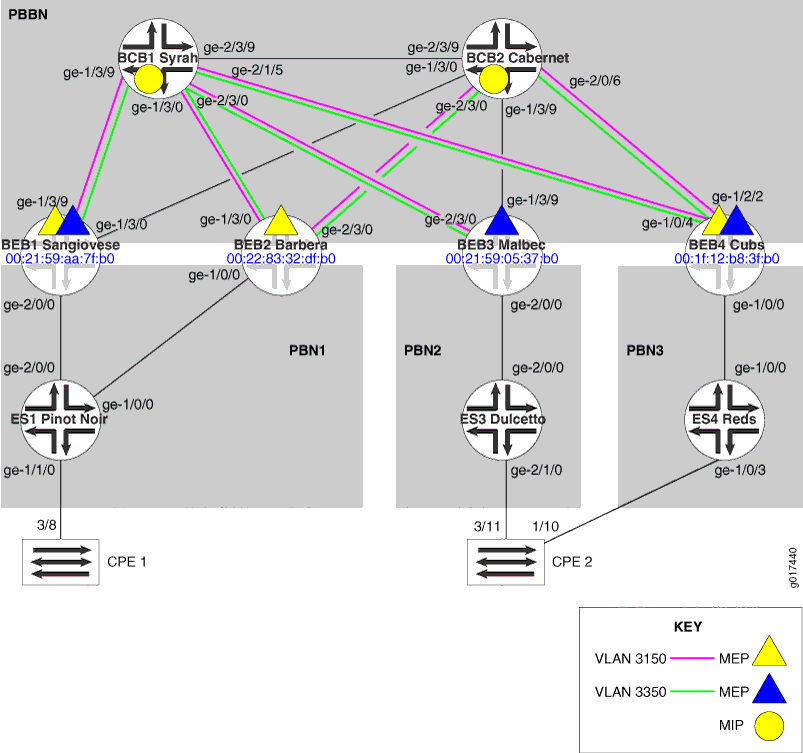
Table 1 shows the maintenance end points (MEPs) and maintenance intermediate points (MIPs) that are configured for each router in the PBBN. The PBBN is configured with VLAN 3150 and 3350. CFM must be configured for monitoring the connectivity in both the VLANs. To do this, configure a MEP for each VLAN at the endpoints (BEBs), and configure a MIP for each VLAN on the core bridges (BCBs).
To configure a MIP for level x, the maintenance domain default-x is configured on the router. For example, if MEPs in the PBBN are configured at level 3, the MIP is configured as default-3.
 | Note: CFM in the PBBN is used to check the connectivity in the PBBN domain only, and packets are never leaked to the PBN. |
Table 1: CFM Components Configured for the PBBN
VLAN | Router | Level | MEP | MIP |
|---|---|---|---|---|
3150 | BEB1 (Sangiovese) | 5 | 100 | — |
BEB2 (Barbera) | 5 | 101 | — | |
BEB4 (Cubs) | 5 | 102 | — | |
BCB1 (Syrah) | 5 | — | default-5 | |
BCB2 (Cabernet) | 5 | — | default-5 | |
3350 | BEB1 (Sangiovese) | 5 | 100 | — |
BEB3 (Malbec) | 5 | 102 | — | |
BEB4 (Cubs) | 5 | 102 | — | |
BCB1 (Syrah) | 5 | — | default-5 | |
BCB2 (Cabernet) | 5 | — | default-5 |
Figure 2 displays the topology for PBN. BEB1, BEB2, BEB3, and BEB4 are connected to customer edge switches ES1, ES3, and ES4.
The PBN is configured with VLAN 500 and 600. CFM must be configured for monitoring the connectivity in both the VLANs. To do this, configure a MEP for each VLAN at the endpoints (ESs), and configure a MIP for each VLAN on the BEBs.
Comparing both topologies, notice that the BEBs are actually part of both the PBN and the PBBN. They perform the function of a MEP in the PBBN, but perform the function of a MIP in the PBN and participate in multiple maintenance domains. In comparison, BCBs in the PBBN participate in one maintenance domain and ESs in the PBN participate in one maintenance domain.
| Note: CFM on the PBN is used to check the connectivity in the PBN domain—these packets are simply tunneled in the PBBN domain as data packets. |
Figure 2: Network Topology for the PBN
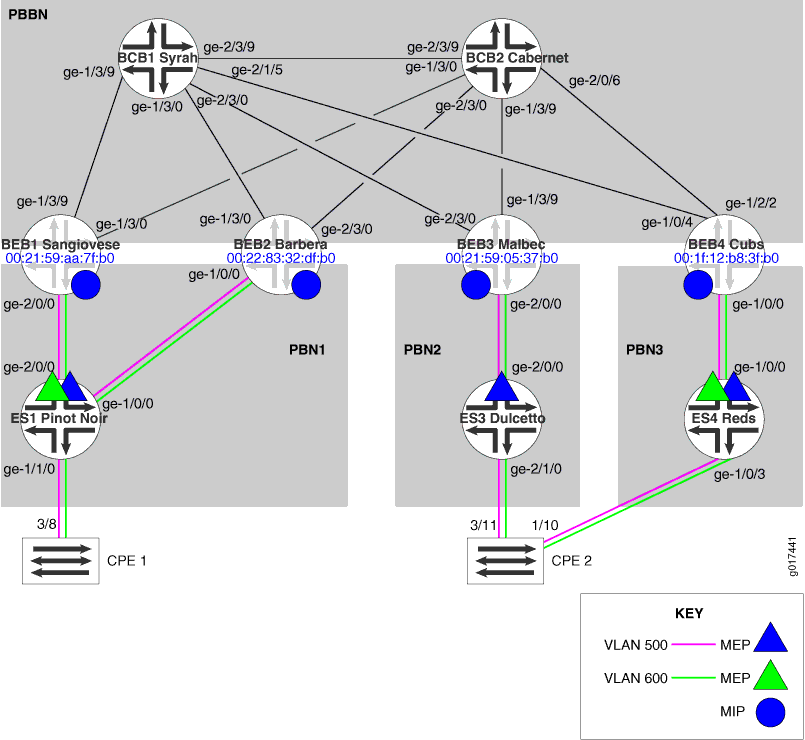
Table 2 shows the MEPs and MIPs that are configured in the PBN.
Table 2: CFM Components Configured for the PBN
VLAN | Router | Level | MEP | MIP |
|---|---|---|---|---|
500 | ES1 (Pinot Noir) | 3 | 1 | — |
ES3 (Dolcetto) | 3 | 2 | — | |
ES4 (Reds) | 3 | 2 | — | |
BEB1 (Sangiovese) | 3 | — | default-3 | |
BEB2 (Barbera) | 3 | — | default-3 | |
BEB3 (Malbec) | 3 | — | default-3 | |
BEB4 (Cubs) | 3 | — | default-3 | |
600 | ES1 (Pinot Noir) | 3 | 1 | — |
ES4 (Reds) | 3 | 2 | — | |
BEB1 (Sangiovese) | 3 | — | default-3 | |
BEB2 (Barbera) | 3 | — | default-3 | |
BEB3 (Malbec) | 3 | — | default-3 | |
BEB4 (Cubs) | 3 | — | default-3 |
| Note: MX Series router ES3 (Dolcetto) is visible in the topology, but is not part of the CFM configuration example. |
Configuring Connectivity Fault Management for a PBBN
To configure connectivity fault management on MX Series routers in a provider backbone bridge network, perform these tasks:
- Configuring a MEP on BEB1 (Sangiovese)
- Configuring a MEP on BEB2 (Barbera)
- Configuring a MEP on BEB3 (Malbec)
- Configuring a MEP on BEB4 (Cubs)
- Configuring a MIP on BCB1 (Syrah)
- Configuring a MIP on BCB2 (Cabernet)
Configuring a MEP on BEB1 (Sangiovese)
CLI Quick Configuration
To quickly configure a MEP for BEB1, copy the following commands and paste them into the router terminal window:
[edit]set protocols oam ethernet connectivity-fault-management
maintenance-domain pbbn level 5set protocols oam ethernet connectivity-fault-management
maintenance-domain pbbn maintenance-association vlan3350 continuity-check
interval 1sset protocols oam ethernet connectivity-fault-management
maintenance-domain pbbn maintenance-association vlan3350 mep 100 interface
cbp0.0set protocols oam ethernet connectivity-fault-management
maintenance-domain pbbn maintenance-association vlan3350 mep 100 interface
vlan 3350set protocols oam ethernet connectivity-fault-management
maintenance-domain pbbn maintenance-association vlan3350 mep 100 direction
upset protocols oam ethernet connectivity-fault-management
maintenance-domain pbbn maintenance-association vlan3350 mep 100 auto-discoveryset protocols oam ethernet connectivity-fault-management
maintenance-domain pbbn maintenance-association vlan3150 continuity-check
interval 1sset protocols oam ethernet connectivity-fault-management
maintenance-domain pbbn maintenance-association vlan3150 mep 100 interface
cbp0.0set protocols oam ethernet connectivity-fault-management
maintenance-domain pbbn maintenance-association vlan3150 mep 100 interface
vlan 3150set protocols oam ethernet connectivity-fault-management
maintenance-domain pbbn maintenance-association vlan3150 mep 100 direction
upset protocols oam ethernet connectivity-fault-management
maintenance-domain pbbn maintenance-association vlan3150 mep 100 auto-discoveryStep-by-Step Procedure
To configure a MEP for BEB1:
- Create a maintenance domain at level 5 for PBBN monitoring
(here, the maintenance domain is pbbn):
[edit protocols oam]
user@beb1# set ethernet connectivity-fault-management maintenance-domain pbbn level 5 - Configure the continuity check interval for the maintenance
association (here, vlan3350). The continuity check protocol
is used for fault detection by a Maintenance End Point (MEP). The
MEP periodically sends continuity check multicast messages, and receiving
MEPs use the CC messages to build a MEP database of all MEPs in the
maintenance association.
[edit protocols oam]
user@beb1# set ethernet connectivity-fault-management maintenance-domain pbbn maintenance-association vlan3350 continuity-check interval 1s - Configure a MEP with the same maintenance association
identifier and maintenance domain level (here, vlan3150 and pbbn) and associate them to VLAN 3150 and the pseudo-logical
interface cbp0.0).
Note: When you configure PBB, a customer backbone port (cbp) pseudo-logical interface is configured for the B-component of the BEB. This permits multiple customer routing instances to be associated with a single PBBN provider routing instance.
- Configure the direction in which CFM packets are transmitted
for the MEP. Direction up CCMs are transmitted out of every logical
interface that is part of the same bridge (here, direction is specified
as up).
[edit protocols oam]
user@beb1# set ethernet connectivity-fault-management maintenance-domain pbbn maintenance-association vlan3350 mep 100 direction up - Configure automatic discovery to enable the MEP to accept
continuity check messages from all remote MEPs of the same maintenance
association.
[edit protocols oam]
user@beb1# set ethernet connectivity-fault-management maintenance-domain pbbn maintenance-association vlan3350 mep 100 auto-discovery - Configure the continuity check interval for the maintenance
association (here, vlan3150). The continuity check protocol
is used for fault detection by a MEP. The MEP periodically sends continuity
check multicast messages, and receiving MEPs use the CC messages to
build a MEP database of all MEPs in the maintenance association.
[edit protocols oam]
user@beb1# set ethernet connectivity-fault-management maintenance-domain pbbn maintenance-association vlan3150 continuity-check interval 1s - Configure a MEP with the same maintenance association
identifier and maintenance domain level (here, vlan3150 and pbbn).
[edit protocols oam]
user@beb1# set ethernet connectivity-fault-management maintenance-domain pbbn maintenance-association vlan3150 mep 100 interface vlan 3350 - Configure the direction in which CFM packets are transmitted
for the MEP. Direction up CCMs are transmitted out of every logical
interface that is part of the same bridge (here, direction is specified
as up).
[edit protocols oam]
user@beb1# set ethernet connectivity-fault-management maintenance-domain pbbn maintenance-association vlan3150 mep 100 direction up - Configure automatic discovery to enable the MEP to accept
continuity check messages from all remote MEPs of the same maintenance
association.
Note: You can also use the command remote-mep to specify a remote MEP.
[edit protocols oam]
user@beb1# set ethernet connectivity-fault-management maintenance-domain pbbn
maintenance-association vlan3150 mep 100 auto-discovery
Results
Check the results of the configuration:
Configuring a MEP on BEB2 (Barbera)
CLI Quick Configuration
To quickly configure a MEP for BEB2, copy the following commands and paste them into the router terminal window:
[edit]set protocols oam ethernet connectivity-fault-management
maintenance-domain pbbn level 5set protocols oam ethernet connectivity-fault-management
maintenance-domain pbbn maintenance-association vlan3150 continuity-check
interval 1sset protocols oam ethernet connectivity-fault-management
maintenance-domain pbbn maintenance-association vlan3150 mep 101 interface
cbp0.0set protocols oam ethernet connectivity-fault-management
maintenance-domain pbbn maintenance-association vlan3150 mep 101 interface
vlan 3150set protocols oam ethernet connectivity-fault-management
maintenance-domain pbbn maintenance-association vlan3150 mep 101 auto-discoveryStep-by-Step Procedure
To configure a MEP for BEB2:
- Create a maintenance domain at level 5 for PBBN monitoring
(here, the maintenance domain is pbbn):
[edit protocols oam]
user@beb2# set protocols oam ethernet connectivity-fault-management maintenance-domain pbbn level 5 - Configure the continuity check (CC) interval for the maintenance
association (here, vlan3150). The continuity check protocol
is used for fault detection by a MEP. The MEP periodically sends continuity
check multicast messages, and receiving MEPs use the CC messages to
build a MEP database of all MEPs in the maintenance association.
[edit protocols oam ]
user@beb2# set ethernet connectivity-fault-management maintenance-domain pbbn maintenance-association vlan3150 continuity-check interval 1s - Configure a MEP with the same maintenance association
identifier and maintenance domain level (here, vlan3150 and pbbn) and associate them to VLAN 3150 and the pseudo-logical
interface cbp0.0).
[edit protocols oam ]
user@beb2# set ethernet connectivity-fault-management maintenance-domain pbbn
maintenance-association vlan3150 mep 101 interface vlan 3150
user@beb2# set cfm-pbbn protocols oam ethernet connectivity-fault-management
maintenance-domain pbbn maintenance-association vlan3150 mep 101 interface cbp0.0
Note: When you configure PBB, a customer backbone port (cbp) pseudo-logical interface is configured for the B-component of the BEB. This permits multiple customer routing instances to be associated with a single PBBN provider routing instance.
- Configure the direction in which CFM packets are transmitted
for the MEP. Direction up CCMs are transmitted out of every logical
interface that is part of the same bridge (here, direction is specified
as up).
[edit protocols oam ]
user@beb2# set ethernet connectivity-fault-management maintenance-domain pbbn maintenance-association vlan3150 mep 101 direction up - Configure automatic discovery to enable the MEP to accept
continuity check messages from all remote MEPs of the same maintenance
association.
[edit protocols oam ]
user@beb2# set ethernet connectivity-fault-management maintenance-domain pbbn
maintenance-association vlan3150 mep 101 auto-discovery
Results
Check the results of the configuration:
Configuring a MEP on BEB3 (Malbec)
CLI Quick Configuration
To quickly configure a MEP on BEB3, copy the following commands and paste them into the router terminal window:
[edit]set protocols oam ethernet connectivity-fault-management
maintenance-domain pbbn-elan level 5set protocols oam ethernet connectivity-fault-management
maintenance-domain pbbn-elan maintenance-association vlan3350 mep
2 interface cbp0.0set protocols oam ethernet connectivity-fault-management
maintenance-domain pbbn-elan maintenance-association vlan3350 mep
2 interface vlan 3350set protocols oam ethernet connectivity-fault-management
maintenance-domain pbbn-elan maintenance-association vlan3350 mep
2 direction upset protocols oam ethernet connectivity-fault-management
maintenance-domain pbbn-elan maintenance-association vlan3350 mep
2 auto-discoveryStep-by-Step Procedure
To configure a MEP on BEB3:
- Create a maintenance domain at level 5 for PBBN monitoring
(here, the maintenance domain is pbbn-elan):
[edit groups]
user@beb3# set protocols oam ethernet connectivity-fault-management maintenance-domain pbbn-elan level 5 - Configure a MEP with the same maintenance association
identifier and maintenance domain level (here, vlan3350 and pbbn-elan and associate them to VLAN 3150 and the pseudo-logical
interface cbp0.0.
[edit protocols oam]
user@beb3# set ethernet connectivity-fault-management maintenance-domain pbbn-elan
maintenance-association vlan3350 mep 102 interface vlan 3350
user@beb3# set ethernet connectivity-fault-management maintenance-domain pbbn-elan
maintenance-association vlan3350 mep 101 interface cbp0.0
Note: When you configure PBB, a customer backbone port (cbp) pseudo-logical interface is configured for the B-component of the BEB. This permits multiple customer routing instances to be associated with a single PBBN provider routing instance.
- Configure the direction in which CFM packets are transmitted
for the MEP. Direction up CCMs are transmitted out of every logical
interface that is part of the same bridge (here, direction is specified
as up).
[edit protocols oam]
user@beb3# set ethernet connectivity-fault-management maintenance-domain pbbn maintenance-association vlan3150 mep 101 direction up - Configure automatic discovery to enable the MEP to accept
continuity check messages from all remote MEPs of the same maintenance
association.
[edit protocols oam]
user@beb3# set ethernet connectivity-fault-management maintenance-domain pbbn
maintenance-association vlan3150 mep 101 auto-discovery
Results
Check the results of the configuration:
Configuring a MEP on BEB4 (Cubs)
CLI Quick Configuration
To quickly configure a MEP for BEB4, copy the following commands and paste them into the router terminal window:
[edit]set protocols oam ethernet connectivity-fault-management
maintenance-domain pbbn level 5set protocols oam ethernet connectivity-fault-management
maintenance-domain pbbn maintenance-association vlan3350 continuity-check
interval 1sset protocols oam ethernet connectivity-fault-management
maintenance-domain pbbn maintenance-association vlan3350 mep 102 interface
vlan 3350set protocols oam ethernet connectivity-fault-management
maintenance-domain pbbn maintenance-association vlan3350 mep 102 interface
cbp0.0
set protocols oam ethernet connectivity-fault-management
maintenance-domain pbbn maintenance-association vlan3350 mep 102 direction
up
set protocols oam ethernet connectivity-fault-management
maintenance-domain pbbn maintenance-association vlan3350 mep 102 auto-discovery set protocols oam ethernet connectivity-fault-management
maintenance-domain pbbn maintenance-association vlan3150 continuity-check
interval 1sset protocols oam ethernet connectivity-fault-management
maintenance-domain pbbn maintenance-association vlan3150 mep 102 interface
vlan 3150set protocols oam ethernet connectivity-fault-management
maintenance-domain pbbn maintenance-association vlan3150 mep 102 direction
upset protocols oam ethernet connectivity-fault-management
maintenance-domain pbbn maintenance-association vlan3150 mep 102 auto-discoveryStep-by-Step Procedure
To configure a MEP for BEB4:
- Create a maintenance domain at level 5 for PBBN monitoring
(here, the maintenance domain is pbbn):
[edit protocols oam]
user@beb4# set ethernet connectivity-fault-management maintenance-domain pbbn level 5 - Configure the continuity check interval for the maintenance
association (here, vlan3350). The continuity check protocol
is used for fault detection by a MEP. The MEP periodically sends continuity
check multicast messages, and receiving MEPs use the CC messages to
build a MEP database of all MEPs in the maintenance association.
[edit protocols oam]
user@beb4# set ethernet connectivity-fault-management maintenance-domain pbbn maintenance-association vlan3350 continuity-check interval 1s - Configure a MEP with the same maintenance association
identifier and maintenance domain level (here, vlan3150 and pbbn) and associate them to VLAN 3150 and the pseudo-logical
interface cbp0.0.
Note: When you configure PBB, a customer backbone port (cbp) pseudo-logical interface is configured for the B-component of the BEB. This permits multiple customer routing instances to be associated with a single PBBN provider routing instance.
- Configure the direction in which CFM packets are transmitted
for the MEP. Direction up CCMs are transmitted out of every logical
interface that is part of the same bridge (here, direction is specified
as up).
[edit protocols oam]
user@beb4# set ethernet connectivity-fault-management maintenance-domain pbbn maintenance-association vlan3350 mep 102 direction up - Configure automatic discovery to enable the MEP to accept
continuity check messages from all remote MEPs of the same maintenance
association.
[edit protocols oam]
user@beb4# set protocols oam ethernet connectivity-fault-management maintenance-domain pbbn maintenance-association vlan3350 mep 102 auto-discovery - Configure the continuity check interval for the maintenance
association (here, vlan3150). The continuity check protocol
is used for fault detection by a MEP. The MEP periodically sends continuity
check multicast messages, and receiving MEPs use the CC messages to
build a MEP database of all MEPs in the maintenance association.
[edit protocols oam]
user@beb4# set ethernet connectivity-fault-management maintenance-domain pbbn maintenance-association vlan3150 continuity-check interval 1s - Configure a MEP with the same maintenance association
identifier and maintenance domain level (here, vlan3150 and pbbn).
[edit protocols oam]
user@beb4# set ethernet connectivity-fault-management maintenance-domain pbbn maintenance-association vlan3150 mep 102 interface vlan 3150 - Configure the direction in which CFM packets are transmitted
for the MEP. Direction up CCMs are transmitted out of every logical
interface that is part of the same bridge (here, direction is specified
as up).
[edit protocols oam]
user@beb4# set ethernet connectivity-fault-management maintenance-domain pbbn maintenance-association vlan3150 mep 102 direction up - Configure automatic discovery to enable the MEP to accept
continuity check messages from all remote MEPs of the same maintenance
association.
[edit protocols oam]
user@beb4# set ethernet connectivity-fault-management maintenance-domain pbbn
maintenance-association vlan3150 mep 102 auto-discovery
Results
Check the results of the configuration:
Configuring a MIP on BCB1 (Syrah)
CLI Quick Configuration
To quickly configure a MIP for BCB1, copy the following commands and paste them into the router terminal window:
[edit]set protocols oam ethernet connectivity-fault-management
maintenance-domain default-5 virtual-switch pbbn-1 bridge-domain eline-bvlan
vlan-id 3150set protocols oam ethernet connectivity-fault-management
maintenance-domain default-5 mip-half-function defaultStep-by-Step Procedure
To configure a MIP for BCB1:
- Configure a maintenance domain default-5 and
the bridge domain eline-bvlan and associate them to VLAN
ID 3150.
[edit protocols oam]
user@bcb1# set ethernet connectivity-fault-management maintenance-domain default-5 virtual-switch pbbn-1 bridge-domain eline-bvlan vlan-id 3150 - Specify the OAM Ethernet CFM maintenance domain MIP half
functions (here, the MIP half function is default):
[edit protocols oam]
user@bcb1# ethernet connectivity-fault-management maintenance-domain default-5 mip-half-function default
Note: Whenever a MIP is configured and a bridge domain is mapped to multiple maintenance domains (MDs) or maintenance associations (MAs), it is essential that the mip-half-function value for all MDs and MAs be the same.
Results
Check the results of the configuration:
Configuring a MIP on BCB2 (Cabernet)
CLI Quick Configuration
To quickly configure a MIP for BCB2, copy the following commands and paste them into the router terminal window:
[edit]set protocols oam ethernet connectivity-fault-management
maintenance-domain default-5 virtual-switch pbbn-1 bridge-domain eline-bvlan
vlan-id 3150set protocols oam ethernet connectivity-fault-management
maintenance-domain default-5 mip-half-function defaultStep-by-Step Procedure
To configure a MIP for BCB2:
- Configure maintenance domain default-5 and the
bridge domain eline-bvlan and associate them to VLAN ID 3150.
[edit protocols oam]
user@bcb2# set ethernet connectivity-fault-management maintenance-domain default-5 virtual-switch pbbn-1 bridge-domain eline-bvlan vlan-id 3150 - Specify the OAM Ethernet CFM maintenance domain MIP half
functions (here, the MIP half function is default):
[edit protocols oam]
user@bcb2# ethernet connectivity-fault-management maintenance-domain default-5 mip-half-function default
Note: Whenever a MIP is configured and a bridge domain is mapped to multiple maintenance domains (MDs) or maintenance associations (MAs), it is essential that the mip-half-function value for all MDs and MAs be the same.
Results
Check the results of the configuration:
Configuring Connectivity Fault Management for a PBN
To configure connectivity fault management on MX Series routers in a PBN, perform these tasks:
- Configuring a MIP on BEB1 (Sangiovese)
- Configuring a MIP on BEB2 (Barbera)
- Configuring a MIP on BEB4 (Cubs)
- Configuring a MEP on ES1 (Pinot Noir)
- Configuring a MEP on ES4 (Reds)
Configuring a MIP on BEB1 (Sangiovese)
CLI Quick Configuration
To quickly configure a MIP for BEB1, copy the following commands and paste them into the router terminal window:
[edit]set protocols oam ethernet connectivity-fault-management
maintenance-domain default-3 virtual-switch pbn-1-for-eline bridge-domain
eline-svlans vlan-id 1200set protocols oam ethernet connectivity-fault-management
maintenance-domain default-3 virtual-switch pbn-1-for-eline bridge-domain
eline-svlans vlan-id 2100set protocols oam ethernet connectivity-fault-management
maintenance-domain default-3 mip-half-function defaultStep-by-Step Procedure
To configure a MIP for BEB1:
- To enable CFM at the B-VLAN level, specify the B-VLAN
routing instance name, the B-VLAN ID, and the service group (here,
the routing instance is pbn-1-for-eline, the B-VLAN IDs are 1200 and 2100, and the service group is eline-svlans):
[edit protocols oam ethernet connectivity-fault-management]
set maintenance-domain default-3 virtual-switch pbn-1-for-eline bridge-domain eline-svlans vlan-id 1200
set maintenance-domain default-3 virtual-switch pbn-1-for-eline bridge-domain eline-svlans vlan-id 2100 - Specify the OAM Ethernet CFM maintenance domain MIP half
functions (here, the MIP half function is default):
[edit protocols oam ethernet connectivity-fault-management]
user@beb1# maintenance-domain default-3 mip-half-function default
Note: Whenever a MIP is configured and a bridge domain is mapped to multiple maintenance domains (MDs) or maintenance associations (MAs), it is essential that the mip-half-function value for all MDs and MAs be the same.
Results
Check the results of the configuration:
Configuring a MIP on BEB2 (Barbera)
CLI Quick Configuration
To quickly configure a MIP for BEB2, copy the following commands and paste them into the router terminal window:
[edit]set protocols oam ethernet connectivity-fault-management
maintenance-domain default-3 virtual-switch pbn-1-for-eline bridge-domain
eline-svlans vlan-id 1200set protocols oam ethernet connectivity-fault-management
maintenance-domain default-3 virtual-switch pbn-1-for-eline bridge-domain
eline-svlans vlan-id 2100set protocols oam ethernet connectivity-fault-management
maintenance-domain default-3 mip-half-function defaultStep-by-Step Procedure
To configure a MIP for BEB2:
- Create a MIP for the PBN (here, at level default-3):
[edit protocols oam ]
set ethernet connectivity-fault-management maintenance-domain default-3 virtual-switch pbn-1-for-eline bridge-domain eline-svlans vlan-id 1200
set maintenance-domain default-3 virtual-switch pbn-1-for-eline bridge-domain eline-svlans vlan-id 2100 - Specify the OAM Ethernet CFM maintenance domain MIP half
functions (here, the MIP half function is default):
[edit protocols oam ]
user@beb2# ethernet connectivity-fault-management maintenance-domain default-3 mip-half-function default
Note: Whenever a MIP is configured and a bridge domain is mapped to multiple MDs or MAs, it is essential that the mip-half-function value for all MDs and MAs be the same.
Results
Check the results of the configuration:
Configuring a MIP on BEB4 (Cubs)
CLI Quick Configuration
To quickly configure a MIP for BEB4, copy the following commands and paste them into the router terminal window:
[edit]set protocols oam ethernet connectivity-fault-management
maintenance-domain default-3 virtual-switch pbn-3-for-eline bridge-domain
eline-svlans vlan-id 1200set protocols oam ethernet connectivity-fault-management
maintenance-domain default-3 virtual-switch pbn-3-for-eline bridge-domain
eline-svlans vlan-id 2100set protocols oam ethernet connectivity-fault-management
maintenance-domain default-3 mip-half-function defaultStep-by-Step Procedure
To configure a MIP for BEB4:
- To enable CFM at the B-VLAN level, specify the B-VLAN
routing instance name, the B-VLAN ID, and the service group (here,
the routing instance is pbn-3-for-eline the B-VLAN IDs are 1200 and 2100, and the service group is eline-svlans):
[edit protocols oam]
set ethernet connectivity-fault-management maintenance-domain default-3 virtual-switch pbn-3-for-eline bridge-domain eline-svlans vlan-id 1200
set ethernet connectivity-fault-management maintenance-domain default-3 virtual-switch pbn-3-for-eline bridge-domain eline-svlans vlan-id 2100 - Specify the OAM Ethernet CFM maintenance domain MIP half
functions (here, the MIP half function is default):
[edit protocols oam ]
user@beb4# ethernet connectivity-fault-management maintenance-domain default-3 mip-half-function default
Note: Whenever a MIP is configured and a bridge domain is mapped to multiple maintenance domains (MDs) or maintenance associations (MAs), it is essential that the mip-half-function value for all MDs and MAs be the same.
Results
Check the results of the configuration:
Configuring a MEP on ES1 (Pinot Noir)
CLI Quick Configuration
To quickly configure a MEP for ES1, copy the following commands and paste them into the router terminal window:
[edit]set protocols oam ethernet ethernet connectivity-fault-management
maintenance-domain es-domain level 3set protocols oam ethernet connectivity-fault-management
maintenance-domain es-domain maintenance-association eline-1 continuity-check
interval 1s set protocols oam ethernet connectivity-fault-management
maintenance-domain es-domain maintenance-association eline-1 mep 1
interface ge-1/1/0.0set protocols oam ethernet connectivity-fault-management
maintenance-domain es-domain maintenance-association eline-1 mep 1
interface vlan 500set protocols oam ethernet connectivity-fault-management
maintenance-domain es-domain maintenance-association eline-1 mep 1
direction upset protocols oam ethernet connectivity-fault-management
maintenance-domain es-domain maintenance-association eline-1 mep 1
auto-discoveryset protocols oam ethernet connectivity-fault-management
maintenance-domain es-domain maintenance-association eline-2 continuity-check
interval 1sset protocols oam ethernet connectivity-fault-management
maintenance-domain es-domain maintenance-association eline-2 mep 1
interface ge-1/1/0.0 set protocols oam ethernet connectivity-fault-management
maintenance-domain es-domain maintenance-association eline-2 mep 1
interface vlan 600set protocols oam ethernet connectivity-fault-management
maintenance-domain es-domain maintenance-association eline-2 mep 1
direction upset protocols oam ethernet connectivity-fault-management
maintenance-domain es-domain maintenance-association eline-2 mep 1
auto-discoveryStep-by-Step Procedure
To configure a MEP for ES1:
- Configure the maintenance domain es-domain, a
mandatory parameter that indicates the nesting relationship between
various maintenance domains and is embedded in each of the CFM frames:
[edit protocols oam]
user@es1# set protocols oam ethernet ethernet connectivity-fault-management maintenance-domain es-domain level 3 - Configure the continuity check interval for the maintenance
association (here, vlan3350). The continuity check protocol
is used for fault detection by a MEP. The MEP periodically sends continuity
check multicast messages, and receiving MEPs use the CC messages to
build a MEP database of all MEPs in the maintenance association.
[edit protocols oam]
user@es1# set ethernet connectivity-fault-management maintenance-domain es-domain maintenance-association eline-1continuity-check interval 1s - Configure a MEP with the same maintenance domain and maintenance association identifier (here, es-domain and eline-1) and associate them to VLAN 500 and the pseudo-logical interface ge-1/1/0.0.
- Configure the direction in which CFM packets are transmitted
for the MEP. Direction up CCMs are transmitted out of every logical
interface that is part of the same bridge (here, direction is specified
as up).
[edit protocols oam]
user@es1# set ethernet connectivity-fault-management maintenance-domain es-domain maintenance-association eline-1 mep 1 direction up - Configure automatic discovery to enable the MEP to accept
continuity check messages from all remote MEPs of the same maintenance
association.
[edit protocols oam]
user@es1# set ethernet connectivity-fault-management maintenance-domain pbbn maintenance-association eline-1 mep 1 auto-discovery - Configure the continuity check interval for the maintenance
association (here, vlan3150). The continuity check protocol
is used for fault detection by a MEP. The MEP periodically sends continuity
check multicast messages, and receiving MEPs use the CC messages to
build a MEP database of all MEPs in the maintenance association.
[edit protocols oam]
user@es1# set ethernet connectivity-fault-management maintenance-domain es-domain maintenance-association eline-2 continuity-check interval 1s - Configure a MEP with the same maintenance domain and maintenance association identifier (here, es-domain and eline-2) and associate them to VLAN 500 and the pseudo-logical interface ge-1/0/3.6.
- Configure the direction in which CFM packets are transmitted
for the MEP. Direction up CCMs are transmitted out of every logical
interface that is part of the same bridge (here, direction is specified
as up).
[edit protocols oam]
user@es4# set ethernet connectivity-fault-management maintenance-domain es-domain maintenance-association eline-2 mep 1 direction up - Configure automatic discovery to enable the MEP to accept
continuity check messages from all remote MEPs of the same maintenance
association.
[edit protocols oam]
user@es4# set ethernet connectivity-fault-management maintenance-domain es-domain
maintenance-association eline-2 mep 1 auto-discovery
Results
Check the results of the configuration:
Configuring a MEP on ES4 (Reds)
CLI Quick Configuration
To quickly configure OAM for ES4, copy the following commands and paste them into the router terminal window:
[edit]set protocols oam ethernet ethernet connectivity-fault-management
maintenance-domain es-domain level 3set protocols oam ethernet connectivity-fault-management
maintenance-domain es-domain maintenance-association eline-1 continuity-check
interval 1s set protocols oam ethernet connectivity-fault-management
maintenance-domain es-domain maintenance-association eline-1 mep 2
interface ge-1/0/3.5set protocols oam ethernet connectivity-fault-management
maintenance-domain es-domain maintenance-association eline-1 mep 2
interface vlan 500set protocols oam ethernet connectivity-fault-management
maintenance-domain es-domain maintenance-association eline-1 mep 2
direction upset protocols oam ethernet connectivity-fault-management
maintenance-domain es-domain maintenance-association eline-1 mep 2
auto-discoveryset protocols oam ethernet connectivity-fault-management
maintenance-domain es-domain maintenance-association eline-2 continuity-check
interval 1sset protocols oam ethernet connectivity-fault-management
maintenance-domain es-domain maintenance-association eline-2 mep 2
interface ge-1/0/3.6 set protocols oam ethernet connectivity-fault-management
maintenance-domain es-domain maintenance-association eline-2 mep 2
interface vlan 600set protocols oam ethernet connectivity-fault-management
maintenance-domain es-domain maintenance-association eline-2 mep 2
direction upset protocols oam ethernet connectivity-fault-management
maintenance-domain es-domain maintenance-association eline-2 mep 2
auto-discoveryStep-by-Step Procedure
To configure a MEP for ES4:
- Configure the maintenance domain es-domain, a
mandatory parameter that indicates the nesting relationship between
various maintenance domains and is embedded in each of the CFM frames:
[edit protocols oam]
user@es4# set ethernet connectivity-fault-management maintenance-domain es-domain level 3 - Configure the continuity check interval for the maintenance
association (here, vlan3350). The continuity check protocol
is used for fault detection by a MEP. The MEP periodically sends continuity
check multicast messages, and receiving MEPs use the CC messages to
build a MEP database of all MEPs in the maintenance association.
[edit protocols oam]
user@es4# set ethernet connectivity-fault-management maintenance-domain es-domain maintenance-association eline-1continuity-check interval 1s - Configure a MEP with the same maintenance domain and maintenance association identifier (here, es-domain and eline-1) and associate them to VLAN 500 and the pseudo-logical interface ge-1/0/3.5.
- Configure the direction in which CFM packets are transmitted
for the MEP. Direction up CCMs are transmitted out of every logical
interface that is part of the same bridge (here, direction is specified
as up).
[edit protocols oam]
user@es4# ethernet connectivity-fault-management maintenance-domain es-domain maintenance-association eline-1 mep 2 direction up - Configure automatic discovery to enable the MEP to accept
continuity check messages from all remote MEPs of the same maintenance
association.
[edit protocols oam]
user@es4# set ethernet connectivity-fault-management maintenance-domain pbbn maintenance-association eline-1 mep 2 auto-discovery - Configure the continuity check interval for the maintenance
association (here, vlan3150). The continuity check protocol
is used for fault detection by a MEP. The MEP periodically sends continuity
check multicast messages, and receiving MEPs use the CC messages to
build a MEP database of all MEPs in the maintenance association.
[edit protocols oam]
user@es4# set ethernet connectivity-fault-management maintenance-domain es-domain maintenance-association eline-2 continuity-check interval 1s - Configure a MEP with the same maintenance domain and maintenance association identifier (here, es-domain and eline-2) and associate them to VLAN 500 and the pseudo-logical interface ge-1/0/3.6.
- Configure the direction in which CFM packets are transmitted
for the MEP. Direction up CCMs are transmitted out of every logical
interface that is part of the same bridge (here, direction is specified
as up).
[edit protocols oam]
user@es4# set ethernet connectivity-fault-management maintenance-domain es-domain maintenance-association eline-2 mep 2 direction up - Configure automatic discovery to enable the MEP to accept
continuity check messages from all remote MEPs of the same maintenance
association.
[edit protocols oam]
user@es4# set ethernet connectivity-fault-management maintenance-domain es-domain
maintenance-association eline-2 mep 2 auto-discovery
Results
Check the results of the configuration:
Verification
To confirm that the configuration is working properly on each router in the PBBN and PBN:
- Verify that the CC protocol is UP for VLAN 3150 and VLAN 3350 (in the PBBN) and VLAN 500 and VLAN 600 (in the PBN). The MEP should be able to discover remote MEPs in each VLAN.
- Verify the path between a pair of MEPs using the Linktrace protocol. The MIPs should respond to linktrace messages.
To confirm that the configuration is working properly, perform these tasks:
- Verifying CFM on VLAN 3150 in the PBBN
- Verifying CFM for VLAN 3350 in the PBBN
- Verifying CFM for VLAN 500 in the PBN
- Verifying CFM for VLAN 600 in the PBN
Verifying CFM on VLAN 3150 in the PBBN
Purpose
Verify the CFM configuration on the following routers that are participating in VLAN-3150 using the maintenance domain pbbn and the maintenance association vlan3150 level-5 for OAM monitoring:
- BEB1 (Sangiovese) MEP-100
- BEB2 (Barbera) MEP-101
- BEB4 (Cubs) MEP-102
- BCB1 (Syrah) MIP
- BCB2 (Cabernet) MIP
Action
For BEB1:
Use the following operational mode command on BEB1 to verify the connectivity of the MEP to the remote MEPs (the remote MEPs are displayed at the bottom of the output):
user@beb1> show oam ethernet connectivity-fault-management mep-database maintenance-domain pbbn maintenance-association vlan3150Interface name: cbp0.0, vlan 3150, Interface status: Active, Link status: Up
Maintenance domain name: pbbn, Format: string, Level: 5
Maintenance association name: vlan3150, Format: string
Continuity-check status: enabled, Interval: 1s, Loss-threshold: 3 frames
Interface status TLV: none, Port status TLV: none
MEP identifier: 100, Direction: up, MAC address: 00:21:59:aa:78:11
MEP status: running
Defects:
Remote MEP not receiving CCM : no
Erroneous CCM received : no
Cross-connect CCM received : no
RDI sent by some MEP : no
Some remote MEP's MAC in error state : no
Statistics:
CCMs sent : 14670
CCMs received out of sequence : 0
LBMs sent : 0
Valid in-order LBRs received : 0
Valid out-of-order LBRs received : 0
LBRs received with corrupted data : 0
LBRs sent : 0
LTMs sent : 5
LTMs received : 0
LTRs sent : 0
LTRs received : 10
Sequence number of next LTM request : 5
1DMs sent : 0
Valid 1DMs received : 0
Invalid 1DMs received : 0
Out of sync 1DMs received : 0
DMMs sent : 0
Valid DMMs received : 0
Invalid DMMs received : 0
DMRs sent : 0
Valid DMRs received : 0
Invalid DMRs received : 0
Remote MEP count: 2
Identifier MAC address State Interface
101 00:22:83:32:d8:11 ok ge-1/3/9.0
102 00:1f:12:b8:38:11 ok ge-1/3/9.0
Perform a linktrace to each remote MEP to display the path from the source MEP to the remote MEP:
user@beb1> traceroute ethernet maintenance-domain pbbn maintenance-association
vlan3150 00:22:83:32:d8:11
  Linktrace to 00:22:83:32:d8:11, Interface : ge-1/3/9.0
      Maintenance Domain: pbbn, Level: 5
      Maintenance Association: vlan3150, Local Mep: 100
      Transaction Identifier: 5
    Hop   TTL    Source MAC address        Next-hop MAC address
    .
    1     62     00:21:59:aa:74:8d         00:21:59:aa:74:84
    2     61     00:22:83:32:d8:11         00:00:00:00:00:00
user@beb1> traceroute ethernet maintenance-domain pbbn maintenance-association
vlan3150 00:21:59:aa:74:8d
   Linktrace to 00:1f:12:b8:38:11, Interface : ge-1/3/9.0
      Maintenance Domain: pbbn, Level: 5
      Maintenance Association: vlan3150, Local Mep: 100
      Transaction Identifier: 6
    Hop   TTL    Source MAC address        Next-hop MAC address
    .
    1     62     00:21:59:aa:74:8d         00:21:59:aa:75:d4
    2     61     00:1f:12:b8:38:11         00:00:00:00:00:00
For BEB2:
Use the following operational mode command on BEB2 to verify the connectivity of the MEP to the remote MEPs (the remote MEPs are displayed at the bottom of the output):
user@beb2> show oam ethernet connectivity-fault-management mep-database maintenance-domain pbbn maintenance-association vlan3150Interface name: cbp0.0, vlan 3150, Interface status: Active, Link status: Up
Maintenance domain name: pbbn, Format: string, Level: 5
Maintenance association name: vlan3150, Format: string
Continuity-check status: enabled, Interval: 1s, Loss-threshold: 3 frames
Interface status TLV: none, Port status TLV: none
MEP identifier: 101, Direction: up, MAC address: 00:22:83:32:d8:11
MEP status: running
Defects:
Remote MEP not receiving CCM : no
Erroneous CCM received : no
Cross-connect CCM received : no
RDI sent by some MEP : no
Some remote MEP's MAC in error state : no
Statistics:
CCMs sent : 6021
CCMs received out of sequence : 0
LBMs sent : 0
Valid in-order LBRs received : 0
Valid out-of-order LBRs received : 0
LBRs received with corrupted data : 0
LBRs sent : 0
LTMs sent : 1
LTMs received : 4
LTRs sent : 4
LTRs received : 2
Sequence number of next LTM request : 1
1DMs sent : 0
Valid 1DMs received : 0
Invalid 1DMs received : 0
Out of sync 1DMs received : 0
DMMs sent : 0
Valid DMMs received : 0
Invalid DMMs received : 0
DMRs sent : 0
Valid DMRs received : 0
Invalid DMRs received : 0
Remote MEP count: 2
Identifier MAC address State Interface
100 00:21:59:aa:78:11 ok ge-1/3/0.0
102 00:1f:12:b8:38:11 ok ge-1/3/0.0
Perform a linktrace to each remote MEP to display the path from the source MEP to the remote MEP:
user@beb2> traceroute ethernet maintenance-domain pbbn maintenance-association
vlan3150 00:21:59:aa:78:11
Linktrace to 00:21:59:aa:78:11, Interface : ge-1/3/0.0
Maintenance Domain: pbbn, Level: 5
Maintenance Association: vlan3150, Local Mep: 101
Transaction Identifier: 1
Hop TTL Source MAC address Next-hop MAC address
.
1 62 00:21:59:aa:74:84 00:21:59:aa:74:8d
2 61 00:21:59:aa:78:11 00:00:00:00:00:00 user@beb2> traceroute ethernet maintenance-domain pbbn maintenance-association
vlan3150 00:1f:12:b8:38:11Linktrace to 00:1f:12:b8:38:11, Interface : ge-1/3/0.0
Maintenance Domain: pbbn, Level: 5
Maintenance Association: vlan3150, Local Mep: 101
Transaction Identifier: 2
Hop TTL Source MAC address Next-hop MAC address
.
1 62 00:21:59:aa:74:84 00:21:59:aa:75:d4
2 61 00:1f:12:b8:38:11 00:00:00:00:00:00 For BEB4:
Use the following operational mode command on BEB4 to verify the connectivity of the MEP to the remote MEPs (the remote MEPs are displayed at the bottom of the output):
user@beb4> show oam ethernet connectivity-fault-management mep-database maintenance-domain pbbn maintenance-association vlan3150Interface name: cbp0.0, vlan 3150, Interface status: Active, Link status: Up
Maintenance domain name: pbbn, Format: string, Level: 5
Maintenance association name: vlan3150, Format: string
Continuity-check status: enabled, Interval: 1s, Loss-threshold: 3 frames
Interface status TLV: none, Port status TLV: none
MEP identifier: 102, Direction: up, MAC address: 00:1f:12:b8:38:11
MEP status: running
Defects:
Remote MEP not receiving CCM : no
Erroneous CCM received : no
Cross-connect CCM received : no
RDI sent by some MEP : no
Some remote MEP's MAC in error state : no
Statistics:
CCMs sent : 7507
CCMs received out of sequence : 0
LBMs sent : 0
Valid in-order LBRs received : 0
Valid out-of-order LBRs received : 0
LBRs received with corrupted data : 0
LBRs sent : 0
LTMs sent : 1
LTMs received : 6
LTRs sent : 6
LTRs received : 2
Sequence number of next LTM request : 1
1DMs sent : 0
Valid 1DMs received : 0
Invalid 1DMs received : 0
Out of sync 1DMs received : 0
DMMs sent : 0
Valid DMMs received : 0
Invalid DMMs received : 0
DMRs sent : 0
Valid DMRs received : 0
Invalid DMRs received : 0
Remote MEP count: 2
Identifier MAC address State Interface
100 00:21:59:aa:78:11 ok ge-1/0/4.0
101 00:22:83:32:d8:11 ok ge-1/0/4.0
Perform a linktrace to each remote MEP to display the path from the source MEP to the remote MEP:
user@beb4> traceroute ethernet maintenance-domain pbbn maintenance-association
vlan3150 00:21:59:aa:78:11
Linktrace to 00:21:59:aa:78:11, Interface : ge-1/0/4.0
Maintenance Domain: pbbn, Level: 5
Maintenance Association: vlan3150, Local Mep: 102
Transaction Identifier: 1
Hop TTL Source MAC address Next-hop MAC address
.
1 62 00:21:59:aa:75:d4 00:21:59:aa:74:8d
2 61 00:21:59:aa:78:11 00:00:00:00:00:00
user@beb4> traceroute ethernet maintenance-domain pbbn maintenance-association
vlan3150 00:22:83:32:d8:11
Linktrace to 00:22:83:32:d8:11, Interface : ge-1/0/4.0
Maintenance Domain: pbbn, Level: 5
Maintenance Association: vlan3150, Local Mep: 102
Transaction Identifier: 2
Hop TTL Source MAC address Next-hop MAC address
.
1 62 00:21:59:aa:75:d4 00:21:59:aa:74:84
2 61 00:22:83:32:d8:11 00:00:00:00:00:00
For BCB1:
Use the following operational mode command on BCB1 to verify the MIP status:
MIP information for instance pbbn-1 eline-bvlan-vlan-3150
  maintenance-domain mhf            : unspecified
  maintenance-association mhf       : unspecified
  default maintenance-domain mhf    : default

  Interface       Level
  ge-2/1/5.0          5
  ge-2/3/0.0          5
  ge-2/3/9.0          5
  ge-1/3/0.0          5
  ge-1/3/9.0          5
For BCB2:
Use the following operational mode command on BCB2 to verify the MIP status:
MIP information for instance pbbn-1 eline-bvlan-vlan-3150
  maintenance-domain mhf            : unspecified
  maintenance-association mhf       : unspecified
  default maintenance-domain mhf    : default

  Interface       Level
  ge-2/0/6.0          5
  ge-1/3/0.0          5
  ge-1/3/9.0          5
  ge-2/3/0.0          5
  ge-2/3/9.0          5
Meaning
The command show oam ethernet connectivity-fault-management interfaces mep-database displays the CFM connectivity status per service. When used with the maintenance association vlan3150, it displays the source MAC addresses for the Remote MEPs at the bottom of the output. Use the MAC addresses shown in the Remote MEPs section along with the maintenance association to issue the traceroute ethernet command. This command triggers the linktrace protocol to trace the route between two maintenance points. The operational mode command show oam ethernet connectivity-fault-management mip displays all the MIPs created in the system.
Verifying CFM for VLAN 3350 in the PBBN
Purpose
Verify the CFM configuration on the following routers that are participating in VLAN 3350 using the maintenance domain pbbn and the maintenance association vlan3350 level-5 for OAM monitoring:
- BEB1 (Sangiovese) MEP-100
- BEB4 (Cubs) MEP-102
- BCB1 (Syrah) MIP
- BCB2 (Cabernet) MIP
Action
For BEB1:
Use the following operational mode command on BEB1 to verify the connectivity of the MEP to the remote MEPs (the remote MEPs are displayed at the bottom of the output):
user@beb1> show oam ethernet connectivity-fault-management mep-database maintenance-domain pbbn maintenance-association vlan3350Interface name: cbp0.0, vlan 3350, Interface status: Active, Link status: Up
Maintenance domain name: pbbn, Format: string, Level: 5
Maintenance association name: vlan3350, Format: string
Continuity-check status: enabled, Interval: 1s, Loss-threshold: 3 frames
Interface status TLV: none, Port status TLV: none
MEP identifier: 100, Direction: up, MAC address: 00:21:59:aa:78:11
MEP status: running
Defects:
Remote MEP not receiving CCM : no
Erroneous CCM received : no
Cross-connect CCM received : no
RDI sent by some MEP : no
Some remote MEP's MAC in error state : no
Statistics:
CCMs sent : 14666
CCMs received out of sequence : 0
LBMs sent : 0
Valid in-order LBRs received : 0
Valid out-of-order LBRs received : 0
LBRs received with corrupted data : 0
LBRs sent : 0
LTMs sent : 2
LTMs received : 0
LTRs sent : 0
LTRs received : 2
Sequence number of next LTM request : 2
1DMs sent : 0
Valid 1DMs received : 0
Invalid 1DMs received : 0
Out of sync 1DMs received : 0
DMMs sent : 0
Valid DMMs received : 0
Invalid DMMs received : 0
DMRs sent : 0
Valid DMRs received : 0
Invalid DMRs received : 0
Remote MEP count: 1
Identifier MAC address State Interface
102 00:1f:12:b8:38:11 ok ge-1/3/9.0
Perform a linktrace to each remote MEP to display the path from the source MEP to the remote MEP:
user@beb1> traceroute ethernet maintenance-domain pbbn maintenance-association
vlan3350 00:1f:12:b8:38:11
Linktrace to 00:1f:12:b8:38:11, Interface : ge-1/3/9.0
Maintenance Domain: pbbn, Level: 5
Maintenance Association: vlan3350, Local Mep: 100
Transaction Identifier: 2
Hop TTL Source MAC address Next-hop MAC address
.
1 62 00:1f:12:b8:38:11 00:00:00:00:00:00
For BEB4:
Use the following operational mode command on BEB4 to verify the connectivity of the MEP to the remote MEPs (the remote MEPs are displayed at the bottom of the output):
user@beb4> show oam ethernet connectivity-fault-management mep-database maintenance-domain pbbn maintenance-association vlan3350Interface name: cbp0.0, vlan 3350, Interface status: Active, Link status: Up
Maintenance domain name: pbbn, Format: string, Level: 5
Maintenance association name: vlan3350, Format: string
Continuity-check status: enabled, Interval: 1s, Loss-threshold: 3 frames
Interface status TLV: none, Port status TLV: none
MEP identifier: 102, Direction: up, MAC address: 00:1f:12:b8:38:11
MEP status: running
Defects:
Remote MEP not receiving CCM : no
Erroneous CCM received : no
Cross-connect CCM received : no
RDI sent by some MEP : no
Some remote MEP's MAC in error state : no
Statistics:
CCMs sent : 7507
CCMs received out of sequence : 0
LBMs sent : 0
Valid in-order LBRs received : 0
Valid out-of-order LBRs received : 0
LBRs received with corrupted data : 0
LBRs sent : 0
LTMs sent : 0
LTMs received : 3
LTRs sent : 3
LTRs received : 0
Sequence number of next LTM request : 0
1DMs sent : 0
Valid 1DMs received : 0
Invalid 1DMs received : 0
Out of sync 1DMs received : 0
DMMs sent : 0
Valid DMMs received : 0
Invalid DMMs received : 0
DMRs sent : 0
Valid DMRs received : 0
Invalid DMRs received : 0
Remote MEP count: 1
Identifier MAC address State Interface
100 00:21:59:aa:78:11 ok ge-1/0/4.0
Perform a linktrace to the remote MEP to display the path from the source MEP to the remote MEP:
user@beb4> traceroute ethernet maintenance-domain pbbn maintenance-association
vlan3350 00:21:59:aa:78:11
Linktrace to 00:21:59:aa:78:11, Interface : ge-1/0/4.0
Maintenance Domain: pbbn, Level: 5
Maintenance Association: vlan3350, Local Mep: 102
Transaction Identifier: 0
Hop TTL Source MAC address Next-hop MAC address
.
1 62 00:21:59:aa:78:11 00:00:00:00:00:00 For BCB1:
Use the following operational mode command on BCB1 to verify the MIP status:
MIP information for instance pbbn-1 eline-bvlan-vlan-3150
  maintenance-domain mhf            : unspecified
  maintenance-association mhf       : unspecified
  default maintenance-domain mhf    : default

  Interface       Level
  ge-2/1/5.0          5
  ge-2/3/0.0          5
  ge-2/3/9.0          5
  ge-1/3/0.0          5
  ge-1/3/9.0          5
For BCB2:
Use the following operational mode command on BCB2 to verify the MIP status:
MIP information for instance pbbn-1 eline-bvlan-vlan-3150
  maintenance-domain mhf            : unspecified
  maintenance-association mhf       : unspecified
  default maintenance-domain mhf    : default

  Interface       Level
  ge-2/0/6.0          5
  ge-1/3/0.0          5
  ge-1/3/9.0          5
  ge-2/3/0.0          5
  ge-2/3/9.0          5
Meaning
The command show oam ethernet connectivity-fault-management interfaces mep-database displays the CFM connectivity status per service. When used with the maintenance association vlan3350, it displays the source MAC addresses for the Remote MEPs at the bottom of the output. Use the MAC addresses shown in the Remote MEPs section along with the maintenance association to issue the traceroute ethernet command. This command triggers the linktrace protocol to trace the route between two maintenance points. The operational mode command show oam ethernet connectivity-fault-management mip displays all the MIPs created in the system.
Verifying CFM for VLAN 500 in the PBN
Purpose
Verify the CFM configuration on the following routers that are participating in VLAN 500 using the maintenance domain es-domain and the maintenance association eline-1 at level-3 for OAM monitoring:
- ES1 (Pinot Noir) MEP-1
- ES4 (Reds) MEP-2
- BEB1 (Sangiovese) MIP
- BEB2 (Barbera) MIP
- BEB4 (Cubs) MIP
Action
For ES1:
Use the following operational mode command on ES1 to verify the connectivity of the MEP to the remote MEPs (the remote MEPs are displayed at the bottom of the output):
user@es1> show oam ethernet connectivity-fault-management mep-database maintenance-domain
es-domain maintenance-association eline-1
Interface name: ge-1/1/0.0, vlan 500, Interface status: Active, Link status: Up
Maintenance domain name: es-domain, Format: string, Level: 3
Maintenance association name: eline-1, Format: string
Continuity-check status: enabled, Interval: 1s, Loss-threshold: 3 frames
Interface status TLV: none, Port status TLV: none
MEP identifier: 1, Direction: up, MAC address: 00:21:59:01:e3:3a
MEP status: running
Defects:
Remote MEP not receiving CCM : no
Erroneous CCM received : no
Cross-connect CCM received : no
RDI sent by some MEP : no
Some remote MEP's MAC in error state : no
Statistics:
CCMs sent : 29310
CCMs received out of sequence : 0
LBMs sent : 0
Valid in-order LBRs received : 0
Valid out-of-order LBRs received : 0
LBRs received with corrupted data : 0
LBRs sent : 0
LTMs sent : 3
LTMs received : 2
LTRs sent : 2
LTRs received : 9
Sequence number of next LTM request : 3
1DMs sent : 0
Valid 1DMs received : 0
Invalid 1DMs received : 0
Out of sync 1DMs received : 0
DMMs sent : 0
Valid DMMs received : 0
Invalid DMMs received : 0
DMRs sent : 0
Valid DMRs received : 0
Invalid DMRs received : 0
Remote MEP count: 1
Identifier MAC address State Interface
2 00:1f:12:b8:72:98 ok ge-2/0/0.1
Perform a linktrace to each remote MEP to display the path from the source MEP to the remote MEP:
user@es1> traceroute ethernet maintenance-domain pbbn maintenance-association
eline-1 mep2
Linktrace to 00:1f:12:b8:72:98, Interface : ge-2/0/0.1
Maintenance Domain: es-domain, Level: 3
Maintenance Association: eline-1, Local Mep: 1
Transaction Identifier: 1
Hop TTL Source MAC address Next-hop MAC address
.
1 60 00:1f:12:b8:72:98 00:00:00:00:00:00
2 61 00:1f:12:b8:3f:b0 00:1f:12:b8:3a:95
3 62 00:21:59:aa:7d:2a 00:21:59:aa:7f:b0
For ES4:
Use the following operational mode command on ES4 to verify the connectivity of the MEP to the remote MEPs (the remote MEPs are displayed at the bottom of the output):
user@es4> show oam ethernet connectivity-fault-management mep-database maintenance-domain
es-domain maintenance-association eline-1
Interface name: ge-1/0/3.5, vlan 500, Interface status: Active, Link status: Up
Maintenance domain name: es-domain, Format: string, Level: 3
Maintenance association name: eline-1, Format: string
Continuity-check status: enabled, Interval: 1s, Loss-threshold: 3 frames
Interface status TLV: none, Port status TLV: none
MEP identifier: 2, Direction: up, MAC address: 00:1f:12:b8:72:98
MEP status: running
Defects:
Remote MEP not receiving CCM : no
Erroneous CCM received : no
Cross-connect CCM received : no
RDI sent by some MEP : no
Some remote MEP's MAC in error state : no
Statistics:
CCMs sent : 8133
CCMs received out of sequence : 0
LBMs sent : 8
Valid in-order LBRs received : 0
Valid out-of-order LBRs received : 0
LBRs received with corrupted data : 0
LBRs sent : 0
LTMs sent : 4
LTMs received : 0
LTRs sent : 0
LTRs received : 8
Sequence number of next LTM request : 4
1DMs sent : 0
Valid 1DMs received : 0
Invalid 1DMs received : 0
Out of sync 1DMs received : 0
DMMs sent : 0
Valid DMMs received : 0
Invalid DMMs received : 0
DMRs sent : 0
Valid DMRs received : 0
Invalid DMRs received : 0
Remote MEP count: 1
Identifier MAC address State Interface
1 00:21:59:01:e3:3a ok ge-1/0/0.1
Perform a linktrace to each remote MEP to display the path from the source MEP to the remote MEP:
user@es4> traceroute ethernet maintenance-domain pbbn maintenance-association
eline-1 00:21:59:01:e3:3a
Linktrace to 00:21:59:01:e3:3a, Interface : ge-1/0/0.1
Maintenance Domain: es-domain, Level: 3
Maintenance Association: eline-1, Local Mep: 2
Transaction Identifier: 4
Hop TTL Source MAC address Next-hop MAC address
.
1 62 00:1f:12:b8:3a:95 00:1f:12:b8:3f:b0
2 61 00:22:83:32:df:b0 00:22:83:32:da:95 For BEB1:
Use the following operational mode command on BEB1 to verify the MIP status:
MIP information for instance pbn-1-for-eline eline-svlans-vlan-1200
  maintenance-domain mhf            : unspecified
  maintenance-association mhf       : unspecified
  default maintenance-domain mhf    : default

  Interface       Level
  pip0.0              3
  ge-2/0/0.2          3

MIP information for instance pbn-1-for-eline eline-svlans-vlan-2100
  maintenance-domain mhf            : unspecified
  maintenance-association mhf       : unspecified
  default maintenance-domain mhf    : default

  Interface       Level
  pip0.0              3
  ge-2/0/0.1          3
For BEB2:
Use the following operational mode command on BEB2 to verify the MIP status:
MIP information for instance pbn-1-for-eline eline-svlans-vlan-1200
  maintenance-domain mhf            : unspecified
  maintenance-association mhf       : unspecified
  default maintenance-domain mhf    : default

  Interface       Level
  pip0.0              3
  ge-1/0/0.2          3

MIP information for instance pbn-1-for-eline eline-svlans-vlan-2100
  maintenance-domain mhf            : unspecified
  maintenance-association mhf       : unspecified
  default maintenance-domain mhf    : default

  Interface       Level
  pip0.0              3
  ge-1/0/0.1          3
For BEB4:
Use the following operational mode command on BEB4 to verify the MIP status:
MIP information for instance pbn-3-for-eline eline-svlans-vlan-1200
  maintenance-domain mhf            : unspecified
  maintenance-association mhf       : unspecified
  default maintenance-domain mhf    : default

  Interface       Level
  pip0.0              3
  ge-1/0/0.2          3

MIP information for instance pbn-3-for-eline eline-svlans-vlan-2100
  maintenance-domain mhf            : unspecified
  maintenance-association mhf       : unspecified
  default maintenance-domain mhf    : default

  Interface       Level
  pip0.0              3
  ge-1/0/0.1          3
Meaning
The command show oam ethernet connectivity-fault-management interfaces mep-database displays the CFM connectivity status per service. When used with the maintenance association eline-1, it displays the source MAC addresses for the Remote MEPs at the bottom of the output. Use the MAC address shown in the Remote MEPs section along with the maintenance association to issue the traceroute ethernet command. This command triggers the linktrace protocol to trace the route between two maintenance points. The operational mode command show oam ethernet connectivity-fault-management mip displays all the MIPs created in the system.
Verifying CFM for VLAN 600 in the PBN
Purpose
Verify the CFM configuration on the following routers that are participating in VLAN 600 using the maintenance domain es-domain and the maintenance association eline-2 at level-3 for OAM monitoring:
- ES1 (Pinot Noir) MEP-1
- ES4 (Reds) MEP-2
- BEB1 (Sangiovese) MIP
- BEB2 (Barbera) MIP
- BEB4 (Cubs) MIP
Action
For ES1:
Use the following operational mode command on ES1 to verify the connectivity of the MEP to the remote MEPs (the remote MEPs are displayed at the bottom of the output):
user@es1> show oam ethernet connectivity-fault-management mep-database maintenance-domain
es-domain maintenance-association eline-2
Interface name: ge-1/1/0.0, vlan 600, Interface status: Active, Link status: Up
Maintenance domain name: es-domain, Format: string, Level: 3
Maintenance association name: eline-2, Format: string
Continuity-check status: enabled, Interval: 1s, Loss-threshold: 3 frames
Interface status TLV: none, Port status TLV: none
MEP identifier: 1, Direction: up, MAC address: 00:21:59:01:e3:3a
MEP status: running
Defects:
Remote MEP not receiving CCM : no
Erroneous CCM received : no
Cross-connect CCM received : no
RDI sent by some MEP : no
Some remote MEP's MAC in error state : no
Statistics:
CCMs sent : 29310
CCMs received out of sequence : 0
LBMs sent : 19
Valid in-order LBRs received : 1
Valid out-of-order LBRs received : 0
LBRs received with corrupted data : 0
LBRs sent : 0
LTMs sent : 2
LTMs received : 0
LTRs sent : 0
LTRs received : 6
Sequence number of next LTM request : 2
1DMs sent : 0
Valid 1DMs received : 0
Invalid 1DMs received : 0
Out of sync 1DMs received : 0
DMMs sent : 0
Valid DMMs received : 0
Invalid DMMs received : 0
DMRs sent : 0
Valid DMRs received : 0
Invalid DMRs received : 0
Remote MEP count: 1
Identifier MAC address State Interface
2 00:1f:12:b8:72:98 ok ge-2/0/0.2
Perform a linktrace to each remote MEP to display the path from the source MEP to the remote MEP:
user@es1> traceroute ethernet maintenance-domain pbbn maintenance-association
eline-2 mep2
Linktrace to 00:1f:12:b8:72:98, Interface : ge-2/0/0.2
Maintenance Domain: es-domain, Level: 3
Maintenance Association: eline-2, Local Mep: 2
Transaction Identifier: 1
Hop TTL Source MAC address Next-hop MAC address
.
1 60 00:1f:12:b8:72:98 00:00:00:00:00:00
2 61 00:1f:12:b8:3f:b0 00:1f:12:b8:3a:95
3 62 00:21:59:aa:7d:2a 00:21:59:aa:7f:b0
For ES4:
Use the following operational mode command on ES4 to verify the connectivity of the MEP to the remote MEPs (the remote MEPs are displayed at the bottom of the output):
user@es4> show oam ethernet connectivity-fault-management mep-database maintenance-domain
es-domain maintenance-association eline-2
Interface name: ge-1/0/3.6, vlan 600, Interface status: Active, Link status: Up
Maintenance domain name: es-domain, Format: string, Level: 3
Maintenance association name: eline-2, Format: string
Continuity-check status: enabled, Interval: 1s, Loss-threshold: 3 frames
Interface status TLV: none, Port status TLV: none
MEP identifier: 2, Direction: up, MAC address: 00:1f:12:b8:72:98
MEP status: running
Defects:
Remote MEP not receiving CCM : no
Erroneous CCM received : no
Cross-connect CCM received : no
RDI sent by some MEP : no
Some remote MEP's MAC in error state : no
Statistics:
CCMs sent : 8135
CCMs received out of sequence : 0
LBMs sent : 0
Valid in-order LBRs received : 0
Valid out-of-order LBRs received : 0
LBRs received with corrupted data : 0
LBRs sent : 0
LTMs sent : 1
LTMs received : 0
LTRs sent : 0
LTRs received : 2
Sequence number of next LTM request : 1
1DMs sent : 0
Valid 1DMs received : 0
Invalid 1DMs received : 0
Out of sync 1DMs received : 0
DMMs sent : 0
Valid DMMs received : 0
Invalid DMMs received : 0
DMRs sent : 0
Valid DMRs received : 0
Invalid DMRs received : 0
Remote MEP count: 1
Identifier MAC address State Interface
1 00:21:59:01:e3:3a ok ge-1/0/0.2
Perform a linktrace to each remote MEP to display the path from the source MEP to the remote MEP:
user@es4> traceroute ethernet maintenance-domain pbbn maintenance-association
eline-2 00:21:59:01:e3:3a
Linktrace to 00:21:59:01:e3:3a, Interface : ge-1/0/0.2
Maintenance Domain: es-domain, Level: 3
Maintenance Association: eline-2, Local Mep: 2
Transaction Identifier: 1
Hop TTL Source MAC address Next-hop MAC address
.
1 62 00:1f:12:b8:3a:95 00:1f:12:b8:3f:b0
2 61 00:21:59:aa:7f:b0 00:21:59:aa:7d:2a
For BEB1:
Use the following operational mode command on BEB1 to verify the MIP status:
MIP information for instance pbn-1-for-eline eline-svlans-vlan-1200
  maintenance-domain mhf            : unspecified
  maintenance-association mhf       : unspecified
  default maintenance-domain mhf    : default

  Interface       Level
  pip0.0              3
  ge-2/0/0.2          3

MIP information for instance pbn-1-for-eline eline-svlans-vlan-2100
  maintenance-domain mhf            : unspecified
  maintenance-association mhf       : unspecified
  default maintenance-domain mhf    : default

  Interface       Level
  pip0.0              3
  ge-2/0/0.1          3
For BEB2:
Use the following operational mode command on BEB2 to verify the MIP status:
MIP information for instance pbn-1-for-eline eline-svlans-vlan-1200
  maintenance-domain mhf            : unspecified
  maintenance-association mhf       : unspecified
  default maintenance-domain mhf    : default

  Interface       Level
  pip0.0              3
  ge-1/0/0.2          3

MIP information for instance pbn-1-for-eline eline-svlans-vlan-2100
  maintenance-domain mhf            : unspecified
  maintenance-association mhf       : unspecified
  default maintenance-domain mhf    : default

  Interface       Level
  pip0.0              3
  ge-1/0/0.1          3
For BEB4:
Use the following operational mode command on BEB4 to verify the MIP status:
MIP information for instance pbn-3-for-eline eline-svlans-vlan-1200
  maintenance-domain mhf            : unspecified
  maintenance-association mhf       : unspecified
  default maintenance-domain mhf    : default

  Interface       Level
  pip0.0              3
  ge-1/0/0.2          3

MIP information for instance pbn-3-for-eline eline-svlans-vlan-2100
  maintenance-domain mhf            : unspecified
  maintenance-association mhf       : unspecified
  default maintenance-domain mhf    : default

  Interface       Level
  pip0.0              3
  ge-1/0/0.1          3
Meaning
The command show oam ethernet connectivity-fault-management interfaces mep-database displays the CFM connectivity status per service. When used with the maintenance association eline-2, it displays the source MAC addresses for the Remote MEPs at the bottom of the output. Use the MAC address shown in the Remote MEPs section along with the maintenance association to issue the traceroute ethernet command. This command triggers the linktrace protocol to trace the route between two maintenance points. The operational mode command show oam ethernet connectivity-fault-management mip displays all the MIPs created in the system.
Related Documentation
- MX Series
- Understanding Fault Isolation and Detection in a PBB using Connectivity Fault Management for MX Series Routers
- Understanding Provider Backbone Bridging on MX Series Routers
- Example: Configuring E-LINE and E-LAN Services for a PBB Network on MX Series Routers
- Example: Configuring CoS for a PBB Network on MX Series Routers