Example: Configuring E-LINE and E-LAN Services for a PBB Network on MX Series Routers
The IEEE 802.1ah provider backbone bridge (PBB) is a new standard for connecting and interoperating with provider backbone networks. PBB for MX Series routers supports Ethernet private line (E-LINE) and Ethernet transparent LAN (E-LAN) services on the same PBBN network. In an E-LINE service, premises are connected with a point-to-point Ethernet link. E-LAN services are the multipoint version of E-LINE services and are ideal for multi-site companies that require a transparent Layer 2 Virtual LAN.
The MX Series routers provides a solution to deliver these services, including:
- Class of service (CoS)—Reliably deliver the correct amount of bandwidth and quality of service to subscribers.
- Connectivity fault management (CFM)—Monitor, isolate and verify faults in the network.
- Multiple Spanning Tree Protocol (MSTP)—Ensure that services are carried through a loop-free topology for multiple optimization.
This example describes how to configure two E-LAN services and two E-LINE services for one customer on a PBBN, and demonstrates:
- How to configure an MX Series router to load-balance traffic on a per-VLAN basis to optimally utilize links in the PBBN.
- How to configure an MX Series router to carry E-LINE and E-LAN traffic (from the same customer or multiple customers) on the same PBBN.
To configure services in a PBBN, perform these tasks:
- Requirements
- Overview and Topology
- Configuring E-LINE and E-LAN Services on BEB1 (Sangiovese)
- Configuring E-LINE Service on BEB2 (Barbera)
- Configuring E-LAN Services on BEB3 (Malbec)
- Configuring E-LINE and E-LAN Services on BEB4 (Cubs)
- Configuring Routing Instances and Interfaces on ES1 (Pinot Noir)
- Configuring a Routing Instance and Interfaces on ES3 (Dolcetto)
- Configuring a Routing Instance and Interfaces on ES4 (Reds)
- Configuring a Routing Instance and Interfaces on BCB1 (Syrah)
- Configuring a Routing Instance and Interfaces on BCB2 (Cabernet)
- Verification
Requirements
This example uses the following hardware and software components:
- JUNOS Release 10.0 or later for MX Series routers
- 9 MX Series routers in a PBB configuration
Before you configure the routers for PBB and services, be sure you have:
- Installed your MX Series routers.
- Performed the initial router configuration.
Overview and Topology
Figure 1 displays the E-LAN service topology for this example. A provider backbone bridge network (PBBN) containing Backbone Core Bridge 1 and 2 (BCB1 and BCB2) provide services for Provider Bridged Networks 1, 2, and 3 (PBN1, PBN2, and PBN3). PBN1 contains Backbone Edge Bridge 1 and 2 (BEB1 and BEB2) and Edge Switches 1 (ES1). PBN2 contains BEB3 and ES3. PBN3 contains BEB4 and ES4. All connecting lines between the PBBN, PBN1, PBN2, and PBN3 represent the E-LAN service.
The active paths shown in the topology are based on the MSTP configuration in the PBBN core network and the resulting paths for all traffic through the network.
Figure 1: Network Topology for E-LAN Service in a Provider Bridged Network
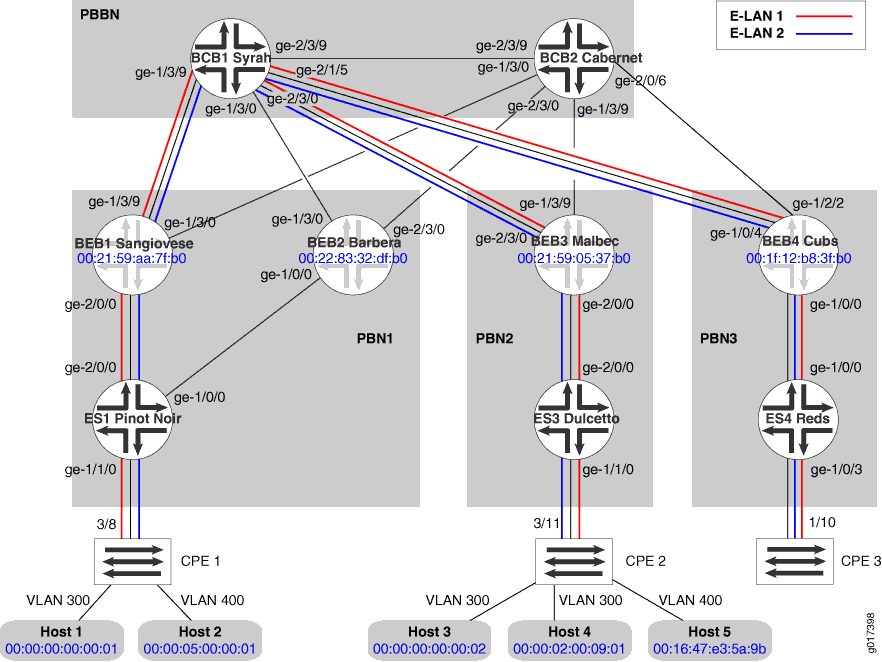
Figure 2 displays the E-LINE service topology for this example. The two E-LINEs are shown using the default path created through the MSTP configuration. The active paths shown in the topology are based on the MSTP configuration in the PBBN core network and the resulting paths resulting paths for all traffic through the network. A PBBN provides services for provider bridged networks in BEB1, BEB2, and BEB3.
Figure 2: Network Topology for E-LINE Service in a Provider Bridged Network
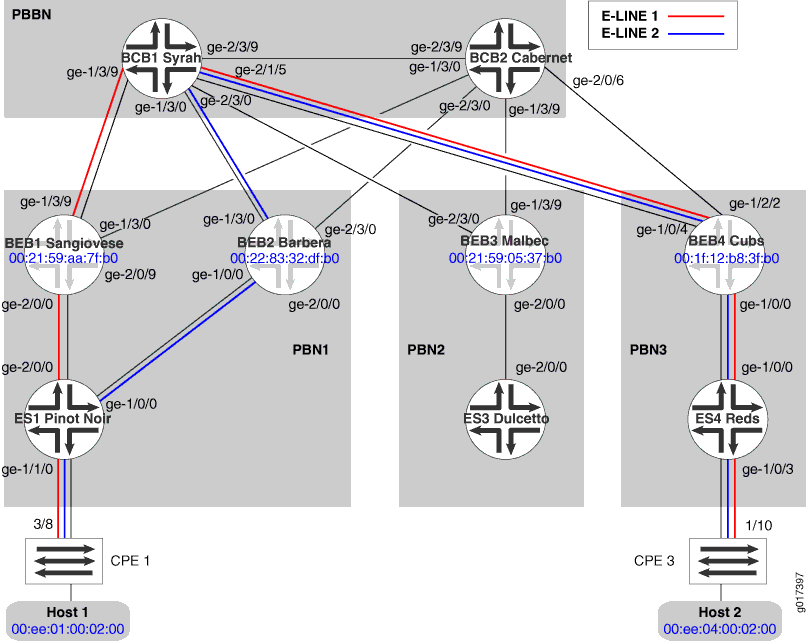
Table 1 shows the different properties that will be configured for E-LINE and E-LAN services on the MX Series routers in the topology.
Table 1: Components of the Topology for Configuring E-LINE and E-LAN Service on MX Series Routers
Property | Settings |
|---|---|
Backbone edge bridges | PBN1 contains:
PBN2 contains:
PBN3 contains:
|
Backbone core bridges | The PBBN contains the following BCBs:
|
Edge switches | The edge switches are connected to the following BEBs:
|
Backbone core bridges | The PBBN contains the following BCBs:
|
BEB1 (Sangiovese) configuration | BEB1 is physically connected to BCB1 and BCB2 in the following manner:
The following routing instance is configured for the B-component (PBBN):
The following routing instance is configured for the I-component (PBN) for E-LAN services:
The following routing instance is configured for the I-component (PBN):
|
BEB2 (Barbera) configuration | BEB2 is physically connected to BCB1 and BCB2 in the following manner:
The following routing instance is configured for the B-component (PBBN):
The following routing instance for E-LINE service is configured for the I-component (PBN):
|
BEB3 (Malbec) configuration | BEB3 is physically connected to BCB2 through interface ge-1/3/9. The following routing instance is configured for the B-component (PBBN):
The following routing instance is configured for the I-component (PBN) for E-LAN services:
|
BEB 4 (Cubs) configuration | BEB4 is physically connected to BCB1 and BCB2 in the following manner:
The following routing instance is configured for the B-component (PBBN):
The following routing instance is configured for the I-component (PBN) for E-LAN services:
The following routing instance is configured for the I-component (PBN):
|
BCB 1 (Syrah) configuration | BCB1 is physically connected to the BEBs in the following manner:
The following routing instance is configured for the PBBN:
|
BCB 2 (Cabernet) configuration | BCB2 is physically connected to the BEBs in the following manner:
The following routing instance is configured for the PBBN:
|
ES1 (Pinot Noir) configuration ES3 (Dolcetto) configuration ES4 (Reds) configuration | ES1, ES3, and ES4 are physically connected to the BEBs in the following manner:
|
To configure services, configure separate routing instances for the PBBN (B-component) and PBN (I-component) on the BEB1, BEB2, BEB3, and BEB4. BCB1 and BCB2 require only a routing instance for the B-component. ES1, ES2, ES3, and ES4 require a routing instance, but not for the B-component.
Multiple Spanning Tree Protocol (MSTP) is configured to provide fast failover and load-balancing benefits to VLANs in the PBBN.
Configuring E-LINE and E-LAN Services on BEB1 (Sangiovese)
Table 2 contains the services configured for BEB1 as well as the correlating service virtual local area networks (S-VLANs), service identifiers (I-SIDs), and backbone virtual local area networks (B-VLANs).
Table 2: BEB1 Mapping
| Service | S-VLAN | I-SID | B-VLAN |
|---|---|---|---|
elan1 | 1300 | 10300 | 3350 |
elan2 | 1400 | 10400 | 3350 |
eline1 | 2100 | 10100 | 3150 |
To configure E-LINE and E-LAN services on the MX Series router BEB1 in a PBBN, perform these tasks:
- Configuring a Routing Instance for E-LINE Services on BEB1
- Configuring a PBN Routing Instance for E-LAN Services on BEB1
- Configuring a PBBN Routing Instance on BEB1
- Configuring the Interfaces on BEB1
Configuring a Routing Instance for E-LINE Services on BEB1
CLI Quick Configuration
To quickly configure the PBN (I-component) routing instance for E-LINE services, copy the following commands and paste them into the router terminal window:
[edit]set routing-instances pbn-1-for-eline instance-type
virtual-switchset routing-instances pbn-1-for-eline interface
ge-2/0/0.1set routing-instances pbn-1-for-eline interface
pip0.0set routing-instances pbn-1-for-eline bridge-domains
bd1 vlan-id 10set routing-instances pbn-1-for-eline bridge-domains
eline-svlans vlan-id-list 2100set routing-instances pbn-1-for-eline pbb-options
peer-instance pbbn-1set routing-instances pbn-1-for-eline service-groups
eline1 service-type elineset routing-instances pbn-1-for-eline service-groups
eline1 pbb-service-options isid 10100 interface ge-2/0/0.1Step-by-Step Procedure
To configure the PBN (I-component) routing instance for E-LINE service:
- Configure the PBN routing instance pbn-1–for-eline and specify the instance type as virtual-switch to provide
support for Layer 2 bridging:
[edit routing-instances]
user@beb1# set pbn-1-for-eline instance-type virtual-switch - Configure the logical interfaces for the PBN routing instance:
[edit routing-instances]
user@beb1# set pbn-1-for-eline interface ge-2/0/0.1 - Configure a provider instance port (PIP) pseudo-logical
interface to provide a connection between customer routing instances
(PBN I-component) and the provider routing instance (PBBN B-component):
[edit routing-instances]
user@beb1# set pbn-1-for-eline interface pip0.0 - Configure the provider bridge domain bd1 and eline-svlans for E-LINE services:
[edit routing-instances]
user@beb1# set pbn-1-for-eline bridge-domains bd1 vlan-id 10
user@beb1# set pbn-1-for-eline bridge-domains eline-svlans vlan-id-list 2100 - Configure the peer PBBN routing instance (here, the peer
PBBN is pbbn-1):
[edit routing-instances]
user@beb1# set pbn-1-for-eline pbb-options peer-instance pbbn-1 - Configure service groups and the type of service they
will provide for the routing instance (here, service groups eline1 and eline2 are configured for eline service):
[edit routing-instances ]
user@beb1# set pbn-1-for-eline service-groups eline1 service-type eline
user@beb1# set pbn-1-for-eline service-groups
eline1 pbb-service-options isid 10100 interface ge-2/0/0.1
Results
Check the results of the configuration:
Configuring a PBN Routing Instance for E-LAN Services on BEB1
CLI Quick Configuration
To quickly configure a PBN (I-component) routing instance for E-LAN services, copy the following commands and paste them into the router terminal window:
[edit]set routing-instances pbn-1-for-elan instance-type
virtual-switchset routing-instances pbn-1-for-elan interface
ge-2/0/0.3set routing-instances pbn-1-for-elan interface
ge-2/0/0.4set routing-instances pbn-1-for-elan interface
pip0.1set routing-instances pbn-1-for-elan bridge-domains
elan-svlans vlan-id-list 1300set routing-instances pbn-1-for-elan bridge-domains
elan-svlans vlan-id-list 1400set routing-instances pbn-1-for-elan pbb-options
peer-instance pbbn-1set routing-instances pbn-1-for-elan service-groups
elan1 service-type elanset routing-instances pbn-1-for-elan service-groups
elan1 pbb-service-options isid 10300 vlan-id-list 1300set routing-instances pbn-1-for-elan service-groups
elan2 service-type elanset routing-instances pbn-1-for-elan service-groups
elan2 pbb-service-options isid 10400 vlan-id-list 1400Step-by-Step Procedure
To configure the PBN (I-component) routing instance for E-LAN service:
- Configure the PBN routing instance pbn–1–for-elan and specify the instance type as virtual-switch to provide
support for Layer 2 bridging:
[edit routing-instances]
user@beb1# set pbn-1-for-elan instance-type virtual-switch - Configure the logical interfaces for the PBN routing instance:
[edit routing-instances]
user@beb1# set pbn-1-for-elan interface ge-2/0/0.3
user@beb1# set pbn-1-for-elan interface ge-2/0/0.4 - Configure a provider instance port (PIP) pseudo-logical
interface to provide a connection between customer routing instances
(PBN I-component) and the provider routing instance (PBBN B-component):
[edit routing-instances]
user@beb1# set pbn-1-for-elan interface pip0.1 - Configure the provider bridge domain elan-svlans for E-LAN services:
[edit routing-instances]
user@beb1# set pbn-1-for-elan bridge-domains elan-svlans vlan-id-list 1300
user@beb1# set pbn-1-for-elan bridge-domains elan-svlans vlan-id-list 1400 - Configure the peer PBBN routing instance (here, the peer
PBBN is pbbn-1):
[edit routing-instances]
user@beb1# set pbn-1-for-elan pbb-options peer-instance pbbn-1 - Configure service groups and the type of service they
will provide for the routing instance (here, service groups elan1 and elan2 are configured for elan service):
[edit routing-instances ]
user@beb1# set pbn-1-for-elan service-groups elan1 service-type elan
user@beb1# set pbn-1-for-elan service-groups
elan1 pbb-service-options isid 10300 vlan-id-list 1300
user@beb1# set pbn-1-for-elan service-groups
elan2 service-type elan
user@beb1# set pbn-1-for-elan service-groups elan2 pbb-service-options isid
10400 vlan-id-list 1400
Results
Check the results of the configuration:
Configuring a PBBN Routing Instance on BEB1
CLI Quick Configuration
To quickly configure a routing instance for a PBBN, copy the following commands and paste them into the router terminal window:
[edit]set routing-instances pbbn-1 instance-type virtual-switchset routing-instances pbbn-1 interface ge-1/3/0.0set routing-instances pbbn-1 interface ge-1/3/9.0set routing-instances pbbn-1 interface cbp0.0set routing-instances pbbn-1 protocols mstp
configuration-name pbbn-1set routing-instances pbbn-1 protocols mstp
interface ge-1/3/0set routing-instances pbbn-1 protocols mstp
interface ge-1/3/9set routing-instances pbbn-1 bridge-domains
elan-bvlan vlan-id 3350set routing instances pbbn-1 pbb-options vlan-id
3350 isid-list 10300set routing instances pbbn-1 pbb-options vlan-id
3350 isid-list 10400set routing instances pbbn-1 pbb-options vlan-id
3150 isid-list 10100Step-by-Step Procedure
To configure the PBBN (B-component) routing instance:
- Configure the PBBN routing instance pbbn-1 and
specify the instance type as virtual-switch to provide support
for Layer 2 bridging:
[edit routing-instances]
user@beb1# set pbbn-1 instance-type virtual-switch - Configure the logical interfaces for the PBBN routing
instance:
[edit routing-instances]
user@beb1# set pbbn-1 interface ge-1/3/0.0
user@beb1# set pbbn-1 interface ge-1/3/9.0 - Configure a customer backbone port (CBP) pseudo-logical
interface to provide a connection between customer routing instances
(PBN I-component) and the provider routing instance (PBBN B-component):
[edit routing-instances]
user@beb1# set pbbn-1 interface cbp0.0 - Configure Multiple Spanning Tree Protocol (MSTP) for the
PBBN routing instance to ensure a loop-free topology:
[edit routing-instances]
user@beb1# set pbbn-1 protocols mstp configuration-name pbbn-1
user@beb1# set pbbn-1 protocols mstp
interface ge-1/3/0
user@beb1# set pbbn-1 protocols mstp interface ge-1/3/9 - Configure the provider bridge domains elan-bvlan and eline-bvlan for E-LINE and E-LAN services:
[edit routing-instances]
user@beb1# set pbbn-1 bridge-domains elan-bvlan vlan-id 3350 - Configure PBB options to provide the PBBN with B-VLAN
to I-SID mapping information in the bridge-domain:
[edit routing-instances]
user@beb1# set pbbn-1 pbb-options vlan-id 3350 isid-list 10300
user@beb1# set pbbn-1 pbb-options vlan-id
3350 isid-list 10400
user@beb1# set pbbn-1 pbb-options vlan-id 3150 isid-list 10100
Results
Check the results of the configuration:
Configuring the Interfaces on BEB1
CLI Quick Configuration
To quickly configure the interfaces on BEB1, copy the following commands and paste them into the router terminal window:
[edit]set interfaces ge-1/3/0 description "Connected
to BCB2 cabernet ge-1/3/0"set interfaces ge-1/3/0 unit 0 family bridge
interface-mode trunkset interfaces ge-1/3/0 unit 0 family bridge
vlan-id-list 3000-4000set interfaces ge-1/3/9 description "Connected
to BCB1 syrah ge-1/3/9"set interfaces ge-1/3/9 unit 0 family bridge
interface-mode trunkset interfaces ge-1/3/9 unit 0 family bridge
vlan-id-list 3000-4000set interfaces ge-2/0/0 description "Connected
to pinotnoir ge-2/0/0" set interfaces ge-2/0/0 flexible-vlan-taggingset interfaces ge-2/0/0 unit 1 family bridge
interface-mode trunkset interfaces ge-2/0/0 unit 1 family bridge
vlan-id-list 2100set interfaces ge-2/0/0 unit 3 family bridge
interface-mode trunkset interfaces ge-2/0/0 unit 3 family bridge
vlan-id-list 1300set interfaces ge-2/0/0 unit 4 family bridge
interface-mode trunkset interfaces ge-2/0/0 unit 4 family bridge
vlan-id-list 1400set interfaces cbp0 unit 0 family bridge interface-mode
trunkset interfaces cbp0 unit 0 family bridge bridge-domain-type
bvlanset interfaces cbp0 unit 0 family bridge isid-list
allset interfaces pip0 unit 0 family bridge interface-mode
trunkset interfaces pip0 unit 0 family bridge bridge-domain-type
svlanset interfaces pip0 unit 0 family bridge isid-list
all-service-groupsset interfaces pip0 unit 1 family bridge interface-mode
trunkset interfaces pip0 unit 1 family bridge bridge-domain-type
svlanset interfaces pip0 unit 1 family bridge isid-list
all-service-groupsStep-by-Step Procedure
To configure interfaces on BEB1:
- Configure interface ge-1/3/0:
[edit interfaces]
user@beb1# set ge-1/3/0 description "Connected to BCB2 cabernet ge-1/3/0"
user@beb1# set ge-1/3/0 unit 0 family
bridge interface-mode trunk
user@beb1# set ge-1/3/0 unit 0 family bridge vlan-id-list 3000-4000 - Configure interface ge-1/3/9:
set interfaces[edit interfaces]
user@beb1# set ge-1/3/9 description "Connected to BCB1 syrah ge-1/3/9"
user@beb1# set ge-1/3/9 unit 0 family bridge interface-mode trunk
user@beb1# set ge-1/3/9 unit 0 family bridge vlan-id-list 3000-4000 - Configure interface ge-2/0/0:
[edit interfaces]
user@beb1# set ge-2/0/0 description "Connected to pinotnoir ge-2/0/0"
user@beb1# set ge-2/0/0 flexible-vlan-tagging
user@beb1# set ge-2/0/0 unit 1 family
bridge interface-mode trunk
user@beb1# set ge-2/0/0 unit 1 family bridge vlan-id-list 2100
user@beb1# set ge-2/0/0 unit 3 family
bridge interface-mode trunk
user@beb1# set ge-2/0/0 unit 3 family bridge vlan-id-list 1300
user@beb1# set ge-2/0/0 unit 4 family
bridge interface-mode trunk
user@beb1# set ge-2/0/0 unit 4 family bridge vlan-id-list 1400 - Configure interface cpb0:
[edit interfaces]
user@beb1# set cbp0 unit 0 family bridge interface-mode trunk
user@beb1# set cbp0 unit 0 family bridge
bridge-domain-type bvlan
user@beb1# set cbp0 unit 0 family bridge isid-list all - Configure interface pip0:
[edit interfaces]
user@beb1# set pip0 unit 0 family bridge interface-mode trunk
user@beb1# set pip0 unit 0 family bridge
bridge-domain-type svlan
user@beb1# set pip0 unit 0 family bridge isid-list all-service-groups
user@beb1# set pip0 unit 1 family bridge
interface-mode trunk
user@beb1# set pip0 unit 1 family bridge bridge-domain-type svlan
user@beb1# set pip0 unit 1 family bridge
isid-list all-service-groups
Results
Check the results of the configuration:
Configuring E-LINE Service on BEB2 (Barbera)
Table 3 contains the service configured for BEB2 as well as the correlating S-VLAN, I-SID, and B-VLAN.
Table 3: BEB2 Mapping
| Service | S-VLAN | I-SID | B-VLAN |
|---|---|---|---|
eline2 | 1200 | 10200 | 3150 |
To configure E-LINE service on the MX Series router BEB2 in a PBBN, perform these tasks:
- Configuring a PBN Routing Instance for E-LINE Services on BEB2
- Configuring a PBBN Routing Instance on BEB2
- Configuring the Interfaces on BEB2
Configuring a PBN Routing Instance for E-LINE Services on BEB2
CLI Quick Configuration
To quickly configure the PBN (I-component) routing instance for E-LINE services, copy the following commands and paste them into the router terminal window:
[edit]set routing-instances pbn-1-for-eline instance-type
virtual-switchset routing-instances pbn-1-for-eline interface
ge-1/0/0.2set routing-instances pbn-1-for-eline interface
pip0.0set routing-instances pbn-1-for-eline bridge-domains
eline-svlansset routing-instances pbn-1-for-eline bridge-domains
eline-svlans vlan-id-list 1200set routing-instances pbn-1-for-eline pbb-options
peer-instance pbbn-1set routing-instances pbn-1-for-eline service-groups
eline2 service-type elineset routing-instances pbn-1-for-eline service-groups
eline2 pbb-service-options isid 10200 interface ge-1/0/0.2Step-by-Step Procedure
To configure the PBN (I-component) routing instance for E-LINE service:
- Configure the PBN routing instance pbn–1–for-eline and specify the instance type as virtual-switch to provide
support for Layer 2 bridging:
[edit routing-instances]
user@beb2# set pbn-1-for-eline instance-type virtual-switch - Configure the logical interfaces for the PBN routing instance:
[edit routing-instances]
user@beb2# set pbn-1-for-eline interface ge-1/0/0.1 - Configure a provider instance port (PIP) pseudo-logical
interface to provide a connection between customer routing instances
(PBN I-component) and the provider routing instance (PBBN B-component):
[edit routing-instances]
user@beb2# set pbn-1-for-eline interface pip0.0 - Configure the provider bridge domain eline-svlans for E-LINE services:
[edit routing-instances]
user@beb2# set pbn-1-for-eline bridge-domains eline-svlans
user@beb2# set pbn-1-for-eline bridge-domains eline-svlans vlan-id-list 1200 - Configure the peer PBBN routing instance (here, the peer
PBBN is pbbn-1):
[edit routing-instances]
user@beb1# set pbn-1-for-eline pbb-options peer-instance pbbn-1 - Configure service groups and the type of service they
will provide for the routing instance (here, service groups eline1 and eline2 are configured for eline service):
[edit routing-instances ]
user@beb2# set pbn-1-for-eline service-groups eline2 service-type eline
user@beb2# set pbn-1-for-eline service-groups
eline2 pbb-service-options isid 10200 interface ge-1/0/0.2
Results
Check the results of the configuration:
Configuring a PBBN Routing Instance on BEB2
CLI Quick Configuration
To quickly configure a routing instance for a PBBN, copy the following commands and paste them into the router terminal window:
[edit]set routing-instances pbbn-1 instance-type virtual-switchset routing-instances pbbn-1 interface ge-1/3/0.0set routing-instances pbbn-1 interface ge-2/3/0.0set routing-instances pbbn-1 interface cbp0.0set routing-instances pbbn-1 protocols mstp
configuration-name pbbn-1set routing-instances pbbn-1 protocols mstp
interface ge-1/3/0set routing-instances pbbn-1 protocols mstp
interface ge-2/3/0set routing-instances pbbn-1 bridge-domains
eline-bvlan vlan-id 3150set routing instances pbbn-1 pbb-options vlan-id
3150 isid-list 10200Step-by-Step Procedure
To configure the PBBN (B-component) routing instance:
- Configure the PBBN routing instance pbbn-1 and
specify the instance type as virtual-switch to provide support
for Layer 2 bridging:
[edit routing-instances]
user@beb2# set pbbn-1 instance-type virtual-switch - Configure the logical interfaces for the PBBN routing
instance:
[edit routing-instances]
user@beb2# set pbbn-1 interface ge-1/3/0.0
user@beb2# set pbbn-1 interface ge-2/3/0.0 - Configure a customer backbone port (CBP) pseudo-logical
interface to provide a connection between customer routing instances
(PBN I-component) and the provider routing instance (PBBN B-component):
[edit routing-instances]
user@beb2# set pbbn-1 interface cbp0.0 - Configure Multiple Spanning Tree Protocol (MSTP) for the
PBBN routing instance to ensure a loop-free topology:
[edit routing-instances]
user@beb2# set pbbn-1 protocols mstp configuration-name pbbn-1
user@beb2# set pbbn-1 protocols mstp
interface ge-1/3/0
user@beb2# set pbbn-1 protocols mstp interface ge-2/3/0 - Configure the provider bridge domain eline-bvlan for E-LINE services:
[edit routing-instances]
user@beb2# set pbbn-1 bridge-domains eline-bvlan vlan-id 3150 - Configure PBB options to provide the PBBN with B-VLAN
to I-SID mapping information in the bridge-domain:
[edit routing-instances]
user@beb2# set pbbn-1 pbb-options vlan-id 3150 isid-list 10200
Results
Check the results of the configuration:
Configuring the Interfaces on BEB2
CLI Quick Configuration
To quickly configure the interfaces on BEB2, copy the following commands and paste them into the router terminal window:
[edit]set interfaces ge-1/0/0 description "Connected
to ES1 pinotnoir ge-1/0/0"set interfaces ge-1/0/0 flexible-vlan-taggingset interfaces ge-1/0/0 unit 2 family bridge
interface-mode trunkset interfaces ge-1/0/0 unit 2 family bridge
vlan-id-list 1200set interfaces ge-1/3/0 description "Connected
to BCB1 syrah ge-1/3/0"set interfaces ge-1/3/0 unit 0 family bridge
interface-mode trunkset interfaces ge-1/3/0 unit 3 family bridge
vlan-id-list 3000-4000set interfaces ge-2/3/0 description "Connected
to BCB2 cabernet ge-2/3/0"set interfaces ge-2/3/0 unit 0 family bridge
interface-mode trunkset interfaces ge-2/3/0 unit 0 family bridge
vlan-id-list 3000-4000set interfaces cbp0 unit 0 family bridge interface-mode
trunkset interfaces cbp0 unit 0 family bridge bridge-domain-type
bvlanset interfaces cbp0 unit 0 family bridge isid-list
allset interfaces pip0 unit 0 family bridge interface-mode
trunkset interfaces pip0 unit 0 family bridge bridge-domain-type
svlanset interfaces pip0 unit 0 family bridge isid-list
all-service-groupsset interfaces pip0 unit 1 family bridge interface-mode
trunkset interfaces pip0 unit 1 family bridge bridge-domain-type
svlanset interfaces pip0 unit 1 family bridge isid-list
all-service-groupsStep-by-Step Procedure
To configure interfaces on BEB2:
- Configure interface ge-1/0/0:
[edit interfaces]
user@beb2# set ge-1/0/0 description "Connected to ES1 pinotnoir ge-1/0/0"
user@beb2# set ge-1/0/0 flexible-vlan-tagging
user@beb2# set ge-1/0/0 unit 2 family
bridge interface-mode trunk
user@beb2# set ge-1/0/0 unit 2 family bridge vlan-id-list 1200 - Configure interface ge-1/3/0:
[edit interfaces]
user@beb2# set ge-1/3/0 description "Connected to BCB1 syrah ge-1/3/0"
user@beb2# set ge-1/3/0 unit 0 family
bridge interface-mode trunk
user@beb2# set ge-1/3/0 unit 3 family bridge vlan-id-list 3000-4000 - Configure interface ge-2/3/0:
[edit interfaces]
user@beb2# set ge-2/3/0 description "Connected to BCB2 cabernet ge-2/3/0"
user@beb2# set ge-2/3/0 unit 0 family
bridge interface-mode trunk
user@beb2# set ge-2/3/0 unit 0 family bridge vlan-id-list 3000-4000 - Configure interface cpb0:
[edit interfaces]
user@beb2# set cbp0 unit 0 family bridge interface-mode trunk
user@beb2# set cbp0 unit 0 family bridge
bridge-domain-type bvlan
user@beb2# set cbp0 unit 0 family bridge isid-list all - Configure interface pip0:
[edit interfaces]
user@beb2# set pip0 unit 0 family bridge interface-mode trunk
user@beb2# set pip0 unit 0 family bridge
bridge-domain-type svlan
user@beb2# set pip0 unit 0 family bridge isid-list all-service-groups
user@beb2# set pip0 unit 1 family bridge
interface-mode trunk
user@beb2# set pip0 unit 1 family bridge bridge-domain-type svlan
user@beb2# set pip0 unit 1 family bridge
isid-list all-service-groups
Results
Check the results of the configuration:
Configuring E-LAN Services on BEB3 (Malbec)
Table 4 contains the services configured for BEB3 as well as the correlating S-VLANs, I-SIDs, and B-VLANs.
Table 4: BEB2 Mapping
| Service | S-VLAN | I-SID | B-VLAN |
|---|---|---|---|
elan1 | 1300 | 10300 | 3350 |
elan2 | 1400 | 10400 | 3350 |
To configure E-LAN services on the MX Series router BEB3 in a PBBN, perform these tasks:
- Configuring a PBN Routing Instance for E-LAN Services on BEB3
- Configuring a PBBN Routing Instance on BEB3 (Malbec)
- Configuring the Interfaces on BEB3
Configuring a PBN Routing Instance for E-LAN Services on BEB3
CLI Quick Configuration
To quickly configure a PBN (I-component) routing instance for E-LAN services, copy the following commands and paste them into the router terminal window:
[edit]set routing-instances pbn-2-for-elan instance-type
virtual-switchset routing-instances pbn-2-for-elan interface
ge-2/0/0.3set routing-instances pbn-2-for-elan interface
ge-2/0/0.4set routing-instances pbn-2-for-elan interface
pip0.1set routing-instances pbn-2-for-elan bridge-domains
elan-svlans vlan-id-list 1300set routing-instances pbn-2-for-elan bridge-domains
elan-svlans vlan-id-list 1400set routing-instances pbn-2-for-elan pbb-options
peer-instance pbbn-1set routing-instances pbn-2-for-elan service-groups
elan1 service-type elanset routing-instances pbn-2-for-elan service-groups
elan1 pbb-service-options isid 10300 vlan-id-list 1300set routing-instances pbn-2-for-elan service-groups
elan2 service-type elanset routing-instances pbn-2-for-elan service-groups
elan2 pbb-service-options isid 10400 vlan-id-list 1400Step-by-Step Procedure
To configure the PBN (I-component) routing instance for E-LAN service:
- Configure the PBN routing instance pbn–2–for-elan and specify the instance type as virtual-switch to provide
support for Layer 2 bridging:
[edit routing-instances]
user@beb3# set pbn-2-for-elan instance-type virtual-switch - Configure the logical interfaces for the PBN routing instance:
[edit routing-instances]
user@beb3# set pbn-2-for-elan interface ge-2/0/0.3
user@beb3# set pbn-2-for-elan interface ge-2/0/0.4 - Configure a provider instance port (PIP) pseudo-logical
interface to provide a connection between customer routing instances
(PBN I-component) and the provider routing instance (PBBN B-component):
[edit routing-instances]
user@beb3# set pbn-2-for-elan interface pip0.1 - Configure the provider bridge domain elan-svlans for E-LAN services:
[edit routing-instances]
user@beb3# set pbn-2-for-elan bridge-domains elan-svlans vlan-id-list 1300
user@beb3# set pbn-2-for-elan bridge-domains elan-svlans vlan-id-list 1400 - Configure the peer PBBN routing instance (here, the peer
PBBN is pbbn-1):
[edit routing-instances]
user@beb3# set pbn-2-for-elan pbb-options peer-instance pbbn-1 - Configure service groups and the type of service they
will provide for the routing instance (here, service groups elan1 and elan2 are configured for elan service):
[edit routing-instances ]
user@beb3# set pbn-2-for-elan service-groups elan1 service-type elan
user@beb3# set pbn-2-for-elan service-groups
elan1 pbb-service-options isid 10300 vlan-id-list 1300
user@beb3# set pbn-2-for-elan service-groups
elan2 service-type elan
user@beb3# set pbn-2-for-elan service-groups elan2 pbb-service-options isid
10400 vlan-id-list 1400
Results
Check the results of the configuration:
Configuring a PBBN Routing Instance on BEB3 (Malbec)
CLI Quick Configuration
To quickly configure a routing instance for a PBBN, copy the following commands and paste them into the router terminal window:
[edit]set routing-instances pbbn-1 instance-type virtual-switchset routing-instances pbbn-1 interface ge-1/3/9.0set routing-instances pbbn-1 interface ge-2/3/0.0set routing-instances pbbn-1 interface cbp0.0set routing-instances pbbn-1 protocols mstp
configuration-name pbbn-1set routing-instances pbbn-1 protocols mstp
interface ge-1/3/9set routing-instances pbbn-1 protocols mstp
interface ge-2/3/0set routing instances pbbn-1 pbb-options vlan-id
3350 isid-list 10300set routing instances pbbn-1 pbb-options vlan-id
3350 isid-list 10400Step-by-Step Procedure
To configure the PBBN (B-component) routing instance:
- Configure the PBBN routing instance pbbn-1 and
specify the instance type as virtual-switch to provide support
for Layer 2 bridging:
[edit routing-instances]
user@beb3# set pbbn-1 instance-type virtual-switch - Configure the logical interfaces for the PBBN routing
instance:
[edit routing-instances]
user@beb3# set pbbn-1 interface ge-1/3/9.0
user@beb3# set pbbn-1 interface ge-2/3/0.0 - Configure a customer backbone port (CBP) pseudo-logical
interface to provide a connection between customer routing instances
(PBN I-component) and the provider routing instance (PBBN B-component):
[edit routing-instances]
user@beb3# set pbbn-1 interface cbp0.0 - Configure Multiple Spanning Tree Protocol (MSTP) for the
PBBN routing instance to ensure a loop-free topology:
[edit routing-instances]
user@beb3# set pbbn-1 protocols mstp configuration-name pbbn-1
user@beb3# set pbbn-1 protocols mstp
interface ge-1/3/9
user@beb3# set pbbn-1 protocols mstp interface ge-2/3/0 - Configure the provider bridge domain elan-bvlan for E-LAN services:
[edit routing-instances]
user@beb3# set pbbn-1 bridge-domains elan-bvlan vlan-id 3350 - Configure PBB options to provide the PBBN with B-VLAN
to I-SID mapping information in the bridge-domain:
[edit routing-instances]
user@beb3# set pbbn-1 pbb-options vlan-id 3350 isid-list 10300
user@beb3# set pbbn-1 pbb-options vlan-id
3350 isid-list 10400
Results
Check the results of the configuration:
Configuring the Interfaces on BEB3
CLI Quick Configuration
To quickly configure the interfaces on BEB3, copy the following commands and paste them into the router terminal window:
[edit]set interfaces ge-1/3/9 description "Connected
to BCB2 cabernet ge-1/3/9"set interfaces ge-1/3/9 unit 0 family bridge
interface-mode trunk set interfaces ge-1/3/9 unit 0 family bridge
vlan-id-list 3000-4000set interfaces ge-2/0/0 description "Connected
to ES3 dolcetto ge-2/0/0"set interfaces ge-2/0/0 flexible-vlan-taggingset interfaces ge-2/0/0 unit 3 family bridge
interface-mode trunkset interfaces ge-2/0/0 unit 3 family bridge
vlan-id-list 1300set interfaces ge-2/0/0 unit 4 family bridge
interface-mode trunkset interfaces ge-2/0/0 unit 4 family bridge
vlan-id-list 1400set interfaces ge-2/3/0 description "Connected
to BCB1 syrah ge-2/3/0"set interfaces ge-2/3/0 unit 0 family bridge
interface-mode trunkset interfaces ge-2/3/0 unit 0 family bridge
vlan-id-list 3000-4000set interfaces cbp0 unit 0 family bridge interface-mode
trunkset interfaces cbp0 unit 0 family bridge bridge-domain-type
bvlanset interfaces cbp0 unit 0 family bridge isid-list
allset interfaces pip0 unit 0 family bridge interface-mode
trunkset interfaces pip0 unit 0 family bridge bridge-domain-type
svlanset interfaces pip0 unit 0 family bridge isid-list
all-service-groupsset interfaces pip0 unit 1 family bridge interface-mode
trunkset interfaces pip0 unit 1 family bridge bridge-domain-type
svlanset interfaces pip0 unit 1 family bridge isid-list
all-service-groupsStep-by-Step Procedure
To configure interfaces on BEB3:
- Configure interface ge-1/3/9:
[edit interfaces]
user@beb3# set ge-1/3/9 description "Connected to CS2 cabernet ge-1/3/9"
user@beb3# set ge-1/3/9 unit 0 family
bridge interface-mode trunk
user@beb3# set ge-1/3/9 unit 0 family bridge vlan-id-list 3000-4000 - Configure interface ge-2/0/0:
[edit interfaces]
user@beb3# set ge-2/0/0 description "Connected to ES3 dolcetto ge-2/0/0"
user@beb3# set ge-2/0/0 flexible-vlan-tagging
user@beb3# set ge-2/0/0 unit 3 family
bridge interface-mode trunk
user@beb3# set ge-2/0/0 unit 3 family bridge vlan-id-list 1300
user@beb3# set ge-2/0/0 unit 4 family
bridge interface-mode trunk
user@beb3# set ge-2/0/0 unit 4 family bridge vlan-id-list 1400 - Configure interface ge-2/3/0:
[edit interfaces]
user@beb3# set ge-2/3/0 description "Connected to BCB1 syrah ge-2/3/0"
user@beb3# set ge-2/3/0 unit 0 family
bridge interface-mode trunk
user@beb3# set ge-2/3/0 unit 0 family bridge vlan-id-list 3000-4000 - Configure interface cpb0:
[edit interfaces]
user@beb3# set cbp0 unit 0 family bridge interface-mode trunk
user@beb3# set cbp0 unit 0 family bridge
bridge-domain-type bvlan
user@beb3# set cbp0 unit 0 family bridge isid-list all - Configure interface pip0:
[edit interfaces]
user@beb3# set pip0 unit 0 family bridge interface-mode trunk
user@beb3# set pip0 unit 0 family bridge
bridge-domain-type svlan
user@beb3# set pip0 unit 0 family bridge isid-list all-service-groups
user@beb3# set pip0 unit 1 family bridge
interface-mode trunk
user@beb3# set pip0 unit 1 family bridge bridge-domain-type svlan
user@beb3# set pip0 unit 1 family bridge
isid-list all-service-groups
Results
Check the results of the configuration:
Configuring E-LINE and E-LAN Services on BEB4 (Cubs)
Table 5 contains the services configured for BEB4 as well as the correlating S-VLANs, I-SIDs, and B-VLANs.
Table 5: BEB4 Mapping
| Service | S-VLAN | I-SID | B-VLAN |
|---|---|---|---|
eline1 | 1100 translated to 2100 | 10100 | 3150 |
eline2 | 1200 | 10200 | 3150 |
elan1 | 1300 | 10300 | 3350 |
elan2 | 1400 | 10400 | 3350 |
To configure E-LINE and E-LAN services on the MX Series router BEB4 in a PBBN, perform these tasks:
- Configuring a Routing Instance for E-LINE Services on BEB4
- Configuring a PBN Routing Instance for E-LAN Services on BEB4
- Configuring a PBBN Routing Instance on BEB4
- Configuring the Interfaces on BEB4
Configuring a Routing Instance for E-LINE Services on BEB4
CLI Quick Configuration
To quickly configure the PBN (I-component) routing instance for E-LINE services, copy the following commands and paste them into the router terminal window:
[edit]set routing-instances pbn-3-for-eline instance-type
virtual-switchset routing-instances pbn-3-for-eline interface
ge-1/0/0.1set routing-instances pbn-3-for-eline interface
ge-1/0/0.2set routing-instances pbn-3-for-eline interface
pip0.0set routing-instances pbn-3-for-eline bridge-domains
eline-svlans vlan-id-list 1200set routing-instances pbn-3-for-eline bridge-domains
eline-svlans vlan-id-list 2100set routing-instances pbn-3-for-eline pbb-options
peer-instance pbbn-1set routing-instances pbn-3-for-eline service-groups
eline1 service-type elineset routing-instances pbn-3-for-eline service-groups
eline1 pbb-service-options isid 10100 interface ge-1/0/0.1set routing-instances pbn-3-for-eline service-groups
eline2 service-type elineset routing-instances pbn-3-for-eline service-groups
eline2 pbb-service-options isid 10200 interface ge-1/0/0.2Step-by-Step Procedure
To configure the PBN (I-component) routing instance for E-LINE service:
- Configure the PBN routing instance pbn3–for-eline and specify the instance type as virtual-switch to provide
support for Layer 2 bridging:
[edit routing-instances]
user@beb4# set pbn-3-for-eline instance-type virtual-switch - Configure the logical interfaces for the PBN routing instance:
[edit routing-instances]
user@beb4# set pbn-3-for-eline interface ge-1/0/0.1
user@beb4# set pbn-3-for-eline interface ge-1/0/0.2 - Configure a provider instance port (PIP) pseudo-logical
interface to provide a connection between customer routing instances
(PBN I-component) and the provider routing instance (PBBN B-component):
[edit routing-instances]
user@beb4# set pbn-3-for-eline interface pip0.0 - Configure the provider bridge domain eline-svlans for E-LINE services:
[edit routing-instances]
user@beb4# set pbn-3-for-eline bridge-domains eline-svlans vlan-id-list 1200
user@beb4# set pbn-3-for-eline bridge-domains eline-svlans vlan-id-list 2100 - Configure the peer PBBN routing instance (here, the peer
PBBN is pbbn-1):
[edit routing-instances]
user@beb4# set pbn-3-for-eline pbb-options peer-instance pbbn-1 - Configure service groups and the type of service they
will provide for the routing instance (here, service groups eline1 and eline1 are configured for eline service):
[edit routing-instances ]
user@beb4# set pbn-3-for-eline service-groups eline1 service-type eline
user@beb4# set pbn-3-for-eline service-groups
eline1 pbb-service-options isid 10100 interface ge-1/0/0.1
user@beb1# set pbn-3-for-eline service-groups
eline2 service-type eline
user@beb1# set pbn-3-for-eline service-groups eline2 pbb-service-options isid
10200 interface ge-1/0/0.2
Results
Check the results of the configuration:
Configuring a PBN Routing Instance for E-LAN Services on BEB4
CLI Quick Configuration
To quickly configure a PBN (I-component) routing instance for E-LAN services, copy the following commands and paste them into the router terminal window:
[edit]set routing-instances pbn-3-for-elan instance-type
virtual-switchset routing-instances pbn-3-for-elan interface
ge-1/0/0.3set routing-instances pbn-3-for-elan interface
ge-1/0/0.4set routing-instances pbn-3-for-elan interface
pip0.1set routing-instances pbn-3-for-elan bridge-domains
elan-svlans vlan-id-list 1300set routing-instances pbn-3-for-elan bridge-domains
elan-svlans vlan-id-list 1400set routing-instances pbn-3-for-elan pbb-options
peer-instance pbbn-1set routing-instances pbn-3-for-elan service-groups
elan1 service-type elanset routing-instances pbn-3-for-elan service-groups
elan1 pbb-service-options isid 10300 vlan-id-list 1300set routing-instances pbn-3-for-elan service-groups
elan2 service-type elanset routing-instances pbn-3-for-elan service-groups
elan2 pbb-service-options isid 10400 vlan-id-list 1400Step-by-Step Procedure
To configure the PBN (I-component) routing instance for E-LAN service:
- Configure the PBN routing instance pbn3–for-elan and specify the instance type as virtual-switch to provide
support for Layer 2 bridging:
[edit routing-instances]
user@beb4# set pbn-3-for-elan instance-type virtual-switch - Configure the logical interfaces for the PBN routing instance:
[edit routing-instances]
user@beb4# set pbn-3-for-elan interface ge-1/0/0.3
user@beb4# set pbn-3-for-elan interface ge-1/0/0.4 - Configure a provider instance port (PIP) pseudo-logical
interface to provide a connection between customer routing instances
(PBN I-component) and the provider routing instance (PBBN B-component):
[edit routing-instances]
user@beb4# set pbn-3-for-elan interface pip0.1 - Configure the provider bridge domain elan-svlans for E-LAN services:
[edit routing-instances]
user@beb4# set pbn-3-for-elan bridge-domains elan-svlans vlan-id-list 1300
user@beb4# set pbn-3-for-elan bridge-domains elan-svlans vlan-id-list 1400 - Configure the peer PBBN routing instance (here, the peer
PBBN is pbbn-1):
[edit routing-instances]
user@beb4# set pbn-3-for-elan pbb-options peer-instance pbbn-1 - Configure service groups and the type of service they
will provide for the routing instance (here, service groups elan1 and elan2 are configured for elan service):
[edit routing-instances ]
user@beb4# set pbn-3-for-elan service-groups elan1 service-type elan
user@beb4# set pbn-3-for-elan service-groups elan1 pbb-service-options isid 10300 vlan-id-list 1300
user@beb4# set pbn-3-for-elan service-groups elan2 service-type elan
user@beb4# set pbn-3-for-elan service-groups elan2 pbb-service-options isid 10400 vlan-id-list 1400
Results
Check the results of the configuration:
Configuring a PBBN Routing Instance on BEB4
CLI Quick Configuration
To quickly configure a routing instance for a PBBN, copy the following commands and paste them into the router terminal window:
[edit]set routing-instances pbbn-1 instance-type virtual-switchset routing-instances pbbn-1 interface ge-1/0/4.0set routing-instances pbbn-1 interface ge-1/2/2.0set routing-instances pbbn-1 interface cbp0.0set routing-instances pbbn-1 protocols mstp
configuration-name pbbn-1set routing-instances pbbn-1 protocols mstp
interface ge-1/0/4set routing-instances pbbn-1 protocols mstp
interface ge-1/2/2set routing-instances pbbn-1 bridge-domains
elan-bvlan vlan-id 3350set routing-instances pbbn-1 bridge-domains
eline-bvlan vlan-id 3150set routing instances pbbn-1 pbb-options vlan-id
3350 isid-list 10300set routing-instances pbbn-1 pbb-options vlan-id
3350 isid-list 10400set routing-instances pbbn-1 pbb-options vlan-id
3150 isid-list 10100 set routing-instances pbbn-1 pbb-options vlan-id
3150 isid-list 10200Step-by-Step Procedure
To configure the PBBN (B-component) routing instance:
- Configure the PBBN routing instance pbbn-1 and
specify the instance type as virtual-switch to provide support
for Layer 2 bridging:
[edit routing-instances]
user@beb4# set pbbn-1 instance-type virtual-switch - Configure the logical interfaces for the PBBN routing
instance:
[edit routing-instances]
user@beb4# set pbbn-1 interface ge-1/0/4.0
user@beb4# set pbbn-1 interface ge-1/2/2.0 - Configure a customer backbone port (CBP) pseudo-logical
interface to provide a connection between customer routing instances
(PBN I-component) and the provider routing instance (PBBN B-component):
[edit routing-instances]
user@beb4# set pbbn-1 interface cbp0.0 - Configure Multiple Spanning Tree Protocol (MSTP) for the
PBBN routing instance to ensure a loop-free topology:
[edit routing-instances]
user@beb4# set pbbn-1 protocols mstp configuration-name pbbn-1
user@beb4# set pbbn-1 protocols mstp interface ge-1/0/4
user@beb34# set pbbn-1 protocols mstp interface ge-1/2/2 - Configure the provider bridge domains elan-bvlan and eline-bvlan for E-LINE and E-LAN services:
[edit routing-instances]
user@beb4# set pbbn-1 bridge-domains elan-bvlan vlan-id 3350
user@beb4# set pbbn-1 bridge-domains eline-bvlan vlan-id 3150 - Configure PBB options to provide the PBBN with B-VLAN
to I-SID mapping information in the bridge-domain:
[edit routing-instances]
user@beb4# set pbbn-1 pbb-options vlan-id 3350 isid-list 10300
user@beb4# set pbbn-1 pbb-options vlan-id 3350 isid-list 10400
user@beb4# set pbbn-1 pbb-options vlan-id 3150 isid-list 10100
user@beb4# set pbbn-1 pbb-options vlan-id 3150 isid-list 10200
Results
Check the results of the configuration:
Configuring the Interfaces on BEB4
CLI Quick Configuration
To quickly configure the interfaces on BEB4, copy the following commands and paste them into the router terminal window:
[edit]set interfaces ge-1/0/0 description "Connected
to ES4 Reds ge-1/0/0"set interfaces ge-1/0/0 flexible-vlan-taggingset interfaces ge-1/0/0 encapsulation flexible-ethernet-servicesset interfaces ge-1/0/0 unit 1 family bridge
interface-mode trunkset interfaces ge-1/0/0 unit 1 family bridge
vlan-id-list 2100set interfaces ge-1/0/0 unit 1 family bridge
vlan-rewrite translate 1100 2100set interfaces ge-1/0/0 unit 2 family bridge
interface-mode trunkset interfaces ge-1/0/0 unit 2 family bridge
vlan-id-list 1200set interfaces ge-1/0/0 unit 3 family bridge
interface-mode trunkset interfaces ge-1/0/0 unit 3 family bridge
vlan-id-list 1300set interfaces ge-1/0/0 unit 4 family bridge
interface-mode trunkset interfaces ge-1/0/0 unit 4 family bridge
vlan-id-list 1400set interfaces ge-1/0/4 description "Connected
to BCB1 Syrah ge-2/1/5" set interfaces ge-1/0/4 unit 0 family bridge
interface-mode trunkset interfaces ge-1/0/4 unit 0 family bridge
vlan-id-list 3000-4000set interfaces ge-1/2/2 description "Connected
to BCB2 Cabernet ge-2/0/6" set interfaces ge-1/2/2 unit 0 family bridge
interface-mode trunkset interfaces ge-1/2/2 unit 0 family bridge
vlan-id-list 3000-4000set interfaces cbp0 unit 0 family bridge interface-mode
trunk set interfaces cbp0 unit 0 family bridge bridge-domain-type
bvlanset interfaces cbp0 unit 0 family bridge isid-list
allset interfaces pip0 unit 0 family bridge interface-mode
trunkset interfaces pip0 unit 0 family bridge bridge-domain-type
svlanset interfaces pip0 unit 0 family bridge isid-list
all-service-groupsset interfaces pip0 unit 1 family bridge interface-mode
trunkset interfaces pip0 unit 1 family bridge bridge-domain-type
svlanset interfaces pip0 unit 1 family bridge isid-list
all-service-groupsStep-by-Step Procedure
To configure interfaces on BEB4:
 | Note: Traffic from ES4 on interface ge-1/0/0 is translated from VLAN 1100 to VLAN 2100 by including the statement vlan-rewrite. |
- Configure interface ge-1/0/0:
Note: Traffic from ES4 on interface ge-1/0/0 is translated from VLAN 1100 to VLAN 2100 by including the statement vlan-rewrite.
[edit interfaces]
user@beb4# set ge-1/0/0 description "Connected to ES4 Reds ge-1/0/0"
user@beb4# set ge-1/0/0 flexible-vlan-tagging
user@beb4# set ge-1/0/0 encapsulation flexible-ethernet-services
user@beb4# set ge-1/0/0 unit 1 family bridge interface-mode trunk
user@beb4# set ge-1/0/0 unit 1 family bridge vlan-id-list 2100
user@beb4# set ge-1/0/0 unit 1 family bridge vlan-rewrite translate 1100 2100
user@beb4# set ge-1/0/0 unit 2 family bridge interface-mode trunk
user@beb4# set ge-1/0/0 unit 2 family bridge vlan-id-list 1200
user@beb4# set ge-1/0/0 unit 3 family bridge interface-mode trunk
user@beb4# set ge-1/0/0 unit 3 family bridge vlan-id-list 1300
user@beb4# set ge-1/0/0 unit 4 family bridge interface-mode trunk
user@beb4# set ge-1/0/0 unit 4 family bridge vlan-id-list 1400 - Configure interface ge-1/0/4:
[edit interfaces]
user@beb4# set ge-1/0/4 description "Connected to BCB1 Syrah ge-2/1/5"
user@beb4# set ge-1/0/4 unit 0 family bridge interface-mode trunk
user@beb4# set ge-1/0/4 unit 0 family bridge vlan-id-list 3000-4000 - Configure interface ge-1/2/2:
[edit interfaces]
user@beb4# set ge-1/2/2 description "Connected to BCB2 Cabernet ge-2/0/6"
user@beb4# set ge-1/2/2 unit 0 family bridge interface-mode trunk
user@beb4# set ge-1/2/2 unit 0 family bridge vlan-id-list 3000-4000 - Configure interface cpb0:
[edit interfaces]
user@beb3# set cbp0 unit 0 family bridge interface-mode trunk
user@beb3# set cbp0 unit 0 family bridge bridge-domain-type bvlan
user@beb3# set cbp0 unit 0 family bridge isid-list all - Configure interface pip0:
[edit interfaces]
user@beb3# set pip0 unit 0 family bridge interface-mode trunk
user@beb3# set pip0 unit 0 family bridge bridge-domain-type svlan
user@beb3# set pip0 unit 0 family bridge isid-list all-service-groups
user@beb3# set pip0 unit 1 family bridge interface-mode trunk
user@beb3# set pip0 unit 1 family bridge bridge-domain-type svlan
user@beb3# set pip0 unit 1 family bridge isid-list all-service-groups
Results
Check the results of the configuration:
Configuring Routing Instances and Interfaces on ES1 (Pinot Noir)
Table 6 contains the information about how the customer VLAN (C-VLAN) is mapped to the services VLAN (S-VLAN) on ES1.
Table 6: ES1 C-VLAN to S-VLAN Mapping
| Service | C-VLAN | S-VLAN |
|---|---|---|
E-LINE | 100 | 1100 |
E-LINE | 200 | 1200 |
E-LAN | 300 | 1300 |
E-LAN | 400 | 1400 |
To configure routing instances and interfaces on the MX Series router called ES1 in a PBBN in the topology shown in Figure 1, perform these tasks:
Configuring a Routing Instance for ES1
CLI Quick Configuration
To quickly configure a routing instance for ES1, copy the following commands and paste them into the router terminal window:
[edit]set routing-instances cust-1 instance-type virtual-switchset routing-instances cust-1 interface ge-1/0/0.1set routing-instances cust-1 interface ge-1/0/0.2set routing-instances cust-1 interface ge-1/0/0.3set routing-instances cust-1 interface ge-1/0/0.4set routing-instances cust-1 interface ge-1/1/0.0set routing-instances cust-1 interface ge-2/0/0.1set routing-instances cust-1 interface ge-2/0/0.2set routing-instances cust-1 interface ge-2/0/0.3set routing-instances cust-1 interface ge-2/0/0.4set routing-instances cust-1 bridge-domains
bds vlan-id-list 100set routing-instances cust-1 bridge-domains
bds vlan-id-list 200set routing-instances cust-1 bridge-domains
bds vlan-id-list 300set routing-instances cust-1 bridge-domains
bds vlan-id-list 400Step-by-Step Procedure
To configure the routing instance for ES1:
- Configure the routing instance cust-1 and specify
the instance type as virtual-switch to provide support for
Layer 2 bridging:
[edit routing-instances]
user@es1# set cust-1instance-type virtual-switch - Configure the logical interfaces for the PBN routing instance:
[edit routing-instances]
user@es1# set cust-1 interface ge-1/0/0.1
user@es1# set cust-1 interface ge-1/0/0.2
user@es1# set cust-1 interface ge-1/0/0.3
user@es1# set cust-1 interface ge-1/0/0.4
user@es1# set cust-1 interface ge-1/1/0.0
user@es1# set cust-1 interface ge-2/0/0.1
user@es1# set cust-1 interface ge-2/0/0.2
user@es1# set cust-1 interface ge-2/0/0.3
user@es1# set cust-1 interface ge-2/0/0.4 - Configure the bridge domain bds:
[edit routing-instances]
user@es1# set cust-1 bridge-domains bds vlan-id-list 100
user@es1# set cust-1 bridge-domains bds vlan-id-list 200
user@es1# set cust-1 bridge-domains bds vlan-id-list 300
user@es1# set cust-1 bridge-domains bds vlan-id-list 400
Results
Check the results of the configuration:
Configuring the Interfaces on ES1
CLI Quick Configuration
To quickly configure the interfaces on ES1, copy the following commands and paste them into the router terminal window:
[edit]set interfaces ge-1/0/0 description "Connected
to BEB2 barbera ge-1/0/0" set interfaces ge-1/0/0 flexible-vlan-taggingset interfaces ge-1/0/0 unit 2 vlan-id 1200set interfaces ge-1/0/0 unit 2 family bridge
interface-mode trunkset interfaces ge-1/0/0 unit 2 family bridge
inner-vlan-id-list 200set interfaces ge-1/1/0 unit 0 family bridge
interface-mode trunkset interfaces ge-1/1/0 unit 0 family bridge
vlan-id-list 100set interfaces ge-1/1/0 unit 0 family bridge
vlan-id-list 200set interfaces ge-1/1/0 unit 0 family bridge
vlan-id-list 300set interfaces ge-1/1/0 unit 0 family bridge
vlan-id-list 400set interfaces ge-2/0/0 description "Connected
to AS1 sangiovese ge-2/0/0"set interfaces ge-2/0/0 flexible-vlan-taggingset interfaces ge-2/0/0 unit 1 vlan-id 2100set interfaces ge-2/0/0 unit 1 family bridge
interface-mode trunkset interfaces ge-2/0/0 unit 1 family bridge
inner-vlan-id-list 100set interfaces ge-2/0/0 unit 3 vlan-id 1300set interfaces ge-2/0/0 unit 3 family bridge
interface-mode trunkset interfaces ge-2/0/0 unit 3 family bridge
inner-vlan-id-list 300set interfaces ge-2/0/0 unit 4 vlan-id 1400set interfaces ge-2/0/0 unit 4 family bridge
interface-mode trunkset interfaces ge-2/0/0 unit 4 family bridge
inner-vlan-id-list 400Step-by-Step Procedure
To configure interfaces on ES1:
- Configure interface ge-1/0/0:
[edit interfaces]
user@es1# set ge-1/0/0 description "Connected to BEB2 barbera ge-1/0/0"
user@es1# set ge-1/0/0 flexible-vlan-tagging
user@es1# set ge-1/0/0 unit 2 vlan-id 1200
user@es1# set ge-1/0/0 unit 2 family bridge interface-mode trunk
user@es1# set ge-1/0/0 unit 2 family bridge inner-vlan-id-list 200 - Configure interface ge-1/1/0:
[edit interfaces]
user@es1# set ge-1/1/0 unit 0 family bridge interface-mode trunk
user@es1# set ge-1/1/0 unit 0 family bridge vlan-id-list 100
user@es1# set ge-1/1/0 unit 0 family bridge vlan-id-list 200
user@es1# set ge-1/1/0 unit 0 family bridge vlan-id-list 300
user@es1# set ge-1/1/0 unit 0 family bridge vlan-id-list 400 - Configure interface ge-2/0/0:
[edit interfaces]
user@es1# set ge-2/0/0 description "Connected to BEB1 sangiovese ge-2/0/0"
user@es1# set ge-2/0/0 flexible-vlan-tagging
user@es1# set ge-2/0/0 unit 1 vlan-id 2100
user@es1# set ge-2/0/0 unit 1 family bridge interface-mode trunk
user@es1# set ge-2/0/0 unit 1 family bridge inner-vlan-id-list 100
user@es1# set ge-2/0/0 unit 3 vlan-id 1300
user@es1# set ge-2/0/0 unit 3 family bridge interface-mode trunk
user@es1# set ge-2/0/0 unit 3 family bridge inner-vlan-id-list 300
user@es1# set ge-2/0/0 unit 4 vlan-id 1400
user@es1# set ge-2/0/0 unit 4 family bridge interface-mode trunk
user@es1# set ge-2/0/0 unit 4 family bridge inner-vlan-id-list 400
Results
Check the results of the configuration:
Configuring a Routing Instance and Interfaces on ES3 (Dolcetto)
Table 7 contains the information about how the customer VLAN (C-VLAN) is mapped to the services VLAN (S-VLAN) on ES3.
Table 7: ES3 C-VLAN to S-VLAN Mapping
| Service | C-VLAN | S-VLAN |
|---|---|---|
E-LAN | 300 | 1300 |
E-LAN | 400 | 1400 |
To configure routing instances and interfaces on the MX Series router called ES3 in a PBBN in the topology shown in Figure 1, perform these tasks:
Configuring a Routing Instance for ES3
CLI Quick Configuration
To quickly configure a routing instance for ES3, copy the following commands and paste them into the router terminal window:
[edit] set routing-instances cust-1 instance-type virtual-switchset routing-instances cust-1 interface ge-2/0/0.3set routing-instances cust-1 interface ge-2/0/0.4set routing-instances cust-1 interface ge-2/1/0.0set routing-instances cust-1 bridge-domains
bds vlan-id-list 300set routing-instances cust-1 bridge-domains
bds vlan-id-list 400Step-by-Step Procedure
To configure the routing instance for ES3:
- Configure the routing instance cust-1 and specify
the instance type as virtual-switch to provide support for
Layer 2 bridging:
[edit routing-instances]
user@es3# set cust-1instance-type virtual-switch - Configure the logical interfaces for the PBN routing instance:
[edit routing-instances]
user@es3# set cust-1 interface ge-2/0/0.3
user@es3# set cust-1 interface ge-2/0/0.4
user@es3# set cust-1 interface ge-2/1/0.0 - Configure the bridge domain bds:
[edit routing-instances]
user@es3# set cust-1 bridge-domains bds vlan-id-list 300
user@es3# set cust-1 bridge-domains bds vlan-id-list 400
Results
Check the results of the configuration:
Configuring the Interfaces on ES3
CLI Quick Configuration
To quickly configure the interfaces on ES3, copy the following commands and paste them into the router terminal window:
[edit]set interfaces ge-1/1/0 unit 0 family bridge
interface-mode trunkset interfaces ge-1/1/0 unit 0 family bridge
vlan-id-list 300set interfaces ge-1/1/0 unit 0 family bridge
vlan-id-list 400set interfaces ge-2/0/0 description "Connected
to BEB3 malbec ge-2/0/0"set interfaces ge-2/0/0 flexible-vlan-taggingset interfaces ge-2/0/0 unit 3 vlan-id 1300set interfaces ge-2/0/0 unit 3 family bridge
interface-mode trunkset interfaces ge-2/0/0 unit 3 family bridge
inner-vlan-id-list 300set interfaces ge-2/0/0 unit 4 vlan-id 1400set interfaces ge-2/0/0 unit 4 family bridge
interface-mode trunkset interfaces ge-2/0/0 unit 4 family bridge
inner-vlan-id-list 400Step-by-Step Procedure
To configure interfaces on ES3:
- Configure interface ge-1/1/0:
[edit interfaces]
user@es3# set ge-1/1/0 unit 0 family bridge interface-mode trunk
user@es3# set ge-1/1/0 unit 0 family bridge vlan-id-list 300
user@es3# set ge-1/1/0 unit 0 family bridge vlan-id-list 400 - Configure interface ge-2/0/0:
[edit interfaces]
user@es3# set ge-2/0/0 description "Connected to BEB3 malbec ge-2/0/0"
user@es3# set ge-2/0/0 flexible-vlan-tagging
user@es3# set ge-2/0/0 unit 3 vlan-id 1300
user@es3# set ge-2/0/0 unit 3 family bridge interface-mode trunk
user@es3# set ge-2/0/0 unit 3 family bridge inner-vlan-id-list 300
user@es3# set ge-2/0/0 unit 4 vlan-id 1400
user@es3# set ge-2/0/0 unit 4 family bridge interface-mode trunk
user@es3# set ge-2/0/0 unit 4 family bridge inner-vlan-id-list 400
Results
Check the results of the configuration:
Configuring a Routing Instance and Interfaces on ES4 (Reds)
Table 8 contains the information about how the customer VLAN (C-VLAN) is mapped to the services VLAN (S-VLAN) on ES4.
Table 8: ES4 C-VLAN to S-VLAN Mapping
| Service | C-VLAN | S-VLAN |
|---|---|---|
E-LINE | 100 | 1100 |
E-LINE | 200 | 1200 |
E-LAN | 300 | 1300 |
E-LAN | 400 | 1400 |
To configure routing instances and interfaces on the MX Series router called ES4 in a PBBN in the topology shown in Figure 1, perform these tasks:
Configuring a Routing Instance for ES4
CLI Quick Configuration
To quickly configure a routing instance for ES4, copy the following commands and paste them into the router terminal window:
[edit] set routing-instances cust-1 instance-type virtual-switchset routing-instances cust-1 interface ge-1/0/0.1set routing-instances cust-1 interface ge-1/0/0.2set routing-instances cust-1 interface ge-1/0/0.3set routing-instances cust-1 interface ge-1/0/0.4set routing-instances cust-1 interface ge-1/0/3.1set routing-instances cust-1 interface ge-1/0/3.2set routing-instances cust-1 interface ge-1/0/3.3set routing-instances cust-1 interface ge-1/0/3.4set routing-instances cust-1 bridge-domains
bds vlan-id-list 100set routing-instances cust-1 bridge-domains
bds vlan-id-list 200set routing-instances cust-1 bridge-domains
bds vlan-id-list 300set routing-instances cust-1 bridge-domains
bds vlan-id-list 400Step-by-Step Procedure
To configure the routing instance for ES4:
- Configure the routing instance cust-1 and specify
the instance type as virtual-switch to provide support for
Layer 2 bridging:
[edit routing-instances]
user@es4# set cust-1instance-type virtual-switch - Configure the logical interfaces for the PBN routing instance:
[edit routing-instances]
user@es4# set cust-1 interface ge-1/0/0.1
user@es4# set cust-1 interface ge-1/0/0.2
user@es4# set cust-1 interface ge-1/0/0.3
user@es4# set cust-1 interface ge-1/0/0.4
user@es4# set cust-1 interface ge-1/0/3.1
user@es4# set cust-1 interface ge-1/0/3.2
user@es4# set cust-1 interface ge-1/0/3.3
user@es4# set cust-1 interface ge-1/0/3.4 - Configure the bridge domain bds:
[edit routing-instances]
user@es4# set cust-1 bridge-domains bds vlan-id-list 100
user@es4# set cust-1 bridge-domains bds vlan-id-list 200
user@es4# set cust-1 bridge-domains bds vlan-id-list 300
user@es4# set cust-1 bridge-domains bds vlan-id-list 400
Results
Check the results of the configuration:
Configuring the Interfaces on ES4
CLI Quick Configuration
To quickly configure the interfaces on ES4, copy the following commands and paste them into the router terminal window:
[edit]set interfaces interface-set vuni-set1 interface
ge-1/0/3 unit 1set interfaces interface-set vuni-set1 interface
ge-1/0/3 unit 3set interfaces interface-set vuni-set1 interface
ge-1/0/3 unit 4set interfaces interface-set vuni-set2 interface
ge-1/0/3 unit 2set interfaces ge-1/0/0 description "Connected
to ES4 Reds ge-1/0/0"set interfaces ge-1/0/0 flexible-vlan-taggingset interfaces ge-1/0/0 unit 1 vlan-id 1100set interfaces ge-1/0/0 unit 1 family bridge
interface-mode trunkset interfaces ge-1/0/0 unit 1 family bridge
inner-vlan-id-list 100set interfaces ge-1/0/0 unit 2 vlan-id 1200set interfaces ge-1/0/0 unit 2 family bridge
interface-mode trunkset interfaces ge-1/0/0 unit 2 family bridge
inner-vlan-id-list 200set interfaces ge-1/0/0 unit 3 vlan-id 1300set interfaces ge-1/0/0 unit 3 family bridge
interface-mode trunkset interfaces ge-1/0/0 unit 3 family bridge
inner-vlan-id-list 300set interfaces ge-1/0/0 unit 4 vlan-id 1400set interfaces ge-1/0/0 unit 4 family bridge
interface-mode trunkset interfaces ge-1/0/0 unit 4 family bridge
inner-vlan-id-list 400set interfaces ge-1/0/3 flexible-vlan-taggingset interfaces ge-1/0/3 unit 1 vlan-id 1100set interfaces ge-1/0/3 unit 1 family bridge
interface-mode trunkset interfaces ge-1/0/3 unit 1 family bridge
inner-vlan-id-list 100set interfaces ge-1/0/3 unit 2 vlan-id 1200set interfaces ge-1/0/3 unit 2 family bridge
interface-mode trunkset interfaces ge-1/0/3 unit 2 family bridge
inner-vlan-id-list 200set interfaces ge-1/0/3 unit 3 vlan-id 1300set interfaces ge-1/0/3 unit 3 family bridge
interface-mode trunkset interfaces ge-1/0/3 unit 3 family bridge
inner-vlan-id-list 300set interfaces ge-1/0/3 unit 4 vlan-id 1400set interfaces ge-1/0/3 unit 4 family bridge
interface-mode trunkset interfaces ge-1/0/3 unit 4 family bridge
inner-vlan-id-list 400Step-by-Step Procedure
To configure interfaces on ES4:
- Configure the interface sets vuni-set1 and vuni-set2:
[edit interfaces]
user@es4# set interface-set vuni-set1 interface ge-1/0/3 unit 1
user@es4# set interface-set vuni-set1 interface ge-1/0/3 unit 3
user@es4# set interface-set vuni-set1 interface ge-1/0/3 unit 4
user@es4# set interface-set vuni-set2 interface ge-1/0/3 unit 2 - Configure interface ge-1/0/0:
[edit interfaces]
user@es4# set ge-1/0/0 description "Connected to BEB4 Cubs ge-1/0/0"
user@es4# set ge-1/0/0 flexible-vlan-tagging
user@es4# set ge-1/0/0 unit 1 vlan-id 1100
user@es4# set ge-1/0/0 unit 1 family bridge interface-mode trunk
user@es4# set ge-1/0/0 unit 1 family bridge inner-vlan-id-list 100
user@es4# set ge-1/0/0 unit 2 vlan-id 1200
user@es4# set ge-1/0/0 unit 2 family bridge interface-mode trunk
user@es4# set ge-1/0/0 unit 2 family bridge inner-vlan-id-list 200
user@es4# set ge-1/0/0 unit 3 vlan-id 1300
user@es4# set ge-1/0/0 unit 3 family bridge interface-mode trunk
user@es4# set ge-1/0/0 unit 3 family bridge inner-vlan-id-list 300
user@es4# set ge-1/0/0 unit 4 vlan-id 1400
user@es4# set ge-1/0/0 unit 4 family bridge interface-mode trunk
user@es4# set ge-1/0/0 unit 4 family bridge inner-vlan-id-list 400 - Configure interface ge-1/0/3:
[edit interfaces]
user@es4# set ge-1/0/3 description "Connected to Gigabit switch"
user@es4# set ge-1/0/3 flexible-vlan-tagging
user@es4# set ge-1/0/3 unit 1 vlan-id 1100
user@es4# set ge-1/0/3 unit 1 family bridge interface-mode trunk
user@es4# set ge-1/0/3 unit 1 family bridge inner-vlan-id-list 100
user@es4# set ge-1/0/3 unit 2 vlan-id 1200
user@es4# set ge-1/0/3 unit 2 family bridge interface-mode trunk
user@es4# set ge-1/0/3 unit 2 family bridge inner-vlan-id-list 200
user@es4# set ge-1/0/3 unit 3 vlan-id 1300
user@es4# set ge-1/0/3 unit 3 family bridge interface-mode trunk
user@es4# set ge-1/0/3 unit 3 family bridge inner-vlan-id-list 300
user@es4# set ge-1/0/3 unit 4 vlan-id 1400
user@es4# set ge-1/0/3 unit 4 family bridge interface-mode trunk
user@es4# set ge-1/0/3 unit 4 family bridge inner-vlan-id-list 400
Results
Check the results of the configuration:
Configuring a Routing Instance and Interfaces on BCB1 (Syrah)
To configure routing instances and interfaces on the MX Series router called BCB1 in a PBBN in the topology shown in Figure 1, perform these tasks:
Configuring a Routing Instance for BCB1
CLI Quick Configuration
To quickly configure a routing instance for BCB1, copy the following commands and paste them into the router terminal window:
[edit] set routing-instances pbbn-1 instance-type virtual-switchset routing-instances pbbn-1 interface ge-1/3/0.0set routing-instances pbbn-1 interface ge-1/3/9.0set routing-instances pbbn-1 interface ge-2/1/5.0set routing-instances pbbn-1 interface ge-2/3/0.0set routing-instances pbbn-1 interface ge-2/3/9.0set routing-instances pbbn-1 protocols mstp
configuration-name pbbn-1set routing-instances pbbn-1 protocols mstp
bridge-priority 4kset routing-instances pbbn-1 protocols mstp
interface ge-1/3/0set routing-instances pbbn-1 protocols mstp
interface ge-1/3/9set routing-instances pbbn-1 protocols mstp
interface ge-2/1/5set routing-instances pbbn-1 protocols mstp
interface ge-2/3/0set routing-instances pbbn-1 protocols mstp
interface ge-2/3/9set routing-instances pbbn-1 bridge-domains
elan-bvlan vlan-id 3350set routing-instances pbbn-1 bridge-domains
eline-bvlan vlan-id-list 3150Step-by-Step Procedure
To configure the routing instance for BCB1:
- Configure the routing instance pbbn-1 and specify
the instance type as virtual-switch to provide support for
Layer 2 bridging:
[edit routing-instances]
user@bcb1# set pbbn-1instance-type virtual-switch - Configure the logical interfaces for the PBN routing instance:
[edit routing-instances]
user@bcb1# set pbbn-1 interface ge-1/3/0.0
user@bcb1# set pbbn-1 interface ge-1/3/9.0
user@bcb1# set pbbn-1 interface ge-2/1/5.0
user@bcb1# set pbbn-1 interface ge-2/3/0.0
user@bcb1# set pbbn-1 interface ge-2/3/9.0 - Configure MSTP:
[edit routing-instances]
user@bcb1# set pbbn-1 protocols mstp configuration-name pbbn-1
user@bcb1# set pbbn-1 protocols mstp bridge-priority 4k
user@bcb1# set pbbn-1 protocols mstp interface ge-1/3/0
user@bcb1# set pbbn-1 protocols mstp interface ge-1/3/9
user@bcb1# set pbbn-1 protocols mstp interface ge-2/1/5
user@bcb1# set pbbn-1 protocols mstp interface ge-2/3/0
user@bcb1# set pbbn-1 protocols mstp interface ge-2/3/9 - Configure the bridge domain bds:
[edit routing-instances]
user@bcb1# set pbbn-1 bridge-domains elan-bvlan vlan-id 3350
user@bcb1# set pbbn-1 bridge-domains eline-bvlan vlan-id-list 3150
Results
Check the results of the configuration:
Configuring the Interfaces on BCB1
CLI Quick Configuration
To quickly configure the interfaces on BCB1, copy the following commands and paste them into the router terminal window:
[edit]set interfaces ge-1/3/0 description "Connected
to BEB2 barbera ge-1/3/0"set interfaces ge-1/3/0 enableset interfaces ge-1/3/0 unit 0 family bridge
interface-mode trunkset interfaces ge-1/3/0 unit 0 family bridge
vlan-id-list 3000-4000set interfaces ge-1/3/9 description "Connected
to BEB1 sangiovese ge-1/3/9"set interfaces ge-1/3/9 unit 0 family bridge
interface-mode trunkset interfaces ge-1/3/9 unit 0 family bridge
vlan-id-list 3000-4000set interfaces ge-2/1/5 description "Connected
to BEB4 Cubs ge-1/0/4"set interfaces ge-2/1/5 unit 0 family bridge
interface-mode trunkset interfaces ge-2/1/5 unit 0 family bridge
vlan-id-list 3000-4000set interfaces ge-2/3/0 description "Connected
to BEB3 malbec ge-2/3/0"set interfaces ge-2/3/0 unit 0 family bridge
interface-mode trunkset interfaces ge-2/3/0 unit 0 family bridge
vlan-id-list 3000-4000set interfaces ge-2/3/9 description "Connected
to BCB2 cabernet ge-2/3/9"set interfaces ge-2/3/9 unit 0 family bridge
interface-mode trunkset interfaces ge-2/3/9 unit 0 family bridge
vlan-id-list 3000-4000Step-by-Step Procedure
To configure interfaces on BCB1:
- Configure interface ge-1/3/0:
[edit interfaces]
user@bcb1# set ge-1/3/0 description "Connected to BEB2 barbera ge-1/3/0"
user@bcb1# set ge-1/3/0 enable
user@bcb1# set ge-1/3/0 unit 0 family bridge interface-mode trunk
user@bcb1# set ge-1/3/0 unit 0 family bridge vlan-id-list 3000-4000 - Configure interface ge-1/3/9:
set interfaces ge-1/3/9 description "Connected to BEB1 sangiovese ge-1/3/9"[edit interfaces]
user@bcb1# set ge-1/3/9 unit 0 family bridge interface-mode trunk
user@bcb1# set ge-1/3/9 unit 0 family bridge vlan-id-list 3000-4000 - Configure interface ge-2/1/5:
[edit interfaces]
user@bcb1# set ge-2/1/5 description "Connected to BEB4 Cubs ge-1/0/4"
user@bcb1# set ge-2/1/5 unit 0 family bridge interface-mode trunk
user@bcb1# set ge-2/1/5 unit 0 family bridge vlan-id-list 3000-4000 - Configure interface ge-2/3/0:
[edit interfaces]
user@bcb1# set ge-2/3/0 description "Connected to BEB3 malbec ge-2/3/0"
user@bcb1# set ge-2/3/0 unit 0 family bridge interface-mode trunk
user@bcb1# set ge-2/3/0 unit 0 family bridge vlan-id-list 3000-4000 - Configure interface ge-2/3/9:
[edit interfaces]
user@bcb1# set ge-2/3/9 description "Connected to BCB2 cabernet ge-2/3/9"
user@bcb1# set ge-2/3/9 unit 0 family bridge interface-mode trunk
user@bcb1# set ge-2/3/9 unit 0 family bridge vlan-id-list 3000-4000
Results
Check the results of the configuration:
Configuring a Routing Instance and Interfaces on BCB2 (Cabernet)
To configure routing instances and interfaces on the MX Series router called BCB2 in a PBBN in the topology shown in Figure 1, perform these tasks:
Configuring a Routing Instance for BCB2
CLI Quick Configuration
To quickly configure a routing instance for BCB2, copy the following commands and paste them into the router terminal window:
[edit] set routing-instances pbbn-1 instance-type virtual-switchset routing-instances pbbn-1 interface ge-1/3/0.0set routing-instances pbbn-1 interface ge-1/3/9.0set routing-instances pbbn-1 interface ge-2/1/5.0set routing-instances pbbn-1 interface ge-2/3/0.0set routing-instances pbbn-1 interface ge-2/3/9.0set routing-instances pbbn-1 protocols mstp
configuration-name pbbn-1set routing-instances pbbn-1 protocols mstp
bridge-priority 4kset routing-instances pbbn-1 protocols mstp
interface ge-1/3/0set routing-instances pbbn-1 protocols mstp
interface ge-1/3/9set routing-instances pbbn-1 protocols mstp
interface ge-2/1/5set routing-instances pbbn-1 protocols mstp
interface ge-2/3/0set routing-instances pbbn-1 protocols mstp
interface ge-2/3/9set routing-instances pbbn-1 bridge-domains
elan-bvlan vlan-id 3350set routing-instances pbbn-1 bridge-domains
eline-bvlan vlan-id-list 3150Step-by-Step Procedure
To configure the routing instance for BCB2:
- Configure the routing instance pbbn-1 and specify
the instance type as virtual-switch to provide support for
Layer 2 bridging:
[edit routing-instances]
user@bcb2# set pbbn-1instance-type virtual-switch - Configure the logical interfaces for the PBN routing instance:
[edit routing-instances]
user@bc21# set pbbn-1 interface ge-1/3/0.0
user@bcb2# set pbbn-1 interface ge-1/3/9.0
user@bcb2# set pbbn-1 interface ge-2/1/5.0
user@bcb2# set pbbn-1 interface ge-2/3/0.0
user@bcb2# set pbbn-1 interface ge-2/3/9.0 - Configure MSTP:
[edit routing-instances]
user@bcb2# set pbbn-1 protocols mstp configuration-name pbbn-1
user@bcb2# set pbbn-1 protocols mstp bridge-priority 4k
user@bcb2# set pbbn-1 protocols mstp interface ge-1/3/0
user@bcb2# set pbbn-1 protocols mstp interface ge-1/3/9
user@bcb2# set pbbn-1 protocols mstp interface ge-2/1/5
user@bcb2# set pbbn-1 protocols mstp interface ge-2/3/0
user@bcb2# set pbbn-1 protocols mstp interface ge-2/3/9 - Configure the bridge domain bds:
[edit routing-instances]
user@bcb2# set pbbn-1 bridge-domains elan-bvlan vlan-id 3350
user@bcb2# set pbbn-1 bridge-domains eline-bvlan vlan-id-list 3150
Results
Check the results of the configuration:
Configuring the Interfaces on BCB2
CLI Quick Configuration
To quickly configure the interfaces on BCB2, copy the following commands and paste them into the router terminal window:
[edit]set interfaces ge-1/3/0 description "Connected
to BEB2 barbera ge-1/3/0"set interfaces ge-1/3/0 enableset interfaces ge-1/3/0 unit 0 family bridge
interface-mode trunkset interfaces ge-1/3/0 unit 0 family bridge
vlan-id-list 3000-4000set interfaces ge-1/3/9 description "Connected
to BEB1 sangiovese ge-1/3/9"set interfaces ge-1/3/9 unit 0 family bridge
interface-mode trunkset interfaces ge-1/3/9 unit 0 family bridge
vlan-id-list 3000-4000set interfaces ge-2/1/5 description "Connected
to BEB4 Cubs ge-1/0/4"set interfaces ge-2/1/5 unit 0 family bridge
interface-mode trunkset interfaces ge-2/1/5 unit 0 family bridge
vlan-id-list 3000-4000set interfaces ge-2/3/0 description "Connected
to BEB3 malbec ge-2/3/0"set interfaces ge-2/3/0 unit 0 family bridge
interface-mode trunkset interfaces ge-2/3/0 unit 0 family bridge
vlan-id-list 3000-4000set interfaces ge-2/3/9 description "Connected
to BCB1 syrah ge-2/3/9"set interfaces ge-2/3/9 unit 0 family bridge
interface-mode trunkset interfaces ge-2/3/9 unit 0 family bridge
vlan-id-list 3000-4000Step-by-Step Procedure
To configure interfaces on BCB2:
- Configure interface ge-1/3/0:
[edit interfaces]
user@bcb2# set ge-1/3/0 description "Connected to BEB2 barbera ge-1/3/0"
user@bcb2# set ge-1/3/0 enable
user@bcb2# set ge-1/3/0 unit 0 family bridge interface-mode trunk
user@bcb2# set ge-1/3/0 unit 0 family bridge vlan-id-list 3000-4000 - Configure interface ge-1/3/9:
set interfaces ge-1/3/9 description "Connected to BEB1 sangiovese ge-1/3/9"[edit interfaces]
user@bcb2# set ge-1/3/9 unit 0 family bridge interface-mode trunk
user@bcb2# set ge-1/3/9 unit 0 family bridge vlan-id-list 3000-4000 - Configure interface ge-2/1/5:
[edit interfaces]
user@bcb2# set ge-2/1/5 description "Connected to BEB4 Cubs ge-1/0/4"
user@bcb2# set ge-2/1/5 unit 0 family bridge interface-mode trunk
user@bcb2# set ge-2/1/5 unit 0 family bridge vlan-id-list 3000-4000 - Configure interface ge-2/3/0:
[edit interfaces]
user@bcb2# set ge-2/3/0 description "Connected to BEB3 malbec ge-2/3/0"
user@bcb2# set ge-2/3/0 unit 0 family bridge interface-mode trunk
user@bcb2# set ge-2/3/0 unit 0 family bridge vlan-id-list 3000-4000 - Configure interface ge-2/3/9:
[edit interfaces]
user@bcb2# set ge-2/3/9 description "Connected to BCB1 syrah ge-2/3/9"
user@bcb2# set ge-2/3/9 unit 0 family bridge interface-mode trunk
user@bcb2# set ge-2/3/9 unit 0 family bridge vlan-id-list 3000-4000
Results
Check the results of the configuration:
Verification
To confirm that the configuration is working properly, perform these tasks:
- Verifying E-LINE and E-LAN Service on BEB1
- Verifying E-LINE and E-LAN Service on BEB3
- Verifying E-LINE and E-LAN Service on BEB4
- Verifying E-LINE and E-LAN Service on BCB1
- Verifying E-LINE and E-LAN Service on BCB2
- Verifying E-LINE and E-LAN Service on ES1
- Verifying E-LINE and E-LAN Service on ES3
- Verifying E-LINE and E-LAN Service on ES4
Verifying E-LINE and E-LAN Service on BEB1
Purpose
Verify the E-LINE and E-LAN service configuration in the backbone instance (B-component) on BEB1 and in the remote backbone edge bridge (PBBN).
Action
Use the following operational mode commands:
user@beb1> show l2-learning backbone-instanceBackbone Routing Instance : pbbn-1, PBBN-ID: 0
Backbone Bridging domain : elan-bvlan, VLAN-ID : 3350
Flags (P2P -ELINE service, MP -ELAN service)
M1 -Many svlans to 1 isid, O1 -One svlan to 1 isid)
ISID PBN Provider S-VLAN Flags Backbone
Routing Bridging Destination
Instance Domain MAC
10400 pbn-1-for-elan elan-svlans-vlan-1400 1400 M1,MP 01:1e:86:00:28:a0
10300 pbn-1-for-elan elan-svlans-vlan-1300 1300 M1,MP 01:1e:86:00:28:3c
Backbone Routing Instance : pbbn-1, PBBN-ID: 0
Backbone Bridging domain : eline-bvlan, VLAN-ID : 3150
Flags (P2P -ELINE service, MP -ELAN service)
M1 -Many svlans to 1 isid, O1 -One svlan to 1 isid)
ISID PBN Provider S-VLAN Flags Backbone
Routing Bridging Destination
Instance Domain MAC
10100 pbn-1-for-eline eline-svlans-vlan-2100 2100 M1,P2P 01:1e:86:00:27:74
user@beb1> show l2-learning provider-instancePBN Routing Instance: pbn-1-for-elan
Flags (P2P -ELINE service, MP -ELAN service,
M1 -Many svlans to 1 isid, O1 -One svlan to 1 isid)
PBN S-VLAN ISID PBBN B-VLAN Flags
Bridging Bridging
Domain Domain
elan-svlans-vlan-1300 1300 10300 elan-bvlan 3350 M1,MP
elan-svlans-vlan-1400 1400 10400 elan-bvlan 3350 M1,MP
PBN Routing Instance: pbn-1-for-eline
Flags (P2P -ELINE service, MP -ELAN service,
M1 -Many svlans to 1 isid, O1 -One svlan to 1 isid)
PBN S-VLAN ISID PBBN B-VLAN Flags
Bridging Bridging
Domain Domain
eline-svlans-vlan-2100 2100 10100 eline-bvlan 3150 M1,P2P
user@beb1> show l2-learning remote-backbone-edge-bridgeRemote backbone edge bridge information per provider backbone bridge network (PBBN) RBEB flags (S -Static) PBBN Routing instance : pbbn-1 RBEB MAC Time before Flags Address expiry (SS:MS) 00:1f:12:b8:3f:b0 :
user@beb1> show bridge mac-tableMAC flags (S -static MAC, D -dynamic MAC,
SE -Statistics enabled, NM -Non configured MAC)
Routing instance : pbbn-1
Bridging domain : elan-bvlan, VLAN : 3350
MAC MAC Logical
address flags interface
00:1f:12:b8:38:11 D ge-1/3/9.0
00:1f:12:b8:3a:99 D ge-1/3/9.0
00:21:59:05:37:19 D ge-1/3/9.0
00:21:59:aa:74:8d D ge-1/3/9.0
00:22:83:32:ef:22 D ge-1/3/9.0
MAC flags (S -static MAC, D -dynamic MAC,
SE -Statistics enabled, NM -Non configured MAC)
Routing instance : pbbn-1
Bridging domain : eline-bvlan, VLAN : 3150
MAC MAC Logical
address flags interface
00:1f:12:b8:38:11 D ge-1/3/9.0
00:1f:12:b8:3f:b0 D ge-1/3/9.0
00:22:83:32:d8:11 D ge-1/3/9.0
MAC flags (S -static MAC, D -dynamic MAC,
SE -Statistics enabled, NM -Non configured MAC)
Routing instance : pbn-1-for-elan
Bridging domain : elan-svlans-vlan-1300, ISID : 10300, VLAN : 1300
MAC MAC Logical Remote
address flags interface MAC address
00:00:00:00:00:01 D ge-2/0/0.3
00:00:00:00:00:02 D pip0.1 00:21:59:05:37:b0
00:00:02:00:09:01 D pip0.1 00:21:59:05:37:b0
Routing instance : pbn-1-for-elan
Bridging domain : elan-svlans-vlan-1400, ISID : 10400, VLAN : 1400
MAC MAC Logical Remote
address flags interface MAC address
00:16:47:e3:5a:9b D pip0.1 00:21:59:05:37:b0
00:00:05:00:00:01 D ge-2/0/0.4
Verifying E-LINE and E-LAN Service on BEB3
Purpose
Verify the E-LINE and E-LAN service configuration in the backbone instance (B-component) on BEB3 and in the remote backbone edge bridge (PBBN).
Action
Use the following operational mode commands:
user@beb3> show l2-learning backbone-instanceBackbone Routing Instance : pbbn-1, PBBN-ID: 0
Backbone Bridging domain : elan-bvlan, VLAN-ID : 3350
Flags (P2P -ELINE service, MP -ELAN service)
M1 -Many svlans to 1 isid, O1 -One svlan to 1 isid)
ISID PBN Provider S-VLAN Flags Backbone
Routing Bridging Destination
Instance Domain MAC
10400 pbn-2-for-elan elan-svlans-vlan-1400 1400 M1,MP 01:1e:86:00:28:a0
10300 pbn-2-for-elan elan-svlans-vlan-1300 1300 M1,MP 01:1e:86:00:28:3cuser@beb3> show l2-learning provider-instancePBN Routing Instance: pbn-2-for-elan
Flags (P2P -ELINE service, MP -ELAN service,
M1 -Many svlans to 1 isid, O1 -One svlan to 1 isid)
PBN S-VLAN ISID PBBN B-VLAN Flags
Bridging Bridging
Domain Domain
elan1-svlan 1300 10300
elan2-svlan 1400 10400 elan-bvlan 3350 M1,MP
user@beb3> show l2-learning remote-backbone-edge-bridgeRemote backbone edge bridge information per provider backbone bridge network (PBBN) RBEB flags (S -Static) PBBN Routing instance : pbbn-1 RBEB MAC Time before Flags Address expiry (SS:MS) 00:1f:12:b8:3f:b0 770 :502 00:21:59:aa:7f:b0 180 :503
user@beb3> show bridge mac-table
MAC flags (S -static MAC, D -dynamic MAC,
SE -Statistics enabled, NM -Non configured MAC)
Routing instance : pbbn-1
Bridging domain : elan-bvlan, VLAN : 3350
MAC MAC Logical
address flags interface
00:1f:12:b8:38:11 D ge-2/3/0.0
00:21:59:aa:77:19 D ge-2/3/0.0
00:21:59:aa:78:11 D ge-2/3/0.0
MAC flags (S -static MAC, D -dynamic MAC,
SE -Statistics enabled, NM -Non configured MAC)
Routing instance : pbn-2-for-elan
Bridging domain : elan1-svlan, ISID : 10300, VLAN : 1300
MAC MAC Logical Remote
address flags interface MAC address
00:00:00:00:00:01 D pip0.1 00:21:59:aa:7f:b0
00:00:00:00:00:02 D ge-2/0/0.3
00:00:02:00:09:01 D ge-2/0/0.3
Routing instance : pbn-2-for-elan
Bridging domain : elan2-svlan, ISID : 10400, VLAN : 1400
MAC MAC Logical Remote
address flags interface MAC address
00:16:47:e3:5a:9b D ge-2/0/0.4
00:00:05:00:00:01 D pip0.1 00:21:59:aa:7f:b0
Meaning
Both operational mode commands show l2-learning backbone-instance and show l2-learning provider-instance show the B-component and I-component routing instances configured. The command show l2-learning backbone-instance also shows all the mappings from the B-component routing instance to the I-component routing instances. Likewise, the command show l2-learning provider-instance shows the mapping from the I-component routing instance to the corresponding B-component routing instance. PBBN routing instance pbbn-1 contains the bridging domain elan-bvlan. The command show l2-learning remote-backbone-edge-bridge shows all remote BEB MACs.
The field Time before expiry shows the expiring timer:
- If a timer value is displayed, it means that C-MACS are not learned behind this remote BEB.
- If a timer value is not displayed, it means that C-MACS are learned behind this remote BEB.
To display the learned C-MACs behind the remote BEB, issue the command show bridge mac-table. The command will also show that for routing instance ppbn-2-for-elan, learning occurs through the pseudo-logical interface pip0.1.
Verifying E-LINE and E-LAN Service on BEB4
Purpose
Verify the E-LINE and E-LAN service configuration in the backbone instance (B-component) on BEB4 and in the remote backbone edge bridge (PBBN).
Action
Use the following operational mode commands:
user@beb4> show l2-learning backbone-instanceBackbone Routing Instance : pbbn-1, PBBN-ID: 0
Backbone Bridging domain : elan-bvlan, VLAN-ID : 3350
Flags (P2P -ELINE service, MP -ELAN service)
M1 -Many svlans to 1 isid, O1 -One svlan to 1 isid)
ISID PBN Provider S-VLAN Flags Backbone
Routing Bridging Destination
Instance Domain MAC
10400 pbn-3-for-elan elan-svlans-vlan-1400 1400 O1,MP 01:1e:86:00:28:a0
10300 pbn-3-for-elan elan-svlans-vlan-1300 1300 M1,MP 01:1e:86:00:28:3c
Backbone Routing Instance : pbbn-1, PBBN-ID: 0
Backbone Bridging domain : eline-bvlan, VLAN-ID : 3150
Flags (P2P -ELINE service, MP -ELAN service)
M1 -Many svlans to 1 isid, O1 -One svlan to 1 isid)
ISID PBN Provider S-VLAN Flags Backbone
Routing Bridging Destination
Instance Domain MAC
10200 pbn-3-for-eline eline-svlans-vlan-1200 1200 M1,P2P 01:1e:86:00:27:d8
10100 pbn-3-for-eline eline-svlans-vlan-2100 2100 M1,P2P 01:1e:86:00:27:74
user@beb4> show l2-learning provider-instancePBN Routing Instance: pbn-3-for-elan
Flags (P2P -ELINE service, MP -ELAN service,
M1 -Many svlans to 1 isid, O1 -One svlan to 1 isid)
PBN S-VLAN ISID PBBN B-VLAN Flags
Bridging Bridging
Domain Domain
elan-svlans-vlan-1300 1300 10300 elan-bvlan 3350 M1,MP
elan-svlans-vlan-1400 1400 10400 elan-bvlan 3350 O1,MP
PBN Routing Instance: pbn-3-for-eline
Flags (P2P -ELINE service, MP -ELAN service,
M1 -Many svlans to 1 isid, O1 -One svlan to 1 isid)
PBN S-VLAN ISID PBBN B-VLAN Flags
Bridging Bridging
Domain Domain
eline-svlans-vlan-1200 1200 10200 eline-bvlan 3150 M1,P2P
eline-svlans-vlan-2100 2100 10100 eline-bvlan 3150 M1,P2Puser@beb4> show l2-learning remote-backbone-edge-bridgeRemote backbone edge bridge information per provider backbone bridge network (PBBN) RBEB flags (S -Static) PBBN Routing instance : pbbn-1 RBEB MAC Time before Flags Address expiry (SS:MS) 00:21:59:aa:7f:b0 : 00:22:83:32:df:b0 :
user@beb4> show bridge mac-tableMAC flags (S -static MAC, D -dynamic MAC,
SE -Statistics enabled, NM -Non configured MAC)
Routing instance : pbbn-1
Bridging domain : elan-bvlan, VLAN : 3350
MAC MAC Logical
address flags interface
00:21:59:aa:75:d4 D ge-1/0/4.0
00:21:59:aa:78:11 D ge-1/0/4.0
MAC flags (S -static MAC, D -dynamic MAC,
SE -Statistics enabled, NM -Non configured MAC)
Routing instance : pbbn-1
Bridging domain : eline-bvlan, VLAN : 3150
MAC MAC Logical
address flags interface
00:21:59:aa:75:d4 D ge-1/0/4.0
00:21:59:aa:78:11 D ge-1/0/4.0
00:21:59:aa:7f:b0 D ge-1/0/4.0
00:22:83:32:d8:11 D ge-1/0/4.0
00:22:83:32:df:b0 D ge-1/0/4.0
MAC flags (S -static MAC, D -dynamic MAC,
SE -Statistics enabled, NM -Non configured MAC)
Routing instance : pbn-1-for-elan
Bridging domain : elan-svlans-vlan-1300, ISID : 10300, VLAN : 1300
MAC MAC Logical Remote
address flags interface MAC address
00:00:00:00:00:01 D pip0.1 00:21:59:aa:7f:b0
00:00:00:00:00:02 D pip0.1 00:21:59:05:37:b0
00:00:02:00:09:01 D pip0.1 00:21:59:05:37:b0
Routing instance : pbn-1-for-elan
Bridging domain : elan-svlans-vlan-1400, ISID : 10400, VLAN : 1400
MAC MAC Logical Remote
address flags interface MAC address
00:16:47:e3:5a:9b D pip0.1 00:21:59:05:37:b0
00:00:05:00:00:01 D pip0.1 00:21:59:aa:7f:b0
Meaning
Both operational mode commands show l2-learning backbone-instance and show l2-learning provider-instance show the B-component and I-Component routing instances configured. The command show l2-learning backbone-instance also shows all the mappings from the B-component routing instance to the I-component routing instances. Likewise, the command show l2-learning provider-instance shows the mapping from the I-component routing instance to the corresponding B-component routing instance. PBBN routing instance pbbn-1 contains the bridging domain elan-bvlan. The command show l2-learning remote-backbone-edge-bridge shows all remote BEB MACs.
The field Time before expiry shows the expiring timer:
- If a timer value is displayed, it means that C-MACS are not learned behind this remote BEB.
- If a timer value is not displayed, it means that C-MACS are learned behind this remote BEB.
To display the learned C-MACs behind the remote BEB, issue the command show bridge mac-table. The command will also show that for routing instance pbn-3-for-eline, learning is occurs through the pseudo-logical interface pip0.0.
Verifying E-LINE and E-LAN Service on BCB1
Purpose
Verify the E-LINE and E-LAN service configuration on BCB1.
Action
Use the following operational mode commands:
user@bcb1> show bridge mac-table
MAC flags (S -static MAC, D -dynamic MAC,
SE -Statistics enabled, NM -Non configured MAC)
Routing instance : pbbn-1
Bridging domain : elan-bvlan, VLAN : 3350
MAC MAC Logical
address flags interface
00:1f:12:b8:38:11 D ge-2/1/5.0
00:1f:12:b8:3a:99 D ge-2/1/5.0
00:21:59:05:37:19 D ge-2/3/0.0
00:21:59:aa:78:11 D ge-1/3/9.0
00:21:59:aa:7c:8d D ge-1/3/9.0
00:22:83:32:ef:22 D ge-2/3/9.0
MAC flags (S -static MAC, D -dynamic MAC,
SE -Statistics enabled, NM -Non configured MAC)
Routing instance : pbbn-1
Bridging domain : eline-bvlan-vlan-3150, VLAN : 3150
MAC MAC Logical
address flags interface
00:1f:12:b8:38:11 D ge-2/1/5.0
00:1f:12:b8:3f:b0 D ge-2/1/5.0
00:21:59:aa:78:11 D ge-1/3/9.0
00:21:59:aa:7f:b0 D ge-1/3/9.0
00:22:83:32:d8:11 D ge-1/3/0.0
00:22:83:32:df:b0 D ge-1/3/0.0
Meaning
The operational mode command show bridge mac-table displays the learned backbone MACs in the PBBN transport network. It also shows the two bridging domains elan-bvlan and eline-bvlan under the pbbn-1 routing instance. Notice that C-MACs are not learned on BCB1.
Verifying E-LINE and E-LAN Service on BCB2
Purpose
Verify the E-LINE and E-LAN service configuration on BCB2.
Action
Use the following operational mode commands:
user@bcb1> show bridge mac-table
MAC flags (S -static MAC, D -dynamic MAC,
SE -Statistics enabled, NM -Non configured MAC)
Routing instance : pbbn-1
Bridging domain : elan-bvlan, VLAN : 3350
MAC MAC Logical
address flags interface
00:1f:12:b8:38:11 D ge-2/3/9.0
00:21:59:aa:77:22 D ge-2/3/9.0
MAC flags (S -static MAC, D -dynamic MAC,
SE -Statistics enabled, NM -Non configured MAC)
Routing instance : pbbn-1
Bridging domain : eline-bvlan-vlan-3150, VLAN : 3150
MAC MAC Logical
address flags interface
00:1f:12:b8:38:11 D ge-2/3/9.0
00:1f:12:b8:3f:b0 D ge-2/3/9.0
00:22:83:32:d8:11 D ge-2/3/9.0
00:22:83:32:df:b0 D ge-2/3/9.0
Meaning
The operational mode command show bridge mac-table displays the learned backbone MACs in the PBBN transport network. It also shows the two bridging domains elan-bvlan and eline-bvlan under the pbbn-1 routing instance. Notice that C-MACs are not learned on BCB2.
Verifying E-LINE and E-LAN Service on ES1
Purpose
Verify the E-LINE and E-LAN service configuration on ES1.
Action
Use the following operational mode commands:
user@es1> show bridge mac-tableRouting instance : cust-1 Bridging domain : bds-vlan-0200, VLAN : 200 MAC MAC Logical address flags interface 00:EE:01:00:02:00 D ge-1/1/0.0 00:EE:04:00:02:00 D ge-1/0/0.2 Routing instance : cust-1 Bridging domain : bds-vlan-0300, VLAN : 300 MAC MAC Logical address flags interface 00:00:00:00:00:01 D ge-1/1/0.0 00:00:00:00:00:02 D ge-2/0/0.3 00:00:02:00:09:01 D ge-2/0/0.3 Routing instance : cust-1 Bridging domain : bds-vlan-0400, VLAN : 400 MAC MAC Logical address flags interface 00:00:05:00:00:01 D ge-1/1/0.0 00:16:47:e3:5a:9b D ge-2/0/0.4
Meaning
The operational mode command show bridge mac-table displays the routing instance cust-1 and the associated bridging domains and MAC addresses learned in the bridging domain.
Verifying E-LINE and E-LAN Service on ES3
Purpose
Verify the E-LINE and E-LAN service configuration on ES3.
Action
Use the following operational mode commands:
user@es3> show bridge mac-tableRouting instance : cust-1 Bridging domain : bds-vlan-0300, VLAN : 300 MAC MAC Logical address flags interface 00:00:00:00:00:01 D ge-2/0/0.3 00:00:00:00:00:02 D ge-1/1/0.0 00:00:02:00:09:01 D ge-1/1/0.0 Routing instance : cust-1 Bridging domain : bds-vlan-0400, VLAN : 400 MAC MAC Logical address flags interface 00:00:05:00:00:01 D ge-2/0/0.4 00:16:47:e3:5a:9b D ge-1/1/0.0
Meaning
The operational mode command show bridge mac-table displays the routing instance cust-1 and the associated bridging domain and MAC addresses learned in the bridging domain.
Verifying E-LINE and E-LAN Service on ES4
Purpose
Verify the E-LINE and E-LAN service configuration on ES4.
Action
Use the following operational mode commands:
user@es4> show bridge mac-tableRouting instance : cust-1 Bridging domain : bds-vlan-0200, VLAN : 200 MAC MAC Logical address flags interface 00:EE:01:00:02:00 D ge-1/0/0.2 00:EE:04:00:02:00 D ge-1/0/3.0 Routing instance : cust-1 Bridging domain : bds-vlan-0300, VLAN : 300 MAC MAC Logical address flags interface 00:00:00:00:00:01 D ge-1/0/0.3 00:00:00:00:00:02 D ge-1/0/0.3 00:00:02:00:09:01 D ge-1/0/0.3 Routing instance : cust-1 Bridging domain : bds-vlan-0400, VLAN : 400 MAC MAC Logical address flags interface 00:00:05:00:00:01 D ge-1/0/0.4 00:16:47:e3:5a:9b D ge-1/0/0.4
Meaning
The operational mode command show bridge mac-table displays the routing instance cust-1 and the associated bridging domains and MAC addresses learned in each bridging domain.