Example: Configuring CoS for a PBB Network on MX Series Routers
The IEEE 802.1ah provider backbone bridge (PBB) is a new standard for connecting and interoperating with provider backbone networks. Configure class-of-service (CoS) on your PBB to manage traffic to assure that service-level agreements (SLAs) are supported with the correct amount of bandwidth and quality of service. Using CoS, you can categorize traffic into classes and provide various levels of throughput and packet loss. This is especially important for traffic that is sensitive to jitter and delay, such as voice traffic.
This example describes how to configure and apply a basic CoS configuration to manage customer traffic:
Requirements
This example uses the following hardware and software components:
- JUNOS Release 10.0 or later for MX Series routers
- One MX Series router in a PBB configuration
Before you configure the switch for CoS, be sure you have:
- Installed your MX Series router.
- Performed the initial router configuration.
- Configured basic PBB in the topology, and verified that traffic is flowing in the topology. For information about configuring PBB, see “Example: Configuring E-LINE and E-LAN Services for a PBB Network on MX Series Routers.”
Overview and Topology
Figure 1 displays the network topology for this example. Four service paths (eline1, eline2, elan1,and elan2) are configured on ES4. Ingress traffic is entering ES4 through interface ge-1/0/3 and egressing through interface ge-1/0/0. Class of service is applied only to ES4 since it is at the edge.
Figure 1: Network Topology for CoS for Provider Backbone Bridging
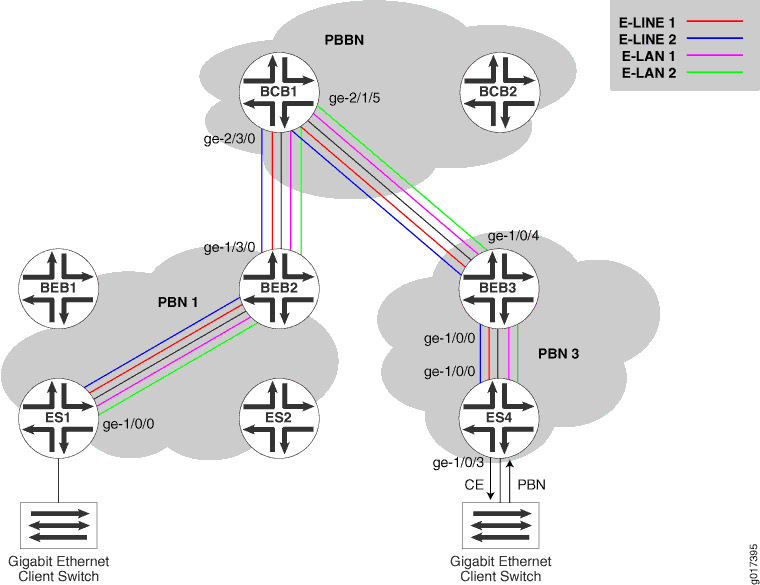
Figure 2 shows the relationship of the forwarding classes that are used in this example. The three forwarding classes are Voice-EF, VPN-PR-DATA, and INET-BEST-EFFORT. These forwarding classes are associated with E-LINE 1, E-LINE 2, E-LAN 1, and E-LAN 2.
E-LINE 1 and E-LINE 2 are bundled into interface set vuni-set1. E-LAN 1 and E-LAN 2 are bundled into interface set vuni-set2. Interface sets provide the same function as a virtual UNI in the carrier Ethernet world. An interface set is used to group a set of logical interfaces under a port and then transport packets through the member logical interface.
Figure 2: Egress Shaping
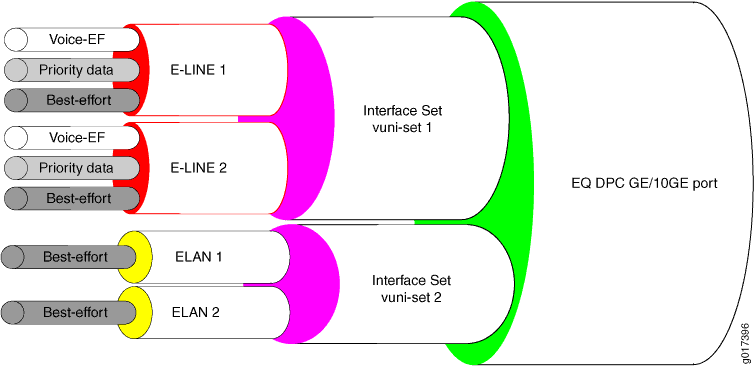
Table 1 shows the services, traffic rates, and the egress SLA that are configured in this example.
Table 1: Egress SLA Enforcement
Service | Traffic Rate Applied for Example | Egress SLA |
|---|---|---|
eline1 from ES1 —> ES4
| Physical interface ge-1/0/3 and interface sets vuni-set1 and interface-set2
| At egress, shaping (using schedulers) is configured at the [edit interfaces interface-set] hierarchy level. The scheduler ensures that voice and data traffic is given a higher priority to protect these traffic classes during congestion.
Note: Traffic is limited to 100 Mbps due to the physical restrictions of the interface on which it travels. |
eline2 from ES1—> ES4
| 60 Mbps | 25 Mbps Note: After scheduling voice and data traffic, the remaining 50 Mbps is shared by the best effort traffic in eline1 and eline2. |
Ingress traffic travels into the ES4 router and through the network to the ES1 router. Figure 3 shows the three levels of service that will be entering E-LINE 1 on ES4. Voice, priority data, and best-effort traffic will be policed in different ways. Voice traffic can receive 15 Mbps, priority data can receive 50 Mbps, and best-effort traffic isn’t policed at all—it operates on what bandwidth is left after servicing voice and priority traffic.
Figure 3: Achieving Ingress SLA by Applying Policers for Each Traffic Class
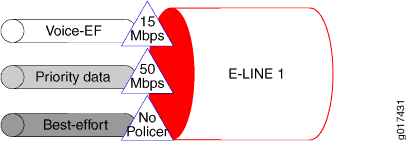
Table 2 provides more information about the services, traffic rates, and the ingress SLA that are configured in this example.
Table 2: Ingress SLA Enforcement
Service | Traffic Rate Applied for Example | Ingress SLA |
|---|---|---|
eline1 to ES4 —> ES1
| Traffic is entering the topology at the following rates:
| Traffic will be policed at the following rates:
|
eline2 to ES4 —> ES1
| 60 Mbps | No policer—all 60 Mbps traffic is accepted |
Table 3 shows the different properties that will be configured for CoS on MX Series router ES4.
Table 3: Components of the Topology for Configuring CoS on MX Series Routers
Property | Settings |
|---|---|
Interface sets | The following interface sets are configured to transport customer traffic:
|
Forwarding classes | The following forwarding classes are configured:
|
Firewall filters | The following firewall filters are configured:
|
Schedule map and schedulers | The schedule map EVC contains the following schedulers:
The schedulers are markings that can be used by the next router to reprioritize traffic. |
Rewrite rules | Rewrite rules (one for 802.1p class packets and one for 802.1ad class packets) are used for conforming and non-conforming traffic. If low, it goes out code-point 010. If high (which means it violated the SLA of the service provider), it goes out code-point 110. |
In provider backbone networks, CoS information is mapped and carried across the network using behavior aggregate (BA) classifiers; specifically, 3 bits of priority code point (PCP) and 1 bit of DEI (drop eligibility indicator). Classifiers provide the capability to classify, map, and rewrite (mark) the PCP+DEI bits from one tag to another across the carrier Ethernet network.
In the following example, you will configure and apply basic CoS features to customer traffic entering interface ge-1/0/3 and exiting interface ge-1/0/0 on the ES4 router. Traffic is mapped to forwarding classes INET-BEST-EFFORT, VPN-PR-DATA, or VOICE-EF. Bandwidth is limited to 50 Mbps for forwarding classes INET-BEST-EFFORT and VPN-PR-DATA. Bandwidth is limited to 15 Mbps for forwarding class VOICE-EF. Rewrite rules are configured for each E-LINE to add marking that can be used by the next router (here, BEB3) to reprioritize traffic from a particular code point. The forwarding classes are marked with code points so that they all “agree” to a specific CoS policy.
CoS is only applied on the ES4 because it is located at the customer edge.
Configuring CoS on an MX Series Router
Configuring CoS on ES4
CLI Quick Configuration
To quickly configure CoS, copy the following commands and paste them into the router terminal window:
[edit]set class-of-service forwarding-classes class
INET-BEST-EFFORT queue-num 0set class-of-service forwarding-classes class
VPN-PR-DATA queue-num 1 set class-of-service forwarding-classes class
VOICE-EF queue-num 2 set class-of-service forwarding-classes class
UNUSED queue-num 3 set class-of-service classifiers ieee-802.1
802p_class forwarding-class INET-BEST-EFFORT loss-priority low code-points
000set class-of-service classifiers ieee-802.1
802p_class forwarding-class INET-BEST-EFFORT loss-priority low code-points
001 set class-of-service classifiers ieee-802.1
802p_class forwarding-class INET-BEST-EFFORT loss-priority high code-points
010 set class-of-service classifiers ieee-802.1
802p_class forwarding-class INET-BEST-EFFORT loss-priority high code-points
011 set class-of-service classifiers ieee-802.1
802p_class forwarding-class VPN-PR-DATA loss-priority low code-points
100set class-of-service classifiers ieee-802.1
802p_class forwarding-class VPN-PR-DATA loss-priority high code-points
101 set class-of-service classifiers ieee-802.1
802p_class forwarding-class VOICE-EF loss-priority low code-points
111 set class-of-service classifiers ieee-802.1
802p_class forwarding-class VOICE-EF loss-priority high code-points
110 set class-of-service traffic-control-profiles
EVC:SERVICE scheduler-map EVCset class-of-service traffic-control-profiles
EVC:SERVICE shaping-rate 20mset class-of-service traffic-control-profiles
VUNI:SERVICE scheduler-map EVCset class-of-service traffic-control-profiles
VUNI:SERVICE shaping-rate 100mset class-of-service traffic-control-profiles
VUNI:SERVICE guaranteed-rate 100mset class-of-service interfaces interface-set
vuni-set1 output-traffic-control-profile VUNI:SERVICEset class-of-service interfaces interface-set
vuni-set2 output-traffic-control-profile VUNI:SERVICEset class-of-service interfaces ge-1/0/0 unit
1 classifiers ieee-802.1 802p_classset class-of-service interfaces ge-1/0/0 unit
1 rewrite-rules ieee-802.1 802p_rwruleset class-of-service interfaces ge-1/0/0 unit
2 classifiers ieee-802.1 802p_class set ge-1/0/0 unit 2 rewrite-rules
ieee-802.1 802p_rwruleset class-of-service interfaces ge-1/0/0 unit
3 forwarding-class INET-BEST-EFFORTset class-of-service interfaces ge-1/0/0 unit
4 forwarding-class INET-BEST-EFFORTset class-of-service interfaces ge-1/0/3 unit
1 output-traffic-control-profile EVC:SERVICEset class-of-service interfaces ge-1/0/3 unit
1 classifiers ieee-802.1 802p_classset class-of-service interfaces ge-1/0/3 unit
1 rewrite-rules ieee-802.1 802p_rwruleset class-of-service interfaces ge-1/0/3 unit
2 classifiers ieee-802.1 802p_classset class-of-service interfaces ge-1/0/3 unit
2 rewrite-rules ieee-802.1 802p_rwruleset class-of-service interfaces ge-1/0/3 unit
3 forwarding-class INET-BEST-EFFORTset class-of-service interfaces ge-1/0/3 unit
4 forwarding-class INET-BEST-EFFORTset class-of-service rewrite-rules ieee-802.1
802p_rwrule forwarding-class VPN-PR-DATA loss-priority low code-point
010 set class-of-service rewrite-rules ieee-802.1
802p_rwrule forwarding-class VPN-PR-DATA loss-priority high code-point
110 set class-of-service rewrite-rules ieee-802.1
802p_rwrule forwarding-class VOICE-EF loss-priority low code-point
011 set class-of-service rewrite-rules ieee-802.1
802p_rwrule forwarding-class VOICE-EF loss-priority high code-point
111 set class-of-service rewrite-rules ieee-802.1
802p_rwrule forwarding-class INET-BEST-EFFORT loss-priority low code-point
100 set class-of-service rewrite-rules ieee-802.1
802p_rwrule forwarding-class INET-BEST-EFFORT loss-priority high code-point
000 set class-of-service scheduler-maps EVC forwarding-class
INET-BEST-EFFORT scheduler BE set class-of-service scheduler-maps EVC forwarding-class
VPN-PR-DATA scheduler PD set class-of-service scheduler-maps EVC forwarding-class
VOICE-EF scheduler EFset class-of-service schedulers BE transmit-rate
percent 30 set class-of-service schedulers BE buffer-size
percent 30 set class-of-service schedulers BE priority
low set PD transmit-rate percent 40 set class-of-service schedulers PD buffer-size
percent 40set class-of-service schedulers PD priority
highset class-of-service schedulers EF transmit-rate
percent 10 set class-of-service schedulers EF buffer-size
percent 10 set class-of-service schedulers EF priority
strict-high deactivate class-of-serviceset firewall policer 15m-pol if-exceeding bandwidth-limit
15m set policer 15m-pol if-exceeding burst-size-limit 60k set firewall policer 15m-pol then discard set
policer 50m-pol if-exceeding bandwidth-limit 50m set firewall relative set policer 50m-pol if-exceeding
burst-size-limit 150k set policer 50m-pol then discard set firewall policer 30m-pol if-exceeding bandwidth-limit
30mset firewall policer 30m-pol if-exceeding burst-size-limit
45kset firewall policer 30m-pol then discard set firewall policer 40m-pol if-exceeding bandwidth-limit
40mset firewall policer 40m-pol if-exceeding burst-size-limit
45kset firewall policer 40m-pol then discard set firewall family bridge filter SERVICE1 interface-specific set firewall family bridge filter SERVICE1 term
Voice_bw_prof from forwarding-class VOICE-EFset firewall family bridge filter SERVICE1 term
Voice_bw_prof then policer 15m-polset firewall family bridge filter SERVICE1 term
Voice_bw_prof then count srv1_voice_cntset firewall family bridge filter SERVICE1 term
VPN_pd_bw_prof from forwarding-class VPN-PR-DATAset firewall family bridge filter SERVICE1 term
VPN_pd_bw_prof then policer 50m-polset firewall family bridge filter SERVICE1 term
VPN_pd_bw_prof then count srv1_vpn_cntset firewall family bridge filter SERVICE1 term
ANY then count srv1_inet_cntset firewall family bridge filter SERVICE2 term
Voice_sw_prof from forwarding-class VOICE-EFset firewall family bridge filter SERVICE2 term
Voice_sw_prof then policer 40m-polset firewall family bridge filter SERVICE2 term
Voice_sw_prof then count srv2_ef_cntset firewall family bridge filter SERVICE2 term
PR_DATA_policer from forwarding-class VPN-PR-DATAset firewall family bridge filter SERVICE2 term
PR_DATA_policer then policer 30m-polset firewall family bridge filter SERVICE2 term
PR_DATA_policer then count srv2_pr_data_cntset firewall family bridge filter SERVICE2 term
ANY then count srv2_be_cntset firewall family bridge filter SERVICE3 term
ANY then count srv3_cntset firewall family bridge filter SERVICE3 term
ANY then forwarding-class INET-BEST-EFFORTStep-by-Step Procedure
To configure and apply CoS:
- Configure one-to-one mapping between forwarding classes
and queues:
[edit class-of-service forwarding-classes]
user@es4# set class INET-BEST-EFFORT
queue-num 0
user@es4# set
class VPN-PR-DATA queue-num 1
user@es4# set class VOICE-EF queue-num 2
user@es4# set class VOICE-EF priority high
user@es4# set class UNUSED queue-num 3 - Define the firewall filter SERVICE1 and use the
statement interface-specific to creates a specific SLA so
that the ELINE or EVC will receive its own policy and each interface
will its own copy of the rule—without this, the rule is shared:
[edit firewall family bridge]
user@es4# set filter SERVICE1 interface-specific - Define the terms Voice_bw_prof, Voice_pd_bw_prof, Voice_bw_prof, VPN_pd_bw_prof, and ANY for the SERVICE1 filter:
[edit firewall family bridge filter SERVICE1]
user@es4# set term Voice_bw_prof then policer 15m-pol
user@es4#set term Voice_bw_prof then
count srv1_voice_cnt
user@es4#set term VPN_pd_bw_prof from forwarding-class VPN-PR-DATA
user@es4#set term Voice_bw_prof from
forwarding-class VOICE-EF
user@es4# set term VPN_pd_bw_prof then policer 50m-pol
user@es4#set term VPN_pd_bw_prof then count srv1_vpn_cnt
user@es4# set term ANY then count srv1_inet_cnt
- Define the firewall filter SERVICE2:
[edit firewall family bridge]
user@es4# set filter SERVICE2 - Define the terms Voice_sw_prof, PR_DATA_policer, and ANY for the SERVICE2 filter:
[edit firewall family bridge filter SERVICE2]
user@es4# Voice_sw_prof from forwarding-class VOICE-EF
user@es4# set term Voice_sw_prof then
policer 40m-pol
user@es4# set term Voice_sw_prof then count srv2_ef_cnt
user@es4# set term PR_DATA_policer from forwarding-class
VPN-PR-DATA
user@es4#set
term PR_DATA_policer then policer 30m-pol
user@es4#set term PR_DATA_policer then count srv2_pr_data_cnt
user@es4#set term ANY then count srv2_be_cnt - Define the firewall filter SERVICE3:
[edit firewall family bridge]
user@es4# set filter SERVICE3 - Define the term ANY for the SERVICE3 filter:
[edit firewall family bridge filter SERVICE3]
user@es4# set term ANY then count srv3_cnt
user@es4# set term ANY then forwarding-class INET-BEST-EFFORT - Apply the firewall filter SERVICE1 and SERVICE2 as an input filter to the interfaces for the servers hosting services:
[edit interfaces]
user@es4# set ge-1/0/3 unit 1 family bridge filter input SERVICE1
user@es4# set ge-1/0/3 unit 2 family bridge filter input SERVICE2 - Configure classifiers to classify the packets in the customer’s
VPN:
[edit class-of-service classifiers]
user@es4# set ieee-802.1 802p_class forwarding-class INET-BEST-EFFORT loss-priority low code-points 000
user@es4# set ieee-802.1 802p_class forwarding-class INET-BEST-EFFORT loss-priority low code-points 001
user@es4# set ieee-802.1 802p_class forwarding-class INET-BEST-EFFORT loss-priority high code-points 010
user@es4# set ieee-802.1 802p_class forwarding-class INET-BEST-EFFORT loss-priority high code-points 011
user@es4# set ieee-802.1 802p_class forwarding-class VPN-PR-DATA loss-priority low code-points 100
user@es4# set ieee-802.1 802p_class forwarding-class VPN-PR-DATA loss-priority high code-points 101
user@es4# set ieee-802.1 802p_class forwarding-class VOICE-EF loss-priority low code-points 111
user@es4# set ieee-802.1 802p_class forwarding-class VOICE-EF loss-priority high code-points 110 - Configure policers to limit traffic of a certain class
to a specified bandwidth and burst size:
[edit firewall]
user@es4# set
policer 15m-pol if-exceeding bandwidth-limit 15m
user@es4# set policer 15m-pol if-exceeding burst-size-limit
60k
user@es4# set policer
15m-pol then discard
user@es4# set policer 50m-pol if-exceeding bandwidth-limit 50m
user@es4# set policer 50m-pol if-exceeding
burst-size-limit 150k
user@es4# set policer 50m-pol then discard
user@es4# set policer 30m-pol if-exceeding bandwidth-limit 30m
user@es4# set policer 30m-pol if-exceeding
burst-size-limit 45k
user@es4# set policer 30m-pol then discard
user@es4# set policer 40m-pol if-exceeding bandwidth-limit 40m
user@es4# set policer 40m-pol if-exceeding
burst-size-limit 45k
user@es4# set policer 40m-pol then discard - Configure schedulers to determine which queue to service
based on the transmit rate and the buffer size:
[edit class-of-service schedulers]
user@es4# set BE transmit-rate percent 30
user@es4# set BE buffer-size percent 30
user@es4# set BE priority low set PD transmit-rate percent 40
user@es4# set PD buffer-size percent
40
user@es4# set PD priority
high
user@es4# set EF transmit-rate
percent 10
user@es4# set
EF buffer-size percent 10
user@es4# set EF priority strict-high - Assign the forwarding classes to schedulers with the scheduler
map EVC:
[edit class-of-service scheduler-maps]
user@es4# set EVC forwarding-class INET-BEST-EFFORT scheduler BE
user@es4# set EVC forwarding-class VPN-PR-DATA scheduler PD
user@es4# set EVC forwarding-class VOICE-EF scheduler EF - Configure an 802.1p rewrite rule named 802p_rwrule in the rewrite table and associate them with forwarding classes:
[edit class-of-service rewrite-rules (Definition)]
user@es4# set ieee-802.1 802p_rwrule forwarding-class VPN-PR-DATA loss-priority low code-point 010
user@es4# set ieee-802.1 802p_rwrule forwarding-class VPN-PR-DATA loss-priority high code-point 110
user@es4# set ieee-802.1 802p_rwrule forwarding-class VPN-PR-DATA loss-priority high code-point 110
user@es4# set ieee-802.1 802p_rwrule forwarding-class VOICE-EF loss-priority low code-point 011
user@es4# set ieee-802.1 802p_rwrule forwarding-class VOICE-EF loss-priority high code-point 111
user@es4# set ieee-802.1 802p_rwrule forwarding-class INET-BEST-EFFORT loss-priority low code-point 100
user@es4# set ieee-802.1 802p_rwrule forwarding-class INET-BEST-EFFORT loss-priority high code-point 000 - Configure traffic control profiles. These policies are
applied to enqueue a packet and send it out to the next router. The
profile VUNI:SERVICE will be applied to interface set vuni-set1.
[edit class-of-service traffic-control-profiles]
user@es4# set EVC:SERVICE scheduler-map
EVC
user@es4# set EVC:SERVICE
shaping-rate 20m
user@es4# set VUNI:SERVICE scheduler-map EVC
user@es4# set VUNI:SERVICE shaping-rate 100m
user@es4# set VUNI:SERVICE guaranteed-rate 100m - Configure the interface sets and associate them with the
logical interfaces on which the services are configured (vuni-set1 is used for eline1 and eline2 traffic, and vuni-set2 is used for elan1 and elan2 traffic):
[edit interfaces]
user@es4# set interface-set vuni-set1 interface ge-1/0/3 unit 1
user@es4# set interface-set vuni-set1 interface ge-1/0/3 unit 3
user@es4# set interface-set vuni-set2 interface ge-1/0/3 unit 4
user@es4# set interface-set vuni-set2 interface ge-1/0/3 unit 2 - Configure the output traffic control profile to apply
the policy that queues packets and sends them onto the next router
(here, policies VUNI:SERVICE and EVC:SERVICE are
applied):
[edit class-of-service interfaces]
user@es4# set interface-set vuni-set1 output-traffic-control-profile VUNI:SERVICE
user@es4# set interface-set vuni-set2 output-traffic-control-profile VUNI:SERVICE
user@es4# set ge-1/0/3 unit 1 output-traffic-control-profile EVC:SERVICE - Apply classifiers and rewrite rules to the logical interfaces
supporting the services:
[edit class-of-service interfaces]
user@es4# set ge-1/0/0 unit 1 classifiers ieee-802.1 802p_class
user@es4# set ge-1/0/0 unit 1 rewrite-rules
ieee-802.1 802p_rwrule
user@es4# set ge-1/0/0 unit 2 classifiers ieee-802.1 802p_class
user@es4# set ge-1/0/0 unit 2 rewrite-rules
ieee-802.1 802p_rwrule
user@es4# set ge-1/0/0 unit 3 forwarding-class INET-BEST-EFFORT
user@es4# set ge-1/0/0 unit 4 forwarding-class
INET-BEST-EFFORT
user@es4# set ge-1/0/3 unit 1 classifiers ieee-802.1 802p_class
user@es4# set ge-1/0/3 unit 1 rewrite-rules
ieee-802.1 802p_rwrule
user@es4# set ge-1/0/3 unit 2 classifiers ieee-802.1 802p_class
user@es4# set ge-1/0/3 unit 2 rewrite-rules
ieee-802.1 802p_rwrule
user@es4# set ge-1/0/3 unit 3 forwarding-class INET-BEST-EFFORT
user@es4# set ge-1/0/3 unit 4 forwarding-class
INET-BEST-EFFORT
Results
Check the results of the configuration:
Verification
To confirm that the configuration is working properly, perform these tasks:
- Verifying Ingress SLA Enforcement
- Verifying Egress SLA
- Verify Traffic Shaping and Scheduling Profiles
- Verifying Schedulers and the Scheduler Map
- Egress SLA Enforcement
Verifying Ingress SLA Enforcement
Purpose
Verify that SLA enforcement is occurring for traffic entering ES4 and exiting towards ES1. The policers for the forwarding classes are:
- 15 Mbps for voice traffic
- 50 Mbps for priority data
- No policer for best effort—all traffic within 40 Mbps is accepted
Action
Use the following operational mode command:
user@es4> show firewallFilter: __default_bpdu_filter__ Filter: SERVICE1-ge-1/0/3.1-i Counters: Name Bytes Packets srv1_vpn_cnt-ge-1/0/3.1-i 899929660584 644648754 srv1_voice_cnt-ge-1/0/3.1-i 183642199700 175737551 srv1_inet_cnt-ge-1/0/3.1-i 359309729428 257385193 Policers: Name Packets 50m-pol-VPN_pd_bw_prof-ge-1/0/3.1-i 255914707 15m-pol-Voice_bw_prof-ge-1/0/3.1-i 0 Filter: SERVICE2 Counters: Name Bytes Packets srv2_pr_data_cnt 0 0 srv2_ef_cnt 2953233408 46144272 srv2_be_cnt 0 0 Policers: Name Packets 30m-pol-PR_DATA_policer 0 ---(more)--- 40m-pol-Voice_sw_prof 0 Filter: SERVICE3 Counters: Name Bytes Packets srv3_cnt 0 0 Filter: __default_arp_policer__ Filter: __cfm_filter_bds-vlan-0500_6__ Counters: Name Bytes Packets __cfm_ethtype_term__ 750 15 __cfm_erp_term__ 0 0 __ge-1/0/3.5_cc_term_lvl_0__ 0 0 __ge-1/0/3.5_cc_term_lvl_1__ 0 0 __ge-1/0/3.5_cc_term_lvl_2__ 0 0 __ge-1/0/3.5_lt_term_lvl_0__ 0 0 __ge-1/0/3.5_lt_term_lvl_1__ 0 0 __ge-1/0/3.5_lt_term_lvl_2__ 0 0 __ge-1/0/3.5_cc_term_lvl_3__ 0 0 __ge-1/0/3.5_cc_term_lvl_4__ 0 0 __ge-1/0/3.5_cc_term_lvl_5__ 0 0 ge-1/0/3.5_cc_term_lvl_6__ 0 0 __ge-1/0/3.5_cc_term_lvl_7__ 0 0 __ge-1/0/3.5_lt_term_lvl_3__ 0 0 __ge-1/0/3.5_lt_term_lvl_4__ 0 0 __ge-1/0/3.5_lt_term_lvl_5__ 0 0 __ge-1/0/3.5_lt_term_lvl_6__ 0 0 __ge-1/0/3.5_lt_term_lvl_7__ 0 0 __mgrp_1_cc_term_lvl_0__ 0 0 __mgrp_1_cc_term_lvl_1__ 0 0 __mgrp_1_cc_term_lvl_2__ 0 0 __mgrp_1_cc_term_lvl_3__ 111794828 1152524 __mgrp_1_cc_term_lvl_4__ 0 0 __mgrp_1_cc_term_lvl_5__ 0 0 __mgrp_1_cc_term_lvl_6__ 0 0 __mgrp_1_cc_term_lvl_7__ 0 0 __mgrp_1_lt_term_lvl_0__ 0 0 __mgrp_1_lt_term_lvl_1__ 0 0 __mgrp_1_lt_term_lvl_2__ 0 0 __mgrp_1_lt_term_lvl_3__ 1152 18 __mgrp_1_lt_term_lvl_4__ 0 0 __mgrp_1_lt_term_lvl_5__ 0 0 __mgrp_1_lt_term_lvl_6__ 0 0 __mgrp_1_lt_term_lvl_7__ 0 0 [truncated]
Meaning
The operational mode command show firewall displays statistics about the firewall filters. Under the Filter: SERVICE1 region, the values 50–pol-VPN_pd_bw_prof-ge-1/0/3.1–I and 15–pol-Voice_bw_prof-ge-1/0/3.1–I indicate that each forwarding class is policed to a certain bandwidth rate. The Bytes value for 50–pol-VPN_pd_bw_prof-ge-1/0/3.1–I is 255914707, which exceeds the 50 Mbps bandwidth limit for priority data. Packets exceeding 50 Mbps will be dropped.
Verifying Egress SLA
Purpose
Verify that SLA enforcement is occurring for traffic coming from ES1 towards ES4. Only 100 Mbps can egress ES1. Voice traffic and priority data take precedence over best-effort traffic.
Action
Use the following operational mode commands:
user@es4> show class-of-service interface-setInterface-set: vuni-set1, Index: 1 Physical interface: ge-1/0/3, Index: 151 Queues supported: 4, Queues in use: 4 Output traffic control profile: VUNI:SERVICE, Index: 49590 Interface-set: vuni-set2, Index: 2 Physical interface: ge-1/0/3, Index: 151 Queues supported: 4, Queues in use: 4 Output traffic control profile: VUNI:SERVICE, Index: 49590
Meaning
The operational mode command show class-of-service interface-set displays the two interface sets vuni-set1 and vuni-set2. It also shows that the VUNI:SERVICE CoS policy is applied to both interface sets.
Verify Traffic Shaping and Scheduling Profiles
Purpose
Verify traffic shaping and scheduling profiles on the router.
Action
Use the following operational mode commands:
run show class-of-service traffic-control-profile
Traffic control profile: EVC:SERVICE, Index: 57589
  Shaping rate: 20000000
  Scheduler map: EVC

Traffic control profile: VUNI:SERVICE, Index: 49590
  Shaping rate: 100000000
  Scheduler map: EVC
  Guaranteed rate: 100000000
Meaning
The operational mode command show class-of-service traffic-control-profiles shows that eline1, elan1, and elan2 are subject to 100 Mbps shaping rate (see guaranteed rate). While 160 Mbps can ingress, only 100 Mbps can egress.
Verifying Schedulers and the Scheduler Map
Purpose
Verify the schedulers and the scheduler map configured on router ES4.
Action
Use the following operational mode command:
user@es4> show class-of-service scheduler-map EVCScheduler map: EVC, Index: 7810
Scheduler: BE, Forwarding class: INET-BEST-EFFORT, Index: 2053
Transmit rate: 30 percent, Rate Limit: none, Buffer size: 30 percent,
Priority: low
Excess Priority: unspecified
Drop profiles:
Loss priority Protocol Index Name
Low any 1 default-drop-profile
Medium low any 1 default-drop-profile
Medium high any 1 default-drop-profile
High any 1 default-drop-profile
Scheduler: PD, Forwarding class: VPN-PR-DATA, Index: 2628
Transmit rate: 40 percent, Rate Limit: none, Buffer size: 40 percent,
Priority: high
Excess Priority: unspecified
Drop profiles:
Loss priority Protocol Index Name
Low any 1 default-drop-profile
Medium low any 1 default-drop-profile
Medium high any 1 default-drop-profile
High any 1 default-drop-profile
Scheduler: EF, Forwarding class: VOICE-EF, Index: 2278
Transmit rate: 10 percent, Rate Limit: none, Buffer size: 10 percent,
Priority: strict-high
Excess Priority: unspecified
Drop profiles:
Loss priority Protocol Index Name
Low any 1 default-drop-profile
Medium low any 1 default-drop-profile
Medium high any 1 default-drop-profile
High any 1 default-drop-profile
Meaning
The operational mode command show class-of-service scheduler-maps EVC displays information about the schedulers BE, PD, and EF that are configured for scheduler map EVC. It also shows how each scheduler is tied to a forwarding class. Scheduler BE is tied to the forwarding class INET-BEST-EFFORT. Scheduler PD is tied to the forwarding class VPN-PR-DATA. Scheduler EF is tied to the forwarding class VOICE-EF.
Egress SLA Enforcement
Purpose
Compare the queues for interface sets vuni-set1 and vuni-set2. Dropped packets for either interface set indicates that bandwidth limits are being exceeded and enforcement is occurring.
Action
Use the following operational mode command:
user@es4> show interfaces interface-set queue
vuni-set1
Interface set: vuni-set1
Interface set index: 1
Forwarding classes: 16 supported, 4 in use
Egress queues: 4 supported, 4 in use
Queue: 0, Forwarding classes: INET-BEST-EFFORT
Queued:
Packets : 2977942923 8933 pps
Bytes : 1949099612484 100314048 bps
Transmitted:
Packets : 1488278642 4464 pps
Bytes : 973656736604 50139648 bps
Tail-dropped packets : 0 0 pps
RED-dropped packets : 1489660186 4466 pps
Low : 1489660186 4466 pps
Medium-low : 0 0 pps
Medium-high : 0 0 pps
High : 0 0 pps
RED-dropped bytes : 975440779240 50162112 bps
Low : 975440779240 50162112 bps
Medium-low : 0 0 bps
Medium-high : 0 0 bps
High : 0 0 bps
Queue: 1, Forwarding classes: VPN-PR-DATA
Queued:
Packets : 1231342961 3576 pps
Bytes : 785429404088 40144224 bps
Transmitted:
Packets : 1231342958 3573 pps
Bytes : 785429402552 40131936 bps
Tail-dropped packets : 0 0 pps
RED-dropped packets : 0 0 pps
Low : 0 0 pps
Medium-low : 0 0 pps
Medium-high : 0 0 pps
High : 0 0 pps
RED-dropped bytes : 0 0 bps
Low : 0 0 bps
Medium-low : 0 0 bps
Medium-high : 0 0 bps
High : 0 0 bps
Queue: 2, Forwarding classes: VOICE-EF
Queued:
Packets : 1639301652 893 pps
Bytes : 294440262416 10030176 bps
Transmitted:
Packets : 1639301652 893 pps
Bytes : 294440262416 10030176 bps
Tail-dropped packets : 0 0 pps
RED-dropped packets : 0 0 pps
Low : 0 0 pps
Medium-low : 0 0 pps
Medium-high : 0 0 pps
High : 0 0 pps
RED-dropped bytes : 0 0 bps
Low : 0 0 bps
Medium-low : 0 0 bps
Medium-high : 0 0 bps
High : 0 0 bps
Queue: 3, Forwarding classes: UNUSED
Queued:
Packets : 3091521 0 pps
Bytes : 222589512 0 bps
Transmitted:
Packets : 3091521 0 pps
Bytes : 222589512 0 bps
Tail-dropped packets : 0 0 pps
RED-dropped packets : 0 0 pps
Low : 0 0 pps
Medium-low : 0 0 pps
Medium-high : 0 0 pps
High : 0 0 pps
RED-dropped bytes : 0 0 bps
Low : 0 0 bps
Medium-low : 0 0 bps
Medium-high : 0 0 bps
High : 0 0 bps
user@es4> show interfaces interface-set queue
vuni-set2
Interface set: vuni-set2
Interface set index: 2
Forwarding classes: 16 supported, 4 in use
Egress queues: 4 supported, 4 in use
Queue: 0, Forwarding classes: INET-BEST-EFFORT
Queued:
Packets : 513317220 3572 pps
Bytes : 720697385280 40120704 bps
Transmitted:
Packets : 513317220 3572 pps
Bytes : 720697385280 40120704 bps
Tail-dropped packets : 0 0 pps
RED-dropped packets : 0 0 pps
Low : 0 0 pps
Medium-low : 0 0 pps
Medium-high : 0 0 pps
High : 0 0 pps
RED-dropped bytes : 0 0 bps
Low : 0 0 bps
Medium-low : 0 0 bps
Medium-high : 0 0 bps
High : 0 0 bps
Queue: 1, Forwarding classes: VPN-PR-DATA
Queued:
Packets : 513317223 3571 pps
Bytes : 720697376892 40109472 bps
Transmitted:
Packets : 513317223 3571 pps
Bytes : 720697376892 40109472 bps
Tail-dropped packets : 0 0 pps
RED-dropped packets : 0 0 pps
Low : 0 0 pps
Medium-low : 0 0 pps
Medium-high : 0 0 pps
High : 0 0 pps
RED-dropped bytes : 0 0 bps
Low : 0 0 bps
Medium-low : 0 0 bps
Medium-high : 0 0 bps
High : 0 0 bps
Queue: 2, Forwarding classes: VOICE-EF
Queued:
Packets : 175354436 893 pps
Bytes : 183560157444 10030176 bps
Transmitted:
Packets : 175354436 893 pps
Bytes : 183560157444 10030176 bps
Tail-dropped packets : 0 0 pps
RED-dropped packets : 0 0 pps
Low : 0 0 pps
Medium-low : 0 0 pps
Medium-high : 0 0 pps
High : 0 0 pps
RED-dropped bytes : 0 0 bps
Low : 0 0 bps
Medium-low : 0 0 bps
Medium-high : 0 0 bps
High : 0 0 bps
Queue: 3, Forwarding classes: UNUSED
Queued:
Packets : 0 0 pps
Bytes : 0 0 bps
Transmitted:
Packets : 0 0 pps
Bytes : 0 0 bps
Tail-dropped packets : 0 0 pps
RED-dropped packets : 0 0 pps
Low : 0 0 pps
Medium-low : 0 0 pps
Medium-high : 0 0 pps
High : 0 0 pps
RED-dropped bytes : 0 0 bps
Low : 0 0 bps
Medium-low : 0 0 bps
Medium-high : 0 0 bps
High : 0 0 bpsMeaning
The operational mode commands show interfaces interface-set queue vuni-set1 and show interfaces interface-set queue vuni-set2 show the queue statistics for the forwarding classes INET-BEST-EFFORT, VPN-PR-DATA, and VOICE-EF. See Queue 2: Forwarding classes: VOICE-EF in the output for command show interfaces interface-set queue vuni-set1. Notice that packets are being dropped for forwarding class INET-BEST-EFFORT. Queue 1 for forwarding class VOICE-EF and queue 2 for forwarding class VPN-PR-DATA are given a high priority during scheduling. Consequently, they do not have any dropped packets. Total traffic is shaped at 100 Mbps. After the 10 Mbps for voice traffic and the 40 Mbps for priority data is subtracted from the total bandwidth of 100 Mbps, 50 Mbps remains and is shared between the best-effort traffic for eline1 and eline2. Excess best-effort traffic is dropped.