Related Documentation
- ACX Series
- Example: Configuring IS-IS IPv4 and IPv6 Unicast Topologies
- M Series
- Example: Configuring Multitopology Routing Based on a Multicast Source
- Example: Configuring IS-IS IPv4 and IPv6 Unicast Topologies
- MX Series
- Example: Configuring Multitopology Routing Based on a Multicast Source
- Example: Configuring IS-IS IPv4 and IPv6 Unicast Topologies
- PTX Series
- Example: Configuring Multitopology Routing Based on a Multicast Source
- Example: Configuring IS-IS IPv4 and IPv6 Unicast Topologies
- T Series
- Example: Configuring Multitopology Routing Based on a Multicast Source
- Example: Configuring IS-IS IPv4 and IPv6 Unicast Topologies
Example: Configuring IS-IS Multicast Topology
IS-IS Multicast Topologies Overview
Most multicast routing protocols perform a reverse-path forwarding (RPF) check on the source of multicast data packets. If a packet comes in on the interface that is used to send data to the source, the packet is accepted and forwarded to one or more downstream interfaces. Otherwise, the packet is discarded and a notification is sent to the multicast routing protocol running on the interface.
In certain instances, the unicast routing table used for the RPF check is also the table used for forwarding unicast data packets. Thus, unicast and multicast routing are congruent. In other cases, where it is preferred that multicast routing be independent of unicast routing, the multicast routing protocols are configured to perform the RPF check using an alternate unicast routing table inet.2.
You can configure IS-IS to calculate an alternate IPv4 multicast topology, in addition to the normal IPv4 unicast topology, and add the corresponding routes to inet.2. The IS-IS interface metrics for the multicast topology can be configured independently of the unicast metrics. You can also selectively disable interfaces from participating in the multicast topology while continuing to participate in the regular unicast topology. This enables you to exercise control over the paths that multicast data takes through a network so that it is independent of unicast data paths. You can also configure IS-IS to calculate an alternate IPv6 multicast topology, in addition to the normal IPv6 unicast topology.
 | Note: IS-IS only starts advertising the routes when the interface routes are in inet.2. |
Table 1 lists the various IPv4 statements you can use to configure IS-IS topologies.
Table 1: IPv4 Statements
Statement | Description |
|---|---|
Enables an alternate IPv4 multicast topology. | |
ipv4-multicast-metric number | Configures the multicast metric for an alternate IPv4 multicast topology. |
Excludes an interface from the IPv4 multicast topology. | |
Excludes an interface from the IPv4 unicast topologies. | |
Table 2 lists the various IPv6 statements you can use to configure IS-IS topologies.
Table 2: IPv6 Statements
Statement | Description |
|---|---|
Enables an alternate IPv6 multicast topology. | |
ipv6-multicast-metric number | Configures the multicast metric for an alternate IPv6 multicast topology. |
ipv6-unicast-metric number | Configures the unicast metric for an alternate IPv6 multicast topology. |
Excludes an interface from the IPv6 multicast topology. | |
Excludes an interface from the IPv6 unicast topologies. |
For a list of hierarchy levels at which you can include these statements, see the statement summary sections for these statements.
Example: Configuring IS-IS Multicast Topology
This example shows how to configure a multicast topology for an IS-IS network.
Requirements
Before you begin, configure IS-IS on all routers. See Example: Configuring IS-IS for information about the required IS-IS configuration.
This example uses the following hardware and software components:
- Junos OS Release 7.3 or later
- M Series, MX Series, and T Series routers
Overview
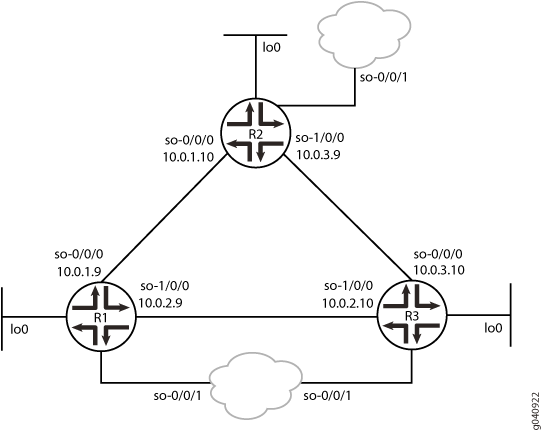
This example shows an IS-IS multicast topology configuration. Three routers are connected to each other. A loopback interface is configured on each router.
Figure 1 shows the sample network.
Figure 1: Configuring IS-IS Multicast Topology
Configuration
CLI Quick Configuration
To quickly configure this example, copy the following commands, paste them into a text file, remove any line breaks, change any details necessary to match your network configuration, and then copy and paste the commands into the CLI at the [edit] hierarchy level.
Router R1
Router R2
Router R3
Step-by-Step Procedure
The following example requires you to navigate various levels in the configuration hierarchy. For information about navigating the CLI, see Using the CLI Editor in Configuration Mode in the CLI User Guide.
To configure IS-IS multicast topologies:
- Enable the multicast topology for IS-IS by using the ipv4-multicast statement.
Routers R1, R2, and R3
[edit protocols isis]user@host# set traceoptions file isis size 5m world-readableuser@host# set traceoptions flag erroruser@host# set topologies ipv4-multicast - Enable multicast metrics on the first SONET/SDH Interface
by using the ipv4-multicast-metric statement.
Router R1
[edit protocols isis interface so-0/0/0 ]user@R1# set level 1 metric 15user@R1# set level 1 ipv4-multicast-metric 18user@R1# set level 2 metric 20user@R1# set level 2 ipv4-multicast-metric 14Router R2
[edit protocols isis interface so-0/0/0]user@R2# set level 1 metric 13user@R2# set level 1 ipv4-multicast-metric 12user@R2# set level 2 metric 29user@R2# set level 2 ipv4-multicast-metric 23Router R3
[edit protocols isis interface so-0/0/0]user@R3# set level 1 metric 19user@R3# set level 1 ipv4-multicast-metric 11user@R3# set level 2 metric 27user@R3# set level 2 ipv4-multicast-metric 21 - Enable multicast metrics on a second sonet Interface by
using the ipv4-multicast-metric statement.
Router R1
[edit protocols isis interface so-1/0/0]user@R1# set level 1 metric 13user@R1# set level 1 ipv4-multicast-metric 12user@R1# set level 2 metric 29user@R1# set level 2 ipv4-multicast-metric 23Router R2
[edit protocols isis interface so-1/0/0]user@R2# set level 1 metric 14user@R2# set level 1 ipv4-multicast-metric 18user@R2# set level 2 metric 32user@R2# set level 2 ipv4-multicast-metric 26Router R3
[edit protocols isis interface so-1/0/0]user@R3# set level 1 metric 16user@R3# set level 1 ipv4-multicast-metric 26user@R3# set level 2 metric 30user@R3# set level 2 ipv4-multicast-metric 20 - Disable the out-of-band management port, fxp0.
Routers R1, R2, and R3
[edit protocols isis]user@host# set interface fxp0.0 disable - If you are done configuring the routers, commit the configuration.
Routers R1, R2, and R3
[edit]user@host# commit
Results
From configuration mode, confirm your configuration by using the show protocols isis statement. If the output does not display the intended configuration, repeat the instructions in this example to correct the configuration.
Router R1
user@R1# show protocols isis
traceoptions {
    file isis size 5m world-readable;
    flag error;
}
topologies ipv4-multicast;
interface so-0/0/0 {
    level 1 {
        metric 15;
        ipv4-multicast-metric 18;
    }
    level 2 {
        metric 20;
        ipv4-multicast-metric 14;
    }
}
interface so-1/0/0 {
    level 1 {
        metric 13;
        ipv4-multicast-metric 12;
    }
    level 2 {
        metric 29;
        ipv4-multicast-metric 23;
    }
}
interface fxp0.0 {
    disable;
}
Router R2
user@R2# show protocols isis
traceoptions {
    file isis size 5m world-readable;
    flag error;
}
topologies ipv4-multicast;
interface so-0/0/0 {
    level 1 {
        metric 13;
        ipv4-multicast-metric 12;
    }
    level 2 {
        metric 29;
        ipv4-multicast-metric 23;
    }
}
interface so-1/0/0 {
    level 1 {
        metric 14;
        ipv4-multicast-metric 18;
    }
    level 2 {
        metric 32;
        ipv4-multicast-metric 26;
    }
}
interface fxp0.0 {
    disable;
}
Router R3
user@R3# show protocols isis
traceoptions {
    file isis size 5m world-readable;
    flag error;
}
topologies ipv4-multicast;
interface so-0/0/0 {
    level 1 {
        metric 19;
        ipv4-multicast-metric 11;
    }
    level 2 {
        metric 27;
        ipv4-multicast-metric 21;
    }
}
interface so-1/0/0 {
    level 1 {
        metric 16;
        ipv4-multicast-metric 26;
    }
    level 2 {
        metric 30;
        ipv4-multicast-metric 20;
    }
}
interface fxp0.0 {
    disable;
}
Verification
Confirm that the configuration is working properly.
- Verifying the Connection Between Routers R1, R2, and R3
- Verifying That IS-IS Is Configured
- Verifying the Configured Multicast Metric Values
- Verifying the Configuration of the Multicast Topology
Verifying the Connection Between Routers R1, R2, and R3
Purpose
Make sure that Routers R1, R2, and R3 are connected to each other.
Action
Ping the other two routers from any router, to check the connectivity between the three routers as per the network topology.
user@R1> ping 10.0.3.9 PING 10.0.3.9 (10.0.3.9): 56 data bytes 64 bytes from 10.0.3.9: icmp_seq=0 ttl=64 time=1.299 ms 64 bytes from 10.0.3.9: icmp_seq=1 ttl=64 time=52.304 ms 64 bytes from 10.0.3.9: icmp_seq=2 ttl=64 time=1.271 ms 64 bytes from 10.0.3.9: icmp_seq=3 ttl=64 time=1.343 ms 64 bytes from 10.0.3.9: icmp_seq=4 ttl=64 time=1.434 ms 64 bytes from 10.0.3.9: icmp_seq=5 ttl=64 time=1.306 ms ^C --- 10.0.3.9 ping statistics --- 6 packets transmitted, 6 packets received, 0% packet loss round-trip min/avg/max/stddev = 1.271/9.826/52.304/18.997 ms
user@R1> ping 10.0.3.10 PING 10.0.3.10 (10.0.3.10): 56 data bytes 64 bytes from 10.0.3.10: icmp_seq=0 ttl=64 time=1.431 ms 64 bytes from 10.0.3.10: icmp_seq=1 ttl=64 time=1.296 ms 64 bytes from 10.0.3.10: icmp_seq=2 ttl=64 time=1.887 ms ^C --- 10.0.3.10 ping statistics --- 3 packets transmitted, 3 packets received, 0% packet loss round-trip min/avg/max/stddev = 1.296/1.538/1.887/0.253 ms
user@R2> ping 10.0.2.9 PING 10.0.2.9 (10.0.2.9): 56 data bytes 64 bytes from 10.0.2.9: icmp_seq=0 ttl=64 time=1.365 ms 64 bytes from 10.0.2.9: icmp_seq=1 ttl=64 time=1.813 ms 64 bytes from 10.0.2.9: icmp_seq=2 ttl=64 time=1.290 ms ^C --- 10.0.2.9 ping statistics --- 3 packets transmitted, 3 packets received, 0% packet loss round-trip min/avg/max/stddev = 1.290/1.489/1.813/0.231 ms
user@R2> ping 10.0.2.10 PING 10.0.2.10 (10.0.2.10): 56 data bytes 64 bytes from 10.0.2.10: icmp_seq=0 ttl=63 time=1.318 ms 64 bytes from 10.0.2.10: icmp_seq=1 ttl=63 time=1.394 ms 64 bytes from 10.0.2.10: icmp_seq=2 ttl=63 time=1.366 ms 64 bytes from 10.0.2.10: icmp_seq=3 ttl=63 time=1.305 ms ^C --- 10.0.2.10 ping statistics --- 4 packets transmitted, 4 packets received, 0% packet loss round-trip min/avg/max/stddev = 1.305/1.346/1.394/0.036 ms
user@R3> ping 10.0.1.10 PING 10.0.1.10 (10.0.1.10): 56 data bytes 64 bytes from 10.0.1.10: icmp_seq=0 ttl=63 time=1.316 ms 64 bytes from 10.0.1.10: icmp_seq=1 ttl=63 time=1.418 ms 64 bytes from 10.0.1.10: icmp_seq=2 ttl=63 time=1.277 ms ^C --- 10.0.1.10 ping statistics --- 3 packets transmitted, 3 packets received, 0% packet loss round-trip min/avg/max/stddev = 1.277/1.337/1.418/0.059 ms
user@R3> ping 10.0.1.9 PING 10.0.1.9 (10.0.1.9): 56 data bytes 64 bytes from 10.0.1.9: icmp_seq=0 ttl=64 time=1.381 ms 64 bytes from 10.0.1.9: icmp_seq=1 ttl=64 time=1.499 ms 64 bytes from 10.0.1.9: icmp_seq=2 ttl=64 time=1.300 ms 64 bytes from 10.0.1.9: icmp_seq=3 ttl=64 time=1.397 ms ^C --- 10.0.1.9 ping statistics --- 4 packets transmitted, 4 packets received, 0% packet loss round-trip min/avg/max/stddev = 1.300/1.394/1.499/0.071 ms
Meaning
Routers R1, R2, and R3 have a peer relationship with each other.
Verifying That IS-IS Is Configured
Purpose
Make sure that the IS-IS instance is running on Routers R1, R2, and R3, and that they are adjacent to each other.
Action
Use the show isis adjacency detail command to check the adjacency between the routers.
Router R1
user@R1> show isis adjacency detail R2 Interface: so-0/0/0, Level: 1, State: Up, Expires in 8 secs Priority: 64, Up/Down transitions: 1, Last transition: 2d 19:23:59 ago Circuit type: 3, Speaks: IP, MAC address: 0:1b:c0:86:54:bd Topologies: IPV4-Multicast Restart capable: Yes, Adjacency advertisement: Advertise LAN id: R2.02, IP addresses: 10.0.1.10 R2 Interface: so-0/0/0, Level: 2, State: Up, Expires in 8 secs Priority: 64, Up/Down transitions: 1, Last transition: 2d 19:23:58 ago Circuit type: 3, Speaks: IP, MAC address: 0:1b:c0:86:54:bd Topologies: IPV4-Multicast Restart capable: Yes, Adjacency advertisement: Advertise LAN id: R2.02, IP addresses: 10.0.1.10 R3 Interface: so-1/0/0, Level: 1, State: Up, Expires in 7 secs Priority: 64, Up/Down transitions: 1, Last transition: 2d 19:24:20 ago Circuit type: 3, Speaks: IP, MAC address: 0:1b:c0:86:54:bd Topologies: IPV4-Multicast Restart capable: Yes, Adjacency advertisement: Advertise LAN id: R3.02, IP addresses: 10.0.2.10 R3 Interface: so-1/0/0, Level: 2, State: Up, Expires in 6 secs Priority: 64, Up/Down transitions: 1, Last transition: 2d 19:24:20 ago Circuit type: 3, Speaks: IP, MAC address: 0:1b:c0:86:54:bd Topologies: IPV4-Multicast Restart capable: Yes, Adjacency advertisement: Advertise LAN id: R3.02, IP addresses: 10.0.2.10
Router R2
user@R2> show isis adjacency detail R1 Interface: so-0/0/0, Level: 1, State: Up, Expires in 20 secs Priority: 64, Up/Down transitions: 1, Last transition: 2d 19:27:50 ago Circuit type: 3, Speaks: IP, MAC address: 0:1b:c0:86:54:bc Topologies: IPV4-Multicast Restart capable: Yes, Adjacency advertisement: Advertise LAN id: R2.02, IP addresses: 10.0.1.9 R1 Interface: so-0/0/0, Level: 2, State: Up, Expires in 26 secs Priority: 64, Up/Down transitions: 1, Last transition: 2d 19:27:50 ago Circuit type: 3, Speaks: IP, MAC address: 0:1b:c0:86:54:bc Topologies: IPV4-Multicast Restart capable: Yes, Adjacency advertisement: Advertise LAN id: R2.02, IP addresses: 10.0.1.9 R3 Interface: so-1/0/0, Level: 1, State: Up, Expires in 8 secs Priority: 64, Up/Down transitions: 1, Last transition: 2d 19:27:22 ago Circuit type: 3, Speaks: IP, MAC address: 0:1b:c0:86:54:bd Topologies: IPV4-Multicast Restart capable: Yes, Adjacency advertisement: Advertise LAN id: R3.03, IP addresses: 10.0.3.10 R3 Interface: so-1/0/0, Level: 2, State: Up, Expires in 8 secs Priority: 64, Up/Down transitions: 1, Last transition: 2d 19:27:22 ago Circuit type: 3, Speaks: IP, MAC address: 0:1b:c0:86:54:bd Topologies: IPV4-Multicast Restart capable: Yes, Adjacency advertisement: Advertise LAN id: R3.03, IP addresses: 10.0.3.10
Router R3
user@R3> show isis adjacency detail R2 Interface: so-0/0/0, Level: 1, State: Up, Expires in 18 secs Priority: 64, Up/Down transitions: 1, Last transition: 2d 19:33:09 ago Circuit type: 3, Speaks: IP, MAC address: 0:1b:c0:86:54:bc Topologies: IPV4-Multicast Restart capable: Yes, Adjacency advertisement: Advertise LAN id: R3.03, IP addresses: 10.0.3.9 R2 Interface: so-0/0/0, Level: 2, State: Up, Expires in 22 secs Priority: 64, Up/Down transitions: 1, Last transition: 2d 19:33:09 ago Circuit type: 3, Speaks: IP, MAC address: 0:1b:c0:86:54:bc Topologies: IPV4-Multicast Restart capable: Yes, Adjacency advertisement: Advertise LAN id: R3.03, IP addresses: 10.0.3.9 R1 Interface: so-1/0/0, Level: 1, State: Up, Expires in 21 secs Priority: 64, Up/Down transitions: 1, Last transition: 2d 19:33:59 ago Circuit type: 3, Speaks: IP, MAC address: 0:1b:c0:86:54:bc Topologies: IPV4-Multicast Restart capable: Yes, Adjacency advertisement: Advertise LAN id: R3.02, IP addresses: 10.0.2.9 R1 Interface: so-1/0/0, Level: 2, State: Up, Expires in 19 secs Priority: 64, Up/Down transitions: 1, Last transition: 2d 19:33:59 ago Circuit type: 3, Speaks: IP, MAC address: 0:1b:c0:86:54:bc Topologies: IPV4-Multicast Restart capable: Yes, Adjacency advertisement: Advertise LAN id: R3.02, IP addresses: 10.0.2.9
Meaning
IS-IS is configured on Routers R1, R2, and R3, and they are adjacent to each other.
Verifying the Configured Multicast Metric Values
Purpose
Make sure that the SPF calculations are accurate as per the configured multicast metric values on Routers R1, R2, and R3.
Action
Use the show isis spf results command to check the SPF calculations for the network.
Router R1
user@R1> show isis spf results ... IPV4 Multicast IS-IS level 1 SPF results: Node Metric Interface NH Via SNPA R3.03 28 so-1/0/0 IPV4 R3 0:1b:c0:86:54:bd R2.00 18 so-0/0/0 IPV4 R2 0:1b:c0:86:54:bd R3.00 17 so-1/0/0 IPV4 R3 0:1b:c0:86:54:bd R1.00 0 4 nodes IPV4 Multicast IS-IS level 2 SPF results: Node Metric Interface NH Via SNPA R3.03 40 so-0/0/0 IPV4 R2 0:1b:c0:86:54:bd R3.00 22 so-1/0/0 IPV4 R3 0:1b:c0:86:54:bd R2.00 14 so-0/0/0 IPV4 R2 0:1b:c0:86:54:bd R1.00 0 4 nodes
Router R2
user@R2> show isis spf results ... IPV4 Multicast IS-IS level 1 SPF results: Node Metric Interface NH Via SNPA R3.02 29 so-0/0/0 IPV4 R1 0:1b:c0:86:54:bc R3.00 18 so-1/0/0 IPV4 R3 0:1b:c0:86:54:bd R1.00 12 so-0/0/0 IPV4 R1 0:1b:c0:86:54:bc R2.02 12 R2.00 0 5 nodes IPV4 Multicast IS-IS level 2 SPF results: Node Metric Interface NH Via SNPA R3.02 45 so-0/0/0 IPV4 R1 0:1b:c0:86:54:bc R3.00 26 so-1/0/0 IPV4 R3 0:1b:c0:86:54:bd R1.00 23 so-0/0/0 IPV4 R1 0:1b:c0:86:54:bc R2.02 23 R2.00 0 5 nodes
Router R3
user@R3> show isis spf results ... IPV4 Multicast IS-IS level 1 SPF results: Node Metric Interface NH Via SNPA R3.02 26 R1.00 23 so-0/0/0 IPV4 R2 0:1b:c0:86:54:bc R2.02 23 so-0/0/0 IPV4 R2 0:1b:c0:86:54:bc R2.00 11 so-0/0/0 IPV4 R2 0:1b:c0:86:54:bc R3.03 11 R3.00 0 6 nodes IPV4 Multicast IS-IS level 2 SPF results: Node Metric Interface NH Via SNPA R2.02 34 so-1/0/0 IPV4 R1 0:1b:c0:86:54:bc R2.00 21 so-0/0/0 IPV4 R2 0:1b:c0:86:54:bc R3.03 21 R1.00 20 so-1/0/0 IPV4 R1 0:1b:c0:86:54:bc R3.02 20 R3.00 0 6 nodes
Meaning
The configured multicast metric values are used in SPF calculations for the IS-IS network.
Verifying the Configuration of the Multicast Topology
Purpose
Make sure that the multicast topology is configured on Routers R1, R2, and R3.
Action
Use the show isis database detail command to verify the multicast topology configuration on the routers.
Router R1
user@R1> show isis database detail
IS-IS level 1 link-state database:

R1.00-00 Sequence: 0x142, Checksum: 0xd07, Lifetime: 663 secs
   IPV4 Unicast IS neighbor: R2.02  	Metric:       15
   IPV4 Unicast IS neighbor: R3.02  	Metric:       15
   IPV4 Multicast IS neighbor: R2.02 	Metric:       18
   IPV4 Multicast IS neighbor: R3.02 	Metric:       17
   IP IPV4 Unicast prefix: 10.0.1.8/30  Metric:       15 Internal Up
   IP IPV4 Unicast prefix: 10.0.2.8/30  Metric:       15 Internal Up

R2.00-00 Sequence: 0x13f, Checksum: 0xf02b, Lifetime: 883 secs
   IPV4 Unicast IS neighbor: R2.02  	Metric:       13
   IPV4 Unicast IS neighbor: R3.03  	Metric:       14
   IPV4 Multicast IS neighbor: R2.02 	Metric:       12
   IPV4 Multicast IS neighbor: R3.03 	Metric:       18
   IP IPV4 Unicast prefix: 10.0.1.8/30  Metric:       13 Internal Up
   IP IPV4 Unicast prefix: 10.0.3.8/30  Metric:       14 Internal Up

R2.02-00 Sequence: 0x13c, Checksum: 0x57e2, Lifetime: 913 secs
   IPV4 Unicast IS neighbor: R1.00  	Metric:        0
   IPV4 Unicast IS neighbor: R2.00  	Metric:        0

R3.00-00 Sequence: 0x13c, Checksum: 0xc8de, Lifetime: 488 secs
   IPV4 Unicast IS neighbor: R3.02  	Metric:       16
   IPV4 Unicast IS neighbor: R3.03  	Metric:       19
   IPV4 Multicast IS neighbor: R3.02 	Metric:       26
   IPV4 Multicast IS neighbor: R3.03 	Metric:       11
   IP IPV4 Unicast prefix: 10.0.2.8/30  Metric:       16 Internal Up
   IP IPV4 Unicast prefix: 10.0.3.8/30  Metric:       19 Internal Up

R3.02-00 Sequence: 0x139, Checksum: 0xfb0e, Lifetime: 625 secs
   IPV4 Unicast IS neighbor: R1.00  	Metric:        0
   IPV4 Unicast IS neighbor: R3.00  	Metric:        0

R3.03-00 Sequence: 0x138, Checksum: 0xad56, Lifetime: 714 secs
   IPV4 Unicast IS neighbor: R2.00  	Metric:        0
   IPV4 Unicast IS neighbor: R3.00  	Metric:        0

IS-IS level 2 link-state database:

R1.00-00 Sequence: 0x142, Checksum: 0x2c7c, Lifetime: 816 secs
   IPV4 Unicast IS neighbor: R2.02  	Metric:       20
   IPV4 Unicast IS neighbor: R3.02  	Metric:       31
   IPV4 Multicast IS neighbor: R2.02 	Metric:       14
   IPV4 Multicast IS neighbor: R3.02 	Metric:       22
   IP IPV4 Unicast prefix: 10.0.1.8/30  Metric:       20 Internal Up
   IP IPV4 Unicast prefix: 10.0.2.8/30  Metric:       31 Internal Up
   IP IPV4 Unicast prefix: 10.0.3.8/30  Metric:       29 Internal Up

R2.00-00 Sequence: 0x13f, Checksum: 0x4826, Lifetime: 966 secs
   IPV4 Unicast IS neighbor: R2.02  	Metric:       29
   IPV4 Unicast IS neighbor: R3.03  	Metric:       32
   IPV4 Multicast IS neighbor: R2.02 	Metric:       23
   IPV4 Multicast IS neighbor: R3.03 	Metric:       26
   IP IPV4 Unicast prefix: 10.0.1.8/30  Metric:       29 Internal Up
   IP IPV4 Unicast prefix: 10.0.2.8/30  Metric:       28 Internal Up
   IP IPV4 Unicast prefix: 10.0.3.8/30  Metric:       32 Internal Up

R2.02-00 Sequence: 0x13c, Checksum: 0x57e2, Lifetime: 966 secs
   IPV4 Unicast IS neighbor: R1.00  	Metric:        0
   IPV4 Unicast IS neighbor: R2.00  	Metric:        0

R3.00-00 Sequence: 0x13d, Checksum: 0x1b19, Lifetime: 805 secs
   IPV4 Unicast IS neighbor: R3.02  	Metric:       30
   IPV4 Unicast IS neighbor: R3.03  	Metric:       27
   IPV4 Multicast IS neighbor: R3.02 	Metric:       20
   IPV4 Multicast IS neighbor: R3.03 	Metric:       21
   IP IPV4 Unicast prefix: 10.0.1.8/30  Metric:       31 Internal Up
   IP IPV4 Unicast prefix: 10.0.2.8/30  Metric:       30 Internal Up
   IP IPV4 Unicast prefix: 10.0.3.8/30  Metric:       27 Internal Up

R3.02-00 Sequence: 0x139, Checksum: 0xfb0e, Lifetime: 844 secs
   IPV4 Unicast IS neighbor: R1.00  	Metric:        0
   IPV4 Unicast IS neighbor: R3.00  	Metric:        0

R3.03-00 Sequence: 0x139, Checksum: 0xab57, Lifetime: 844 secs
   IPV4 Unicast IS neighbor: R2.00  	Metric:        0
   IPV4 Unicast IS neighbor: R3.00  	Metric:        0
Router R2
user@R2> show isis database detail
IS-IS level 1 link-state database:

R1.00-00 Sequence: 0x142, Checksum: 0xd07, Lifetime: 524 secs
   IPV4 Unicast IS neighbor: R2.02  		Metric:       15
   IPV4 Unicast IS neighbor: R3.02  		Metric:       15
   IPV4 Multicast IS neighbor: R2.02 		Metric:       18
   IPV4 Multicast IS neighbor: R3.02 		Metric:       17
   IP IPV4 Unicast prefix: 10.0.1.8/30  Metric:       15 Internal Up
   IP IPV4 Unicast prefix: 10.0.2.8/30  Metric:       15 Internal Up

R2.00-00 Sequence: 0x13f, Checksum: 0xf02b, Lifetime: 748 secs
   IPV4 Unicast IS neighbor: R2.02  		Metric:       13
   IPV4 Unicast IS neighbor: R3.03  		Metric:       14
   IPV4 Multicast IS neighbor: R2.02 		Metric:       12
   IPV4 Multicast IS neighbor: R3.03 		Metric:       18
   IP IPV4 Unicast prefix: 10.0.1.8/30  Metric:       13 Internal Up
   IP IPV4 Unicast prefix: 10.0.3.8/30  Metric:       14 Internal Up

R2.02-00 Sequence: 0x13c, Checksum: 0x57e2, Lifetime: 777 secs
   IPV4 Unicast IS neighbor: R1.00  	Metric:        0
   IPV4 Unicast IS neighbor: R2.00  	Metric:        0

R3.00-00 Sequence: 0x13d, Checksum: 0xc6df, Lifetime: 1102 secs
   IPV4 Unicast IS neighbor: R3.02  		Metric:       16
   IPV4 Unicast IS neighbor: R3.03  		Metric:       19
   IPV4 Multicast IS neighbor: R3.02 		Metric:       26
   IPV4 Multicast IS neighbor: R3.03 		Metric:       11
   IP IPV4 Unicast prefix: 10.0.2.8/30  Metric:       16 Internal Up
   IP IPV4 Unicast prefix: 10.0.3.8/30  Metric:       19 Internal Up

R3.02-00 Sequence: 0x139, Checksum: 0xfb0e, Lifetime: 488 secs
   IPV4 Unicast IS neighbor: R1.00  		Metric:        0
   IPV4 Unicast IS neighbor: R3.00  		Metric:        0

R3.03-00 Sequence: 0x138, Checksum: 0xad56, Lifetime: 577 secs
   IPV4 Unicast IS neighbor: R2.00  		Metric:        0
   IPV4 Unicast IS neighbor: R3.00  		Metric:        0

IS-IS level 2 link-state database:

R1.00-00 Sequence: 0x142, Checksum: 0x2c7c, Lifetime: 676 secs
   IPV4 Unicast IS neighbor: R2.02  		Metric:       20
   IPV4 Unicast IS neighbor: R3.02  		Metric:       31
   IPV4 Multicast IS neighbor: R2.02 		Metric:       14
   IPV4 Multicast IS neighbor: R3.02 		Metric:       22
   IP IPV4 Unicast prefix: 10.0.1.8/30  Metric:       20 Internal Up
   IP IPV4 Unicast prefix: 10.0.2.8/30  Metric:       31 Internal Up
   IP IPV4 Unicast prefix: 10.0.3.8/30  Metric:       29 Internal Up

R2.00-00 Sequence: 0x13f, Checksum: 0x4826, Lifetime: 831 secs
   IPV4 Unicast IS neighbor: R2.02  		Metric:       29
   IPV4 Unicast IS neighbor: R3.03  		Metric:       32
   IPV4 Multicast IS neighbor: R2.02 		Metric:       23
   IPV4 Multicast IS neighbor: R3.03 		Metric:       26
   IP IPV4 Unicast prefix: 10.0.1.8/30  Metric:       29 Internal Up
   IP IPV4 Unicast prefix: 10.0.2.8/30  Metric:       28 Internal Up
   IP IPV4 Unicast prefix: 10.0.3.8/30  Metric:       32 Internal Up

R2.02-00 Sequence: 0x13c, Checksum: 0x57e2, Lifetime: 831 secs
   IPV4 Unicast IS neighbor: R1.00  		Metric:        0
   IPV4 Unicast IS neighbor: R2.00  		Metric:        0

R3.00-00 Sequence: 0x13d, Checksum: 0x1b19, Lifetime: 667 secs
   IPV4 Unicast IS neighbor: R3.02  		Metric:       30
   IPV4 Unicast IS neighbor: R3.03  		Metric:       27
   IPV4 Multicast IS neighbor: R3.02 		Metric:       20
   IPV4 Multicast IS neighbor: R3.03 		Metric:       21
   IP IPV4 Unicast prefix: 10.0.1.8/30  Metric:       31 Internal Up
   IP IPV4 Unicast prefix: 10.0.2.8/30  Metric:       30 Internal Up
   IP IPV4 Unicast prefix: 10.0.3.8/30  Metric:       27 Internal Up

R3.02-00 Sequence: 0x139, Checksum: 0xfb0e, Lifetime: 707 secs
   IPV4 Unicast IS neighbor: R1.00  		Metric:        0
   IPV4 Unicast IS neighbor: R3.00  		Metric:        0

R3.03-00 Sequence: 0x139, Checksum: 0xab57, Lifetime: 707 secs
   IPV4 Unicast IS neighbor: R2.00  		Metric:        0
   IPV4 Unicast IS neighbor: R3.00  		Metric:        0
Router R3
user@R3> show isis database detail
IS-IS level 1 link-state database:

R1.00-00 Sequence: 0x143, Checksum: 0xb08, Lifetime: 1155 secs
   IPV4 Unicast IS neighbor: R2.02  		Metric:       15
   IPV4 Unicast IS neighbor: R3.02  		Metric:       15
   IPV4 Multicast IS neighbor: R2.02 		Metric:       18
   IPV4 Multicast IS neighbor: R3.02 		Metric:       17
   IP IPV4 Unicast prefix: 10.0.1.8/30  Metric:       15 Internal Up
   IP IPV4 Unicast prefix: 10.0.2.8/30  Metric:       15 Internal Up

R2.00-00 Sequence: 0x13f, Checksum: 0xf02b, Lifetime: 687 secs
   IPV4 Unicast IS neighbor: R2.02  		Metric:       13
   IPV4 Unicast IS neighbor: R3.03  		Metric:       14
   IPV4 Multicast IS neighbor: R2.02 		Metric:       12
   IPV4 Multicast IS neighbor: R3.03 		Metric:       18
   IP IPV4 Unicast prefix: 10.0.1.8/30  Metric:       13 Internal Up
   IP IPV4 Unicast prefix: 10.0.3.8/30  Metric:       14 Internal Up

R2.02-00 Sequence: 0x13c, Checksum: 0x57e2, Lifetime: 716 secs
   IPV4 Unicast IS neighbor: R1.00  	Metric:        0
   IPV4 Unicast IS neighbor: R2.00  	Metric:        0

R3.00-00 Sequence: 0x13d, Checksum: 0xc6df, Lifetime: 1044 secs
   IPV4 Unicast IS neighbor: R3.02  		Metric:       16
   IPV4 Unicast IS neighbor: R3.03  		Metric:       19
   IPV4 Multicast IS neighbor: R3.02 		Metric:       26
   IPV4 Multicast IS neighbor: R3.03 		Metric:       11
   IP IPV4 Unicast prefix: 10.0.2.8/30  Metric:       16 Internal Up
   IP IPV4 Unicast prefix: 10.0.3.8/30  Metric:       19 Internal Up

R3.02-00 Sequence: 0x139, Checksum: 0xfb0e, Lifetime: 430 secs
   IPV4 Unicast IS neighbor: R1.00  		Metric:        0
   IPV4 Unicast IS neighbor: R3.00  		Metric:        0

R3.03-00 Sequence: 0x138, Checksum: 0xad56, Lifetime: 519 secs
   IPV4 Unicast IS neighbor: R2.00  		Metric:        0
   IPV4 Unicast IS neighbor: R3.00  		Metric:        0

IS-IS level 2 link-state database:

R1.00-00 Sequence: 0x142, Checksum: 0x2c7c, Lifetime: 617 secs
   IPV4 Unicast IS neighbor: R2.02  		Metric:       20
   IPV4 Unicast IS neighbor: R3.02  		Metric:       31
   IPV4 Multicast IS neighbor: R2.02 		Metric:       14
   IPV4 Multicast IS neighbor: R3.02 		Metric:       22
   IP IPV4 Unicast prefix: 10.0.1.8/30  Metric:       20 Internal Up
   IP IPV4 Unicast prefix: 10.0.2.8/30  Metric:       31 Internal Up
   IP IPV4 Unicast prefix: 10.0.3.8/30  Metric:       29 Internal Up

R2.00-00 Sequence: 0x13f, Checksum: 0x4826, Lifetime: 769 secs
   IPV4 Unicast IS neighbor: R2.02  		Metric:       29
   IPV4 Unicast IS neighbor: R3.03  		Metric:       32
   IPV4 Multicast IS neighbor: R2.02 		Metric:       23
   IPV4 Multicast IS neighbor: R3.03 		Metric:       26
   IP IPV4 Unicast prefix: 10.0.1.8/30  Metric:       29 Internal Up
   IP IPV4 Unicast prefix: 10.0.2.8/30  Metric:       28 Internal Up
   IP IPV4 Unicast prefix: 10.0.3.8/30  Metric:       32 Internal Up

R2.02-00 Sequence: 0x13c, Checksum: 0x57e2, Lifetime: 769 secs
   IPV4 Unicast IS neighbor: R1.00  		Metric:        0
   IPV4 Unicast IS neighbor: R2.00  		Metric:        0

R3.00-00 Sequence: 0x13d, Checksum: 0x1b19, Lifetime: 610 secs
   IPV4 Unicast IS neighbor: R3.02  		Metric:       30
   IPV4 Unicast IS neighbor: R3.03  		Metric:       27
   IPV4 Multicast IS neighbor: R3.02 		Metric:       20
   IPV4 Multicast IS neighbor: R3.03 		Metric:       21
   IP IPV4 Unicast prefix: 10.0.1.8/30  Metric:       31 Internal Up
   IP IPV4 Unicast prefix: 10.0.2.8/30  Metric:       30 Internal Up
   IP IPV4 Unicast prefix: 10.0.3.8/30  Metric:       27 Internal Up

R3.02-00 Sequence: 0x139, Checksum: 0xfb0e, Lifetime: 649 secs
   IPV4 Unicast IS neighbor: R1.00  		Metric:        0
   IPV4 Unicast IS neighbor: R3.00  		Metric:        0

R3.03-00 Sequence: 0x139, Checksum: 0xab57, Lifetime: 649 secs
   IPV4 Unicast IS neighbor: R2.00  		Metric:        0
   IPV4 Unicast IS neighbor: R3.00  		Metric:        0
Meaning
Multicast topology is configured on Routers R1, R2, and R3.
Related Documentation
- ACX Series
- Example: Configuring IS-IS IPv4 and IPv6 Unicast Topologies
- M Series
- Example: Configuring Multitopology Routing Based on a Multicast Source
- Example: Configuring IS-IS IPv4 and IPv6 Unicast Topologies
- MX Series
- Example: Configuring Multitopology Routing Based on a Multicast Source
- Example: Configuring IS-IS IPv4 and IPv6 Unicast Topologies
- PTX Series
- Example: Configuring Multitopology Routing Based on a Multicast Source
- Example: Configuring IS-IS IPv4 and IPv6 Unicast Topologies
- T Series
- Example: Configuring Multitopology Routing Based on a Multicast Source
- Example: Configuring IS-IS IPv4 and IPv6 Unicast Topologies