Related Documentation
- ACX Series
- Understanding Traffic Control with Metrics in a RIP Network on page 29
- RIP Configuration Overview
- Example: Controlling Traffic in a RIP Network with an Outgoing Metric
- J Series
- Understanding Traffic Control with Metrics in a RIP Network on page 29
- RIP Configuration Overview
- Example: Controlling Traffic in a RIP Network with an Outgoing Metric
- Verifying a RIP Configuration
- M Series
- Understanding Traffic Control with Metrics in a RIP Network on page 29
- RIP Configuration Overview
- Example: Controlling Traffic in a RIP Network with an Outgoing Metric
- Verifying a RIP Configuration
- MX Series
- Understanding Traffic Control with Metrics in a RIP Network on page 29
- RIP Configuration Overview
- Example: Controlling Traffic in a RIP Network with an Outgoing Metric
- Verifying a RIP Configuration
- PTX Series
- Understanding Traffic Control with Metrics in a RIP Network on page 29
- Example: Controlling Traffic in a RIP Network with an Outgoing Metric
- QFX Series
- Understanding Traffic Control with Metrics in a RIP Network on page 29
- Example: Controlling Traffic in a RIP Network with an Outgoing Metric
- SRX Series
- Understanding Traffic Control with Metrics in a RIP Network on page 29
- RIP Configuration Overview
- Example: Controlling Traffic in a RIP Network with an Outgoing Metric
- Verifying a RIP Configuration
- T Series
- Understanding Traffic Control with Metrics in a RIP Network on page 29
- RIP Configuration Overview
- Example: Controlling Traffic in a RIP Network with an Outgoing Metric
- Verifying a RIP Configuration
Example: Controlling Traffic in a RIP Network with an Incoming Metric
This example shows how to control traffic with an incoming metric.
Requirements
Before you begin, define RIP groups, and add interfaces to the groups. Then configure a routing policy to export directly connected routes and routes learned through the RIP routing exchanges. See Example: Configuring a Basic RIP Network.
Overview
In this example, routes to Router D are received by Router A across both of its RIP-enabled interfaces as shown in Figure 1. Because the route through Router B and the route through Router C have the same number of hops, both routes are imported into the forwarding table. However, because the T3 link from Router B to Router D has a higher bandwidth than the T1 link from Router C to Router D, you want traffic to flow from Router A through Router B to Router D.
Figure 1: Controlling Traffic in a RIP Network with the Incoming Metric
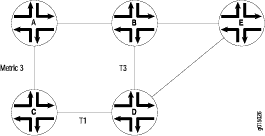
To force this flow, you can modify the route metrics as they are imported into Router A's routing table. By setting the incoming metric on the interface from Router A to Router C, you modify the metric on all routes received through that interface. Setting the incoming route metric on Router A changes only the routes in Router A's routing table, and affects only how Router A sends traffic to Router D. Router D's route selection is based on its own routing table, which, by default, includes no adjusted metric values.
In the example, Router C receives a route advertisement from Router D and readvertises the route to Router A. When Router A receives the route, it applies the incoming metric on the interface. Instead of incrementing the metric by 1 (the default), Router A increments it by 3 (the configured incoming metric), giving the route from Router A to Router D through Router C a total path metric of 4. Because the route through Router B has a metric of 2, it becomes the preferred route for all traffic from Router A to Router D.
This example uses a RIP group called alpha 1 on interface g3–0/0/0.
Configuration
Step-by-Step Procedure
To control traffic with an incoming metric:
- Enable RIP on the interface.[edit protocols rip]user@host# set group alpha1 neighbor ge-0/0/0
- Set the incoming metric.[edit protocols rip]user@host# set metric-in 3
- If you are done configuring the device, commit the configuration.[edit]user@host# commit
Verification
To verify that the configuration is working properly, enter the show route protocols rip command.
Related Documentation
- ACX Series
- Understanding Traffic Control with Metrics in a RIP Network on page 29
- RIP Configuration Overview
- Example: Controlling Traffic in a RIP Network with an Outgoing Metric
- J Series
- Understanding Traffic Control with Metrics in a RIP Network on page 29
- RIP Configuration Overview
- Example: Controlling Traffic in a RIP Network with an Outgoing Metric
- Verifying a RIP Configuration
- M Series
- Understanding Traffic Control with Metrics in a RIP Network on page 29
- RIP Configuration Overview
- Example: Controlling Traffic in a RIP Network with an Outgoing Metric
- Verifying a RIP Configuration
- MX Series
- Understanding Traffic Control with Metrics in a RIP Network on page 29
- RIP Configuration Overview
- Example: Controlling Traffic in a RIP Network with an Outgoing Metric
- Verifying a RIP Configuration
- PTX Series
- Understanding Traffic Control with Metrics in a RIP Network on page 29
- Example: Controlling Traffic in a RIP Network with an Outgoing Metric
- QFX Series
- Understanding Traffic Control with Metrics in a RIP Network on page 29
- Example: Controlling Traffic in a RIP Network with an Outgoing Metric
- SRX Series
- Understanding Traffic Control with Metrics in a RIP Network on page 29
- RIP Configuration Overview
- Example: Controlling Traffic in a RIP Network with an Outgoing Metric
- Verifying a RIP Configuration
- T Series
- Understanding Traffic Control with Metrics in a RIP Network on page 29
- RIP Configuration Overview
- Example: Controlling Traffic in a RIP Network with an Outgoing Metric
- Verifying a RIP Configuration