Create API Tokens
Create tokens to provide authentication for your APIs.
API tokens contain authentication information and are bound to specific users or an entire organization. API tokens send identification information about the user or organization to the API server to indicate whether or not the user has access to the API, to ensure security.
Like many other API providers, HPE Mist offers a way to generate API tokens for authentication (in the HTTP header). When considering tokens, HPE Mist uses the terms token and key interchangeably.
Token Types
In HPE Mist, there are two types of API tokens: organization and user.
Organization Tokens
Organization tokens are useful when you're building an application that multiple users will access to automate tasks for your organization. With multiple users, you need an organization token for authentication.
- The token persists in the organization.
- The token is not bound to any specific user, meaning the access does not depend upon any user’s access to the organization.
- Supports N org tokens, which can have different privileges.
- The token can only be used for that specific organization.
- Rate limiting is done by the individual token. For example, if OrgToken1 consumes 5000 API calls and reaches the rate limit, OrgToken2 is not impacted.
User Tokens
User tokens are useful when you're testing a script or creating a script strictly for your own use. For a single user, you don't need an organization token.
-
The API token assumes the same privileges as the assigned user’s account privileges.
- The token is bound to the specific user, meaning the access directly correlates to the user’s access to the organization.
- The token can be used for any Managed Service Provider (MSP) or organization that the user has access to.
- Supports N tokens, which all have the same privilege as the user account.
- Rate limiting is done by the account that is tied to the user. For example, if UserToken1 consumes 5000 API calls and reaches the rate limit, UserToken2 AND account log in to the GUI are impacted.
Video Overview
Watch this video to learn about creating tokens.
Hello everyone, my name is Anonet Alwad, technical marketing engineer with HP networking campus and branch TME team and I welcome you back on this CX1 Mist series. This is going to be a quick demo where we are going to talk about how to create the tokens for the Rest API access to your Mist dashboard. So as we have seen in the previous video, you can easily find the API endpoints for that is-- that are being used in your Mist dashboard and can then use for other automation tasks. What you need to also know that you can only access the information from the Mist via API once you are authenticated, and API tokens are the way to go. So before we start exploring the Mist API responses, we need to understand how API access is authenticated. Mist provides two primary token types: user tokens and organization tokens. A user token is associated with an individual Mist account and inherits that user's permissions. This makes it useful for personal testing, maybe API exploration or scripts operated by a specific administrator. An organizational level token belongs to Mist organization rather than to an individual user. It can be assigned its own access level and is better suited to shared automation platforms or integrations that need to operate independently of one user account. For this introductory demonstration, the important point is that the token type defines the ownership while the access level defines the authorization. So let me quickly jump on the organization page and let's see how these tokens are actually created. What I'll do I'll select the organization and I jump to the settings page. If you scroll down you will see a tile that is called API token. At the top you see the see a button that is says Create Token. If I click that, you will see there are multiple access level being listed here. So what does this particular access level mean? The access level options follow the same general permission model used within Mist. A read-only role is suitable when an application only needs to retrieve inventory, switch status, port information or operational data. A broader administrative role is required only when the workflow must create or above all modify the configuration. For example, an Observer style token can support dashboard or reporting system that can only read data. A Network Admin token can support automation limited to selected site. An Org Admin token can support broader organization level configuration workflows. Superuser provides the unrestricted organization access and should only be used when that level of control is genuinely required by a particular task. So this follows the principle of least privilege, which means select the narrowest token score and access level that can complete the intented task for that particular time. Uh in our demonstration let's say I'm a network admin who just want to have a read-only access to a particular selected site and I just want to fetch some data and see how systems are behaving. What I'll do I'll click on this Observer button and click and maybe enter the name of this particular token that will help us to identify it. So I'll call it-- this is test token, just a random name, and I'll generate it within a small blink of eye. It will actually create a key for you that you can copy. Now this is a very very critical point and this is something that we need to understand that after generating this token: Mist displays a complete key only once. The token that we have just created should therefore be copied and above all stored securely. Why I'm saying this? Because a key or a token key is similar to your authentication to your Mist dashboard. So if this token is being accessed by someone, they can reach out to your network or have access to your network. So the very very important thing is to treat it like a password and next, never expose it uh to uh to someone you don't want to expose it to. So with this token that is now available, we can now use this. We will click on the Done button. And if you see uh we this token will be added here and we can now use this token to further use this to authenticate and fetch the data via the rest APIs. One important thing if you want if there is no use or if somehow this token is exposed, you can go ahead and delete this token once and for all and create a new one. So what you need to do is to click on this particular token, click on the Delete button and the token will be deleted from your organization. And that's how you can create the user access tokens for the API authentication, which will help you to fetch data from your Mist dashboard. In the next sessions, we'll look how to leverage this-- uh, these tokens and the Rest APIs to fetch the data from the system and have it displayed on your respective third-party systems or by maybe Python automation scripts or other systems that we have. So see you back in the next session. Thank you.
Create an Organization Token in the HPE Mist Portal
-
Select an Access Level to define the permissions for the
token.

-
Click the copy button next to the Key field and store it
somewhere for safekeeping.
Note:
The only time you will see the entire, untruncated key is upon creation. You will not be able to see the full key ever again. If you misplace the key, you will have to create a new key.
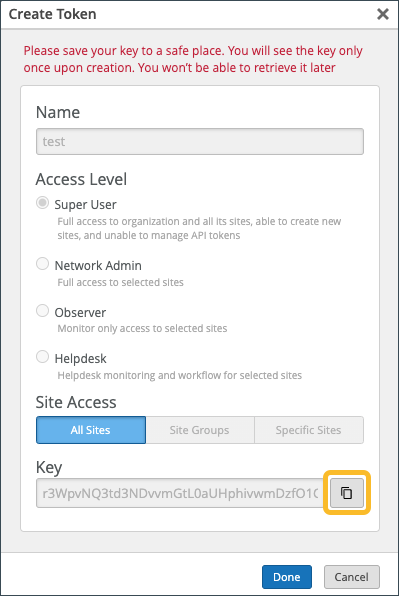
Create a User Token in the HPE Mist Portal
You can generate an API user token from the My Account page in the HPE Mist portal.
To generate an API user token:
-
At the top-right corner of the
HPE
Mist portal, click the
HPE
Mist Account icon, and then click My Account.

-
Enter a name for the token and click Generate. The generated
key is the user API token.
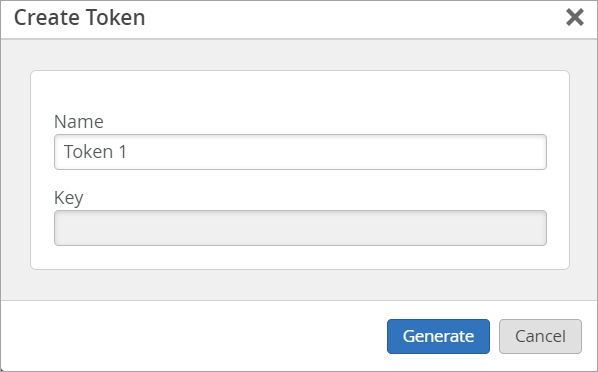
-
Click the copy button next to the Key field.
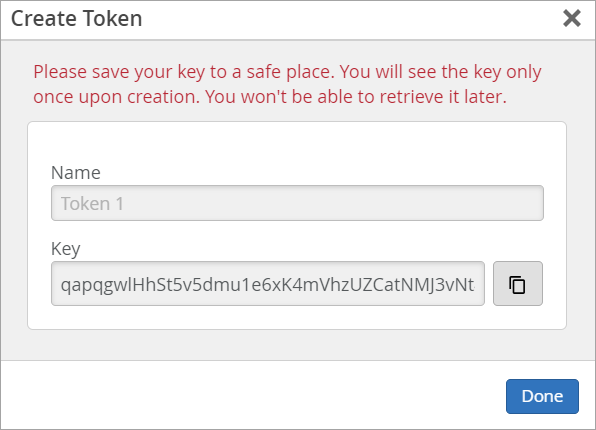
Ensure to store the key somewhere for safekeeping as you will not be able to see the full key again. If you misplace the key, you’ll need to create a new key.
-
Click Done.
Note:
If you need to delete a user token, click the token in the API Token section of the My Profile page, and then click Delete in the Edit Token page.
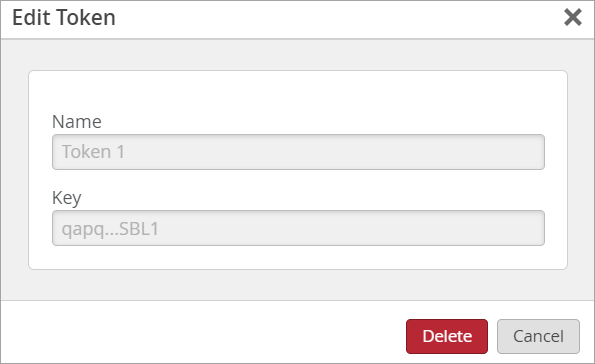
Create a User or Organization Token Using the REST API Explorer
-
Click POST.
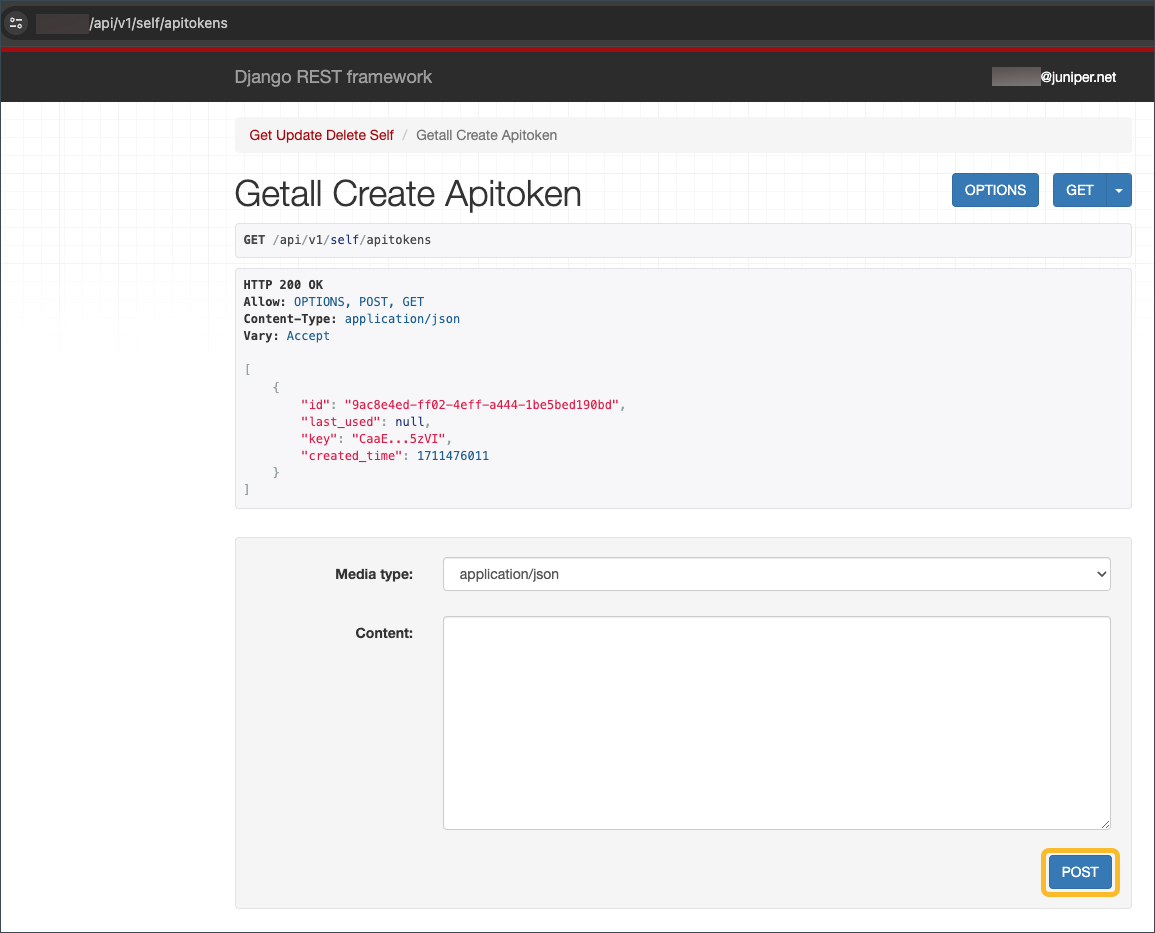
The response will be similar to this example:
{
  "id": "437de3bf-acd2-4bed-****-cbba973b91f8",
  "last_used": null,
  "key": "L0kN12lkn4lkn***nklnqlkewnrsFTJ",
  "created_time": 1596821422
}