Example: Configuring VLAN-Aware Pseudowire Head-End Termination with EVPN VPWS and ELAN Services
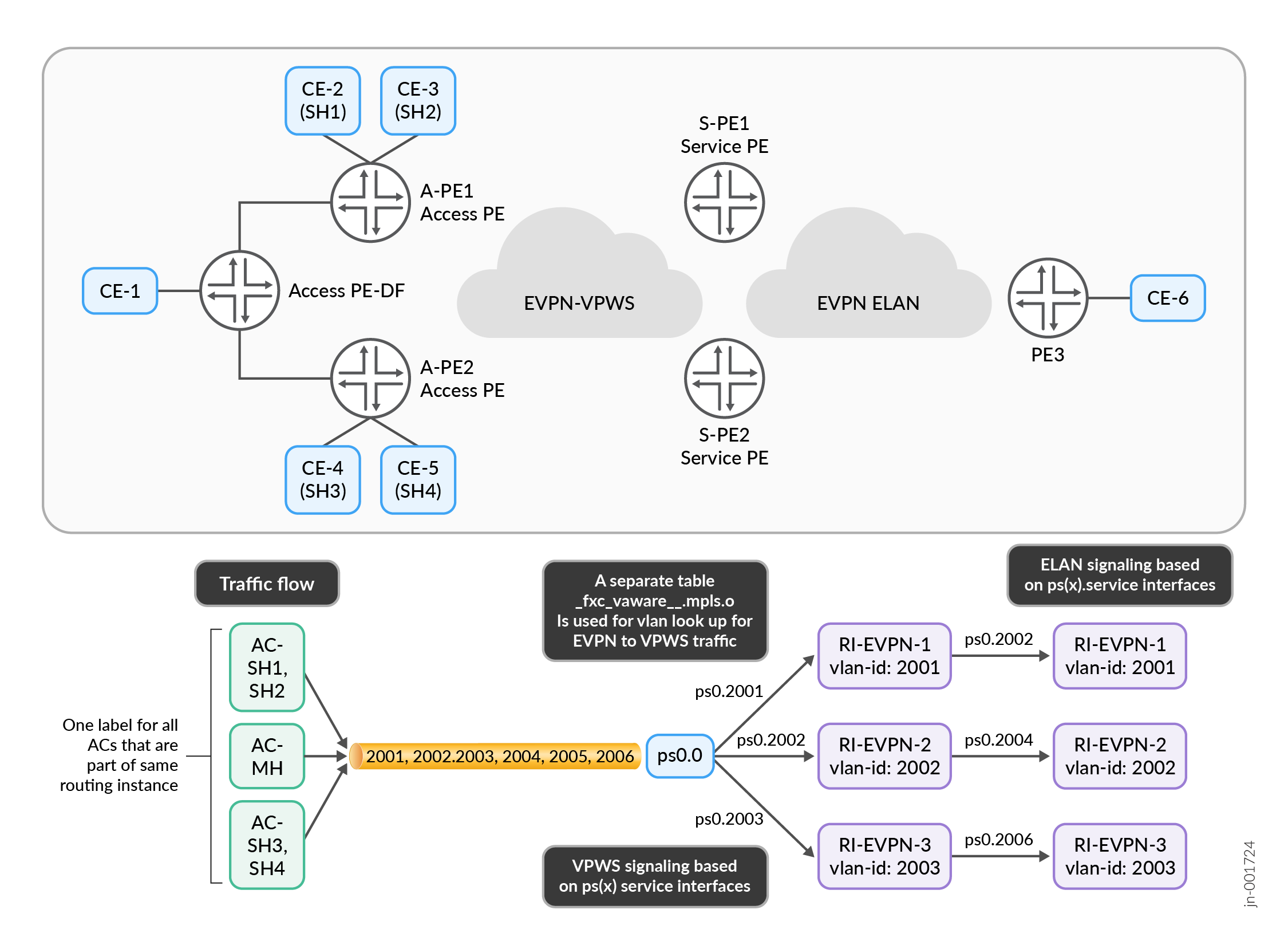
This configuration example demonstrates how to implement VLAN-aware pseudowire head-end termination (PWHT) that integrates EVPN Virtual Private Wire Service (VPWS) on the access side with EVPN Ethernet LAN (ELAN) services on the service side, enabling flexible Layer 2 VPN service delivery with multi-homing support.Figure 1 shows a diagram of VLAN-Aware PWHT traffic flowing into an EVPN ELAN instance.
Prerequisites
-
Supported hardware platforms with EVPN and PS interface capabilities
-
Minimum Junos OS release supporting EVPN VPWS and PS interfaces
-
EVPN license requirements and Advanced Layer 2 services license requirements
-
Basic understanding of EVPN, VPWS, and ELAN technologies
-
Configured MPLS core network with BGP EVPN address family
-
Physical connectivity between access interfaces and customer equipment
CLI Quick Configuration
CLI Quick Configuration
Edit the below configuration to fit your implementation, then copy and paste the edited code into Junos OS via a command-line interface.
- Access Side Configuration
- Service Side Configuration - EVPN-VPWS Termination
- Service Side Configuration - Individual EVPN Instances
- Alternate Service Side Configuration - Virtual Switch
Access Side Configuration
set interfaces xe-0/0/2:0 flexible-vlan-tagging
set interfaces xe-0/0/2:0 encapsulation flexible-ethernet-services
set interfaces xe-0/0/2:0 unit 2001 encapsulation vlan-ccc
set interfaces xe-0/0/2:0 unit 2001 vlan-id 2001
set interfaces xe-0/0/2:0 unit 2001 input-vlan-map swap
set interfaces xe-0/0/2:0 unit 2001 input-vlan-map vlan-id 2001
set interfaces xe-0/0/2:0 unit 2001 output-vlan-map swap
set interfaces xe-0/0/2:1 flexible-vlan-tagging
set interfaces xe-0/0/2:1 encapsulation flexible-ethernet-services
set interfaces xe-0/0/2:1 unit 2002 encapsulation vlan-ccc
set interfaces xe-0/0/2:1 unit 2002 vlan-id 2002
set interfaces xe-0/0/2:1 unit 2002 input-vlan-map swap
set interfaces xe-0/0/2:1 unit 2002 input-vlan-map vlan-id 2002
set interfaces xe-0/0/2:1 unit 2002 output-vlan-map swap
set interfaces ae0 flexible-vlan-tagging
set interfaces ae0 encapsulation flexible-ethernet-services
set interfaces ae0 esi 00:11:11:11:11:11:11:11:11:11
set interfaces ae0 esi all-active
set interfaces ae0 aggregated-ether-options lacp active
set interfaces ae0 aggregated-ether-options lacp periodic slow
set interfaces ae0 aggregated-ether-options lacp system-id 00:01:02:03:04:05
set interfaces ae0 unit 2003 encapsulation vlan-ccc
set interfaces ae0 unit 2003 vlan-id 2003
set interfaces ae0 unit 2003 input-vlan-map swap
set interfaces ae0 unit 2003 input-vlan-map vlan-id 2003
set interfaces ae0 unit 2003 output-vlan-map swap
set interfaces ae0 unit 2004 encapsulation vlan-ccc
set interfaces ae0 unit 2004 vlan-id 2004
set interfaces ae0 unit 2004 input-vlan-map swap
set interfaces ae0 unit 2004 input-vlan-map vlan-id 2004
set interfaces ae0 unit 2004 output-vlan-map swap
set routing-instances VPWS-FXC-AWARE instance-type evpn-vpws
set routing-instances VPWS-FXC-AWARE protocols evpn interface ae0.2003
set routing-instances VPWS-FXC-AWARE protocols evpn interface ae0.2004
set routing-instances VPWS-FXC-AWARE protocols evpn interface xe-0/0/2:0.2001
set routing-instances VPWS-FXC-AWARE protocols evpn interface xe-0/0/2:1.2002
set routing-instances VPWS-FXC-AWARE protocols evpn flexible-cross-connect-vlan-aware
set routing-instances VPWS-FXC-AWARE protocols evpn auto-service-id
set routing-instances VPWS-FXC-AWARE route-distinguisher 100.100.100.1:3003
set routing-instances VPWS-FXC-AWARE vrf-target target:65000:2001
Service Side Configuration - EVPN-VPWS Termination
set interfaces ps0 anchor-point lt-0/0/10
set interfaces ps0 flexible-vlan-tagging
set interfaces ps0 encapsulation flexible-ethernet-services
set interfaces ps0 esi 00:22:22:22:22:22:22:22:22:22
set interfaces ps0 esi all-active
set interfaces ps0 esi df-election-type preference value 100
set interfaces ps0 unit 0 encapsulation ethernet-ccc
set interfaces ps0 unit 2001 encapsulation vlan-bridge
set interfaces ps0 unit 2001 vlan-id 2001
set interfaces ps0 unit 2002 encapsulation vlan-bridge
set interfaces ps0 unit 2002 vlan-id 2002
set interfaces ps0 unit 2003 encapsulation vlan-bridge
set interfaces ps0 unit 2003 vlan-id 2003
set interfaces ps0 unit 2004 encapsulation vlan-bridge
set interfaces ps0 unit 2004 vlan-id 2004
set interfaces ps0 unit 2005 encapsulation vlan-bridge
set interfaces ps0 unit 2005 vlan-id 2005
set interfaces ps0 unit 2006 encapsulation vlan-bridge
set interfaces ps0 unit 2006 vlan-id 2006
set routing-instances VPWS-FXC-AWARE instance-type evpn-vpws
set routing-instances VPWS-FXC-AWARE protocols evpn interface ps0.2001
set routing-instances VPWS-FXC-AWARE protocols evpn interface ps0.2002
set routing-instances VPWS-FXC-AWARE protocols evpn interface ps0.2003
set routing-instances VPWS-FXC-AWARE protocols evpn interface ps0.2004
set routing-instances VPWS-FXC-AWARE protocols evpn interface ps0.2005
set routing-instances VPWS-FXC-AWARE protocols evpn interface ps0.2006
set routing-instances VPWS-FXC-AWARE protocols evpn flexible-cross-connect-vlan-aware
set routing-instances VPWS-FXC-AWARE protocols evpn auto-service-id
set routing-instances VPWS-FXC-AWARE interface ps0.0
set routing-instances VPWS-FXC-AWARE route-distinguisher 100.100.100.3:3003
set routing-instances VPWS-FXC-AWARE vrf-target target:65000:2001
Service Side Configuration - Individual EVPN Instances
set routing-instances RI-EVPN-2001 instance-type evpn
set routing-instances RI-EVPN-2001 protocols evpn encapsulation mpls
set routing-instances RI-EVPN-2001 protocols evpn default-gateway no-gateway-community
set routing-instances RI-EVPN-2001 vlan-id 2001
set routing-instances RI-EVPN-2001 interface ps0.2001
set routing-instances RI-EVPN-2001 route-distinguisher 100.100.100.3:2001
set routing-instances RI-EVPN-2001 vrf-target target:10:2001
set routing-instances RI-EVPN-2002 instance-type evpn
set routing-instances RI-EVPN-2002 protocols evpn encapsulation mpls
set routing-instances RI-EVPN-2002 protocols evpn default-gateway no-gateway-community
set routing-instances RI-EVPN-2002 vlan-id 2002
set routing-instances RI-EVPN-2002 interface ps0.2002
set routing-instances RI-EVPN-2002 route-distinguisher 100.100.100.3:2002
set routing-instances RI-EVPN-2002 vrf-target target:10:2002
Alternate Service Side Configuration - Virtual Switch
set routing-instances RI-VSWITCH instance-type virtual-switch
set routing-instances RI-VSWITCH protocols evpn encapsulation mpls
set routing-instances RI-VSWITCH protocols evpn default-gateway no-gateway-community
set routing-instances RI-VSWITCH protocols evpn extended-vlan-list 2001-2006
set routing-instances RI-VSWITCH bridge-domains BD-2001 vlan-id 2001
set routing-instances RI-VSWITCH bridge-domains BD-2001 interface ps0.2001
set routing-instances RI-VSWITCH bridge-domains BD-2002 vlan-id 2002
set routing-instances RI-VSWITCH bridge-domains BD-2002 interface ps0.2002
Step-by-Step: Access Side Device Configuration
-
Configure channelized interfaces on the access side device
-
Configure Aggregated Ethernet Interface
-
Configure EVPN-VPWS Instance
Step-by-Step: Service Side Device Configuration
-
Configure service side PS interface
-
Configure service side EVPN-VPWS termination
-
Configure individual EVPN instances
-
Configure Virtual Switch Instance (if used):
Verification
Use these commands individually, instead of as a block of commands.
-
Verify Interface Status
-
Verify EVPN-VPWS Status
-
Verify ESI and Multi-Homing
-
Verify EVPN E-LAN Services
-
Verify end-to-end connectivity