Enabling IPv6-Based Management of the HPE Networking Apstra Data Center Director Cluster and Devices
Starting in Apstra DC Director 6.1, you can use IPv6 as the only address family in your management network for Junos OS Release 23.4R2, and Junos OS EVO Release 23.4R2.
You can use the aos_mgmt_ipv6 tool to check if there is a usable IPv6 address for communication between controller node and worker nodes, controller node and devices, and worker nodes and devices (when using offbox device agents that are scheduled to run on worker nodes).
Issue the sudo aos_magmt_ipv6 enable command to instruct Apstra software to use IPv6 for all process communication.
Apstra doesn't support dual-stack communication between the controller node, worker nodes, and devices.
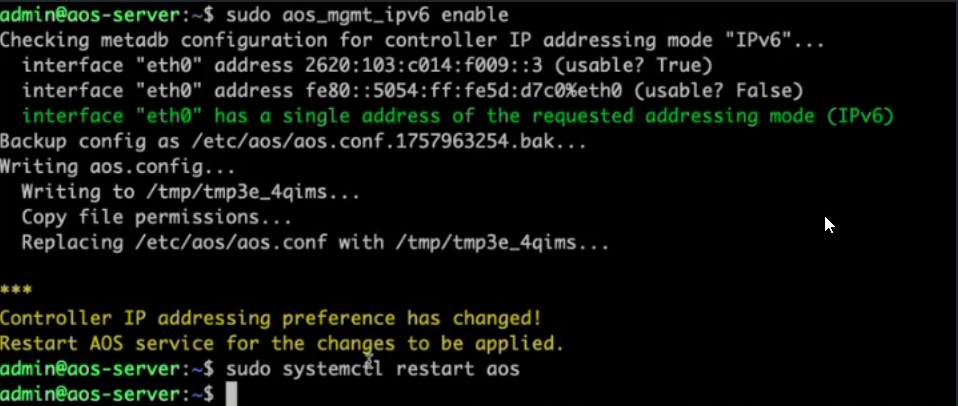
Issue the aos_mgmt_ipv6 status command to verify that Apstra DC Director is using IPv6 for all process communication.
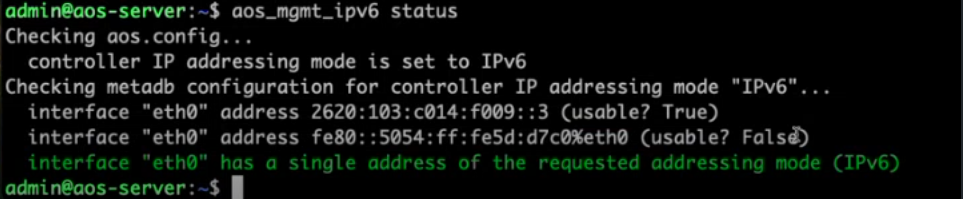
Now that Apstra DC Director can use IPv6 for process communication, you can add devices using their IPv6 management addresses.
See Create Onbox Agent and Create Offbox Agent for more information.You can also assign IPv6 addresses to your Apstra DC Director Cluster nodes. See Server Cluster Nodes for more details.