Getting SIB Hardware Information
To get the hardware information you need to return a failed SIB:
Display SIB Hardware Information
Purpose
To obtain SIB hardware information.
Action
To display the SIB hardware information, use the following command:
Sample Output
t640@host>  show chassis hardware
Item 						Version 				Part number 		Serial number 			Description
Chassis 											19061 					T640
[...Output truncated...]
SIB 0 					REV 05 				710-003980 			HF9603 							SIB-I8
SIB 1 					REV 05 				710-003980 			HF9577 							SIB-I8
SIB 2 					REV 05 				710-003980 			HF9540 							SIB-I8
SIB 3 					REV 05 				710-003980 			HF9550 							SIB-I8
SIB 4 					REV 05 				710-003980 			HF9592 							SIB-I8
Meaning
The command output displays the SIB slot number, revision level, part number, serial number, and description.
Locate the SIB Serial Number ID Label
Purpose
To locate the serial number ID on the SIB.
Action
To find the SIB serial number ID label locations, do the following:
On the M320 router, the SIB serial number label is located on the right side of the top of the component (see Figure 1).
Figure 1: M320 Router SIB Serial Number ID Label location
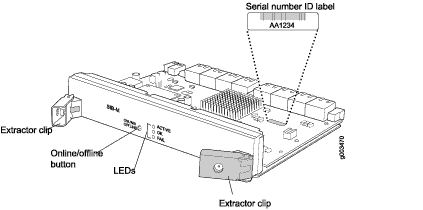
On the T320 router and the T640 router, the SIB serial number ID label is located on the left side of the top panel of the component
On the T1600 router, for the standard SIB or SIB version B, the serial number label is located on the right side of the top of the SIB (see Figure 2).
Figure 2: T1600 Router Standard SIB and SIB Version B Serial Number I D Label Location
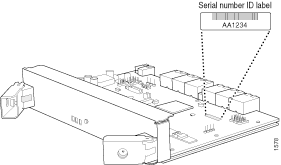
On the TX Matrix router, the serial number label is located on the top of the right side of the TX-SIB (see Figure 3).
Figure 3: TX Matrix Router TX-SIB Serial Number ID Label Location
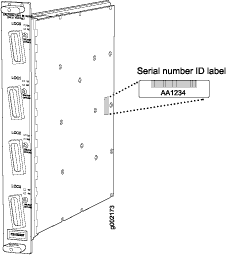
For the LCC-SIB in the T640 router connected to a TX Matrix router, the serial number label is located on the left side of the SIB (see Figure 4).
Figure 4: Line-Card Chassis SIB Serial Number Label
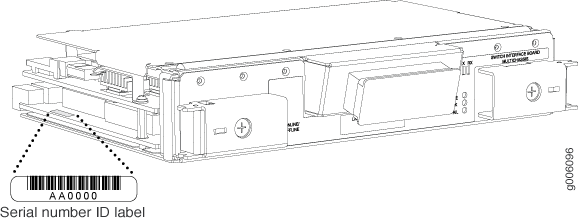
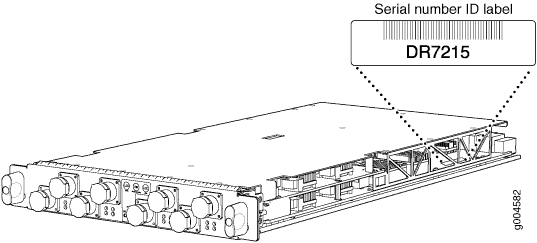
On the TX Matrix Plus router, the serial number label is located on the top of the right side of the SIB (see Figure 5).
Figure 5: TX Matrix Plus Router TXP-F13 Serial Number ID Label Location