Related Documentation
- ACX Series
- Example: Configuring OSPFv3 Not-So-Stubby Areas
- Example: Configuring OSPFv3 Stub and Totally Stubby Areas
- M Series
- Example: Configuring OSPFv3 Not-So-Stubby Areas
- Example: Configuring OSPFv3 Stub and Totally Stubby Areas
- MX Series
- Example: Configuring OSPFv3 Not-So-Stubby Areas
- Example: Configuring OSPFv3 Stub and Totally Stubby Areas
- PTX Series
- Example: Configuring OSPFv3 Not-So-Stubby Areas
- Example: Configuring OSPFv3 Stub and Totally Stubby Areas
- T Series
- Example: Configuring OSPFv3 Not-So-Stubby Areas
- Example: Configuring OSPFv3 Stub and Totally Stubby Areas
Example: Configuring OSPFv3 Not-So-Stubby Areas with Filtering
Understanding NSSA Filtering
You might have a situation when exporting Type 7 LSAs into a not-so-stubby area (NSSA) is unnecessary. When an autonomous system (AS) boundary router is also an area border router (ABR) with an NSSA attached, Type 7 LSAs are exported into the NSSA by default.
Also, when the ABR is attached to multiple NSSAs, a separate Type 7 LSA is exported into each NSSA by default. During route redistribution, this routing device generates both Type 5 LSAs and Type 7 LSAs.
You can disable exporting Type 7 LSAs into the NSSA by including the no-nssa-abr statement on the routing device.
Example: Configuring OSPFv3 Not-So-Stubby Areas with Filtering
This example shows how to configure an OSPFv3 no-so-stubby area (NSSA) when there is no need to inject external routes into the NSSA as type 7.
Requirements
No special configuration beyond device initialization is required before configuring this example.
Overview
When an autonomous system border router (ASBR) is also an NSSA area border router (ABR), the routing device generates type 5 as well as type 7 LSAs. You can prevent the router from creating type 7 LSAs for the NSSA with the no-nssa-abr statement.
In this example, Device 5 and Device 3 are in customer networks. Device 4 and Device 2 are both injecting the customer routes into OSPFv3. Area 1 is an NSSA. Because Device 4 is both an NSSA ABR and an ASBR, it is injecting both type 5 and type 7 LSAs into area 1. To stop type 7 LSAs from being injected into area 1, the no-nssa-abr statement in included in the Device 4 configuration.
Figure 1: OSPFv3 Network Topology with an NSSA ABR That Is Also an ASBR
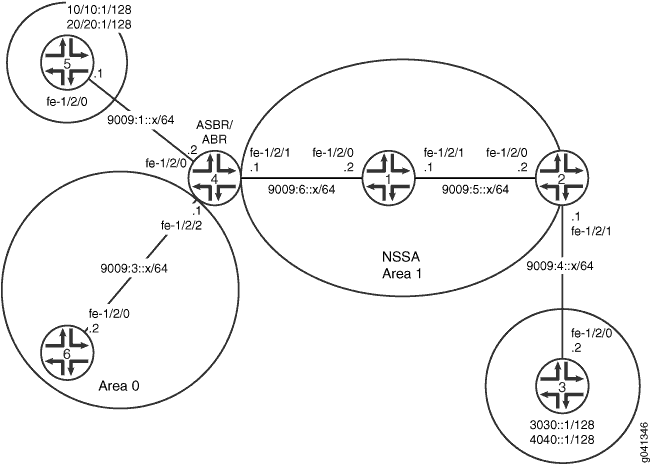
CLI Quick Configuration shows the configuration for all of the devices in Figure 1. The section Step-by-Step Procedure describes the steps on Device 4.
Configuration
CLI Quick Configuration
To quickly configure this example, copy the following commands, paste them into a text file, remove any line breaks, change any details necessary to match your network configuration, and then copy and paste the commands into the CLI at the [edit] hierarchy level.
Device 1
Device 2
Device 3
Device 4
Device 5
Device 6
Step-by-Step Procedure
The following example requires you to navigate various levels in the configuration hierarchy. For information about navigating the CLI, see Using the CLI Editor in Configuration Mode in the CLI User Guide.
To configure Device 4:
- Configure the interfaces.[edit interfaces]user@4# set fe-1/2/0 unit 0 family inet6 address 9009:1::2/64user@4# set fe-1/2/1 unit 0 family inet6 address 9009:6::1/64user@4# set fe-1/2/2 unit 0 family inet6 address 9009:3::1/64user@4# set lo0 unit 0 family inet address 4.4.4.4/32
- Enable OSPFv3 on the interfaces that are in area 0.[edit protocols ospf3 area 0.0.0.0]user@4# set interface fe-1/2/2.0user@4# set interface lo0.0 passive
- Enable OSPFv3 on the interface that is in area 1.[edit protocols ospf3 area 0.0.0.1]user@4# set interface fe-1/2/1.0
- Configure an OSPFv3 NSSA.
The nssa statement is required on all routing devices in the area.
[edit protocols ospf3 area 0.0.0.1]user@4# set nssa - On the ABR, inject a default route into the area.[edit protocols ospf3 area 0.0.0.1]user@4# set nssa default-lsa default-metric 10
- (Optional) On the ABR, specify the external metric type
for the default route.[edit protocols ospf3 area 0.0.0.1]user@4# set nssa default-lsa metric-type 1
- (Optional) On the ABR, specify the flooding of Type 7
LSAs.[edit protocols ospf3 area 0.0.0.1]user@4# set nssa default-lsa type-7
- On the ABR, restrict summary LSAs from entering the area.[edit protocols ospf3 area 0.0.0.1]user@4# set nssa no-summaries
- Disable exporting Type 7 LSAs into the NSSA.
This setting is useful if you have an AS boundary router that is also an ABR with an NSSA area attached.
[edit protocols ospf3]user@4# set no-nssa-abr - Configure static routes to the customer network.[edit routing-options rib inet6.0 static]user@4# set route 1010::1/128 next-hop 9009:1::1user@4# set route 2020::1/128 next-hop 9009:1::1
- Configure a policy to inject the static routes into OSPFv3.[edit policy-options policy-statement static-to-ospf term 1]user@4# set from protocol staticuser@4# set then accept
- Apply the policy to OSPFv3.[edit protocols ospf3]user@4# set export static-to-ospf
Results
From configuration mode, confirm your configuration by entering the show interfaces, show protocols, show policy-options, and show routing-options commands. If the output does not display the intended configuration, repeat the instructions in this example to correct the configuration.
Device 4
If you are done configuring the device, enter commit from configuration mode.
Verification
Confirm that the configuration is working properly.
Verifying the Routes in the OSPFv3 Stub Area
Purpose
Make sure that the expected routes are present in the routing tables.
Action
From operational mode on Device 1 and Device 6, enter the show route command.
user@1> show routeinet.0: 1 destinations, 1 routes (1 active, 0 holddown, 0 hidden)
+ = Active Route, - = Last Active, * = Both
1.1.1.1/32 *[Direct/0] 03:25:44
> via lo0.0
inet6.0: 11 destinations, 14 routes (11 active, 0 holddown, 0 hidden)
+ = Active Route, - = Last Active, * = Both
::/0 *[OSPF3/150] 01:52:58, metric 11, tag 0
> via fe-1/2/0.0
3030::1/128 *[OSPF3/150] 02:44:02, metric 0, tag 0
> via fe-1/2/1.0
4040::1/128 *[OSPF3/150] 02:44:02, metric 0, tag 0
> via fe-1/2/1.0
9009:5::/64 *[Direct/0] 03:25:34
> via fe-1/2/1.0
[OSPF3/10] 03:25:24, metric 1
> via fe-1/2/1.0
9009:5::1/128 *[Local/0] 03:25:34
Local via fe-1/2/1.0
9009:6::/64 *[Direct/0] 03:25:34
> via fe-1/2/0.0
[OSPF3/10] 03:25:34, metric 1
> via fe-1/2/0.0
9009:6::2/128 *[Local/0] 03:25:34
Local via fe-1/2/0.0
fe80::/64 *[Direct/0] 03:25:34
> via fe-1/2/0.0
[Direct/0] 03:25:34
> via fe-1/2/1.0
fe80::2a0:a514:0:44c/128
*[Local/0] 03:25:34
Local via fe-1/2/0.0
fe80::2a0:a514:0:74c/128
*[Local/0] 03:25:34
Local via fe-1/2/1.0
ff02::5/128 *[OSPF3/10] 03:27:00, metric 1
MultiRecvuser@6> show routeinet.0: 1 destinations, 1 routes (1 active, 0 holddown, 0 hidden)
+ = Active Route, - = Last Active, * = Both
6.6.6.6/32 *[Direct/0] 03:26:57
> via lo0.0
inet6.0: 11 destinations, 12 routes (11 active, 0 holddown, 0 hidden)
+ = Active Route, - = Last Active, * = Both
1010::1/128 *[OSPF3/150] 03:16:59, metric 0, tag 0
> via fe-1/2/0.0
2020::1/128 *[OSPF3/150] 03:16:59, metric 0, tag 0
> via fe-1/2/0.0
3030::1/128 *[OSPF3/150] 02:44:34, metric 0, tag 0
> via fe-1/2/0.0
4040::1/128 *[OSPF3/150] 02:44:34, metric 0, tag 0
> via fe-1/2/0.0
9009:3::/64 *[Direct/0] 03:26:29
> via fe-1/2/0.0
[OSPF3/10] 03:26:29, metric 1
> via fe-1/2/0.0
9009:3::2/128 *[Local/0] 03:26:29
Local via fe-1/2/0.0
9009:5::/64 *[OSPF3/10] 02:44:34, metric 3
> via fe-1/2/0.0
9009:6::/64 *[OSPF3/10] 03:16:59, metric 2
> via fe-1/2/0.0
fe80::/64 *[Direct/0] 03:26:29
> via fe-1/2/0.0
fe80::2a0:a514:0:64c/128
*[Local/0] 03:26:29
Local via fe-1/2/0.0
ff02::5/128 *[OSPF3/10] 03:27:37, metric 1
MultiRecvMeaning
On Device 1, the default route (::/0) has been learned because of the default-metric statement on the ABR, Device 4. The customer routes 3030::1 and 4040::1 have been learned from Device 2. The 1010::1 and 2020::1 have been suppressed. They are not needed because the default route can be used instead.
On Device 6 which in area 0, all of the customer routes have been learned.
Verifying the Type of LSAs
Purpose
Verify the type of LSAs that are in the area.
Action
From operational mode on Device 1, enter the show ospf3 database nssa detail command.
user@4> show ospf3 database nssa detailArea 0.0.0.1 Type ID Adv Rtr Seq Age Cksum Len NSSA 0.0.0.1 2.2.2.2 0x80000004 2063 0xceaf 60 Prefix 3030::1/128 Prefix-options 0x8, Metric 0, Type 2, Fwd addr 9009:5::2, NSSA 0.0.0.2 2.2.2.2 0x80000004 1463 0x3627 60 Prefix 4040::1/128 Prefix-options 0x8, Metric 0, Type 2, Fwd addr 9009:5::2, NSSA *0.0.0.1 4.4.4.4 0x80000003 35 0x25f8 28 Prefix ::/0 Prefix-options 0x0, Metric 10, Type 1,
Meaning
Device 4 is not sending type 7 (NSSA) LSAs for customer routes, 1010::1/128 and 2020::1/128. If you were to delete or deactivate the no-nssa-abr statement and then rerun the show ospf3 database nssa detail command, you would see that Device 4 is sending type 7 LSAs for 1010::1/128 and 2020::1/128.
Related Documentation
- ACX Series
- Example: Configuring OSPFv3 Not-So-Stubby Areas
- Example: Configuring OSPFv3 Stub and Totally Stubby Areas
- M Series
- Example: Configuring OSPFv3 Not-So-Stubby Areas
- Example: Configuring OSPFv3 Stub and Totally Stubby Areas
- MX Series
- Example: Configuring OSPFv3 Not-So-Stubby Areas
- Example: Configuring OSPFv3 Stub and Totally Stubby Areas
- PTX Series
- Example: Configuring OSPFv3 Not-So-Stubby Areas
- Example: Configuring OSPFv3 Stub and Totally Stubby Areas
- T Series
- Example: Configuring OSPFv3 Not-So-Stubby Areas
- Example: Configuring OSPFv3 Stub and Totally Stubby Areas