Related Documentation
- M Series
- Example: Configuring BGP Autodiscovery for LDP VPLS
- Configuring Interoperability Between BGP Signaling and LDP Signaling in VPLS
- Virtual Private LAN Service Overview
- VPLS Protocol Operation
- MX Series
- Example: Configuring BGP Autodiscovery for LDP VPLS
- Configuring Interoperability Between BGP Signaling and LDP Signaling in VPLS
- Virtual Private LAN Service Overview
- VPLS Protocol Operation
- T Series
- Example: Configuring BGP Autodiscovery for LDP VPLS
- Configuring Interoperability Between BGP Signaling and LDP Signaling in VPLS
- Virtual Private LAN Service Overview
- VPLS Protocol Operation
Example: Configuring BGP Autodiscovery for LDP VPLS with User-Defined Mesh Groups
This example describes how to configure user-defined mesh groups for BGP autodiscovery for LDP VPLS, as specified in forwarding equivalency class (FEC) 129. FEC 129 uses BGP autodiscovery to convey endpoint information, so you do not need to manually configure pseudowires. You configure mesh groups on the border router to group the sets of PE routers that are automatically fully meshed and that share the same signaling protocol, either BGP or LDP. You can configure multiple mesh groups to map each fully meshed LDP-signaled or BGP-signaled VPLS domain to a mesh group.
Requirements
Before you begin, configure BGP autodiscovery for LDP VPLS. See Example: Configuring BGP Autodiscovery for LDP VPLS.
The hardware and software requirements for this example are the same as the requirements for the Example: Configuring BGP Autodiscovery for LDP VPLS. You will need to adapt the example configuration to the topology used in this example.
Overview
Configuration for a mesh group for FEC 129 is very similiar to the mesh-group configuration for FEC 128.
Note the following differences for FEC 129:
- Each user-defined mesh group must have a unique route distinguisher. Do not use the route distinguisher that is defined for the default mesh group at the [edit routing-intances] hierarchy level.
- Each user-defined mesh group must have its own import and export route target.
- Each user-defined mesh group can have a unique Layer 2 VPN ID. By default, all the mesh groups that are configured for a VPLS routing instance use the same Layer 2 VPN ID as the one that you configure at the [edit routing-instances] hierarchy level.
Topology Diagram
Figure 1 shows a topology that includes a user-defined mesh group.
Figure 1: BGP Autodiscovery for LDP VPLS with a User-Defined Mesh Group
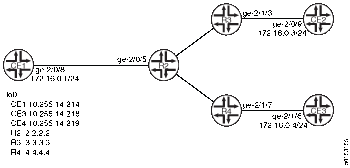
CLI Quick Configuration shows the configuration for all of the devices in Figure 1. The section Step-by-Step Procedure describes the steps on Device R2.
Configuration
CLI Quick Configuration
To quickly configure a mesh group, copy the following commands, remove any line breaks, and then paste the commands into the CLI of each device.
Device CE1
Device CE3
Device CE4
Device R2
Device R3
Device R4
Step-by-Step Procedure
To configure a mesh group:
Configure the interfaces.
[edit interfaces]user@R2# set ge-2/0/5 encapsulation ethernet-vplsuser@R2# set ge-2/0/5 unit 0 description to_CE1user@R2# set ge-2/0/5 unit 0 family vpls
user@R2# set ge-2/0/10 unit 0 description to_R3user@R2# set ge-2/0/10 unit 0 family inet address 10.10.4.2/30user@R2# set ge-2/0/10 unit 0 family mpls
user@R2# set ge-2/0/11 unit 0 description to_R4user@R2# set ge-2/0/11 unit 0 family inet address 10.10.5.1/30user@R2# set ge-2/0/11 unit 0 family mpls
user@R2# set lo0 unit 0 family inet address 2.2.2.2/32Configure MPLS on the interfaces.
[edit protocols mpls]user@R2# set interface ge-2/0/10.0user@R2# set interface ge-2/0/11.0Configure BGP.
[edit protocols bgp]user@R2# set local-address 2.2.2.2
[edit protocols bgp group pe-pe]user@R2# set type internaluser@R2# set connect-retry-interval 1user@R2# set family l2vpn auto-discovery-onlyuser@R2# set family l2vpn signalinguser@R2# set neighbor 3.3.3.3user@R2# set neighbor 4.4.4.4Set the import and export route target for the default mesh group.
[edit protocols ospf]user@R2# set traffic-engineeringuser@R2# set area 0.0.0.0 interface lo0.0 passiveuser@R2# set area 0.0.0.0 interface ge-2/0/10.0user@R2# set area 0.0.0.0 interface ge-2/0/11.0Configure LDP on the core-facing interfaces and on the loopback interface.
[edit protocols ldp]user@R2# set interface ge-2/0/10.0user@R2# set interface ge-2/0/11.0user@R2# set interface lo0.0Configure the VPLS routing instance.
Make sure that the route distinguisher in the mesh group is unique.
[edit routing-instances inst512]user@R2# set instance-type vplsuser@R2# set interface ge-2/0/5.0user@R2# set route-distinguisher 100:100user@R2# set l2vpn-id l2vpn-id:1:2user@R2# set vrf-target target:1:1user@R2# set protocols vpls mesh-group metro1 vrf-target target:2:1user@R2# set protocols vpls mesh-group metro1 route-distinguisher 100:200Configure the autonomous system (AS) number.
[edit routing-options]user@R2# set autonomous-system 64510If you are done configuring the device, commit the configuration.
[edit]user@R2# commit
Results
From configuration mode, confirm your configuration by entering the show routing-instances command. If the output does not display the intended configuration, repeat the instructions in this example to correct the configuration.
Verification
Confirm that the configuration is working properly.
- Verifying the Routes
- Checking Connectivity
- Checking the VPLS Connections
- Display Learned VPLS MAC Address Information
Verifying the Routes
Purpose
Verify that the expected routes are learned.
Action
From operational mode, enter the show route command.
user@R2> show routeinet.0: 9 destinations, 9 routes (9 active, 0 holddown, 0 hidden)
+ = Active Route, - = Last Active, * = Both
2.2.2.2/32 *[Direct/0] 4d 02:42:47
> via lo0.0
3.3.3.3/32 *[OSPF/10] 4d 02:41:56, metric 1
> to 10.10.4.1 via ge-2/0/10.0
4.4.4.4/32 *[OSPF/10] 4d 02:42:01, metric 1
> to 10.10.5.2 via ge-2/0/11.0
10.10.3.2/32 *[Local/0] 4d 02:42:47
Reject
10.10.4.0/30 *[Direct/0] 4d 02:42:46
> via ge-2/0/10.0
10.10.4.2/32 *[Local/0] 4d 02:42:47
Local via ge-2/0/10.0
10.10.5.0/30 *[Direct/0] 4d 02:42:46
> via ge-2/0/11.0
10.10.5.1/32 *[Local/0] 4d 02:42:47
Local via ge-2/0/11.0
224.0.0.5/32 *[OSPF/10] 4d 02:42:49, metric 1
MultiRecv
inet.3: 2 destinations, 2 routes (2 active, 0 holddown, 0 hidden)
+ = Active Route, - = Last Active, * = Both
3.3.3.3/32 *[LDP/9] 4d 02:01:06, metric 1
> to 10.10.4.1 via ge-2/0/10.0
4.4.4.4/32 *[LDP/9] 4d 02:01:06, metric 1
> to 10.10.5.2 via ge-2/0/11.0
mpls.0: 12 destinations, 12 routes (12 active, 0 holddown, 0 hidden)
+ = Active Route, - = Last Active, * = Both
0 *[MPLS/0] 4d 02:42:49, metric 1
Receive
1 *[MPLS/0] 4d 02:42:49, metric 1
Receive
2 *[MPLS/0] 4d 02:42:49, metric 1
Receive
13 *[MPLS/0] 4d 02:42:49, metric 1
Receive
299776 *[LDP/9] 4d 02:01:06, metric 1
> to 10.10.5.2 via ge-2/0/11.0, Pop
299776(S=0) *[LDP/9] 4d 02:01:06, metric 1
> to 10.10.5.2 via ge-2/0/11.0, Pop
299792 *[LDP/9] 4d 02:01:06, metric 1
> to 10.10.4.1 via ge-2/0/10.0, Pop
299792(S=0) *[LDP/9] 4d 02:01:06, metric 1
> to 10.10.4.1 via ge-2/0/10.0, Pop
800000 *[VPLS/7] 4d 02:01:05
> via vt-2/0/10.185597952, Pop
800001 *[VPLS/7] 4d 02:01:05
> via vt-2/0/10.185597953, Pop
vt-2/0/10.185597953*[VPLS/7] 4d 02:01:05, metric2 1
> to 10.10.5.2 via ge-2/0/11.0, Push 800001
vt-2/0/10.185597952*[VPLS/7] 4d 02:01:05, metric2 1
> to 10.10.4.1 via ge-2/0/10.0, Push 800001
bgp.l2vpn.0: 2 destinations, 2 routes (2 active, 0 holddown, 0 hidden)
+ = Active Route, - = Last Active, * = Both
100:100:3.3.3.3/96 AD
*[BGP/170] 4d 02:32:41, localpref 100, from 3.3.3.3
AS path: I, validation-state: unverified
> to 10.10.4.1 via ge-2/0/10.0
100:100:4.4.4.4/96 AD
*[BGP/170] 4d 02:32:41, localpref 100, from 4.4.4.4
AS path: I, validation-state: unverified
> to 10.10.5.2 via ge-2/0/11.0
inst512.l2vpn.0: 8 destinations, 8 routes (8 active, 0 holddown, 0 hidden)
+ = Active Route, - = Last Active, * = Both
100:100:2.2.2.2/96 AD
*[VPLS/170] 4d 02:01:05, metric2 1
Indirect
100:100:3.3.3.3/96 AD
*[BGP/170] 4d 02:32:41, localpref 100, from 3.3.3.3
AS path: I, validation-state: unverified
> to 10.10.4.1 via ge-2/0/10.0
100:100:4.4.4.4/96 AD
*[BGP/170] 4d 02:32:41, localpref 100, from 4.4.4.4
AS path: I, validation-state: unverified
> to 10.10.5.2 via ge-2/0/11.0
100:200:2.2.2.2/96 AD
*[VPLS/170] 4d 02:01:05, metric2 1
Indirect
3.3.3.3:NoCtrlWord:5:1:2:2.2.2.2:3.3.3.3/176
*[VPLS/7] 4d 02:01:05, metric2 1
> to 10.10.4.1 via ge-2/0/10.0
3.3.3.3:NoCtrlWord:5:1:2:3.3.3.3:2.2.2.2/176
*[LDP/9] 4d 02:01:05
Discard
4.4.4.4:NoCtrlWord:5:1:2:2.2.2.2:4.4.4.4/176
*[VPLS/7] 4d 02:01:05, metric2 1
> to 10.10.5.2 via ge-2/0/11.0
4.4.4.4:NoCtrlWord:5:1:2:4.4.4.4:2.2.2.2/176
*[LDP/9] 4d 02:01:05
Discard
ldp.l2vpn.0: 2 destinations, 2 routes (2 active, 0 holddown, 0 hidden)
+ = Active Route, - = Last Active, * = Both
3.3.3.3:NoCtrlWord:5:1:2:3.3.3.3:2.2.2.2/176
*[LDP/9] 4d 02:01:05
Discard
4.4.4.4:NoCtrlWord:5:1:2:4.4.4.4:2.2.2.2/176
*[LDP/9] 4d 02:01:05
DiscardMeaning
The output shows all the learned routes, including the autodiscovered (AD) routes.
Checking Connectivity
Purpose
Verify that Device CE1 can ping Device CE3 and Device CE4.
Action
user@CE1> ping 10.255.14.218PING 10.255.14.218 (10.255.14.218): 56 data bytes 64 bytes from 10.255.14.218: icmp_seq=0 ttl=64 time=0.787 ms 64 bytes from 10.255.14.218: icmp_seq=1 ttl=64 time=0.651 ms ^C --- 10.255.14.218 ping statistics --- 2 packets transmitted, 2 packets received, 0% packet loss round-trip min/avg/max/stddev = 0.651/0.719/0.787/0.068 ms
user@CE1> ping 10.255.14.219PING 10.255.14.219 (10.255.14.219): 56 data bytes 64 bytes from 10.255.14.219: icmp_seq=0 ttl=64 time=1.054 ms 64 bytes from 10.255.14.219: icmp_seq=1 ttl=64 time=0.669 ms ^C --- 10.255.14.219 ping statistics --- 2 packets transmitted, 2 packets received, 0% packet loss round-trip min/avg/max/stddev = 0.669/0.862/1.054/0.193 ms
Meaning
The output shows that VPLS is operational.
Checking the VPLS Connections
Purpose
Make sure that all of the FEC 129 VPLS connections come up correctly.
Action
user@R2> show vpls connectionsInstance: inst512
L2vpn-id: 1:2
Local-id: 2.2.2.2
Mesh-group connections: __ves__
Remote-id Type St Time last up # Up trans
4.4.4.4 rmt Up Oct 26 15:11:56 2012 1
Remote PE: 4.4.4.4, Negotiated control-word: No
Incoming label: 800001, Outgoing label: 800001
Local interface: vt-2/0/10.185597953, Status: Up, Encapsulation: ETHERNET
Description: Intf - vpls inst512 local-id 2.2.2.2 remote-id 4.4.4.4 neighbor 4.4.4.4
3.3.3.3 rmt Up Oct 26 15:11:56 2012 1
Remote PE: 3.3.3.3, Negotiated control-word: No
Incoming label: 800000, Outgoing label: 800001
Local interface: vt-2/0/10.185597952, Status: Up, Encapsulation: ETHERNET
Description: Intf - vpls inst512 local-id 2.2.2.2 remote-id 3.3.3.3 neighbor 3.3.3.3
Meaning
As expected, the connections are up.
Display Learned VPLS MAC Address Information
Purpose
Verify that all CE devices’ MAC addresses are learned and installed.
Action
user@R2> show vpls mac-table
MAC flags (S -static MAC, D -dynamic MAC, L -locally learned, C -Control MAC
           SE -Statistics enabled, NM -Non configured MAC, R -Remote PE MAC)

Logical system   : R2
Routing instance : inst512
 Bridging domain : __inst512__, VLAN : NA
   MAC                 MAC      Logical          NH     RTR
   address             flags    interface        Index  ID
   00:21:59:0f:35:32   D        ge-2/0/5.0
   00:21:59:0f:35:33   D        vt-2/0/10.185597952
   00:21:59:0f:35:d5   D        vt-2/0/10.185597953
Related Documentation
- M Series
- Example: Configuring BGP Autodiscovery for LDP VPLS
- Configuring Interoperability Between BGP Signaling and LDP Signaling in VPLS
- Virtual Private LAN Service Overview
- VPLS Protocol Operation
- MX Series
- Example: Configuring BGP Autodiscovery for LDP VPLS
- Configuring Interoperability Between BGP Signaling and LDP Signaling in VPLS
- Virtual Private LAN Service Overview
- VPLS Protocol Operation
- T Series
- Example: Configuring BGP Autodiscovery for LDP VPLS
- Configuring Interoperability Between BGP Signaling and LDP Signaling in VPLS
- Virtual Private LAN Service Overview
- VPLS Protocol Operation