Related Documentation
- ACX Series
- Understanding Internal BGP Peering Sessions
- BGP Configuration Overview
- J Series
- BGP Configuration Overview
- M Series
- Understanding Internal BGP Peering Sessions
- BGP Configuration Overview
- MX Series
- Understanding Internal BGP Peering Sessions
- BGP Configuration Overview
- SRX Series
- BGP Configuration Overview
- T Series
- Understanding Internal BGP Peering Sessions
- Additional Information
- Routing Policy Configuration Guide
Example: Configuring Internal BGP Peer Sessions
This example shows how to configure internal BGP peer sessions.
Requirements
No special configuration beyond device initialization is required before you configure this example.
Overview
In this example, you configure internal BGP (IBGP) peer sessions. The loopback interface (lo0) is used to establish connections between IBGP peers. The loopback interface is always up as long as the device is operating. If there is a route to the loopback address, the IBGP peer session stays up. If a physical interface address is used instead and that interface goes up and down, the IBGP peer session also goes up and down. Thus, if the device has link redundancy, the loopback interface provides fault tolerance in case the physical interface or one of the links goes down.
When a device peers with a remote device’s loopback interface address, the local device expects BGP update messages to come from (be sourced by) the remote device’s loopback interface address. The local-address statement enables you to specify the source information in BGP update messages. If you omit the local-address statement, the expected source of BGP update messages is based on the device’s source address selection rules, which normally results in the egress interface address being the expected source of update messages. When this happens, the peer session is not established because a mismatch exists between the expected source address (the egress interface of the peer) and the actual source (the loopback interface of the peer). To make sure that the expected source address matches the actual source address, specify the loopback interface address in the local-address statement.
Because IBGP supports multihop connections, IBGP neighbors can be located anywhere within the autonomous system (AS) and often do not share a link. A recursive route lookup resolves the loopback peer address to an IP forwarding next hop. In this example, this service is provided by OSPF. Although interior gateway protocol (IGP) neighbors do not need to be directly connected, they do need to be fully meshed. In this case, fully meshed means that each device is logically connected to every other device through neighbor peer relationships. The neighbor statement creates the mesh.
 | Note: The requirement for a full mesh is waived if you configure a confederation or route reflection. |
After the BGP peers are established, BGP routes are not automatically advertised by the BGP peers. At each BGP-enabled device, policy configuration is required to export the local, static, or IGP-learned routes into the BGP routing information base (RIB) and then advertise them as BGP routes to the other peers. BGP's advertisement policy, by default, does not advertise any non-BGP routes (such as local routes) to peers.
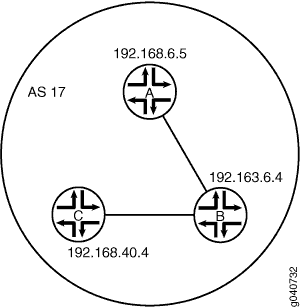
In the sample network, the devices in AS 17 are fully meshed in the group internal-peers. The devices have loopback addresses 192.168.6.5, 192.163.6.4, and 192.168.40.4.
Figure 1 shows a typical network with internal peer sessions.
Figure 1: Typical Network with IBGP Sessions
Configuration
CLI Quick Configuration
To quickly configure this example, copy the following commands, paste them into a text file, remove any line breaks, change any details necessary to match your network configuration, and then copy and paste the commands into the CLI at the [edit] hierarchy level.
Device A
Device B
Device C
Configuring Device A
Step-by-Step Procedure
The following example requires you to navigate various levels in the configuration hierarchy. For information about navigating the CLI, see Using the CLI Editor in Configuration Mode in the CLI User Guide.
To configure internal BGP peer sessions on Device A:
- Configure the interfaces.[edit interfaces ge-0/1/0 unit 1]user@A# set description to-Buser@A# set family inet address 10.10.10.1/30
[edit interfaces]user@A# set lo0 unit 1 family inet address 192.168.6.5/32 - Configure BGP.
The neighbor statements are included for both Device B and Device C, even though Device A is not directly connected to Device C.
[edit protocols bgp group internal-peers]user@A# set type internaluser@A# set description “connections to B and C”user@A# set local-address 192.168.6.5user@A# set export send-directuser@A# set neighbor 192.163.6.4user@A# set neighbor 192.168.40.4 - Configure OSPF.[edit protocols ospf area 0.0.0.0]user@A# set interface lo0.1 passiveuser@A# set interface ge-0/1/0.1
- Configure a policy that accepts direct routes.
Other useful options for this scenario might be to accept routes learned through OSPF or local routes.
[edit policy-options policy-statement send-direct term 2]user@A# set from protocol directuser@A# set then accept - Configure the router ID and the AS number.[edit routing-options]user@A# set router-id 192.168.6.5user@A# set autonomous-system 17
Results
From configuration mode, confirm your configuration by entering the show interfaces, show policy-options, show protocols, and show routing-options commands. If the output does not display the intended configuration, repeat the instructions in this example to correct the configuration.
If you are done configuring the device, enter commit from configuration mode.
Configuring Device B
Step-by-Step Procedure
The following example requires that you navigate various levels in the configuration hierarchy. For information about navigating the CLI, see Using the CLI Editor in Configuration Mode.
To configure internal BGP peer sessions on Device B:
- Configure the interfaces.[edit interfaces ge-0/1/0 unit 2]user@B# set description to-Auser@B# set family inet address 10.10.10.2/30
[edit interfaces ge-0/1/1]user@B# set unit 5 description to-Cuser@B# set unit 5 family inet address 10.10.10.5/30
[edit interfaces]user@B# set lo0 unit 2 family inet address 192.163.6.4/32 - Configure BGP.
The neighbor statements are included for both Device B and Device C, even though Device A is not directly connected to Device C.
[edit protocols bgp group internal-peers]user@B# set type internaluser@B# set description “connections to A and C”user@B# set local-address 192.163.6.4user@B# set export send-directuser@B# set neighbor 192.168.40.4user@B# set neighbor 192.168.6.5 - Configure OSPF.[edit protocols ospf area 0.0.0.0]user@B# set interface lo0.2 passiveuser@B# set interface ge-0/1/0.2user@B# set interface ge-0/1/1.5
- Configure a policy that accepts direct routes.
Other useful options for this scenario might be to accept routes learned through OSPF or local routes.
[edit policy-options policy-statement send-direct term 2]user@B# set from protocol directuser@B# set then accept - Configure the router ID and the AS number.[edit routing-options]user@B# set router-id 192.163.6.4user@B# set autonomous-system 17
Results
From configuration mode, confirm your configuration by entering the show interfaces, show policy-options, show protocols, and show routing-options commands. If the output does not display the intended configuration, repeat the instructions in this example to correct the configuration.
If you are done configuring the device, enter commit from configuration mode.
Configuring Device C
Step-by-Step Procedure
The following example requires you to navigate various levels in the configuration hierarchy. For information about navigating the CLI, see Using the CLI Editor in Configuration Mode in the CLI User Guide.
To configure internal BGP peer sessions on Device C:
- Configure the interfaces.[edit interfaces ge-0/1/0 unit 6]user@C# set description to-Buser@C# set family inet address 10.10.10.6/30
[edit interfaces]user@C# set lo0 unit 3 family inet address 192.168.40.4/32 - Configure BGP.
The neighbor statements are included for both Device B and Device C, even though Device A is not directly connected to Device C.
[edit protocols bgp group internal-peers]user@C# set type internaluser@C# set description “connections to A and B”user@C# set local-address 192.168.40.4user@C# set export send-directuser@C# set neighbor 192.163.6.4user@C# set neighbor 192.168.6.5 - Configure OSPF.[edit protocols ospf area 0.0.0.0]user@C# set interface lo0.3 passiveuser@C# set interface ge-0/1/0.6
- Configure a policy that accepts direct routes.
Other useful options for this scenario might be to accept routes learned through OSPF or local routes.
[edit policy-options policy-statement send-direct term 2]user@C# set from protocol directuser@C# set then accept - Configure the router ID and the AS number.[edit routing-options]user@C# set router-id 192.168.40.4user@C# set autonomous-system 17
Results
From configuration mode, confirm your configuration by entering the show interfaces, show policy-options, show protocols, and show routing-options commands. If the output does not display the intended configuration, repeat the instructions in this example to correct the configuration.
If you are done configuring the device, enter commit from configuration mode.
Verification
Confirm that the configuration is working properly.
- Verifying BGP Neighbors
- Verifying BGP Groups
- Verifying BGP Summary Information
- Verifying That BGP Routes Are Installed in the Routing Table
Verifying BGP Neighbors
Purpose
Verify that BGP is running on configured interfaces and that the BGP session is active for each neighbor address.
Action
From operational mode, enter the show bgp neighbor command.
user@A> show bgp neighborPeer: 192.163.6.4+179 AS 17 Local: 192.168.6.5+58852 AS 17
Type: Internal State: Established Flags: Sync
Last State: OpenConfirm Last Event: RecvKeepAlive
Last Error: None
Export: [ send-direct ]
Options: Preference LocalAddress Refresh
Local Address: 192.168.6.5 Holdtime: 90 Preference: 170
Number of flaps: 0
Peer ID: 192.163.6.4 Local ID: 192.168.6.5 Active Holdtime: 90
Keepalive Interval: 30 Peer index: 0
BFD: disabled, down
NLRI for restart configured on peer: inet-unicast
NLRI advertised by peer: inet-unicast
NLRI for this session: inet-unicast
Peer supports Refresh capability (2)
Restart time configured on the peer: 120
Stale routes from peer are kept for: 300
Restart time requested by this peer: 120
NLRI that peer supports restart for: inet-unicast
NLRI that restart is negotiated for: inet-unicast
NLRI of received end-of-rib markers: inet-unicast
NLRI of all end-of-rib markers sent: inet-unicast
Peer supports 4 byte AS extension (peer-as 17)
Peer does not support Addpath
Table inet.0 Bit: 10000
RIB State: BGP restart is complete
Send state: in sync
Active prefixes: 0
Received prefixes: 3
Accepted prefixes: 3
Suppressed due to damping: 0
Advertised prefixes: 2
Last traffic (seconds): Received 25 Sent 19 Checked 67
Input messages: Total 2420 Updates 4 Refreshes 0 Octets 46055
Output messages: Total 2411 Updates 2 Refreshes 0 Octets 45921
Output Queue[0]: 0
Peer: 192.168.40.4+179 AS 17 Local: 192.168.6.5+56466 AS 17
Type: Internal State: Established Flags: Sync
Last State: OpenConfirm Last Event: RecvKeepAlive
Last Error: None
Export: [ send-direct ]
Options: Preference LocalAddress Refresh
Local Address: 192.168.6.5 Holdtime: 90 Preference: 170
Number of flaps: 0
Peer ID: 192.168.40.4 Local ID: 192.168.6.5 Active Holdtime: 90
Keepalive Interval: 30 Peer index: 1
BFD: disabled, down
NLRI for restart configured on peer: inet-unicast
NLRI advertised by peer: inet-unicast
NLRI for this session: inet-unicast
Peer supports Refresh capability (2)
Restart time configured on the peer: 120
Stale routes from peer are kept for: 300
Restart time requested by this peer: 120
NLRI that peer supports restart for: inet-unicast
NLRI that restart is negotiated for: inet-unicast
NLRI of received end-of-rib markers: inet-unicast
NLRI of all end-of-rib markers sent: inet-unicast
Peer supports 4 byte AS extension (peer-as 17)
Peer does not support Addpath
Table inet.0 Bit: 10000
RIB State: BGP restart is complete
Send state: in sync
Active prefixes: 0
Received prefixes: 2
Accepted prefixes: 2
Suppressed due to damping: 0
Advertised prefixes: 2
Last traffic (seconds): Received 7 Sent 21 Checked 24
Input messages: Total 2412 Updates 2 Refreshes 0 Octets 45867
Output messages: Total 2409 Updates 2 Refreshes 0 Octets 45883
Output Queue[0]: 0Verifying BGP Groups
Purpose
Verify that the BGP groups are configured correctly.
Action
From operational mode, enter the show bgp group command.
user@A> show bgp groupGroup Type: Internal AS: 17 Local AS: 17 Name: internal-peers Index: 0 Flags: <Export Eval> Export: [ send-direct ] Holdtime: 0 Total peers: 2 Established: 2 192.163.6.4+179 192.168.40.4+179 inet.0: 0/5/5/0 Groups: 1 Peers: 2 External: 0 Internal: 2 Down peers: 0 Flaps: 0 Table Tot Paths Act Paths Suppressed History Damp State Pending inet.0 5 0 0 0 0 0
Verifying BGP Summary Information
Purpose
Verify that the BGP configuration is correct.
Action
From operational mode, enter the show bgp summary command.
user@A> show bgp summaryGroups: 1 Peers: 2 Down peers: 0 Table Tot Paths Act Paths Suppressed History Damp State Pending inet.0 5 0 0 0 0 0 Peer AS InPkt OutPkt OutQ Flaps Last Up/Dwn State|#Active/Received/Accepted/Damped... 192.163.6.4 17 2441 2432 0 0 18:18:52 0/3/3/0 0/0/0/0 192.168.40.4 17 2432 2430 0 0 18:18:48 0/2/2/0 0/0/0/0
Verifying That BGP Routes Are Installed in the Routing Table
Purpose
Verify that the export policy configuration is causing the BGP routes to be installed in the routing tables of the peers.
Action
From operational mode, enter the show route protocol bgp command.
user@A> show route protocol bgpinet.0: 7 destinations, 12 routes (7 active, 0 holddown, 0 hidden)
+ = Active Route, - = Last Active, * = Both
10.10.10.0/30 [BGP/170] 07:09:57, localpref 100, from 192.163.6.4
AS path: I
> to 10.10.10.2 via ge-0/1/0.1
10.10.10.4/30 [BGP/170] 07:09:57, localpref 100, from 192.163.6.4
AS path: I
> to 10.10.10.2 via ge-0/1/0.1
[BGP/170] 07:07:12, localpref 100, from 192.168.40.4
AS path: I
> to 10.10.10.2 via ge-0/1/0.1
192.163.6.4/32 [BGP/170] 07:09:57, localpref 100, from 192.163.6.4
AS path: I
> to 10.10.10.2 via ge-0/1/0.1
192.168.40.4/32 [BGP/170] 07:07:12, localpref 100, from 192.168.40.4
AS path: I
> to 10.10.10.2 via ge-0/1/0.1Related Documentation
- ACX Series
- Understanding Internal BGP Peering Sessions
- BGP Configuration Overview
- J Series
- BGP Configuration Overview
- M Series
- Understanding Internal BGP Peering Sessions
- BGP Configuration Overview
- MX Series
- Understanding Internal BGP Peering Sessions
- BGP Configuration Overview
- SRX Series
- BGP Configuration Overview
- T Series
- Understanding Internal BGP Peering Sessions
- Additional Information
- Routing Policy Configuration Guide