Related Documentation
- J Series
- Routing Policies Configuration Overview
- Understanding Damping Parameters
- M Series
- Routing Policies Configuration Overview
- Understanding Damping Parameters
- MX Series
- Understanding Damping Parameters
- SRX Series
- Routing Policies Configuration Overview
- Understanding Damping Parameters
- T Series
- Routing Policies Configuration Overview
- Understanding Damping Parameters
Example: Configuring Damping Parameters
This example shows how to configure damping parameters.
Requirements
Before you begin, configure router interfaces and configure routing protocols, as explained in Routing Policies Configuration Overview.
Overview
This example has three routing devices. Device R2 has external BGP (EBGP) connections with Device R1 and Device R3.
Device R1 and Device R3 have some static routes configured for testing purposes, and these static routes are advertised through BGP to Device R2.
Device R2 damps routes received from Device R1 and Device R3 according to these criteria:
- Damp all prefixes with a mask length equal to or greater than 17 more aggressively than routes with a mask length between 9 and 16.
- Damp routes with a mask length between 0 and 8, inclusive, less than routes with a mask length greater than 8.
- Do not damp the 10.128.0.0/9 prefix at all.
The routing policy is evaluated when routes are being exported from the routing table into the forwarding table. Only the active routes are exported from the routing table.
Figure 1 shows the sample network.
Figure 1: BGP Flap Damping Topology
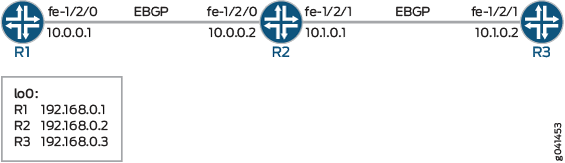
CLI Quick Configuration shows the configuration for all of the devices in Figure 1.
The section Step-by-Step Procedure describes the steps on Device R2.
Configuration
CLI Quick Configuration
To quickly configure this example, copy the following commands, paste them into a text file, remove any line breaks, change any details necessary to match your network configuration, and then copy and paste the commands into the CLI at the [edit] hierarchy level.
Device R1
Device R2
Device R3
Step-by-Step Procedure
The following example requires you to navigate various levels in the configuration hierarchy. For information about navigating the CLI, see Using the CLI Editor in Configuration Mode in the CLI User Guide.
To configure damping parameters:
Specify the routes to dampen and associate each group of routes with a group name.
[edit interfaces]user@R2# set fe-1/2/0 unit 0 family inet address 10.0.0.2/30user@R2# set fe-1/2/1 unit 0 family inet address 10.1.0.1/30user@R2# set lo0 unit 0 family inet address 192.168.0.2/32- Configure the BGP neighbors.[edit protocols bgp group ext]user@R2# set type externaluser@R2# set neighbor 10.0.0.1 peer-as 100user@R2# set neighbor 10.1.0.2 peer-as 300
Create and configure the damping parameter groups.
[edit policy-options]user@R2# set damping aggressive half-life 30user@R2# set damping aggressive suppress 2500user@R2# set damping timid half-life 5user@R2# set damping dry disableConfigure the damping policy.
[edit policy-options policy-statement damp term 1]user@R2# set from route-filter 10.128.0.0/9 exact damping dryuser@R2# set from route-filter 0.0.0.0/0 prefix-length-range /0-/8 damping timiduser@R2# set from route-filter 0.0.0.0/0 prefix-length-range /17-/32 damping aggressiveEnable damping for BGP.
[edit protocols bgp]user@R2# set dampingApply the policy as an import policy for the BGP neighbor.
[edit protocols bgp group ext]user@R2# set import damp
Note: You can refer to the same routing policy one or more times in the same or different import statements.
- Configure an export policy.[edit policy-options policy-statement send-direct term 1]user@R2# set from protocol directuser@R2# set then accept
- Apply the export policy.[edit protocols bgp group ext]user@R2# set export send-direct
- Configure the autonomous system (AS) number.user@R2# set routing-options autonomous-system 200
Results
Confirm your configuration by entering the show interfaces, show protocols, show policy-options, and show routing-optionscommands from configuration mode. If the output does not display the intended configuration, repeat the configuration instructions in this example to correct it.
If you are done configuring the device, enter commit from configuration mode.
Verification
Confirm that the configuration is working properly.
Causing Some Routes to Flap
Purpose
To verify your route flap damping policy, some routes must flap. Having a live Internet feed almost guarantees that a certain number of route flaps will be present. If you have control over a remote system that is advertising the routes, you can modify the advertising router's policy to effect the advertisement and withdrawal of all routes or of a given prefix. In a test environment, you can cause routes to flap by clearing the BGP neighbors or by restarting the routing process on the BGP neighbors, as shown here.
Action
From operational mode on Device R1 and Device R3, enter the restart routing command.
 | Caution: Use this command cautiously in a production network. |
user@R1> restart routingR1 started, pid 10474
user@R3> restart routingR3 started, pid 10478
Meaning
On Device R2, all of the routes from the neighbors are withdrawn and readvertised.
Checking the Route Flaps
Purpose
View the number of neighbor flaps.
Action
From operational mode, enter the show bgp summary command.
user@R2> show bgp summary
Groups: 1 Peers: 2 Down peers: 0
Table          Tot Paths  Act Paths Suppressed    History Damp State    Pending
inet.0
                      12          1         11          0         11          0
Peer                     AS      InPkt     OutPkt    OutQ   Flaps Last Up/Dwn State|#Active/Received/Accepted/Damped...
10.0.0.1                100         10         10       0       4        2:50 0/9/0/9              0/0/0/0
10.1.0.2                300         10         10       0       4        2:53 1/3/1/2              0/0/0/0
Meaning
This output was captured after the routing process was restarted on Device R2’s neighbors four times.
Verifying Route Flap Damping
Purpose
Verify that routes are being hidden due to damping.
Action
From operational mode, enter the show route damping suppressed command.
user@R2> show route damping suppressed
inet.0: 15 destinations, 17 routes (6 active, 0 holddown, 11 hidden)
+ = Active Route, - = Last Active, * = Both

0.0.0.0/0           [BGP ] 00:00:12, localpref 100
                      AS path: 100 I, validation-state: unverified
                    > to 10.0.0.1 via fe-1/2/0.0
10.0.0.0/9          [BGP ] 00:00:12, localpref 100
                      AS path: 100 I, validation-state: unverified
                    > to 10.0.0.1 via fe-1/2/0.0
10.0.0.0/30         [BGP ] 00:00:12, localpref 100
                      AS path: 100 I, validation-state: unverified
                    > to 10.0.0.1 via fe-1/2/0.0
10.1.0.0/30         [BGP ] 00:00:15, localpref 100
                      AS path: 300 I, validation-state: unverified
                    > to 10.1.0.2 via fe-1/2/1.0
10.224.0.0/11       [BGP ] 00:00:12, localpref 100
                      AS path: 100 I, validation-state: unverified
                    > to 10.0.0.1 via fe-1/2/0.0
172.16.0.0/16       [BGP ] 00:00:12, localpref 100
                      AS path: 100 I, validation-state: unverified
                    > to 10.0.0.1 via fe-1/2/0.0
172.16.128.0/17     [BGP ] 00:00:12, localpref 100
                      AS path: 100 I, validation-state: unverified
                    > to 10.0.0.1 via fe-1/2/0.0
172.16.192.0/20     [BGP ] 00:00:12, localpref 100
                      AS path: 100 I, validation-state: unverified
                    > to 10.0.0.1 via fe-1/2/0.0
192.168.0.1/32      [BGP ] 00:00:12, localpref 100
                      AS path: 100 I, validation-state: unverified
                    > to 10.0.0.1 via fe-1/2/0.0
192.168.0.3/32      [BGP ] 00:00:15, localpref 100
                      AS path: 300 I, validation-state: unverified
                    > to 10.1.0.2 via fe-1/2/1.0
224.0.0.0/7         [BGP ] 00:00:12, localpref 100
                      AS path: 100 I, validation-state: unverified
                    > to 10.0.0.1 via fe-1/2/0.0
Meaning
The output shows some routing instability. 11 routes are hidden due to damping.
Displaying the Details of a Damped Route
Purpose
Display the details of damped routes provides useful information.
Action
From operational mode, enter the show route damping suppressed 172.16.192.0/20 detail command.
user@R2> show route damping suppressed 172.16.192.0/20
detail
inet.0: 15 destinations, 17 routes (6 active, 0 holddown, 11 hidden)
172.16.192.0/20 (1 entry, 0 announced)
         BGP                 /-101
                Next hop type: Router, Next hop index: 758
                Address: 0x9414484
                Next-hop reference count: 9
                Source: 10.0.0.1
                Next hop: 10.0.0.1 via fe-1/2/0.0, selected
                Session Id: 0x100201
                State: <Hidden Ext>
                Local AS:   200 Peer AS:   100
                Age: 52
                Validation State: unverified
                Task: BGP_100.10.0.0.1+55922
                AS path: 100 I
                Localpref: 100
                Router ID: 192.168.0.1
                Merit (last update/now): 4278/4196
                damping-parameters: aggressive
                Last update:       00:00:52 First update:       01:01:55
                Flaps: 8
                Suppressed. Reusable in:       01:14:40
                Preference will be: 170
Meaning
This output indicates that the displayed route has a mask length that is equal to or greater than /17, and confirms that it has been correctly mapped to the aggressive damping profile. You can also see the route’s current (and last) figure of merit value, and when the route is expected to become active if it remains stable.
Verifying the Default Damping Parameters Are in Effect
Purpose
Locating a damped route with a /16 mask confirms that the default parameters are in effect
Action
From operational mode, enter the show route damping suppressed detail | match 0/16 command.
user@R2> show route damping suppressed detail
| match 0/16
172.16.0.0/16 (1 entry, 0 announced)
user@R2> show route damping suppressed 172.16.0.0/16
detail
inet.0: 15 destinations, 17 routes (6 active, 0 holddown, 11 hidden)
172.16.0.0/16 (1 entry, 0 announced)
         BGP                 /-101
                Next hop type: Router, Next hop index: 758
                Address: 0x9414484
                Next-hop reference count: 9
                Source: 10.0.0.1
                Next hop: 10.0.0.1 via fe-1/2/0.0, selected
                Session Id: 0x100201
                State: <Hidden Ext>
                Local AS:   200 Peer AS:   100
                Age: 1:58
                Validation State: unverified
                Task: BGP_100.10.0.0.1+55922
                AS path: 100 I
                Localpref: 100
                Router ID: 192.168.0.1
                Merit (last update/now): 3486/3202
                Default damping parameters used
                Last update:       00:01:58 First update:       01:03:01
                Flaps: 8
                Suppressed. Reusable in:       00:31:40
                Preference will be: 170
Meaning
/16 routes are not impacted by the custom damping rules. Therefore, the default damping rules are in effect.
To repeat, the custom rules are as follows:
- Damp all prefixes with a mask length equal to or greater than 17 more aggressively than routes with a mask length between 9 and 16.
- Damp routes with a mask length between 0 and 8, inclusive, less than routes with a mask length greater than 8.
- Do not damp the 10.128.0.0/9 prefix at all.
Filtering the Damping Information
Purpose
Use OR groupings or cascaded piping to simplify the determination of what damping profile is being used for routes with a given mask length.
Action
From operational mode, enter the show route damping suppressed command.
user@R2> show route damping suppressed detail
| match "0 announced | damp"
0.0.0.0/0 (1 entry, 0 announced)
                damping-parameters: timid
10.0.0.0/9 (1 entry, 0 announced)
                Default damping parameters used
                damping-parameters: aggressive
                damping-parameters: aggressive
10.224.0.0/11 (1 entry, 0 announced)
                Default damping parameters used
172.16.0.0/16 (1 entry, 0 announced)
                Default damping parameters used
172.16.128.0/17 (1 entry, 0 announced)
                damping-parameters: aggressive
172.16.192.0/20 (1 entry, 0 announced)
                damping-parameters: aggressive
192.168.0.1/32 (1 entry, 0 announced)
                damping-parameters: aggressive
192.168.0.3/32 (1 entry, 0 announced)
                damping-parameters: aggressive
224.0.0.0/7 (1 entry, 0 announced)
                damping-parameters: timid
Meaning
When you are satisfied that your EBGP routes are correctly associated with a damping profile, you can issue the clear bgp damping operational mode command to restore an active status to your damped routes, which will return your connectivity to normal operation.
Related Documentation
- J Series
- Routing Policies Configuration Overview
- Understanding Damping Parameters
- M Series
- Routing Policies Configuration Overview
- Understanding Damping Parameters
- MX Series
- Understanding Damping Parameters
- SRX Series
- Routing Policies Configuration Overview
- Understanding Damping Parameters
- T Series
- Routing Policies Configuration Overview
- Understanding Damping Parameters