Related Documentation
- ACX Series
- Understanding RIPng Import Policies
- M Series
- Understanding RIPng Import Policies
- MX Series
- Understanding RIPng Import Policies
- T Series
- Understanding RIPng Import Policies
Example: Applying Policies to RIPng Routes Imported from Neighbors
This example shows how to configure an import policy in a RIPng network.
Requirements
No special configuration beyond device initialization is required before configuring this example.
Overview
In this example, Device R2 has several extra loopback interface addresses configured to simulate additional networks.
Device R1 has an import policy that accepts the fe80::/64 and 2001:db8::/64 routes and rejects all other routes. This means that the extra networks advertised by Device R2 are not accepted into Device R1’s routing table.
An export policy is also shown because an export policy is required as part of the minimum configuration for RIPng.
Figure 1 shows the topology used in this example.
Figure 1: RIPng Import Policy Network Topology
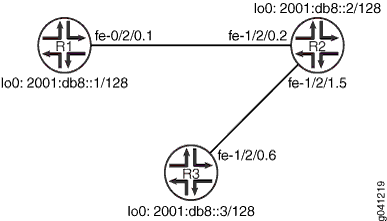
CLI Quick Configuration shows the configuration for all of the devices in Figure 1. The section Step-by-Step Procedure describes the steps on Device R1.
Configuration
CLI Quick Configuration
To quickly configure this example, copy the following commands, paste them into a text file, remove any line breaks, change any details necessary to match your network configuration, and then copy and paste the commands into the CLI at the [edit] hierarchy level.
Device R1
Device R2
Device R3
Step-by-Step Procedure
The following example requires you to navigate various levels in the configuration hierarchy. For information about navigating the CLI, see Using the CLI Editor in Configuration Mode in the CLI User Guide.
To configure a RIPng import policy:
- Configure the network interfaces.
This example shows multiple loopback interface addresses to simulate attached networks.
[edit interfaces]user@R1# set fe-1/2/0 unit 1 description to-R2user@R1# set fe-1/2/0 unit 1 family inet6 address 2001:db8:0:1::/64 eui-64
user@R1# set lo0 unit 1 family inet6 address 2001:db8::1/128 - Create the RIPng group and add the interface.
To configure RIPng in Junos OS, you must configure a group that contains the interfaces on which RIPng is enabled. You do not need to enable RIPng on the loopback interface.
[edit protocols ripng group ripng-group]user@R1# set neighbor fe-1/2/0.1 - Create the routing policy to advertise both direct and
RIPng-learned routes.[edit policy-options policy-statement advertise-routes-through-ripng term 1]user@R1# set from protocol directuser@R1# set from protocol ripnguser@R1# set then accept
- Apply the routing policy.
In Junos OS, you can only apply RIPng export policies at the group level.
[edit protocols ripng group ripng-group]user@R1# set export advertise-routes-through-ripng - Configure the import policy. [edit policy-options policy-statement ripng-import]user@R1# set term 1 from route-filter fe80::/64 orlongeruser@R1# set term 1 from route-filter 2001:db8::/64 orlongeruser@R1# set term 1 then acceptuser@R1# set term 2 then reject
- Apply the import policy.[edit protocols ripng group ripng-group]user@R1# set neighbor fe-1/2/0.1 import ripng-import
Results
From configuration mode, confirm your configuration by entering the show interfaces, show protocols, and show policy-options commands. If the output does not display the intended configuration, repeat the configuration instructions in this example to correct it.
If you are done configuring the device, enter commit from configuration mode.
Verification
Confirm that the configuration is working properly.
- Looking at the Neighbor Addresses for Device R2
- Looking at the Routes That Device R2 Is Advertising to Device R1
- Looking at the Routes That Device R1 Is Receiving from Device R2
- Checking the Routing Table
Looking at the Neighbor Addresses for Device R2
Purpose
Determine the neighbor address that Device R2 is using for Device R1.
Action
From operational mode, enter the show ripng neighbor command.
user@R2> show ripng neighbor fe-1/2/0.2
                    Source                           Dest               In
Neighbor     State  Address                          Address  Send Recv Met
--------     -----  -------                          -------  ---- ---- ---
fe-1/2/0.2      Up fe80::2a0:a514:0:24c              ff02::9  yes  yes  1
Meaning
Device R2 is using the fe80::2a0:a514:0:24c address to send routes to Device R1.
Looking at the Routes That Device R2 Is Advertising to Device R1
Purpose
Verify that Device R2 is sending the expected routes.
Action
From operational mode, enter the show route advertising-protocol ripng command.
user@R2> show route advertising-protocol ripng fe80::2a0:a514:0:24cinet6.0: 17 destinations, 18 routes (17 active, 0 holddown, 0 hidden)
+ = Active Route, - = Last Active, * = Both
2001:db8::2/128 *[Direct/0] 3d 22:00:34
> via lo0.2
2001:db8::3/128 *[RIPng/100] 3d 21:47:00, metric 2, tag 0
> to fe80::2a0:a514:0:64c via fe-1/2/1.5
2001:db8:0:2::/64 *[Direct/0] 3d 22:00:34
> via fe-1/2/0.2
2001:db8:0:3::/64 *[Direct/0] 3d 22:00:34
> via fe-1/2/1.5
2001:db8:0:4::/64 *[RIPng/100] 3d 21:47:00, metric 2, tag 0
> to fe80::2a0:a514:0:64c via fe-1/2/1.5
2002:db7::2/128 *[Direct/0] 00:29:05
> via lo0.2
2002:db8::2/128 *[Direct/0] 00:31:49
> via lo0.2
2002:db9::2/128 *[Direct/0] 00:29:05
> via lo0.2Meaning
Device R2 is sending the extra loopback interface /128 routes to Device R1.
Looking at the Routes That Device R1 Is Receiving from Device R2
Purpose
Verify that Device R1 is receiving the expected routes.
Action
From operational mode, enter the show route receive-protocol ripng command.
user@R1> show route receive-protocol ripng fe80::2a0:a514:0:24c
inet6.0: 9 destinations, 9 routes (9 active, 0 holddown, 0 hidden)
+ = Active Route, - = Last Active, * = Both

2001:db8::2/128    *[RIPng/100] 3d 21:55:49, metric 2, tag 0
                    > to fe80::2a0:a514:0:24c via fe-1/2/0.1
2001:db8::3/128    *[RIPng/100] 3d 21:55:46, metric 3, tag 0
                    > to fe80::2a0:a514:0:24c via fe-1/2/0.1
Meaning
The output shows that the extra loopback interface addresses are excluded.
Checking the Routing Table
Purpose
Verify that the routing table is populated with the expected routes.
Action
From operational mode, enter the show route protocol ripng command.
user@R1> show route protocol ripnginet6.0: 9 destinations, 9 routes (9 active, 0 holddown, 0 hidden)
+ = Active Route, - = Last Active, * = Both
2001:db8::2/128 *[RIPng/100] 3d 22:01:40, metric 2, tag 0
> to fe80::2a0:a514:0:24c via fe-1/2/0.1
2001:db8::3/128 *[RIPng/100] 3d 22:01:37, metric 3, tag 0
> to fe80::2a0:a514:0:24c via fe-1/2/0.1
ff02::9/128 *[RIPng/100] 00:00:08, metric 1
MultiRecvMeaning
The output shows that the routes have been learned from Device R2 and Device R3.
If you delete or deactivate the import policy, the routing table contains the extra loopback interface routes.
Related Documentation
- ACX Series
- Understanding RIPng Import Policies
- M Series
- Understanding RIPng Import Policies
- MX Series
- Understanding RIPng Import Policies
- T Series
- Understanding RIPng Import Policies