Related Documentation
- ACX Series
- Example: Configuring a Basic Set of Static Routes
- J Series
- Example: Configuring a Basic Set of Static Routes
- Example: Configuring Static Routes Between Logical Systems Within the Same Router
- M Series
- Example: Configuring a Basic Set of Static Routes
- Example: Configuring Static Routes Between Logical Systems Within the Same Router
- MX Series
- Example: Configuring a Basic Set of Static Routes
- Example: Configuring Static Routes Between Logical Systems Within the Same Router
- PTX Series
- Example: Configuring Static Routes Between Logical Systems Within the Same Router
- SRX Series
- Example: Configuring a Basic Set of Static Routes
- Example: Configuring Static Routes Between Logical Systems Within the Same Router
- T Series
- Example: Configuring a Basic Set of Static Routes
- Example: Configuring Static Routes Between Logical Systems Within the Same Router
Example: Configuring IPv6 Static Routes
This example shows how to configure static routes when the interfaces have IPv6 addresses.
Requirements
In this example, no special configuration beyond device initialization is required.
Overview
There are many practical applications for static routes. Static routing is often used at the network edge to support attachment to stub networks, which, given their single point of entry and egress, are well suited to the simplicity of a static route. In Junos OS, static routes have a global preference of 5. Static routes are activated if the specified next hop is reachable.
In this example, you configure a static default route of ::/0, using a next-hop address 2001:db8:0:1:2a0:a502:0:1da.
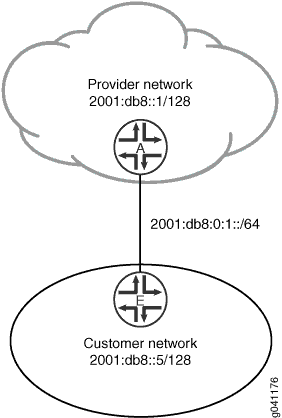
For demonstration purposes, some loopback interfaces are configured on Device A and Device E. These loopback interfaces provide addresses to ping and thus verify that the static routes are working.
Figure 1 shows the sample network.
Figure 1: Customer Routes Connected to a Service Provider
Configuration
CLI Quick Configuration
To quickly configure this example, copy the following commands, paste them into a text file, remove any line breaks, change any details necessary to match your network configuration, and then copy and paste the commands into the CLI at the [edit] hierarchy level.
Device A
Device E
Step-by-Step Procedure
The following example requires you to navigate various levels in the configuration hierarchy. For information about navigating the CLI, see Using the CLI Editor in Configuration Mode in the CLI User Guide.
To configure basic static routes:
- On Device A, configure the interfaces.[edit interfaces]set interfaces fe-1/2/0 unit 1 description to-Eset interfaces fe-1/2/0 unit 1 family inet6 address 2001:db8:0:1:2a0:a502:0:1da/64
set interfaces lo0 unit 1 family inet6 address 2001:db8::1/128 primaryset interfaces lo0 unit 1 family inet6 address 2001:db8::2/128set interfaces lo0 unit 1 family inet6 address 2001:db8::3/128 - On Device A, create a static route to Device E’s
loopback address and set the next-hop address.
This ensures that Device A has a route back to Device E.
[edit routing-options]set rib inet6.0 static route 2001:db8::5/128 next-hop 2001:db8:0:1:2a0:a502:0:19da - If you are done configuring Device A, commit the configuration.[edit interfaces]user@A# commit
- On Device E, configure the interfaces.[edit]set interfaces fe-1/2/0 unit 25 description to-Aset interfaces fe-1/2/0 unit 25 family inet6 address 2001:db8:0:1:2a0:a502:0:19da/64set interfaces lo0 unit 5 family inet6 address 2001:db8::5/128
- On Device E, create a static default route and set the
next-hop address.[edit routing-options]set routing-options rib inet6.0 static route ::/0 next-hop 2001:db8:0:1:2a0:a502:0:1da
- If you are done configuring Device E, commit the configuration.[edit]user@E# commit
Results
Confirm your configuration by issuing the show interfaces and show routing-options commands. If the output does not display the intended configuration, repeat the instructions in this example to correct the configuration.
Device A
Device E
Verification
Confirm that the configuration is working properly.
Checking the Routing Tables
Purpose
Make sure that the static routes appear in the routing tables of Device A and Device E.
Action
user@A> show route protocol staticinet6.0: 9 destinations, 9 routes (9 active, 0 holddown, 0 hidden)
+ = Active Route, - = Last Active, * = Both
2001:db8::5/128 *[Static/5] 00:27:46
> to 2001:db8:0:1:2a0:a502:0:19da via fe-1/2/0.1
user@E> show route protocol staticinet6.0: 7 destinations, 7 routes (7 active, 0 holddown, 0 hidden)
+ = Active Route, - = Last Active, * = Both
::/0 *[Static/5] 00:19:11
> to 2001:db8:0:1:2a0:a502:0:1da via fe-1/2/0.25Meaning
The static routes are in the routing tables.
Pinging the Remote Addresses
Purpose
Verify that the static routes are working.
From Device A, ping one of the loopback interface addresses on Device E.
From Device E, ping one of the loopback interface addresses on Device A.
Action
user@A> ping 2001:db8::5 PING6(56=40+8+8 bytes) 2001:db8:0:1:2a0:a502:0:1da --> 2001:db8::5 16 bytes from 2001:db8::5, icmp_seq=0 hlim=64 time=1.790 ms 16 bytes from 2001:db8::5, icmp_seq=1 hlim=64 time=1.529 ms 16 bytes from 2001:db8::5, icmp_seq=2 hlim=64 time=1.531 ms
user@E> ping 2001:db8::3PING6(56=40+8+8 bytes) 2001:db8:0:1:2a0:a502:0:19da --> 2001:db8::3 16 bytes from 2001:db8::3, icmp_seq=0 hlim=64 time=2.146 ms 16 bytes from 2001:db8::3, icmp_seq=1 hlim=64 time=1.964 ms 16 bytes from 2001:db8::3, icmp_seq=2 hlim=64 time=1.550 ms
Related Documentation
- ACX Series
- Example: Configuring a Basic Set of Static Routes
- J Series
- Example: Configuring a Basic Set of Static Routes
- Example: Configuring Static Routes Between Logical Systems Within the Same Router
- M Series
- Example: Configuring a Basic Set of Static Routes
- Example: Configuring Static Routes Between Logical Systems Within the Same Router
- MX Series
- Example: Configuring a Basic Set of Static Routes
- Example: Configuring Static Routes Between Logical Systems Within the Same Router
- PTX Series
- Example: Configuring Static Routes Between Logical Systems Within the Same Router
- SRX Series
- Example: Configuring a Basic Set of Static Routes
- Example: Configuring Static Routes Between Logical Systems Within the Same Router
- T Series
- Example: Configuring a Basic Set of Static Routes
- Example: Configuring Static Routes Between Logical Systems Within the Same Router