Related Documentation
- ACX Series
- Example: Configuring Static Route Preferences and Qualified Next Hops
- Understanding BFD for Static Routes
- J Series
- Understanding BFD for Static Routes
- Verifying the Static Route Configuration
- M Series
- Example: Configuring Static Route Preferences and Qualified Next Hops
- Understanding BFD for Static Routes
- MX Series
- Example: Configuring Static Route Preferences and Qualified Next Hops
- Understanding BFD for Static Routes
- QFX Series standalone switches
- Understanding BFD for Static Routes
- SRX Series
- Understanding BFD for Static Routes
- Verifying the Static Route Configuration
- T Series
- Example: Configuring Static Route Preferences and Qualified Next Hops
- Understanding BFD for Static Routes
Example: Enabling BFD on Qualified Next Hops in Static Routes
This example shows how to configure a static route with multiple possible next hops. Each next hop has Bidirectional Forwarding Detection (BFD) enabled.
Requirements
In this example, no special configuration beyond device initialization is required.
Overview
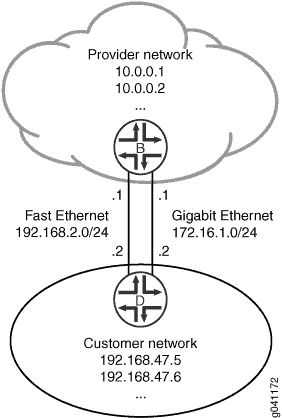
In this example, Device B has the static route 192.168.47.0/24 with two possible next hops. The two next hops are defined using two qualified-next-hop statements. Each next hop has BFD enabled.
BFD is also enabled on Device D because BFD must be enabled on both ends of the connection.
A next hop is included in the routing table if the BFD session is up. The next hop is removed from the routing table if the BFD session is down.
See Figure 1.
Figure 1: BFD Enabled on Qualified Next Hops
Configuration
CLI Quick Configuration
To quickly configure this example, copy the following commands, paste them into a text file, remove any line breaks, change any details necessary to match your network configuration, and then copy and paste the commands into the CLI at the [edit] hierarchy level.
Device B
Device D
Step-by-Step Procedure
The following example requires that you navigate various levels in the configuration hierarchy. For instructions on how to do that, see Using the CLI Editor in Configuration Mode in the CLI User Guide.
To configure a static route with two possible next hops, both with BFD enabled:
- On Device B, configure the interfaces.[edit interfaces fe-0/1/0]user@B# set unit 2 description secondary-B->Duser@B# set unit 2 family inet address 192.168.2.1/24
[edit interfaces ge-1/2/0]user@B# set unit 0 description B->Duser@B# set unit 0 family inet address 172.16.1.1/24 - On Device B, configure the static route with two next
hops, both with BFD enabled.[edit routing-options static route 192.168.47.0/24]user@B# set qualified-next-hop 192.168.2.2 bfd-liveness-detection minimum-interval 60user@B# set qualified-next-hop 172.16.1.2 bfd-liveness-detection minimum-interval 60
- On Device D, configure the interfaces.[edit interfaces fe-0/1/0]user@D# set unit 3 description secondary-D->Buser@D# set unit 3 family inet address 192.168.2.2/24
[edit interfaces ge-1/2/0]user@D# set unit 1 description D->Buser@D# set unit 1 family inet address 172.16.1.2/24 - On Device D, configure a BFD-enabled default static route
with two next hops to the provider network.
In this case, BFD is enabled on the route, not on the next hops.
[edit routing-options static route 0.0.0.0/0]user@D# set qualified-next-hop 192.168.2.1user@D# set qualified-next-hop 172.16.1.1user@D# set bfd-liveness-detection minimum-interval 60
Results
Confirm your configuration by issuing the show interfaces and show routing-options commands. If the output does not display the intended configuration, repeat the instructions in this example to correct the configuration.
If you are done configuring the devices, enter commit from configuration mode.
Verification
Confirm that the configuration is working properly.
- Checking the Routing Tables
- Verifying the BFD Sessions
- Removing BFD from Device D
- Removing BFD from One Next Hop
Checking the Routing Tables
Purpose
Make sure that the static route appears in the routing table on Device B with two possible next hops.
Action
user@B> show route 192.168.47.0 extensiveinet.0: 5 destinations, 5 routes (5 active, 0 holddown, 0 hidden)
192.168.47.0/24 (1 entry, 1 announced)
TSI:
KRT in-kernel 192.168.47.0/24 -> {192.168.2.2}
*Static Preference: 5
Next hop type: Router
Address: 0x9334010
Next-hop reference count: 1
Next hop: 172.16.1.2 via ge-1/2/0.0
Next hop: 192.168.2.2 via fe-0/1/0.2, selected
State: <Active Int Ext>
Age: 9
Task: RT
Announcement bits (1): 3-KRT
AS path: I
Meaning
Both next hops are listed. The next hop 192.168.2.2 is the selected route.
Verifying the BFD Sessions
Purpose
Make sure that the BFD sessions are up.
Action
user@B> show bfd session
                                          Detect   Transmit
Address          State     Interface      Time     Interval  Multiplier
172.16.1.2       Up        ge-1/2/0.0     0.720     0.240        3
192.168.2.2      Up        fe-0/1/0.2     0.720     0.240        3

2 sessions, 2 clients
Cumulative transmit rate 8.3 pps, cumulative receive rate 8.3 pps
Meaning
The output shows that the BFD sessions are up.
Removing BFD from Device D
Purpose
Demonstrate what happens when the BFD session is down for both next hops.
Action
- Deactivate BFD on Device D.[edit routing-options static route 0.0.0.0/0]user@D# deactivate bfd-liveness-detectionuser@D# commit
- Rerun the show bfd session command on Device
B.
user@B> show bfd sessionDetect Transmit Address State Interface Time Interval Multiplier 172.16.1.2 Down ge-1/2/0.0 3.000 1.000 3 192.168.2.2 Down fe-0/1/0.2 3.000 1.000 3 2 sessions, 2 clients Cumulative transmit rate 2.0 pps, cumulative receive rate 2.0 pps - Rerun the show route 192.168.47.0 command on
Device B.
user@B> show route 192.168.47.0
Meaning
As expected, when the BFD sessions are down, the static route is removed from the routing table.
Removing BFD from One Next Hop
Purpose
Demonstrate what happens when only one next hop has BFD enabled.
Action
- If it is not already deactivated, deactivate BFD on Device
D.[edit routing-options static route 0.0.0.0/0]user@D# deactivate bfd-liveness-detectionuser@D# commit
- Deactivate BFD on one of the next hops on Device B.[edit routing-options static route 192.168.47.0/24 qualified-next-hop 172.16.1.2]user@B# deactivate bfd-liveness-detectionuser@B# commit
- Rerun the show bfd session command on Device
B.
user@B> show bfd sessionDetect Transmit Address State Interface Time Interval Multiplier 192.168.2.2 Down fe-0/1/0.2 3.000 1.000 3 - Rerun the show route 192.168.47.0 extensive command on Device B.
user@B> show route 192.168.47.0 extensiveinet.0: 5 destinations, 5 routes (5 active, 0 holddown, 0 hidden) 192.168.47.0/24 (1 entry, 1 announced) TSI: KRT in-kernel 192.168.47.0/24 -> {172.16.1.2} *Static Preference: 5 Next hop type: Router, Next hop index: 624 Address: 0x92f0178 Next-hop reference count: 3 Next hop: 172.16.1.2 via ge-1/2/0.0, selected State: <Active Int Ext> Age: 2:36 Task: RT Announcement bits (1): 3-KRT AS path: I
Meaning
As expected, the BFD session is down for the 192.168.2.2 next hop. The 172.16.1.2 next hop remains in the routing table, and the route remains active, because BFD is not a condition for this next hop to remain valid.
Related Documentation
- ACX Series
- Example: Configuring Static Route Preferences and Qualified Next Hops
- Understanding BFD for Static Routes
- J Series
- Understanding BFD for Static Routes
- Verifying the Static Route Configuration
- M Series
- Example: Configuring Static Route Preferences and Qualified Next Hops
- Understanding BFD for Static Routes
- MX Series
- Example: Configuring Static Route Preferences and Qualified Next Hops
- Understanding BFD for Static Routes
- QFX Series standalone switches
- Understanding BFD for Static Routes
- SRX Series
- Understanding BFD for Static Routes
- Verifying the Static Route Configuration
- T Series
- Example: Configuring Static Route Preferences and Qualified Next Hops
- Understanding BFD for Static Routes