Related Documentation
- ACX Series
- Understanding Aggregate Routes
- J Series
- Understanding Aggregate Routes
- M Series
- Understanding Aggregate Routes
- MX Series
- Understanding Aggregate Routes
- SRX Series
- Understanding Aggregate Routes
- T Series
- Understanding Aggregate Routes
Example: Summarizing Routes Through Route Aggregation
This example shows how to summarize routes by configuring aggregate routes.
Requirements
No special configuration beyond device initialization is required before configuring this example.
Overview
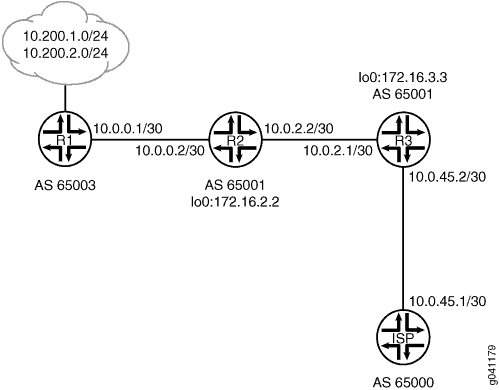
In this example, Device R1 is connected to customer networks 10.200.1.0/24 and 10.200.2.0/24. For demonstration purposes, these routes are represented in this example as loopback interfaces on Device R1.
Device R2 has static routes configured to reach Device R1’s customer networks. Device R2 also has a routing policy configured to advertise all static routes to its neighbors in autonomous system (AS) 65001.
Device R3 is in AS 65001 and receives the static routes from Device R2. When Device R3 sends information about these routes to Device ISP, the information is summarized as a single aggregate route. The aggregate route is 10.200.0.0/16.
Device ISP injects a default route into AS 65001, and Device R3 advertises the default route.
This example shows the configuration for all of the devices and the step-by-step configuration on Device R3.
Figure 1 shows the sample network.
Figure 1: Aggregate Route Advertised to an ISP
Configuration
CLI Quick Configuration
To quickly configure this example, copy the following commands, paste them into a text file, remove any line breaks, change any details necessary to match your network configuration, and then copy and paste the commands into the CLI at the [edit] hierarchy level.
Device R1
Device R2
Device R3
Device ISP
Step-by-Step Procedure
The following example requires you to navigate various levels in the configuration hierarchy. For information about navigating the CLI, see Using the CLI Editor in Configuration Mode in the CLI User Guide.
To configure Device R3:
- Configure the interfaces.[edit interfaces]user@R3# set ge-1/2/0 unit 3 description R3->R2user@R3# set ge-1/2/0 unit 3 family inet address 10.0.2.1/30
user@R3# set ge-1/2/1 unit 6 description R3->ISPuser@R3# set ge-1/2/1 unit 6 family inet address 10.0.45.2/30
user@R3# set lo0 unit 3 family inet address 172.16.3.3/32 Configure the AS number.
[edit routing-options]user@R3# set autonomous-system 65001- Configure the BGP session with the ISP device.[edit protocols bgp group ext]user@R3# set type externaluser@R3# set peer-as 65000user@R3# set neighbor 10.0.45.1
- Configure the BGP session with Device R2.[edit protocols bgp group int]user@R3# set type internaluser@R3# set local-address 172.16.3.3user@R3# set neighbor 172.16.2.2
Configure OSPF.
[edit protocols ospf area 0.0.0.0]user@R3# set interface ge-1/2/0.3user@R3# set interface lo0.3 passiveConfigure the aggregate route.
[edit routing-options]user@R3# set aggregate route 10.200.0.0/16Configure the routing policy to advertise the aggregate route.
The first term in this policy advertises the aggregate route. The second term prevents more specific routes from being advertised.
[edit policy-options policy-statement send-aggregate]user@R3# set term 1 from protocol aggregateuser@R3# set term 1 then acceptuser@R3# set term suppress-specific-routes from route-filter 10.200.0.0/16 longeruser@R3# set term suppress-specific-routes then rejectApply the aggregate route policy to the external BGP session with Device ISP.
[edit protocols bgp group ext]user@R3# set export send-aggregateConfigure the routing policy to advertise the default route from Device ISP.
[edit policy-options policy-statement send-default]user@R3# set from route-filter 0.0.0.0/0 exactuser@R3# set then acceptApply the default routing policy to OSPF.
[edit protocols ospf]user@R3# set export send-defaultIf you are done configuring the device, commit the configuration.
[edit]user@R3# commit
Results
Confirm your configuration by issuing the show interfaces, show protocols, show policy-options, and show routing-options commands. If the output does not display the intended configuration, repeat the instructions in this example to correct the configuration.
Verification
Confirm that the configuration is working properly.
- Verifying That Device R3 Has the Expected Routes
- Verifying That Device R3 Advertises the Aggregate Route to Device ISP
Verifying That Device R3 Has the Expected Routes
Purpose
Make sure that Device R3 has the specific static routes.
Action
user@R3>show route terse protocol bgpinet.0: 12 destinations, 12 routes (12 active, 0 holddown, 0 hidden) + = Active Route, - = Last Active, * = Both A Destination P Prf Metric 1 Metric 2 Next hop AS path * 0.0.0.0/0 B 170 100 >10.0.45.1 65000 I * 10.200.1.0/24 B 170 100 >10.0.2.2 I * 10.200.2.0/24 B 170 100 >10.0.2.2 I
Meaning
The output shows that Device R3 has the specific routes to the 10.200.1.0/24 and 10.200.2.0/24 networks.
Verifying That Device R3 Advertises the Aggregate Route to Device ISP
Purpose
Make sure that Device R3 does not send the specific static routes and only sends the summarized aggregate route.
Action
user@R3>show route advertising-protocol bgp
10.0.45.1
inet.0: 12 destinations, 12 routes (12 active, 0 holddown, 0 hidden) Prefix Nexthop MED Lclpref AS path * 10.200.0.0/16 Self I
Meaning
The output shows that Device R3 sends only the summarized route to Device ISP.
Related Documentation
- ACX Series
- Understanding Aggregate Routes
- J Series
- Understanding Aggregate Routes
- M Series
- Understanding Aggregate Routes
- MX Series
- Understanding Aggregate Routes
- SRX Series
- Understanding Aggregate Routes
- T Series
- Understanding Aggregate Routes