Related Documentation
Example: Configuring External BGP on Logical Systems with IPv6 Interfaces
This example shows how to configure external BGP (EBGP) point-to-point peer sessions on logical systems with IPv6 interfaces.
Requirements
In this example, no special configuration beyond device initialization is required.
Overview
Junos OS supports EBGP peer sessions by means of IPv6 addresses. An IPv6 peer session can be configured when an IPv6 address is specified in the neighbor statement. This example uses EUI-64 to generate IPv6 addresses that are automatically applied to the interfaces. An EUI-64 address is an IPv6 address that uses the IEEE EUI-64 format for the interface identifier portion of the address (the last 64 bits).
 | Note: Alternatively, you can configure EBGP sessions using manually assigned 128-bit IPv6 addresses. If you use 128-bit link-local addresses for the interfaces, you must include the local-interface statement. This statement is valid only for 128-bit IPv6 link-local addresses and is mandatory for configuring an IPv6 EBGP link-local peer session. Configuring EBGP peering using link-local addresses is only applicable for directly connected interfaces. There is no support for multihop peering. |
After your interfaces are up, you can use the show interfaces terse command to view the EUI-64-generated IPv6 addresses on the interfaces. You must use these generated addresses in the BGP neighbor statements. This example demonstrates the full end-to-end procedure.
In this example, Frame Relay interface encapsulation is applied to the logical tunnel (lt) interfaces. This is a requirement because only Frame Relay encapsulation is supported when IPv6 addresses are configured on the lt interfaces.
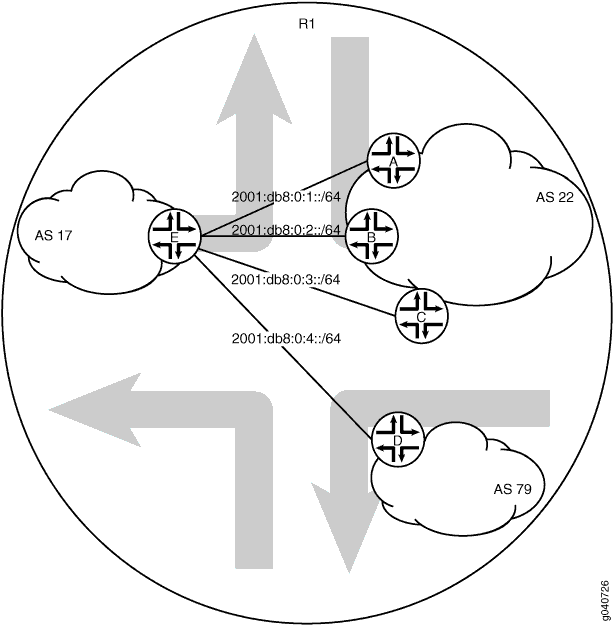
Figure 1 shows a network with BGP peer sessions. In the sample network, Router R1 has five logical systems configured. Device E in autonomous system (AS) 17 has BGP peer sessions to a group of peers called external-peers. Peers A, B, and C reside in AS 22. This example shows the step-by-step configuration on Logical System A and Logical System E.
Figure 1: Typical Network with BGP Peer Sessions
Configuration
CLI Quick Configuration
To quickly configure this example, copy the following commands, paste them into a text file, remove any line breaks, change any details necessary to match your network configuration, and then copy and paste the commands into the CLI at the [edit] hierarchy level.
Device A
Device B
Device C
Device D
Device E
Step-by-Step Procedure
The following example requires you to navigate various levels in the configuration hierarchy. For information about navigating the CLI, see Using the CLI Editor in Configuration Mode in the CLI User Guide.
To configure the BGP peer sessions:
- Run the show interfaces terse command to verify
that the physical router has a logical tunnel (lt) interface.
user@R1> show interfaces terseInterface Admin Link Proto Local Remote ... lt-0/1/0 up up ...
- On Logical System A, configure the interface encapsulation,
peer-unit number, and DLCI to reach Logical System E.user@R1> set cli logical-system ALogical system: A[edit]user@R1:A> editEntering configuration mode[edit]user@R1:A# edit interfaces[edit interfaces]user@R1:A# set lt-0/1/0 unit 1 encapsulation frame-relayuser@R1:A# set lt-0/1/0 unit 1 dlci 1user@R1:A# set lt-0/1/0 unit 1 peer-unit 25
- On Logical System A, configure the network address for the link
to Peer E, and configure a loopback interface.[edit interfaces]user@R1:A# set lt-0/1/0 unit 1 description to-Euser@R1:A# set lt-0/1/0 unit 1 family inet6 address 2001:db8:0:1::/64 eui-64user@R1:A# set lo0 unit 1 family inet6 address 2001:db8::1/128
- On Logical System E, configure the interface encapsulation,
peer-unit number, and DLCI to reach Logical System A.user@R1> set cli logical-system ELogical system: E[edit]user@R1:E> editEntering configuration mode[edit]user@R1:E# edit interfaces[edit interfaces]user@R1:E# set lt-0/1/0 unit 25 encapsulation frame-relayuser@R1:E# set lt-0/1/0 unit 25 dlci 1user@R1:E# set lt-0/1/0 unit 25 peer-unit 1
- On Logical System E, configure the network address for the link
to Peer A, and configure a loopback interface.[edit interfaces]user@R1:E# set lt-0/1/0 unit 25 description to-Auser@R1:E# set lt-0/1/0 unit 25 family inet6 address 2001:db8:0:1::/64 eui-64user@R1:E# set lo0 unit 5 family inet6 address 2001:db8::5/128
- Run the show interfaces terse command to see
the IPv6 addresses that are generated by EUI-64.
The 2001 addresses are used in this example in the BGP neighbor statements.
Note: The fe80 addresses are link-local addresses and are not used in this example.
user@R1:A> show interfaces terseInterface Admin Link Proto Local Remote Logical system: A betsy@tp8:A> show interfaces terse Interface Admin Link Proto Local Remote lt-0/1/0 lt-0/1/0.1 up up inet6 2001:db8:0:1:2a0:a502:0:1da/64 fe80::2a0:a502:0:1da/64 lo0 lo0.1 up up inet6 2001:db8::1 fe80::2a0:a50f:fc56:1dauser@R1:E> show interfaces terseInterface Admin Link Proto Local Remote lt-0/1/0 lt-0/1/0.25 up up inet6 2001:db8:0:1:2a0:a502:0:19da/64 fe80::2a0:a502:0:19da/64 lo0 lo0.5 up up inet6 2001:db8::5 fe80::2a0:a50f:fc56:1da - Repeat the interface configuration on the other logical systems.
Configuring the External BGP Sessions
Step-by-Step Procedure
The following example requires you to navigate various levels in the configuration hierarchy. For information about navigating the CLI, see Using the CLI Editor in Configuration Mode in the CLI User Guide.
To configure the BGP peer sessions:
- On Logical System A, create the BGP group, and add the
external neighbor address.[edit protocols bgp group external-peers]user@R1:A# set neighbor 2001:db8:0:1:2a0:a502:0:19da
- On Logical System E, create the BGP group, and add the
external neighbor address.[edit protocols bgp group external-peers]user@R1:E# set neighbor 2001:db8:0:1:2a0:a502:0:1da
- On Logical System A, specify the autonomous system (AS)
number of the external AS.[edit protocols bgp group external-peers]user@R1:A# set peer-as 17
- On Logical System E, specify the autonomous system (AS)
number of the external AS.[edit protocols bgp group external-peers]user@R1:E# set peer-as 22
- On Logical System A, set the peer type to EBGP.[edit protocols bgp group external-peers]user@R1:A# set type external
- On Logical System E, set the peer type to EBGP.[edit protocols bgp group external-peers]user@R1:E# set type external
- On Logical System A, set the autonomous system (AS) number
and router ID.
- On Logical System E, set the AS number and router ID.[edit routing-options]user@R1:E# set router-id 5.5.5.5user@R1:E# set autonomous-system 17
- Repeat these steps for Peers A, B, C, and D.
Results
From configuration mode, confirm your configuration by entering the show logical-systems command. If the output does not display the intended configuration, repeat the instructions in this example to correct the configuration.
If you are done configuring the device, enter commit from configuration mode.
Verification
Confirm that the configuration is working properly.
- Verifying BGP Neighbors
- Verifying BGP Groups
- Verifying BGP Summary Information
- Checking the Routing Table
Verifying BGP Neighbors
Purpose
Verify that BGP is running on configured interfaces and that the BGP session is active for each neighbor address.
Action
From operational mode, run the show bgp neighbor command.
user@R1:E> show bgp neighborPeer: 2001:db8:0:1:2a0:a502:0:1da+54987 AS 22 Local: 2001:db8:0:1:2a0:a502:0:19da+179 AS 17
Type: External State: Established Flags: <Sync>
Last State: OpenConfirm Last Event: RecvKeepAlive
Last Error: Open Message Error
Options: <Preference PeerAS Refresh>
Holdtime: 90 Preference: 170
Number of flaps: 0
Error: 'Open Message Error' Sent: 20 Recv: 0
Peer ID: 1.1.1.1 Local ID: 5.5.5.5 Active Holdtime: 90
Keepalive Interval: 30 Peer index: 0
BFD: disabled, down
Local Interface: lt-0/1/0.25
NLRI for restart configured on peer: inet6-unicast
NLRI advertised by peer: inet6-unicast
NLRI for this session: inet6-unicast
Peer supports Refresh capability (2)
Stale routes from peer are kept for: 300
Peer does not support Restarter functionality
NLRI that restart is negotiated for: inet6-unicast
NLRI of received end-of-rib markers: inet6-unicast
NLRI of all end-of-rib markers sent: inet6-unicast
Peer supports 4 byte AS extension (peer-as 22)
Peer does not support Addpath
Table inet6.0 Bit: 10000
RIB State: BGP restart is complete
Send state: in sync
Active prefixes: 0
Received prefixes: 0
Accepted prefixes: 0
Suppressed due to damping: 0
Advertised prefixes: 0
Last traffic (seconds): Received 7 Sent 18 Checked 81
Input messages: Total 1611 Updates 1 Refreshes 0 Octets 30660
Output messages: Total 1594 Updates 0 Refreshes 0 Octets 30356
Output Queue[0]: 0
Peer: 2001:db8:0:2:2a0:a502:0:6da+179 AS 22 Local: 2001:db8:0:2:2a0:a502:0:5da+55502 AS 17
Type: External State: Established Flags: <Sync>
Last State: OpenConfirm Last Event: RecvKeepAlive
Last Error: Open Message Error
Options: <Preference PeerAS Refresh>
Holdtime: 90 Preference: 170
Number of flaps: 0
Error: 'Open Message Error' Sent: 26 Recv: 0
Peer ID: 2.2.2.2 Local ID: 5.5.5.5 Active Holdtime: 90
Keepalive Interval: 30 Peer index: 2
BFD: disabled, down
Local Interface: lt-0/1/0.5
NLRI for restart configured on peer: inet6-unicast
NLRI advertised by peer: inet6-unicast
NLRI for this session: inet6-unicast
Peer supports Refresh capability (2)
Stale routes from peer are kept for: 300
Peer does not support Restarter functionality
NLRI that restart is negotiated for: inet6-unicast
NLRI of received end-of-rib markers: inet6-unicast
NLRI of all end-of-rib markers sent: inet6-unicast
Peer supports 4 byte AS extension (peer-as 22)
Peer does not support Addpath
Table inet6.0 Bit: 10000
RIB State: BGP restart is complete
Send state: in sync
Active prefixes: 0
Received prefixes: 0
Accepted prefixes: 0
Suppressed due to damping: 0
Advertised prefixes: 0
Last traffic (seconds): Received 15 Sent 8 Checked 8
Input messages: Total 1610 Updates 1 Refreshes 0 Octets 30601
Output messages: Total 1645 Updates 0 Refreshes 0 Octets 32417
Output Queue[0]: 0
Peer: 2001:db8:0:3:2a0:a502:0:ada+55983 AS 22 Local: 2001:db8:0:3:2a0:a502:0:9da+179 AS 17
Type: External State: Established Flags: <Sync>
Last State: OpenConfirm Last Event: RecvKeepAlive
Last Error: None
Options: <Preference PeerAS Refresh>
Holdtime: 90 Preference: 170
Number of flaps: 0
Peer ID: 3.3.3.3 Local ID: 5.5.5.5 Active Holdtime: 90
Keepalive Interval: 30 Peer index: 3
BFD: disabled, down
Local Interface: lt-0/1/0.9
NLRI for restart configured on peer: inet6-unicast
NLRI advertised by peer: inet6-unicast
NLRI for this session: inet6-unicast
Peer supports Refresh capability (2)
Stale routes from peer are kept for: 300
Peer does not support Restarter functionality
NLRI that restart is negotiated for: inet6-unicast
NLRI of received end-of-rib markers: inet6-unicast
NLRI of all end-of-rib markers sent: inet6-unicast
Peer supports 4 byte AS extension (peer-as 22)
Peer does not support Addpath
Table inet6.0 Bit: 10000
RIB State: BGP restart is complete
Send state: in sync
Active prefixes: 0
Received prefixes: 0
Accepted prefixes: 0
Suppressed due to damping: 0
Advertised prefixes: 0
Last traffic (seconds): Received 21 Sent 21 Checked 67
Input messages: Total 1610 Updates 1 Refreshes 0 Octets 30641
Output messages: Total 1587 Updates 0 Refreshes 0 Octets 30223
Output Queue[0]: 0
Peer: 2001:db8:0:4:2a0:a502:0:7da+49255 AS 79 Local: 2001:db8:0:4:2a0:a502:0:15da+179 AS 17
Type: External State: Established Flags: <Sync>
Last State: OpenConfirm Last Event: RecvKeepAlive
Last Error: None
Options: <Preference PeerAS Refresh>
Holdtime: 90 Preference: 170
Number of flaps: 0
Peer ID: 4.4.4.4 Local ID: 5.5.5.5 Active Holdtime: 90
Keepalive Interval: 30 Peer index: 1
BFD: disabled, down
Local Interface: lt-0/1/0.21
NLRI for restart configured on peer: inet6-unicast
NLRI advertised by peer: inet6-unicast
NLRI for this session: inet6-unicast
Peer supports Refresh capability (2)
Stale routes from peer are kept for: 300
Peer does not support Restarter functionality
NLRI that restart is negotiated for: inet6-unicast
NLRI of received end-of-rib markers: inet6-unicast
NLRI of all end-of-rib markers sent: inet6-unicast
Peer supports 4 byte AS extension (peer-as 79)
Peer does not support Addpath
Table inet6.0 Bit: 10000
RIB State: BGP restart is complete
Send state: in sync
Active prefixes: 0
Received prefixes: 0
Accepted prefixes: 0
Suppressed due to damping: 0
Advertised prefixes: 0
Last traffic (seconds): Received 6 Sent 17 Checked 25
Input messages: Total 1615 Updates 1 Refreshes 0 Octets 30736
Output messages: Total 1593 Updates 0 Refreshes 0 Octets 30337
Output Queue[0]: 0Meaning
IPv6 unicast network layer reachability information (NLRI) is being exchanged between the neighbors.
Verifying BGP Groups
Purpose
Verify that the BGP groups are configured correctly.
Action
From operational mode, run the show bgp group command.
user@R1:E> show bgp groupGroup Type: External Local AS: 17 Name: external-peers Index: 0 Flags: <> Holdtime: 0 Total peers: 4 Established: 4 2001:db8:0:1:2a0:a502:0:1da+54987 2001:db8:0:2:2a0:a502:0:6da+179 2001:db8:0:3:2a0:a502:0:ada+55983 2001:db8:0:4:2a0:a502:0:7da+49255 inet6.0: 0/0/0/0 Groups: 1 Peers: 4 External: 4 Internal: 0 Down peers: 0 Flaps: 0 Table Tot Paths Act Paths Suppressed History Damp State Pending inet6.0 0 0 0 0 0 0 inet6.2 0 0 0 0 0 0
Meaning
The group type is external, and the group has four peers.
Verifying BGP Summary Information
Purpose
Verify that the BGP that the peer relationships are established.
Action
From operational mode, run the show bgp summary command.
user@R1:E> show bgp summaryGroups: 1 Peers: 4 Down peers: 0 Table Tot Paths Act Paths Suppressed History Damp State Pending inet6.0 0 0 0 0 0 0 inet6.2 0 0 0 0 0 0 Peer AS InPkt OutPkt OutQ Flaps Last Up/Dwn State|#Active/Received/Accepted/Damped... 2001:db8:0:1:2a0:a502:0:1da 22 1617 1600 0 0 12:07:00 Establ inet6.0: 0/0/0/0 2001:db8:0:2:2a0:a502:0:6da 22 1616 1651 0 0 12:06:56 Establ inet6.0: 0/0/0/0 2001:db8:0:3:2a0:a502:0:ada 22 1617 1594 0 0 12:04:32 Establ inet6.0: 0/0/0/0 2001:db8:0:4:2a0:a502:0:7da 79 1621 1599 0 0 12:07:00 Establ inet6.0: 0/0/0/0
Meaning
The Down peers: 0 output shows that the BGP peers are in the established state.
Checking the Routing Table
Purpose
Verify that the inet6.0 routing table is populated with local and direct routes.
Action
From operational mode, run the show route command.
user@R1:E> show routeinet6.0: 15 destinations, 18 routes (15 active, 0 holddown, 0 hidden)
+ = Active Route, - = Last Active, * = Both
2001:db8::5/128 *[Direct/0] 12:41:18
> via lo0.5
2001:db8:0:1::/64 *[Direct/0] 14:40:01
> via lt-0/1/0.25
2001:db8:0:1:2a0:a502:0:19da/128
*[Local/0] 14:40:01
Local via lt-0/1/0.25
2001:db8:0:2::/64 *[Direct/0] 14:40:02
> via lt-0/1/0.5
2001:db8:0:2:2a0:a502:0:5da/128
*[Local/0] 14:40:02
Local via lt-0/1/0.5
2001:db8:0:3::/64 *[Direct/0] 14:40:02
> via lt-0/1/0.9
2001:db8:0:3:2a0:a502:0:9da/128
*[Local/0] 14:40:02
Local via lt-0/1/0.9
2001:db8:0:4::/64 *[Direct/0] 14:40:01
> via lt-0/1/0.21
2001:db8:0:4:2a0:a502:0:15da/128
*[Local/0] 14:40:01
Local via lt-0/1/0.21
fe80::/64 *[Direct/0] 14:40:02
> via lt-0/1/0.5
[Direct/0] 14:40:02
> via lt-0/1/0.9
[Direct/0] 14:40:01
> via lt-0/1/0.21
[Direct/0] 14:40:01
> via lt-0/1/0.25
fe80::2a0:a502:0:5da/128
*[Local/0] 14:40:02
Local via lt-0/1/0.5
fe80::2a0:a502:0:9da/128
*[Local/0] 14:40:02
Local via lt-0/1/0.9
fe80::2a0:a502:0:15da/128
*[Local/0] 14:40:01
Local via lt-0/1/0.21
fe80::2a0:a502:0:19da/128
*[Local/0] 14:40:01
Local via lt-0/1/0.25
fe80::2a0:a50f:fc56:1da/128
*[Direct/0] 12:41:18
> via lo0.5Meaning
The inet6.0 routing table contains local and direct routes. To populate the routing table with other types of routes, you must configure routing policies.