Related Documentation
Example: Removing Private AS Numbers from AS Paths
This example demonstrates the removal of a private AS number from the advertised AS path to avoid announcing the private AS number to the Internet.
Requirements
No special configuration beyond device initialization is required before you configure this example.
Overview
Service providers and enterprise networks use the remove-private statement to prevent advertising private AS numbers to the Internet. The remove-private statement works in the outbound direction. You configure the remove-private statement on a device that has a public AS number and that is connected to one or more devices that have private AS numbers. Generally, you would not configure this statement on a device that has a private AS number.
Figure 1 shows the sample topology.
Figure 1: Topology for Removing a Private AS from the Advertised AS Path
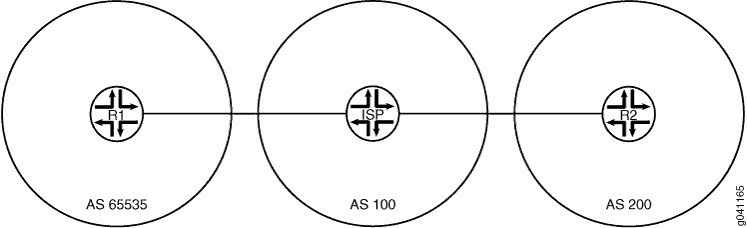
In this example, Device R1 is connected to its service provider using private AS number 65535. The example shows the remove-private statement configured on Device ISP to prevent Device R1’s private AS number from being announced to Device R2. Device R2 sees only the AS number of the service provider.
Configuration
CLI Quick Configuration
To quickly configure this example, copy the following commands, paste them into a text file, remove any line breaks, change any details necessary to match your network configuration, and then copy and paste the commands into the CLI at the [edit] hierarchy level.
Device R1
Device ISP
Device R2
Device ISP
Step-by-Step Procedure
The following example requires you to navigate various levels in the configuration hierarchy. For information about navigating the CLI, see Using the CLI Editor in Configuration Mode in the CLI User Guide.
To configure Device ISP:
- Configure the interfaces.[edit interfaces]user@ISP# set fe-1/2/0 unit 2 family inet address 192.168.10.10/24user@ISP# set fe-1/2/1 unit 3 family inet address 192.168.20.20/24user@ISP# set lo0 unit 2 family inet address 10.10.0.1/32
- Configure EBGP.[edit protocols bgp group ext]user@ISP# set type externaluser@ISP# set neighbor 192.168.10.1 peer-as 65535user@ISP# set neighbor 192.168.20.1 peer-as 200
- For the neighbor in autonomous system (AS) 200 (Device
R2), remove private AS numbers from the advertised AS paths.[edit protocols bgp group ext]user@ISP# set neighbor 192.168.20.1 remove-private
- Configure the AS number.[edit routing-options]user@ISP# set autonomous-system 100
Results
From configuration mode, confirm your configuration by entering the show interfaces, show protocols, and show routing-options commands. If the output does not display the intended configuration, repeat the instructions in this example to correct the configuration.
If you are done configuring the device, enter commit from configuration mode. Repeat the configuration on Device R1 and Device R2, changing the interface names and IP address, as needed, and adding the routing policy configuration.
Verification
Confirm that the configuration is working properly.
- Checking the Neighbor Status
- Checking the Routing Tables
- Checking the AS Path When the remove-private Statement Is Deactivated
Checking the Neighbor Status
Purpose
Make sure that Device ISP has the remove-private setting enabled in its neighbor session with Device R2.
Action
From operational mode, enter the show bgp neighbor 192.168.20.1 command.
user@ISP> show bgp neighbor 192.168.20.1Peer: 192.168.20.1+179 AS 200 Local: 192.168.20.20+60216 AS 100
Type: External State: Established Flags: <ImportEval Sync>
Last State: OpenConfirm Last Event: RecvKeepAlive
Last Error: None
Options: <Preference RemovePrivateAS PeerAS Refresh>
Holdtime: 90 Preference: 170
Number of flaps: 0
Peer ID: 10.10.20.1 Local ID: 10.10.0.1 Active Holdtime: 90
Keepalive Interval: 30 Peer index: 0
BFD: disabled, down
Local Interface: fe-1/2/1.3
NLRI for restart configured on peer: inet-unicast
NLRI advertised by peer: inet-unicast
NLRI for this session: inet-unicast
Peer supports Refresh capability (2)
Stale routes from peer are kept for: 300
Peer does not support Restarter functionality
NLRI that restart is negotiated for: inet-unicast
NLRI of received end-of-rib markers: inet-unicast
NLRI of all end-of-rib markers sent: inet-unicast
Peer supports 4 byte AS extension (peer-as 200)
Peer does not support Addpath
Table inet.0 Bit: 10001
RIB State: BGP restart is complete
Send state: in sync
Active prefixes: 1
Received prefixes: 3
Accepted prefixes: 2
Suppressed due to damping: 0
Advertised prefixes: 1
Last traffic (seconds): Received 10 Sent 16 Checked 55
Input messages: Total 54 Updates 3 Refreshes 0 Octets 1091
Output messages: Total 54 Updates 1 Refreshes 0 Octets 1118
Output Queue[0]: 0Meaning
The RemovePrivateAS option shows that Device ISP has the expected setting.
Checking the Routing Tables
Purpose
Make sure that the devices have the expected routes and AS paths.
Action
From operational mode, enter the show route protocol bgp command.
user@R1> show route protocol bgpinet.0: 5 destinations, 5 routes (5 active, 0 holddown, 0 hidden)
+ = Active Route, - = Last Active, * = Both
10.10.20.1/32 *[BGP/170] 00:28:57, localpref 100
AS path: 100 200 I
> to 192.168.10.10 via fe-1/2/0.1user@ISP> show route protocol bgp
inet.0: 7 destinations, 11 routes (7 active, 0 holddown, 2 hidden)
+ = Active Route, - = Last Active, * = Both

10.10.10.1/32      *[BGP/170] 00:29:40, localpref 100
                      AS path: 65535 I
                    > to 192.168.10.1 via fe-1/2/0.2
10.10.20.1/32      *[BGP/170] 00:29:36, localpref 100
                      AS path: 200 I
                    > to 192.168.20.1 via fe-1/2/1.3
192.168.10.0/24     [BGP/170] 00:29:40, localpref 100
                      AS path: 65535 I
                    > to 192.168.10.1 via fe-1/2/0.2
192.168.20.0/24     [BGP/170] 00:29:36, localpref 100
                      AS path: 200 I
                    > to 192.168.20.1 via fe-1/2/1.3
user@R2> show route protocol bgpinet.0: 5 destinations, 5 routes (5 active, 0 holddown, 0 hidden)
+ = Active Route, - = Last Active, * = Both
10.10.10.1/32 *[BGP/170] 00:29:53, localpref 100
AS path: 100 I
> to 192.168.20.20 via fe-1/2/0.4Meaning
Device ISP has the private AS number 65535 in its AS path to Device R1. However, Device ISP does not advertise this private AS number to Device R2. This is shown in the routing table of Device R2. Device R2’s path to Device R1 contains only the AS number for Device ISP.
Checking the AS Path When the remove-private Statement Is Deactivated
Purpose
Verify that without the remove-private statement, the private AS number appears in Device R2’s routing table.
Action
From configuration mode on Device ISP, enter the deactivate remove-private command and then recheck the routing table on Device R2.
user@R2> show route protocol bgpinet.0: 5 destinations, 5 routes (5 active, 0 holddown, 0 hidden)
+ = Active Route, - = Last Active, * = Both
10.10.10.1/32 *[BGP/170] 00:00:54, localpref 100
AS path: 100 65535 I
> to 192.168.20.20 via fe-1/2/0.4
Meaning
Private AS number 65535 appears in Device R2’s AS path to Device R1.