Related Documentation
- ACX Series
- Understanding External BGP Peering Sessions
- BGP Configuration Overview
- J Series
- Understanding External BGP Peering Sessions
- BGP Configuration Overview
- M Series
- Understanding External BGP Peering Sessions
- BGP Configuration Overview
- MX Series
- Understanding External BGP Peering Sessions
- BGP Configuration Overview
- SRX Series
- Understanding External BGP Peering Sessions
- BGP Configuration Overview
Example: Configuring BGP Prefix-Based Outbound Route Filtering
This example shows how to configure a Juniper Networks router to accept route filters from remote peers and perform outbound route filtering using the received filters.
Requirements
Before you begin:
- Configure the router interfaces.
- Configure an interior gateway protocol (IGP).
Overview
You can configure a BGP peer to accept route filters from remote peers and perform outbound route filtering using the received filters. By filtering out unwanted updates, the sending peer saves resources needed to generate and transmit updates, and the receiving peer saves resources needed to process updates. This feature can be useful, for example, in a virtual private network (VPN) in which subsets of customer edge (CE) devices are not capable of processing all the routes in the VPN. The CE devices can use prefix-based outbound route filtering to communicate to the provider edge (PE) routing device to transmit only a subset of routes, such as routes to the main data centers only.
The maximum number of prefix-based outbound route filters that a BGP peer can accept is 5000. If a remote peer sends more than 5000 outbound route filters to a peer address, the additional filters are discarded, and a system log message is generated.
You can configure interoperability for the routing device as a whole or for specific BGP groups or peers only.
Topology
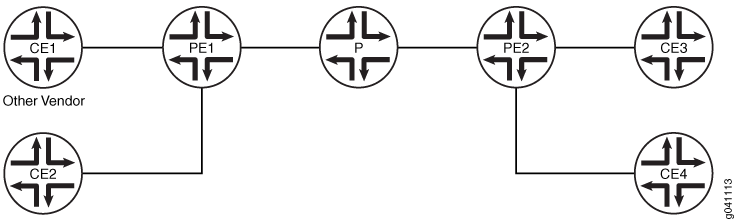
In the sample network, Device CE1 is a router from another vendor. The configuration shown in this example is on Juniper Networks Router PE1.
Figure 1 shows the sample network.
Figure 1: BGP Prefix-Based Outbound Route Filtering
Configuration
CLI Quick Configuration
To quickly configure this example, copy the following commands, paste them into a text file, remove any line breaks, change any details necessary to match your network configuration, and then copy and paste the commands into the CLI at the [edit] hierarchy level.
PE1
Step-by-Step Procedure
The following example requires that you navigate various levels in the configuration hierarchy. For information about navigating the CLI, see Using the CLI Editor in Configuration Mode in the CLI User Guide.
To configure Router PE1 to accept route filters from Device CE1 and perform outbound route filtering using the received filters:
- Configure the local autonomous system.[edit routing-options]user@PE1# set autonomous-system 65500
- Configure external peering with Device CE1.[edit protocols bgp group cisco-peers]user@PE1# set type externaluser@PE1# set description “to CE1”user@PE1# set local-address 192.168.165.58user@PE1# set peer-as 35user@PE1# set neighbor 192.168.165.56
- Configure Router PE1 to accept IPv4 route filters from
Device CE1 and perform outbound route filtering using the received
filters.[edit protocols bgp group cisco-peers]user@PE1# set outbound-route-filter prefix-based accept inet
- (Optional) Enable interoperability with routing devices
that use the vendor-specific compatibility code of 130 for outbound
route filters and the code type of 128.
The IANA standard code is 3, and the standard code type is 64.
[edit protocols bgp group cisco-peers]user@PE1# set outbound-route-filter bgp-orf-cisco-mode
Results
From configuration mode, confirm your configuration by entering the show protocols and show routing-options commands. If the output does not display the intended configuration, repeat the instructions in this example to correct the configuration.
If you are done configuring the device, enter commit from configuration mode.
Verification
Confirm that the configuration is working properly.
Verifying the Outbound Route Filter
Purpose
Display information about the prefix-based outbound route filter received from Device CE1.
Action
From operational mode, enter the show bgp neighbor orf detail command.
user@PE1> show bgp neighbor orf 192.168.165.56
detail
Peer: 192.168.165.56 Type: External
Group: cisco-peers
inet-unicast
Filter updates recv: 4 Immediate: 0
Filter: prefix-based receive
Updates recv: 4
Received filter entries:
seq 10 2.2.0.0/16 deny minlen 0 maxlen 0
seq 20 3.3.0.0/16 deny minlen 24 maxlen 0
seq 30 4.4.0.0/16 deny minlen 0 maxlen 28
seq 40 5.5.0.0/16 deny minlen 24 maxlen 28
Verifying the BGP Neighbor Mode
Purpose
Verify that the bgp-orf-cisco-mode setting is enabled for the peer by making sure that the ORFCiscoMode option is displayed in the show bgp neighbor command output.
Action
From operational mode, enter the show bgp neighbor command.
user@PE1> show bgp neighborPeer: 192.168.165.56 AS 35 Local: 192.168.165.58 AS 65500 Type: External State: Active Flags: <> Last State: Idle Last Event: Start Last Error: None Export: [ adv_stat ] Options: <Preference LocalAddress AddressFamily PeerAS Refresh> Options: <ORF ORFCiscoMode> Address families configured: inet-unicast Local Address: 192.168.165.58 Holdtime: 90 Preference: 170 Number of flaps: 0 Trace options: detail open detail refresh Trace file: /var/log/orf size 5242880 files 20
Related Documentation
- ACX Series
- Understanding External BGP Peering Sessions
- BGP Configuration Overview
- J Series
- Understanding External BGP Peering Sessions
- BGP Configuration Overview
- M Series
- Understanding External BGP Peering Sessions
- BGP Configuration Overview
- MX Series
- Understanding External BGP Peering Sessions
- BGP Configuration Overview
- SRX Series
- Understanding External BGP Peering Sessions
- BGP Configuration Overview