Related Documentation
- ACX Series
- Understanding BGP Path Selection
- J Series
- Understanding BGP Path Selection
- M Series
- Understanding BGP Path Selection
- MX Series
- Understanding BGP Path Selection
- PTX Series
- Understanding BGP Path Selection
- QFX Series
- Understanding BGP Path Selection
- SRX Series
- Understanding BGP Path Selection
- T Series
- Understanding BGP Path Selection
Example: Ignoring the AS Path Attribute When Selecting the Best Path
If multiple BGP routes to the same destination exist, BGP selects the best path based on the route attributes of the paths. One of the route attributes that affects the best-path decision is the length of the AS paths of each route. Routes with shorter AS paths are preferred over those with longer AS paths. Although not typically practical, some scenarios might require that the AS path length be ignored in the route selection process. This example shows how to configure a routing device to ignore the AS path attribute.
Requirements
No special configuration beyond device initialization is required before you configure this example.
Overview
On externally connected routing devices, the purpose of skipping the AS path comparison might be to force an external BGP (EBGP) versus internal BGP (IBGP) decision to remove traffic from your network as soon as possible. On internally connected routing devices, you might want your IBGP-only routers to default to the local externally connected gateway. The local IBGP-only (internal) routers skip the AS path comparison and move down the decision tree to use the closest interior gateway protocol (IGP) gateway (lowest IGP metric). Doing this might be an effective way to force these routers to use a LAN connection instead of their WAN connection.
 | Caution: When you include the as-path-ignore statement on a routing device in your network, you might need to include it on all other BGP-enabled devices in your network to prevent routing loops and convergence issues. This is especially true for IBGP path comparisons. |
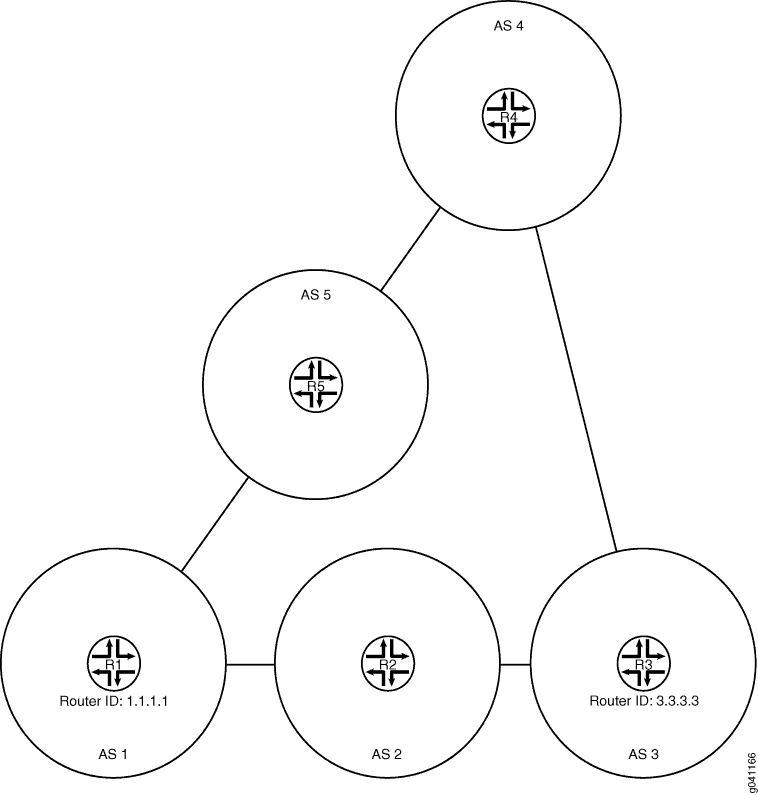
In this example, Device R2 is learning about the loopback interface address on Device R4 (4.4.4.4/32) from Device R1 and Device R3. Device R1 is advertising 4.4.4.4/32 with an AS-path of 1 5 4, and Device R3 is advertising 4.4.4.4/32 with an AS-path of 3 4. Device R2 selects the path for 4.4.4.4/32 from Device R3 as the best path because the AS path is shorter than the AS path from Device R1.
This example modifies the BGP configuration on Device R2 so that the AS-path length is not used in the best-path selection.
Device R1 has a lower router ID (1.1.1.1) than Device R3 (1.1.1.1). If all other path selection criteria are equal (or, as in this case, ignored), the route learned from Device R1 is used. Because the AS-path attribute is being ignored, the best path is toward Device R1 because of its lower router ID value.
Figure 1 shows the sample topology.
Figure 1: Topology for Ignoring the AS-Path Lengh
Configuration
CLI Quick Configuration
To quickly configure this example, copy the following commands, paste them into a text file, remove any line breaks, change any details necessary to match your network configuration, and then copy and paste the commands into the CLI at the [edit] hierarchy level.
Device R1
Device R2
Device R3
Device R4
Device R5
Configuring Device R2
Step-by-Step Procedure
The following example requires you to navigate various levels in the configuration hierarchy. For information about navigating the CLI, see Using the CLI Editor in Configuration Mode in the CLI User Guide.
To configure Device R2:
- Configure the interfaces.[edit interfaces]user@R2# set fe-1/2/0 unit 2 family inet address 192.168.10.2/24user@R2# set fe-1/2/1 unit 3 family inet address 192.168.20.2/24user@R2# set lo0 unit 2 family inet address 2.2.2.2/32
- Configure EBGP.[edit protocols bgp group ext]user@R2# set type externaluser@R2# set export send-directuser@R2# set export send-staticuser@R2# set export send-localuser@R2# set neighbor 192.168.10.1 peer-as 1user@R2# set neighbor 192.168.20.1 peer-as 3
- Configure the autonomous system (AS) path attribute to
be ignored in the Junos OS path selection algorithm.[edit protocols bgp]user@R2# set path-selection as-path-ignore
- Configure the routing policy.[edit policy-options]user@R2# set policy-statement send-direct term 1 from protocol directuser@R2# set policy-statement send-direct term 1 then acceptuser@R2# set policy-statement send-local term 1 from protocol localuser@R2# set policy-statement send-local term 1 then acceptuser@R2# set policy-statement send-static term 1 from protocol staticuser@R2# set policy-statement send-static term 1 then accept
- Configure some static routes.[edit routing-options static]user@R2# set route 192.168.50.0/24 next-hop 192.168.10.1user@R2# set route 192.168.40.0/24 next-hop 192.168.10.1user@R2# set route 192.168.30.0/24 next-hop 192.168.20.1
- Configure the autonomous system (AS) number and the router
ID.[edit routing-options]user@R2# set router-id 2.2.2.2user@R2# set autonomous-system 2
Results
From configuration mode, confirm your configuration by entering the show interfaces, show policy-options, show protocols, and show routing-options commands. If the output does not display the intended configuration, repeat the instructions in this example to correct the configuration.
If you are done configuring the device, enter commit from configuration mode. Repeat the configuration on the other devices in the network, changing the interface names and IP addresses, as needed.
Verification
Confirm that the configuration is working properly.
Checking the Neighbor Status
Purpose
Make sure that from Device R2, the active path to get to AS 4 is through AS 1 and AS 5, not through AS 3.
 | Note: To verify the functionality of the as-path-ignore statement, you might need to run the restart routing command to force reevaluation of the active path. This is because for BGP, if both paths are external, the Junos OS behavior is to prefer the currently active path. This behavior helps to minimize route-flapping. Use caution when restarting the routing protocol process in a production network. |
Action
From operational mode, enter the restart routing command.
user@R2> restart routingRouting protocols process started, pid 49396
From operational mode, enter the show route 4.4.4.4 protocol bgp command.
user@R2> show route 4.4.4.4 protocol bgpinet.0: 12 destinations, 25 routes (12 active, 0 holddown, 4 hidden)
+ = Active Route, - = Last Active, * = Both
4.4.4.4/32 *[BGP/170] 00:00:12, localpref 100
AS path: 1 5 4 I
> to 192.168.10.1 via fe-1/2/0.2
[BGP/170] 00:00:08, localpref 100
AS path: 3 4 I
> to 192.168.20.1 via fe-1/2/1.3Meaning
The asterisk (*) is next to the path learned from R1, meaning that this is the active path. The AS path for the active path is 1 5 4, which is longer than the AS path (3 4) for the nonactive path learned from Router R3.
Related Documentation
- ACX Series
- Understanding BGP Path Selection
- J Series
- Understanding BGP Path Selection
- M Series
- Understanding BGP Path Selection
- MX Series
- Understanding BGP Path Selection
- PTX Series
- Understanding BGP Path Selection
- QFX Series
- Understanding BGP Path Selection
- SRX Series
- Understanding BGP Path Selection
- T Series
- Understanding BGP Path Selection