Related Documentation
- ACX Series
- Example: Redistributing OSPF Routes into IS-IS
- J Series
- Example: Redistributing OSPF Routes into IS-IS
- M Series
- Default Routing Policies and Actions
- Routing Tables Affected by Routing Policies
- Configuring Dynamic Routing Policies
- Example: Redistributing OSPF Routes into IS-IS
- MX Series
- Example: Redistributing OSPF Routes into IS-IS
- PTX Series
- Default Routing Policies and Actions
- Routing Tables Affected by Routing Policies
- Configuring Dynamic Routing Policies
- QFX Series
- Example: Redistributing OSPF Routes into IS-IS
- SRX Series
- Example: Redistributing OSPF Routes into IS-IS
- T Series
- Default Routing Policies and Actions
- Routing Tables Affected by Routing Policies
- Configuring Dynamic Routing Policies
- Example: Redistributing OSPF Routes into IS-IS
Understanding Routing Policies
For some routing platform vendors, the flow of routes occurs between various protocols. If, for example, you want to configure redistribution from RIP to OSPF, the RIP process tells the OSPF process that it has routes that might be included for redistribution. In Junos OS, there is not much direct interaction between the routing protocols. Instead, there are central gathering points where all protocols install their routing information. These are the main unicast routing tables inet.0 and inet6.0.
From these tables, the routing protocols calculate the best route to each destination and place these routes in a forwarding table. These routes are then used to forward routing protocol traffic toward a destination, and they can be advertised to neighbors.
As shown in Figure 1, you use import routing policies to control which routes are placed in the routing table, and export routing policies to control which routes are advertised from the routing table to neighbors.
Figure 1: Importing and Exporting Routing Policies
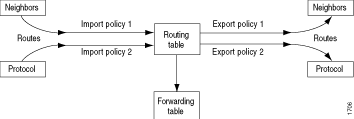
In general, the routing protocols place all their routes in the routing table and advertise a limited set of routes from the routing table. The general rules for handling the routing information between the routing protocols and the routing table are known as the routing policy framework.
The routing policy framework is composed of default rules for each routing protocol that determine which routes the protocol places in the routing table and advertises from the routing table. The default rules for each routing protocol are known as default routing policies.
You can create routing policies to preempt the default policies, which are always present. A routing policy is a mechanism in Junos OS that allows you to modify the routing policy framework to suit your needs. You can create and implement your own routing policies to do the following:
- Control which routes a routing protocol places in the routing table.
- Control which active routes a routing protocol advertises from the routing table. An active route is a route that is chosen from all routes in the routing table to reach a destination.
- Manipulate the route characteristics as a routing protocol places the route in the routing table or advertises the route from the routing table.
You can manipulate the route characteristics to control which route is selected as the active route to reach a destination. The active route is placed in the forwarding table and is used to forward traffic toward the route’s destination. In general, the active route is also advertised to a router’s neighbors.
To create a routing policy, you must define the policy and apply it. You define the policy by specifying the criteria that a route must match and the actions to perform if a match occurs. You then apply the policy to a routing protocol or to the forwarding table.
In Junos OS Release 9.5 and later, you can configure routing policies and certain routing policy objects in a dynamic database that is not subject to the same verification required by the standard configuration database. As a result, you can quickly commit these routing policies and policy objects, which can be referenced and applied in the standard configuration as needed. BGP is the only protocol to which you can apply routing policies that reference policies configured in the dynamic database. After a routing policy based on the dynamic database is configured and committed in the standard configuration, you can quickly make changes to existing routing policies by modifying policy objects in the dynamic database. Because Junos OS does not validate configuration changes to the dynamic database, when you use this feature, you should test and verify all configuration changes before committing them.
Related Documentation
- ACX Series
- Example: Redistributing OSPF Routes into IS-IS
- J Series
- Example: Redistributing OSPF Routes into IS-IS
- M Series
- Default Routing Policies and Actions
- Routing Tables Affected by Routing Policies
- Configuring Dynamic Routing Policies
- Example: Redistributing OSPF Routes into IS-IS
- MX Series
- Example: Redistributing OSPF Routes into IS-IS
- PTX Series
- Default Routing Policies and Actions
- Routing Tables Affected by Routing Policies
- Configuring Dynamic Routing Policies
- QFX Series
- Example: Redistributing OSPF Routes into IS-IS
- SRX Series
- Example: Redistributing OSPF Routes into IS-IS
- T Series
- Default Routing Policies and Actions
- Routing Tables Affected by Routing Policies
- Configuring Dynamic Routing Policies
- Example: Redistributing OSPF Routes into IS-IS