Pathfinder Applications
Note: † Internal applications are hidden from customers and partners. This is visible to you because you have logged into HPEs internal network.
Navigation
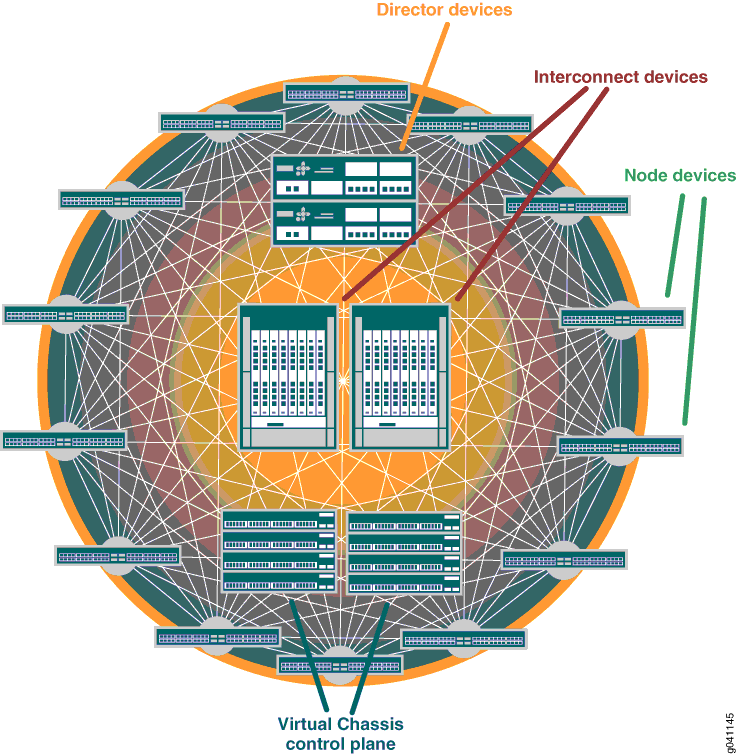
Table of Contents
Guide That Contains This Content
[+] Expand All
[-] Collapse All
Understanding Partitions
Partitions provide a way to allocate specified virtual and physical resources within your QFabric system. This topic covers:
QFabric System Default Partition
By default, all equipment and virtual resources in the QFabric system belong to the default partition. As a result, the QFabric system in its initial state has a single broadcast domain that is administered by a single main administrator. Figure 1 shows a topology with the default settings—a single collection that contains all the devices in the QFabric system.
Figure 1: QFabric System Topology - Default Partition
 | Note: The initial release of the QFabric system supports a single default partition. All equipment and resources belong to the default partition. |
A partition provides the following functions:
- Fault isolation and separation from other partitions at the control plane level.
- A separate configuration domain for the Node devices within the partition.
- A Layer 2 domain in which MAC learning takes place, and members of the same VLAN can communicate with each other. To provide network connectivity between partitions, you need to enable Layer 3 routing by way of a routed VLAN interface (RVI).