Pathfinder Applications
Note: † Internal applications are hidden from customers and partners. This is visible to you because you have logged into HPEs internal network.
Navigation
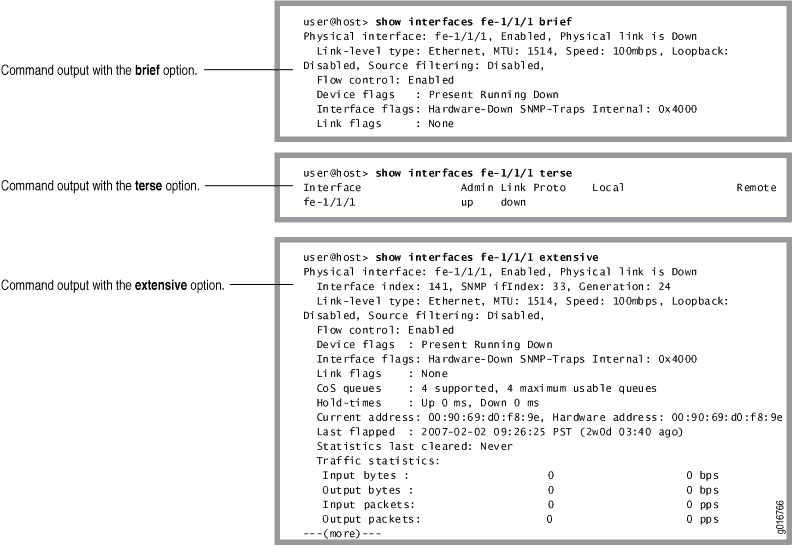
Table of Contents
Guide That Contains This Content
[+] Expand All
[-] Collapse All
Related Documentation
- ACX Series
- Overview of Junos OS CLI Operational Mode Commands
- Controlling the Scope of an Operational Mode Command
- EX Series
- Overview of Junos OS CLI Operational Mode Commands
- Controlling the Scope of an Operational Mode Command
- J Series
- Overview of Junos OS CLI Operational Mode Commands
- Controlling the Scope of an Operational Mode Command
- M Series
- Overview of Junos OS CLI Operational Mode Commands
- Controlling the Scope of an Operational Mode Command
- MX Series
- Overview of Junos OS CLI Operational Mode Commands
- Controlling the Scope of an Operational Mode Command
- PTX Series
- Overview of Junos OS CLI Operational Mode Commands
- Controlling the Scope of an Operational Mode Command
- QFX Series
- Overview of Junos OS CLI Operational Mode Commands
- T Series
- Overview of Junos OS CLI Operational Mode Commands
- Controlling the Scope of an Operational Mode Command
Understanding the Brief, Detail, Extensive, and Terse Options of Junos OS Operational Commands
The Junos OS operational mode commands can include brief, detail, extensive, or terse options. You can use these options to control the amount of information you want to view.
- Use the ? prompt to list options available for the command.
For example:
user@host> show interfaces fe-1/1/1 ?Possible completions: <[Enter]> Execute this command brief Display brief output descriptions Display interface description strings detail Display detailed output extensive Display extensive output media Display media information snmp-index SNMP index of interface statistics Display statistics and detailed output terse Display terse output | Pipe through a command
- Choose the option you wish to use with the command. (See Figure 1.)
Figure 1: Command Output Options
Related Documentation
- ACX Series
- Overview of Junos OS CLI Operational Mode Commands
- Controlling the Scope of an Operational Mode Command
- EX Series
- Overview of Junos OS CLI Operational Mode Commands
- Controlling the Scope of an Operational Mode Command
- J Series
- Overview of Junos OS CLI Operational Mode Commands
- Controlling the Scope of an Operational Mode Command
- M Series
- Overview of Junos OS CLI Operational Mode Commands
- Controlling the Scope of an Operational Mode Command
- MX Series
- Overview of Junos OS CLI Operational Mode Commands
- Controlling the Scope of an Operational Mode Command
- PTX Series
- Overview of Junos OS CLI Operational Mode Commands
- Controlling the Scope of an Operational Mode Command
- QFX Series
- Overview of Junos OS CLI Operational Mode Commands
- T Series
- Overview of Junos OS CLI Operational Mode Commands
- Controlling the Scope of an Operational Mode Command