Related Documentation
- ACX Series
- Entering and Exiting the Junos OS CLI Configuration Mode
- EX Series
- Entering and Exiting the Junos OS CLI Configuration Mode
- J Series
- Entering and Exiting the Junos OS CLI Configuration Mode
- M Series
- Entering and Exiting the Junos OS CLI Configuration Mode
- MX Series
- Entering and Exiting the Junos OS CLI Configuration Mode
- PTX Series
- Entering and Exiting the Junos OS CLI Configuration Mode
- T Series
- Entering and Exiting the Junos OS CLI Configuration Mode
Understanding Junos OS CLI Configuration Mode
You can configure all properties of Junos OS, including interfaces, general routing information, routing protocols, and user access, as well as several system hardware properties.
As described in Understanding the Junos OS CLI Modes, Commands, and Statement Hierarchies, a router configuration is stored as a hierarchy of statements. In configuration mode, you create the specific hierarchy of configuration statements that you want to use. When you have finished entering the configuration statements, you commit them, which activates the configuration on the router.
You can create the hierarchy interactively or you can create an ASCII text file that is loaded onto the router or switch and then committed.
This topic covers:
Configuration Mode Commands
Table 1 summarizes each CLI configuration mode command. The commands are organized alphabetically.
Table 1: Summary of Configuration Mode Commands
Command | Description |
|---|---|
activate | Remove the inactive: tag from a statement, effectively reading the statement or identifier to the configuration. Statements or identifiers that have been activated take effect when you next issue the commit command. |
annotate | Add comments to a configuration. You can add comments only at the current hierarchy level. |
commit | Commit the set of changes to the database and cause the changes to take operational effect. |
copy | Make a copy of an existing statement in the configuration. |
deactivate | Add the inactive: tag to a statement, effectively commenting out the statement or identifier from the configuration. Statements or identifiers marked as inactive do not take effect when you issue the commit command. |
delete | Delete a statement or identifier. All subordinate statements and identifiers contained within the specified statement path are deleted with it. |
edit | Move inside the specified statement hierarchy. If the statement does not exist, it is created. |
exit | Exit the current level of the statement hierarchy, returning to the level prior to the last edit command, or exit from configuration mode. The quit and exit commands are synonyms. |
extension | Manage configurations that are contributed by SDK application packages. Either display or delete user-defined configuration contributed by the named SDK application package. A configuration defined in any native Junos OS package is never deleted by the extension command. |
help | Display help about available configuration statements. |
insert | Insert an identifier into an existing hierarchy. |
load | Load a configuration from an ASCII configuration file or from terminal input. Your current location in the configuration hierarchy is ignored when the load operation occurs. |
quit | Exit the current level of the statement hierarchy, returning to the level prior to the last edit command, or exit from configuration mode. The quit and exit commands are synonyms. |
rename | Rename an existing configuration statement or identifier. |
replace | Replace identifiers or values in a configuration. |
rollback | Return to a previously committed configuration. The software saves the last 10 committed configurations, including the rollback number, date, time, and name of the user who issued the commit configuration command. |
run | Run a top-level CLI command without exiting from configuration mode. |
save | Save the configuration to an ASCII file. The contents of the current level of the statement hierarchy (and below) are saved, along with the statement hierarchy containing it. This allows a section of the configuration to be saved, while fully specifying the statement hierarchy. |
set | Create a statement hierarchy and set identifier values. This is similar to edit except that your current level in the hierarchy does not change. |
show | Display the current configuration. |
status | Display the users currently editing the configuration. |
top | Return to the top level of configuration command mode, which is indicated by the [edit] banner. |
up | Move up one level in the statement hierarchy. |
update | Update a private database. |
wildcard | Delete a statement or identifier. All subordinate statements and identifiers contained within the specified statement path are deleted with it. You can use regular expressions to specify a pattern. Based on this pattern, you search for items that contain these patterns and delete them. |
Configuration Statements and Identifiers
You can configure router or switch properties by including the corresponding statements in the configuration. Typically, a statement consists of a keyword, which is fixed text, and, optionally, an identifier. An identifier is an identifying name that you can define, such as the name of an interface or a username, which enables you and the CLI to differentiate among a collection of statements.
Table 2 describes top-level CLI configuration mode statements.
 | Note: The QFX3500 switch does not support the IS-IS, OSPF, BGP, LDP, MPLS, and RSVP protocols. |
Table 2: Configuration Mode Top-Level Statements
Statement | Description |
|---|---|
access | Configure the Challenge Handshake Authentication Protocol (CHAP). For information about the statements in this hierarchy, see the Junos OS System Basics Configuration Guide. |
accounting-options | Configure accounting statistics data collection for interfaces and firewall filters. For information about the statements in this hierarchy, see the Network Management Configuration Guide. |
chassis | Configure properties of the router chassis, including conditions that activate alarms and SONET/SDH framing and concatenation properties. For information about the statements in this hierarchy, see the Junos OS System Basics Configuration Guide. |
class-of-service | Configure class-of-service parameters. For information about the statements in this hierarchy, see the Junos OS Class of Service Configuration Guide. |
firewall | Define filters that select packets based on their contents. For information about the statements in this hierarchy, see the Routing Policy Configuration Guide. |
forwarding-options | Define forwarding options, including traffic sampling options. For information about the statements in this hierarchy, see the Junos® OS Network Interfaces. |
groups | Configure configuration groups. For information about statements in this hierarchy, see the Junos OS System Basics Configuration Guide. |
interfaces | Configure interface information, such as encapsulation, interfaces, virtual channel identifiers (VCIs), and data-link connection identifiers (DLCIs). For information about the statements in this hierarchy, see the Junos® OS Network Interfaces. |
policy-options | Define routing policies, which allow you to filter and set properties in incoming and outgoing routes. For information about the statements in this hierarchy, see the Routing Policy Configuration Guide. |
protocols | Configure routing protocols, including BGP, IS-IS, LDP, MPLS, OSPF, RIP, and RSVP. For information about the statements in this hierarchy, see the chapters that discuss how to configure the individual routing protocols in the Junos OS Routing Protocols Configuration Guide and the Junos OS MPLS Applications Configuration Guide. |
routing-instances | Configure multiple routing instances. For information about the statements in this hierarchy, see the Junos OS Routing Protocols Configuration Guide. |
routing-options | Configure protocol-independent routing options, such as static routes, autonomous system numbers, confederation members, and global tracing (debugging) operations to log. For information about the statements in this hierarchy, see the Junos OS Routing Protocols Configuration Guide. |
security | Configure IP Security (IPsec) services. For information about the statements in this hierarchy see the Junos OS System Basics Configuration Guide. |
snmp | Configure SNMP community strings, interfaces, traps, and notifications. For information about the statements in this hierarchy, see the Network Management Configuration Guide. |
system | Configure systemwide properties, including the hostname, domain name, Domain Name System (DNS) server, user logins and permissions, mappings between hostnames and addresses, and software processes. For information about the statements in this hierarchy, see the Junos OS System Basics Configuration Guide. |
For specific information on configuration statements, see the Junos OS configuration guides.
Configuration Statement Hierarchy
The Junos OS configuration consists of a hierarchy of statements. There are two types of statements: container statements, which are statements that contain other statements, and leaf statements, which do not contain other statements (see Figure 1). All of the container and leaf statements together form the configuration hierarchy.
Figure 1: Configuration Mode Hierarchy of Statements
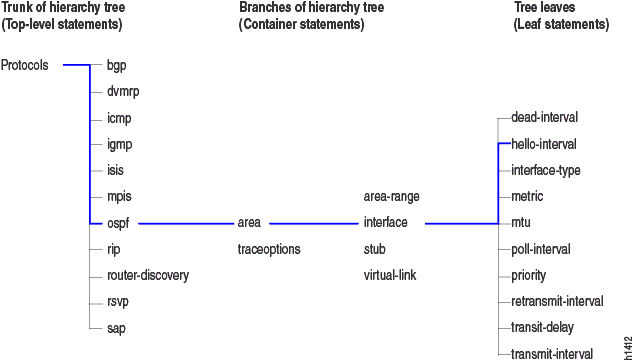
Each statement at the top level of the configuration hierarchy resides at the trunk (or root level) of a hierarchy tree. The top-level statements are container statements, containing other statements that form the tree branches. The leaf statements are the leaves of the hierarchy tree. An individual hierarchy of statements, which starts at the trunk of the hierarchy tree, is called a statement path. Figure 1 illustrates the hierarchy tree, showing a statement path for the portion of the protocol configuration hierarchy that configures the hello interval on an interface in an OSPF area.
The protocols statement is a top-level statement at the trunk of the configuration tree. The ospf, area, and interface statements are all subordinate container statements of a higher statement (they are branches of the hierarchy tree); and the hello-interval statement is a leaf on the tree which in this case contains a data value: the length of the hello interval, in seconds.
The CLI represents the statement path shown in Figure 1
as [edit protocols ospf area area-number interface interface-name] and displays
the configuration as follows:
The CLI indents each level in the hierarchy to indicate each statement’s relative position in the hierarchy and generally sets off each level with braces, using an open brace at the beginning of each hierarchy level and a closing brace at the end. If the statement at a hierarchy level is empty, the braces are not printed.
Each leaf statement ends with a semicolon. If the hierarchy does not extend as far as a leaf statement, the last statement in the hierarchy ends with a semicolon.
The configuration hierarchy can also contain “oneliners” at the last level in the hierarchy. Oneliners remove one level of braces in the syntax and display the container statement, its identifiers, the child or leaf statement and its attributes all on one line. For example, in the following sample configuration hierarchy, the line level 1 metric 10 is a oneliner because the level container statement with identifier 1, its child statement metric, and its corresponding attribute 10 all appear on a single line in the hierarchy:
Likewise, in the following example, dynamic-profile dynamic-profile-name aggregate-clients; is a oneliner because the dynamic-profile statement, its identifier dynamic-profile-name, and leaf statement aggregate-clients all appear on one line when you run the show command in the configuration mode:
Related Documentation
- ACX Series
- Entering and Exiting the Junos OS CLI Configuration Mode
- EX Series
- Entering and Exiting the Junos OS CLI Configuration Mode
- J Series
- Entering and Exiting the Junos OS CLI Configuration Mode
- M Series
- Entering and Exiting the Junos OS CLI Configuration Mode
- MX Series
- Entering and Exiting the Junos OS CLI Configuration Mode
- PTX Series
- Entering and Exiting the Junos OS CLI Configuration Mode
- T Series
- Entering and Exiting the Junos OS CLI Configuration Mode