Configuring the Static Route Extension

Static route extension provides Horizon dashboard and Neutron REST API for configuring static routes with preferences. The Horizon dashboard is available at the following location: Project > Network > Routers > Static Routes.

Supported Devices

EX, QFX, SRX, and vSRX series devices

Configuring the Static Route Extension

To configure the static route extension:

  1. Update the Neutron configuration file /etc/neutron/neutron.conf as follows:
  2. Restart Neutron and Horizon services.

    Neutron-Server

    1. Ubuntu - service neutron-server restart

    2. Centos - systemctl restart neutron-server

    Apache (restarts Horizon)

    1. Ubuntu - service apache2 restart

    2. CentOS - systemctl restart httpd

  3. From the OpenStack Dashboard, you can perform the following tasks using OpenStack tenant:
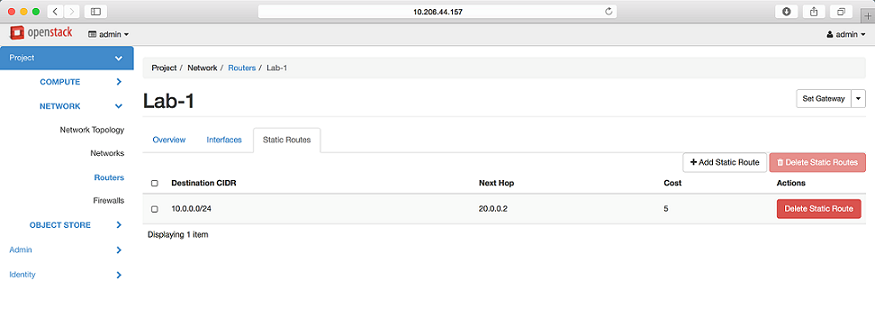
    Figure 1 shows how to view static routes.

    Figure 1: View Static routesOpenStack dashboard showing router Lab-1 in Network section, Static Routes tab active with route details: Destination CIDR 10.0.0.0/24, Next Hop 20.0.0.2, Cost 5. Admin user logged in.

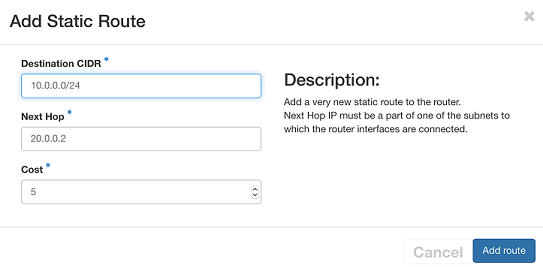
    Figure 2 shows how to add a static route.

    Figure 2: Add a Static routeUser interface for adding a static route to a router with fields for Destination CIDR, Next Hop, and Cost. Includes Cancel and Add route buttons.

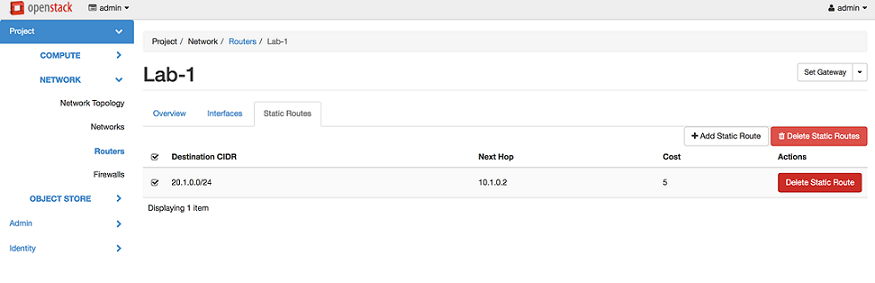
    Figure 3 shows how to delete a static route.

    Figure 3: Delete Static RoutesOpenStack dashboard showing static routes for the router in project Lab-1. Route: Destination CIDR 20.1.0.0/24, Next Hop 10.1.0.2, Cost 5. Options to delete or add routes.