ON THIS PAGE
Configuration Cleanup on Switches
Learn how you can perform an organization-wide cleanup of stale switch configurations directly from the Mist portal.
Overview
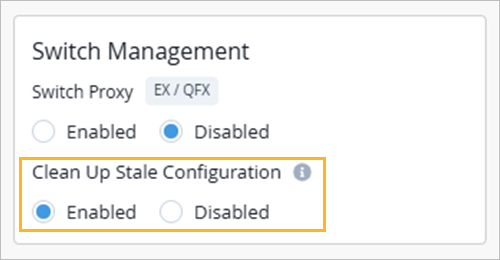
When a switch is managed by Juniper Mist, the cloud pushes and maintains the switch configuration. However, an administrator might occasionally apply configurations directly on the switch using the native CLI—for example, during troubleshooting or maintenance. Over time, these CLI configurations can accumulate and create a mismatch between the configuration defined in the Mist cloud and the actual configuration running on the switch. The Clean Up Stale Configuration option, available under the Switch Management tile on the Organization>Settings page, lets you control how Juniper Mist manages these CLI configurations.
This feature is supported only on EX and QFX Series switches.
-
When the Clean Up Stale Configuration option is enabled, Juniper Mist performs a full configuration cleanup each time it pushes a configuration to a switch. Any setting on the switch that was not configured through the Mist cloud, including configurations added through the native switch CLI, is removed to align the switch configuration with the configuration defined in the Mist cloud.
Note:Configurations defined under Additional CLI commands in the Mist switch configuration (device, site, or template level) are retained and not removed. Only out-of-band CLI configurations that are not managed by Mist are cleaned up.
-
When the Clean Up Stale Configuration option is disabled, Mist will preserve the local changes, even as it continues to apply cloud-driven configuration updates. In this mode, Juniper Mist manages only the parameters it has explicitly configured—such as VLANs, interface settings, and protocols. Any configuration applied directly through the switch CLI is retained and not removed during the cloud configuration pushes.
Clean Up Stale Configuration on Switches
With the Clean Up Stale Configuration option enabled, Mist deletes settings not defined in the Mist cloud, including those manually added through the switch CLI. This ensures that the configuration on the switch exactly matches the cloud configuration. By default, the Clean Up Stale Configuration option is disabled.
Before you enable the cleanup option, review all configurations currently applied to your managed switches using the native CLI. If any of those configurations need to be retained, add them to the Mist switch configuration at the device, site, or template level.
To enable stale configuration cleanup:
-
In the Switch Management tile, select the Enabled
option in the Clean Up Stale Configuration section.