Cloud-Ready Connection Process
Learn about the process that your switches use to connect to the services in the Juniper Mist™ cloud.
Juniper EX Series switches are cloud-ready devices, which means they are Day-0 capable of connecting to the Juniper Mist cloud. When running a supported version of Junos, these switches can also automatically establish a connection to Juniper Mist cloud services, where they can then be on-boarded (Day 1), managed (Day 2), and monitored (Day2+) from the Mist portal.
As part of zero-touch-provisioning (ZTP), a secure TCP connection uses pre-shared keys on both the device and cloud to establish a connection. Figure 1 provides a break-down of the ZTP process.
On the front of EX4100, EX4100-F, and EX4400 switches there is a CLD interface LED that you can use to monitor the ZTP progress. The blink pattern of the LED can help troubleshoot any Day 0 connection issues.
For switches already in the cloud, you can view the connection status from the Switches page of the Mist portal.
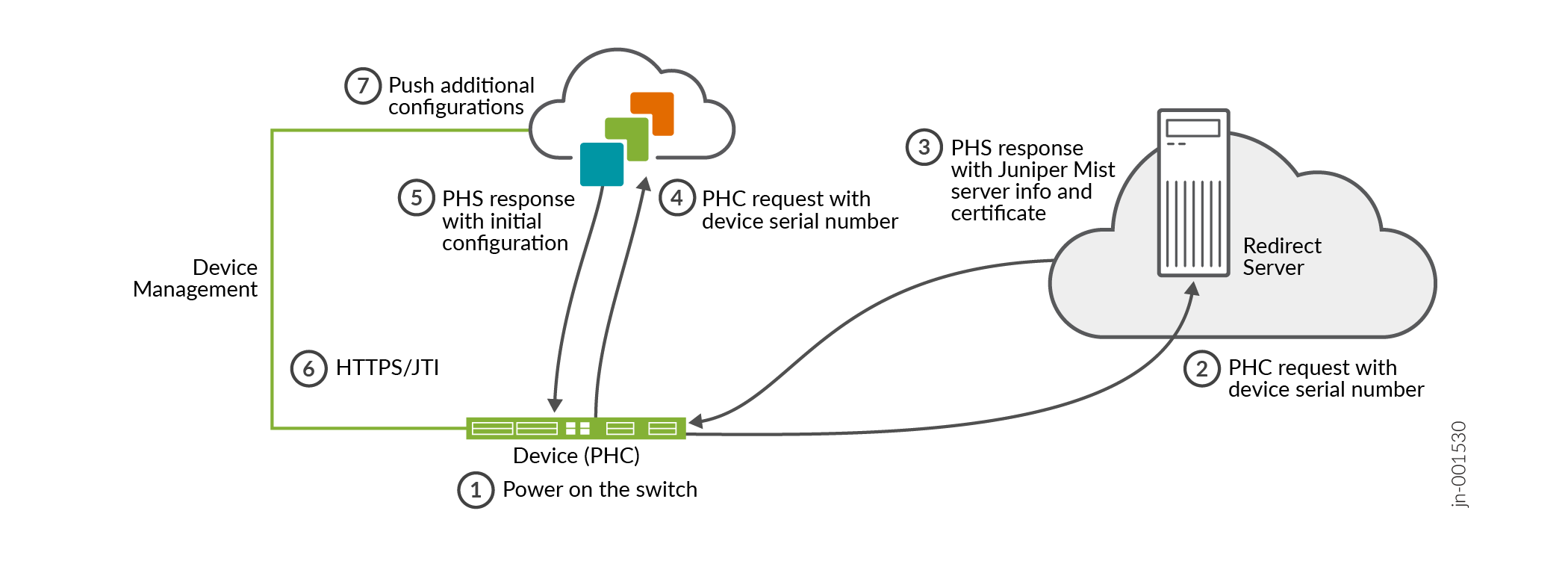
The first time a cloud-ready switch is powered on, an on-board phone-home client (PHC) connects to a redirect server, which then redirects it to a phone home server (PHS) where the switch can get the latest Junos configuration. You can also have the switch connect to a DHCP server that supports ZTP and run the ZTP process from there.
Switches running outbound SSH are managed using SSH/NETCONF sessions. Switches enabled with CloudX use HTTPS and JTI for management, which is the default behavior.