View Your Support Tickets

Follow these steps to go to your support dashboard and view the status of your tickets.

You can view your support tickets from the Juniper Mist™ portal.
  1. Click the question icon near the top-right corner of the Juniper Mist portal, and then click Support Tickets.
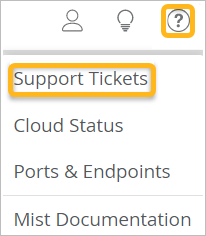
    Menu interface with highlighted Support Tickets option in yellow and a yellow-highlighted question mark icon in the top-right corner for help or support. Other menu options include Cloud Status, Ports Endpoints, and Mist Documentation. Top icons represent user actions, ideas, and help.
  2. (Optional) Select the time period.
    Support Tickets dashboard with a time range filter dropdown and a table listing tickets by number, type, created date, last update, requester, and status, showing two pending tickets.
  3. Click the ticket that you want to view.
