ON THIS PAGE
Enable Ultrawideband
Enable ultrawideband in your Mist Location Services deployments.
You can enable ultrawideband (UWB) for your Juniper Mist Location Services deployments.
Mist access points (APs) work in conjunction with ultrawideband tags from third-party vendors. Mist uses SICK (formerly known as Zigpos) tags, and currently supports and adheres to the Fira and Omlox ultrawideband standards.
For more information, see Ultrawideband.
Prerequisites
- Ensure your APs are on firmware version 0.15.34994 or later.
- Ensure AP47s are deployed across the entire site or area where you need UWB coverage. These can be AP47D or AP47E models.
- Follow standard deployment standards for Mist Location Services deployments. See the topics in the Get Started chapter of this guide.
-
Review your tag vendor's deployment and configuration guidelines on how to place tags, such as how to place tags in relation to APs.
-
For additional support, Create a Support Ticket.
Enable Ultrawideband
-
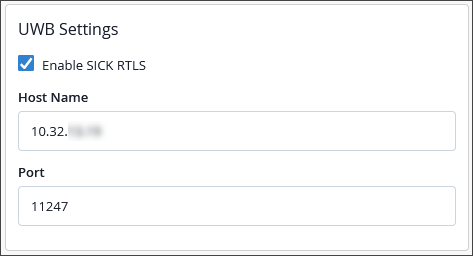
Enter the Host Name (the FQDN or IP address of the SICK Coriva
location engine) and Port number (0–65535) that you obtained from
the third-party tag vendor.