NAT
Learn how NAT enables communication between private and public networks by translating IP addresses and, when required, port information, allowing multiple devices to share a limited pool of public IP addresses while improving address utilization and enhancing network security.
What Is NAT?
Network Address Translation (NAT) translates IP address and, when required, port information in packet headers to enable communication between private and public networks. By translating IP addresses, NAT ensures that multiple devices on a private network can share a limited pool of public IPv4 addresses while masking internal addressing schemes from external networks. You can use NAT to provide Internet access, publish internal services, redirect traffic, support load distribution, and simplify network migrations.
| NAT Type | What It Does | Use Case |
|---|---|---|
| Static NAT | Creates a permanent one-to-one mapping between a private and public IP address. | Publicly accessible servers that require a consistent IP address. |
| Destination NAT | Translates the destination IP address of inbound traffic. | Publishing internal applications and services to external users. |
| Source NAT | Translates the source IP address of outbound traffic. | Providing Internet access for devices on a private network. |
| Persistent NAT | Maintains a consistent IP address and port mapping throughout a session. | Applications that require session continuity, such as VoIP and SIP. |
How NAT Works
Following destination NAT, the device conducts routing and security policy checks. Security policies define packet destinations and validate traffic permissions.
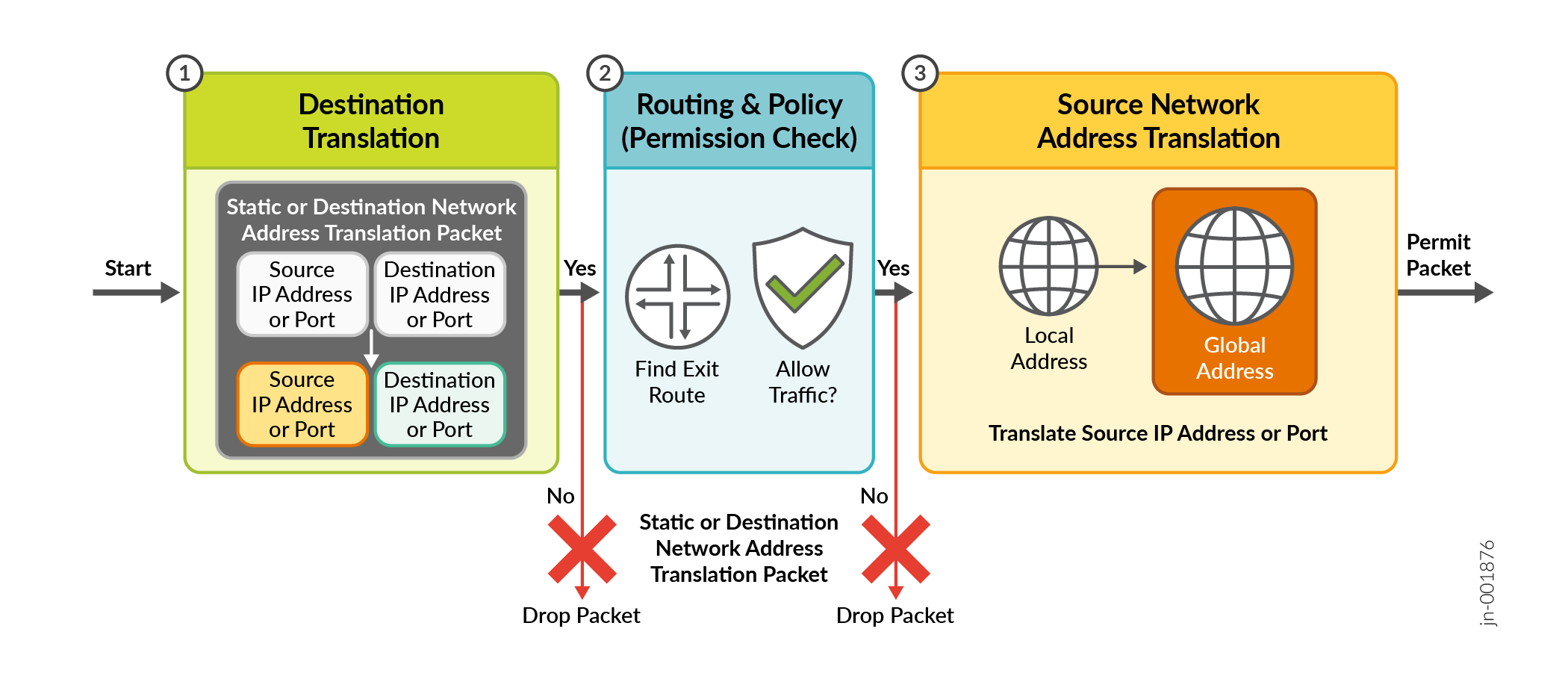
| Step | NAT Processing Stage | What Happens | Result |
|---|---|---|---|
| 1 | Ingress packet | A packet enters the device through an ingress interface. NAT processing begins before the packet is forwarded. | Packet enters the NAT processing pipeline. |
| 2 | Static NAT or destination NAT | The device checks for static NAT or destination NAT rules. If a matching rule exists, the device translates the destination IP address and optionally the port before any routing decision occurs. | The packet is updated with the translated destination address. If no rule matches, the original destination address is retained. |
| 3 | Route lookup | After destination NAT, the device performs a route lookup using the translated destination IP address to determine the correct egress interface. | The device identifies the outbound path for the packet. |
| 4 | Security policy evaluation | The device evaluates security policies to determine whether the translated traffic is allowed between the source and destination security zones. | Allow: Continue processing.Deny: Drop the packet. |
| 5 | Source NAT | If the traffic is permitted, the device checks for source NAT rules. If configured, it translates the source IP address (and optionally the source port) before the packet leaves the device. | The packet now contains the translated source IP address suitable for external communication. |
| 6 | Packet forwarding (egress) | The translated packet is forwarded through the selected egress interface toward its destination. | The packet successfully exits the device. |
| 7 | Packet drop (if required) | If the packet fails the routing lookup or does not match a permit security policy, the device discards the packet. Source NAT is not performed on dropped traffic. | Packet is dropped and not forwarded. |
| Order | Operation | Purpose |
|---|---|---|
| 1 | Static NAT or destination NAT | Translate the destination IP address before routing. |
| 2 | Route lookup | Determine the outbound interface. |
| 3 | Security policy check | Verify whether the traffic is permitted. |
| 4 | Source NAT | Translate the source IP address before forwarding. |
| 5 | Packet forwarding | Send the translated packet to the destination. |
Benefits of NAT
- Allows multiple devices to share a single public IP address.
- Reduces the need for complex IP address management.
- Enhances network security by masking internal IP addresses from external networks.
- Provides seamless connectivity between private and public networks.
- Supports IPv6 communication by enabling operation within an IPv4 network.
- Facilitates load balancing across multiple servers.
NAT Terminology
| Term | Definition |
|---|---|
| Network Address Translation (NAT) | A method used to modify network address information in packet headers while in transit across a traffic routing device. |
| Source NAT | A type of NAT where the source IP address of outgoing packets is translated. |
| Source pool | A set of IP addresses used for source NAT translation. |
| Destination NAT | A type of NAT where the destination IP address of incoming packets is translated. |
| Static NAT | A one-to-one mapping between a private and a public IP address, allowing bidirectional communication. |
| Persistent NAT | A NAT configuration that maintains the same mapping for a specific session, allowing return traffic from the external host to reach the internal host. |
| NAT64 | A mechanism that allows IPv6 clients to communicate with IPv4 servers using a form of NAT. |
| Multicast NAT | NAT applied to multicast flows, allowing multicast traffic to pass through NAT devices. |
| IPv6 NAT | NAT applied to IPv6 traffic, enabling address translation in IPv6 networks. |
| Dual-Stack Lite (DS-Lite) | A technology that allows IPv4 communication over an IPv6-only network using NAT. |
| Virtual Routing and Forwarding (VRF) | A technology that allows multiple routing table instances on the same router, often used with NAT for traffic separation. |
| SD-WAN NAT VRF Group | A configuration combining SD-WAN and VRF to manage NAT in complex network environments. |