IPv6 NAT
Learn how IPv6 Network Address Translation (NAT) translates traffic between IPv4 and IPv6 networks and between IPv6 hosts. Understand source NAT, destination NAT, and static NAT mappings, including address and prefix translation, PAT, and NAT-PT support for IPv4-to-IPv6 and IPv6-to-IPv4 communication.
IPv6 NAT translates IPv4 addresses to IPv6 addresses for network devices. IPv6 NAT also translates addresses between IPv6 hosts. IPv6 NAT supports source NAT, destination NAT, and static NAT.
IPv6 Dual-Stack Lite (DS-Lite) is a technology that helps Internet service providers migrate to an IPv6 access network without changing end-user software. IPv4 users continue to access IPv4 Internet content with minimum disruption to their home networks while enabling IPv6 users to access IPv6 content.
To avoid IPv6 fragmentation header issues during NAT64 translations, use the
set security nat natv6v4 no-v6-frag-header command
What Is IPv6 NAT?
IPv6 has a vastly larger address space than the impending exhausted IPv4 address space. IPv4 has been extended using techniques such as Network Address Translation (NAT), which allows for ranges of private addresses to be represented by a single public address, and temporary address assignment. A lot of technologies provide the transition mechanism for the legacy IPv4 host to keep the connection to the Internet. IPv6 NAT provides address translation between IPv4 and IPv6 addressed network devices. It also provides address translation between IPv6 hosts. NAT between IPv6 hosts is done in a similar manner and for similar purposes as IPv4 NAT.
IPv6 NAT in Junos OS provides the following NAT types:
Source NAT
Destination NAT
Static NAT
- Source NAT Translations Supported by IPv6 NAT
- Destination NAT Mappings Supported by IPv6 NAT
- Static NAT Mappings Supported by IPv6 NAT
Source NAT Translations Supported by IPv6 NAT
Source NAT is the translation of the source IP address of a packet leaving the Juniper Networks device. Source NAT is used to allow hosts with private IP addresses to access a public network.
IPv6 NAT in Junos OS supports the following source NAT translations:
Translation of one IPv6 subnet to another IPv6 subnet without PAT
Translation of IPv4 addresses to IPv6 prefix + IPv4 addresses
Translation of IPv6 hosts to IPv6 hosts with or without PAT
Translation of IPv6 hosts to IPv4 hosts with or without PAT
Translation of IPv4 hosts to IPv6 hosts with or without PAT
Destination NAT Mappings Supported by IPv6 NAT
Destination NAT is the translation of the destination IP address of a packet entering the Juniper Networks device. Destination NAT is used to redirect traffic destined to a virtual host (identified by the original destination IP address) to the real host (identified by the translated destination IP address).
IPv6 NAT in Junos OS supports the following destination NAT translations:
Prefix translation between IPv4 and IPv6 prefix
Mapping of one IPv6 subnet to another IPv6 subnet
Mapping of one IPv6 subnet to an IPv6 host
Mapping of one IPv6 subnet to one IPv4 subnet
Mapping of one IPv4 subnet to one IPv6 subnet
Mapping of one IPv6 host (and optional port number) to one special IPv6 host (and optional port number)
Mapping of one IPv6 host (and optional port number) to one special IPv4 host (and optional port number)
Mapping of one IPv4 host (and optional port number) to one special IPv6 host (and optional port number)
Static NAT Mappings Supported by IPv6 NAT
Static NAT defines a one-to-one mapping from one IP subnet to another IP subnet. The mapping includes destination IP address translation in one direction and source IP address translation in the reverse direction. From the NAT device, the original destination address is the virtual host IP address while the mapped-to address is the real host IP address.
IPv6 NAT in Junos OS supports the following static NAT translations:
Translation of one IPv6 subnet to another IPv6 subnet
Translation of one IPv6 hosts to another IPv6 host
Translation of one IPv4 address a.b.c.d to IPv6 address Prefix::a.b.c.d
Translation of IPv4 hosts to IPv6 hosts
Translation of IPv6 hosts to IPv4 hosts
Mapping of one IPv6 prefix to one IPv4 prefix
Mapping of one IPv4 prefix to one IPv6 prefix
IPv6 NAT-PT
IPv6 Network Address Translation-Protocol Translation (NAT-PT) provides address allocation and protocol translation between IPv4 and IPv6 addressed network devices. The translation process is based on the Stateless IP/ICMP Translation (SIIT) method; however, the state and the context of each communication are retained during the session lifetime. IPv6 NAT-PT supports ICMP, TCP, and UDP packets.
IPv6 NAT-PT supports the following types of NAT-PT:
Traditional NAT-PT—In traditional NAT-PT, the sessions are unidirectional and outbound from the IPv6 network. Traditional NAT-PT allows hosts within an IPv6 network to access hosts in an IPv4 network. There are two variations to traditional NAT-PT: basic NAT-PT and NAPT-PT.
In basic NAT-PT, a block of IPv4 addresses at an IPv4 interface is set aside for translating addresses as IPv6 hosts as they initiate sessions to the IPv4 hosts. The basic NAT-PT translates the source IP address and related fields such as IP, TCP, UDP, and ICMP header checksums for packets outbound from the IPv6 domain. For inbound packets, it translates the destination IP address and the checksums.
Network Address Port Translation-Protocol Translation (NAPT-PT) can be combined with basic NAT-PT so that a pool of external addresses is used in conjunction with port translation. NAPT-PT allows a set of IPv6 hosts to share a single IPv4 address. NAPT-PT translates the source IP address, source transport identifier, and related fields such as IP, TCP, UDP, and ICMP header checksums, for packets outbound from the IPv6 network. The transport identifier can be a TCP/UDP port or an ICMP query ID. For inbound packets, it translates the destination IP address, destination transport identifier, and the IP and the transport header checksums.
Bidirectional NAT-PT—In bidirectional NAT-PT, sessions can be initiated from hosts in the IPv4 network as well as the IPv6 network. IPv6 network addresses are bound to IPv4 addresses, either statically or dynamically as connections are established in either direction. The static configuration is similar to static NAT translation. Hosts in IPv4 realm access hosts in the IPv6 realm using DNS for address resolution. A DNS ALG must be employed in conjunction with bidirectional NAT-PT to facilitate name-to-address mapping. Specifically, the DNS ALG must be capable of translating IPv6 addresses in DNS queries and responses into their IPv4 address bindings, and vice versa, as DNS packets traverse between IPv6 and IPv4 realms.
The devices partially support the bidirectional NAT-PT specification. It supports flow of bidirectional traffic assuming that there are other ways to convey the mapping between the IPv6 address and the dynamically allocated IPv4 address. For example, a local DNS can be configured with the mapped entries for IPv4 nodes to identify the addresses.
NAT- PT Operation—The devices support the traditional NAT-PT and allow static mapping for the user to communicate from IPv4 to IPv6. The user needs to statically configure the DNS server with an IPv4 address for the hostname and then create a static NAT on the device for the IPv6-only node to communicate from an IPv4-only node to an IPv6-only node based on the DNS.
NAT-PT communication with static mapping— Network Address Translation-Protocol Translation (NAT-PT) can be done in two directions, from IPv6 to IPv4 and vice versa. For each direction, static NAT is used to map the destination host to a local address and a source address NAT is used to translate the source address. There are two types of static NAT and source NAT mapping: one-to-one mapping and prefix-based mapping.
NAT- PT communication with DNS ALG—A DNS-based mechanism dynamically maps IPv6 addresses to IPv4-only servers. NAT-PT uses the DNS ALG to transparently do the translations. For example, a company using an internal IPv6 network needs to be able to communicate with external IPv4 servers that do not yet have IPv6 addresses.
To support the dynamic address binding, a DNS should be used for name resolution. The IPv4 host looks up the name of the IPv6 node in its local configured IPv4 DNS server, which then passes the query to the IPv6 DNS server through a device using NAT-PT.
The DNS ALG in NAT device:
-
Translates the IPv6 address resolution back to IPv4 address resolution.
-
Allocates an IPv6 address for the mapping.
-
Stores a mapping of the allocated IPv4 address to the IPv6 address returned in the IPv6 address resolution so that the session can be established from any-IPv4 hosts to the IPv6 host.
See Also
IPv6 Dual-Stack Lite
IPv6 DS-Lite is a technology that enables Internet service providers to move to an IPv6 network while simultaneously handling IPv4 address depletion.
IPv4 addresses are becoming depleted; therefore, broadband service providers (DSL, cable, and mobile) need new addresses to support new users. Providing IPv6 addresses alone is often not workable because most of the systems that make up the public Internet are still enabled and support only IPv4, and many users’ systems do not yet fully support IPv6.
DS-Lite allows service providers to migrate to an IPv6 access network without changing end-user software. The device that accesses the Internet remains the same, thus allowing IPv4 users to continue accessing IPv4 Internet content with minimum disruption to their home networks, while enabling IPv6 users to access IPv6 content.
Figure 1 illustrates the DS-Lite architecture which uses IPv6-only links between the provider and the user while maintaining the IPv4 (or dual-stack) hosts in the user network.
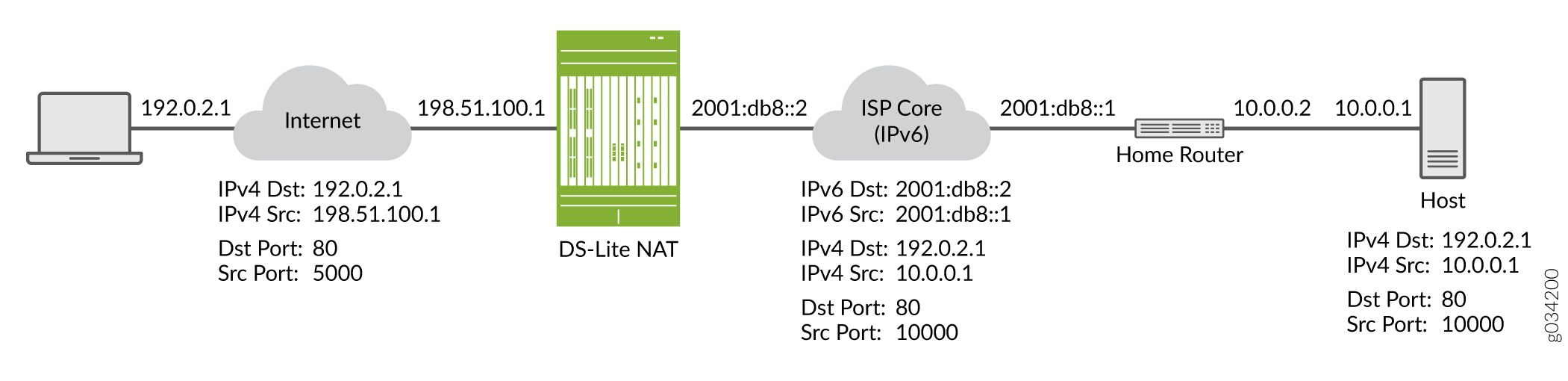
The DS-Lite deployment model consists of the following components:
-
Softwire initiator for the DS-Lite home router–Encapsulates the IPv4 packet and transmits it across an IPv6 tunnel.
-
Softwire concentrator for DS-Lite carrier-grade NAT–Decapsulates the IPv4-in-IPv6 packet and also performs IPv4-IPv4 NAT translations.
When a user’s device sends an IPv4 packet to an external destination, DS-Lite encapsulates the IPv4 packet in an IPv6 packet for transport into the provider network. These IPv4-in-IPv6 tunnels are called softwires. Tunneling IPv4 over IPv6 is simpler than translation and eliminates performance and redundancy concerns.
The softwires terminate in a softwire concentrator at some point in the service provider network, which decapsulates the IPv4 packets and sends the IPv4 packets through a carrier-grade NAT device. There, the packets undergo source NAT processing to hide the original source address.
IPv6 packets originated by hosts in the subscriber’s home network are transported natively over the access network.
The DS-Lite carrier-grade NAT translates IPv4-to-IPv4 addresses to multiple subscribers through a single global IPv4 address. Overlapping address spaces used by subscribers are disambiguated through the identification of tunnel endpoints. One concentrator can be the endpoint of multiple softwires.
The IPv4 packets originated by the end hosts have private (and possibly overlapping) IP addresses. Therefore, NAT must be applied to these packets. If end hosts have overlapping addresses, Network Address Port Translation (NAPT) is needed.
Using NAPT, the system adds the source address of the encapsulating IPv6 packet in the subscriber network to the inside IPv4 source address and port. Because each user’s IPv6 address is unique, the combination of the IPv6 source address with the IPv4 source address and port creates an unambiguous mapping.
The system takes the following actions when it receives a responding IPv4 packet from outside the subscriber network:
-
Encapsulates the IPv4 packet in an IPv6 packet using the mapped IPv6 address as the IPv6 destination address.
-
Forwards the packet to the user.
The maximum number of softwire initiators and softwire concentrators per device depends on the platform and Junos OS release in your installation.
Use Feature Explorer to confirm platform and release support for specific features.
Review the Platform-Specific NAT Softwire Initiator Capacity Behavior section for notes related to your platform.
Firewalls support 32 softwire concentrator.
The most recent IETF draft documentation for DS-Lite uses new terminology:
-
The term softwire initiator has been replaced by B4.
-
The term softwire concentrator has been replaced by AFTR.
Junos OS documentation generally uses the original terms when discussing configuration in order to be consistent with the CLI statements used to configure DS-Lite.
For more information, see the following documents:
-
RFC 2473, Generic Packet Tunneling in IPv6 Specification, December 1998.
-
RFC 2663, IP Network Address Translator (NAT) Terminology and Considerations, August 1999.
-
RFC 4787, Network Address Translation (NAT) Behavioral Requirements for Unicast UDP, BCP 127, January 2007.
-
RFC 4925, Softwire Problem Statement, July 2007.
-
RFC 5382, NAT Behavioral Requirements for TCP, BCP 142, October 2008.
-
RFC 5508, NAT Behavioral Requirements for ICMP, BCP 148, April 2009.
-
http://www.iana.org/assignments/ipv4-address-space/ipv4-address-space.xhtml
Example: Configure IPv6 Dual-Stack Lite
When an ISP begins to allocate IPv6 addresses and IPv6-capable equipment to new subscriber homes, DS-Lite provides a method for the private IPv4 addresses behind the IPv6 CE WAN equipment to reach the IPv4 network. DS-Lite enables IPv4 customers to continue to access the Internet using their current hardware by using a softwire initiator at the CE to encapsulate IPv4 packets into IPv6 packets with minimum disruption to their home network, while enabling IPv6 customers to access IPv6 content. The softwire concentrator decapsulates the IPv4-in-IPv6 packets and also performs IPv4-IPv4 NAT translations.
This example shows you how to configure a softwire concentrator for IPv4-in-IPv6 addresses.
Requirements
Before you begin:
-
Review the overview section on DS-Lite. See IPv6 Dual-Stack Lite.
-
Review how ICMPv6 packets are handled by the Firewalls. See Understanding How Firewall Devices Handle ICMPv6 Packets.
Overview
This configuration example shows how to configure a softwire concentrator, the softwire name, the concentrator address, and the softwire type.
The softwire concentrator IPv6 address can match an IPv6 address configured on a physical interface or an IPv6 address configured on a lo0.
Configuration
Procedure
CLI Quick Configuration
To quickly configure this example, copy the following commands, paste the commands into a text
file, remove any line breaks, change any details necessary to match your network
configuration, and then copy and paste the commands into the CLI at the
[edit] hierarchy level, and then enter commit from
configuration mode.
set security softwires softwire-name my_sc1 softwire-concentrator 2001:db8::1 softwire-type IPv4-in-IPv6
Step-by-Step Procedure
The following example requires you to navigate various levels in the configuration hierarchy. For instructions on how to do that, see Using the CLI Editor in Configuration Mode in the CLI User Guide.
To configure a DS-Lite softwire concentrator to convert IPv4 packets into IPv6 packets:
Assign a name for the softwire concentrator.
[edit security]
user@host# edit softwires softwire-name my_sc1
Specify the address of the softwire concentrator.
[edit security softwires softwire-name my_sc1]
user@host# set softwire-concentrator 2001:db8::1
Specify the softwire type for IPv4 to IPv6.
[edit security softwires softwire-name my_sc1 softwire-concentrator 2001:db8::1
user@host# set softwire-type IPv4-in-IPv6
Results
From configuration mode, confirm your configuration by entering the show command. If the output does not display the intended configuration, repeat the instructions in this example to correct the configuration.
[edit security softwires softwire-name my_sc1]
user@host# show
softwire-concentrator 2001:db8::1;
softwire-type ipv4-in-ipv6;
If you are done configuring the device, enter commit from configuration mode.
Verification
From operational mode, enter the show security softwires command. If a softwire is not connected, the operational output looks like the following sample:
user@host# show security softwires
Softwire Name            SC Address         Status   Number of SI connected
  my-sc1                2001:db8::1          Active      0
If a softwire is connected, the operational output looks like the following sample:
user@host# show security softwires
Softwire Name            SC Address         Status   Number of SI connected
  my-sc1                2001:db8::1          Connected      1
Configure IPv4-to-IPv6 Connections Using Default Static Mapping
This example shows how to configure an IPv4-initiated connection to an IPv6 node using default destination address prefix static mapping.
Requirements
Before you begin, configure interfaces and assign them to security zones.
Overview
The following example describes how to configure an IPv4-initiated connection to an IPv6 node that has a static mapping 126-based IPv6 address defined on its interface and static mapping /126 set up on the device. This example assumes that the IPv6 addresses to be mapped to IPv4 addresses make the IPv4 addresses part of the IPv6 address space.
Configuring an IPv4-initiated connection to an IPv6 node is useful when the devices on the IPv4 network must be interconnected to the devices on the IPv6 network and during migration of an IPv4 network to an IPv6 network. The mapping can be used for DNS ALG for reverse lookup of IPv4 addresses from IPv6 addresses, for the traffic initiated from the IPv6 network. This process also provides connectivity for sessions initiated from IPv4 nodes with IPv6 nodes on the other side of the NAT/PT device.
Configuration
Procedure
CLI Quick Configuration
To quickly configure this example, copy the following commands, paste them
into a text file, remove any line breaks, change any details necessary to
match your network configuration, copy and paste the commands into the CLI
at the [edit] hierarchy level, and then enter
commit from configuration mode.
set security nat static rule-set test_rs from interface ge-0/0/0.0
set security nat static rule-set test_rs rule test_rule match destination-address 10.1.1.0/30
set security nat static rule-set test_rs rule test_rule then static-nat prefix 2001:db8::/126
set security nat source pool myipv6_prefix address 2001:db8::/126
set security nat source rule-set myipv6_rs from interface ge-0/0/0.0
set security nat source rule-set myipv6_rs to interface ge-0/0/1.0
set security nat source rule-set myipv6_rs rule ipv6_rule match source-address 10.1.1.45/30
set security nat source rule-set myipv6_rs rule ipv6_rule match destination-address 2001:db8::/96
set security nat source rule-set myipv6_rs rule ipv6_rule then source-nat pool myipv6_prefix
Step-by-Step Procedure
The following example requires you to navigate various levels in the configuration hierarchy.
To configure an IPv4-initiated connection to an IPv6 node using static destination address one-to-one mapping:
-
Configure the static NAT rule set for an interface.
[edit security nat static]
user@host# set rule-set test_rs from interface ge-0/0/0.0
-
Define the rule to match the destination address prefix.
The destination address number in the match rule must be a number equal to the static-nat prefix range.
There is no limitation on the source address number in the match rule.
[edit security nat static rule-set test_rs]
user@host# set rule test_rule match destination-address 10.1.1.0/30
Define the static NAT prefix for the device.
[edit security nat static rule-set test_rs]
user@host# set rule test_rule then static-nat prefix 2001:db8::/126
-
Configure the source NAT pool with an IPv6 address prefix.
[edit security nat source]
user@host# set pool myipv6_prefix address 2001:db8::/126
-
Configure the source NAT rule set for the interface.
[edit security nat source]
user@host# set rule-set myipv6_rs from interface ge-0/0/0.0
user@host# set rule-set myipv6_rs to interface ge-0/0/1.0
-
Configure the IPv6 source NAT source address.
The source address number in the match rule must be an address number equal to the source pool range. For example, ^2(32 – 30) = 2^(128 – 126) =>.
There is no limitation on the destination address number in the match rule.
[edit security nat source rule-set myipv6_rs]
user@host# set rule ipv6_rule match source-address 10.1.1.45/30
-
Configure the IPv6 source NAT destination address.
[edit security nat source rule-set myipv6_rs]
user@host# set rule ipv6_rule match destination-address 2001:db8::/96
-
Define the configured source NAT IPv6 pool in the rule.
[edit security nat source rule-set myipv6_rs]
user@host# set rule ipv6_rule then source-nat pool myipv6_prefix
Results
From configuration mode, confirm your configuration by entering the
show security nat command. If the output does not
display the intended configuration, repeat the configuration instructions in
this example to correct it.
source {
    pool myipv6_prefix {
        address {
            2001:db8::/126;
        }
    }
    rule-set myipv6_rs {
        from interface ge-0/0/0.0;
        to interface ge-0/0/1.0;
        rule ipv6_rule {
            match {
                source-address 10.1.1.45/30;
                destination-address 2001:db8::/96;
            }
            then {
                source-nat {
                    pool {
                        myipv6_prefix;
                    }
                }
            }
        }
    }
}
static {
    rule-set test_rs {
        from interface ge-0/0/0.0;
        rule test_rule {
            match {
                destination-address 10.1.1.0/30;
            }
            then {
                static-nat {
                    prefix {
                        2001:db8::/126;
                    }
                }
            }
        }
    }
}
If you are done configuring the device, enter commit from
configuration mode.
Verification
To confirm that the configuration is working properly, perform these tasks:
Verifying That Static NAT Is Configured
Purpose
Verify whether static NAT is configured with an interface, a destination address, and a prefix.
Action
From operational mode, enter the show security
nat static command.
Configure IPv4-to-IPv6 Connections Using One-To-One Static Mapping
This example shows how to configure an IPv4-initiated connection to an IPv6 node using static destination address one-to-one mapping.
Requirements
Before you begin, configure the interfaces and assign the interfaces to security zones.
Overview
The following example describes how to configure an IPv4 node to communicate with an IPv6 node using one-to-one static NAT on the device.
The communication of an IPv4 node with an IPv6 node is useful for IPv4 hosts accessing an IPv6 server, for new servers that support IPv6 only and that need to be connected to the IPv6 network, and for migrating of old hosts to the new server when most of the machines have already moved to IPv6. For example, you can use this feature to connect an IPv4-only node to an IPv6-only printer. This mapping can also be used for DNS ALG for reverse lookup of IPv4 addresses from IPv6 addresses for traffic that is initiated from the IPv6 network.
In this example, the source IPv4 address matching the prefix 10.10.10.1/30 is added with the IPv6 prefix 2001:db8::/96 to form the translated source IPv6 address and the destination IPv4 address 10.1.1.25/32 is translated to IPv6 address 2001:db8::25/128.
Configuration
Procedure
CLI Quick Configuration
To quickly configure this example, copy the following commands, paste the commands into a text
file, remove any line breaks, change any details necessary to match your
network configuration, copy and paste the commands into the CLI at the
[edit] hierarchy level, and then enter
commit from configuration mode.
set security nat static rule-set test_rs from interface ge-0/0/1
set security nat static rule-set test_rs rule test_rule match destination-address 10.1.1.25/32
set security nat static rule-set test_rs rule test_rule then static-nat prefix 2001:db8::25/128
set security nat source pool myipv6_prefix address 2001:db8::/96
set security nat source rule-set myipv6_rs from interface ge-0/0/1
set security nat source rule-set myipv6_rs to interface ge-0/0/2
set security nat source rule-set myipv6_rs rule ipv6_rule match source-address 10.10.10.1/30
set security nat source rule-set myipv6_rs rule ipv6_rule match destination-address 2001:db8::25
set security nat source rule-set myipv6_rs rule ipv6_rule then source-nat pool myipv6_prefix
Step-by-Step Procedure
The following example requires you to navigate various levels in the configuration hierarchy. For instructions on how to do that, see Using the CLI Editor in Configuration Mode.
To configure an IPv4-initiated connection to an IPv6 node using static destination address one-to-one mapping:
Configure the static NAT rule set for an interface.
 [edit security nat static]
user@host# set rule-set test_rs from interface ge-0/0/1
Define the rule and the destination address.
[edit security nat static rule-set test_rs]
user@host# set rule test_rule match destination-address 10.1.1.25/32
Define the static NAT prefix.
[edit security nat static rule-set test_rs]
user@host# set rule test_rule then static-nat prefix 2001:db8::25/128
Configure a source NAT pool with an IPv6 prefix address.
[edit security]
user@host# set nat source pool myipv6_prefix address 2001:db8::/96
Configure the source NAT rule set.
[edit security nat source]
user@host# set rule-set myipv6_rs from interface ge-0/0/1
user@host# set rule-set myipv6_rs to interface ge-0/0/2
Configure the source NAT source address.
[edit security nat source rule-set myipv6_rs]
user@host# set rule ipv6_rule match source-address 10.10.10.1/30
Configure the source NAT destination address.
[edit security nat source rule-set myipv6_rs]
user@host# set rule ipv6_rule match destination-address 2001:db8::25
Define a configured source NAT IPv6 pool in the rule.
[edit security nat source rule-set myipv6_rs]
user@host# set rule ipv6_rule then source-nat pool myipv6_prefix
Results
From configuration mode, confirm your configuration
by entering the show security nat command. If the output
does not display the intended configuration, repeat the configuration
instructions in this example to correct it.
[edit]
user@host# show security nat
source {
    pool myipv6_prefix {
        address {
            2001:db8::/96;
        }
    }
    rule-set myipv6_rs {
        from interface ge-0/0/1.0;
        to interface ge-0/0/2.0;
        rule ipv6_rule {
            match {
                source-address 10.10.10.1/30;
                destination-address 2001:db8::25;
            }
            then {
                source-nat {
                    pool {
                        myipv6_prefix;
                    }
                }
            }
        }
    }
}
static {
    rule-set test_rs {
        from interface ge-0/0/1.0;
        rule test_rule {
            match {
                destination-address 10.1.1.25/32;
            }
            then {
                static-nat prefix 2001:db8::25/128;
            }
        }
    }
}
If you are done configuring the device, enter commit from configuration mode.
Verification
To confirm that the configuration is working properly, perform these tasks:
Verifying That Static NAT Is Configured
Purpose
Verify whether static NAT is configured with an interface, a destination address, and a prefix.
Action
From operational mode, enter the show security
nat static command.
Configure IPv6-to-IPv4 Connections Using Default Static Mapping
This example shows how to configure an IPv6-initiated connection to an IPv4 node using default destination address prefix static mapping. This example does not show how to configure the NAT translation for the reverse direction.
Requirements
Before you begin, configure the interfaces and assign the interfaces to security zones.
Overview
The following example describes the communication of an IPv6 node with an IPv4 node that has prefix-based static NAT defined on the device. The static NAT assumes that the IPv4 network is a special IPv6 network (that is, an IPv4-mapped IPv6 network), and hides the entire IPv4 network behind an IPv6 prefix.
The communication of an IPv6 node with an IPv4 node is useful when IPv6 is used in the network and must be connected to the IPv4 network, or when both IPv4 and IPv6 are used in the network and a mechanism is required to interconnect the two networks during migration. This also provides connectivity for sessions initiated from IPv6 nodes with IPv4 nodes on the other side of the NAT/PT device.
Configuration
Procedure
CLI Quick Configuration
To quickly configure this example, copy the following commands, paste the commands into a text
file, remove any line breaks, change any details necessary to match your
network configuration, copy and paste the commands into the CLI at the
[edit] hierarchy level, and then enter
commit from configuration mode.
set security nat static rule-set test_rs from interface ge-0/0/1
set security nat static rule-set test_rs rule test_rule match destination-address 2001:db8::1/96
set security nat static rule-set test_rs rule test_rule then static-nat inet
set security nat source pool myipv4 address 203.0.113.2 to 203.0.113.5
set security nat source rule-set myipv4_rs from interface ge-0/0/1
set security nat source rule-set myipv4_rs to interface ge-0/0/2
set security nat source rule-set myipv4_rs rule ipv4_rule match destination-address 10.1.1.15/30
set security nat source rule-set myipv4_rs rule ipv4_rule match source-address 2001:db8::2/96
set security nat source rule-set myipv4_rs rule ipv4_rule then source-nat pool myipv4
Step-by-Step Procedure
The following example requires you to navigate various levels in the configuration hierarchy. For instructions on how to do that, see Using the CLI Editor in Configuration Mode.
To configure an IPv6-initiated connection to an IPv4 node using default destination address prefix static mapping:
Configure the static NAT for an interface.
[edit security nat static]
user@host# set rule test_rs from interface ge-0/0/1
Define the rule and destination address with the prefix for the static NAT translation defined on the device.
[edit security nat static rule-set test_rs]
user@host# set rule test_rule match destination-address 2001:db8::1/96
Define the static NAT as inet to translate to an IPv4 address.
[edit security nat static rule-set test_rs]
user@host# set rule test_rule then static-nat inet
Configure the IPv4 source NAT pool address.
[edit security nat source]
user@host# set pool myipv4 address 203.0.113.2 to 203.0.113.5
Configure the source NAT rule set.
[edit security nat source ]
user@host# set rule-set myipv4_rs from interface ge-0/0/1
user@host# set rule-set myipv4_rs to interface ge-0/0/2
Configure the IPv4 source NAT destination address.
[edit security nat source rule-set myipv4_rs]
user@host# set rule ipv4_rule match destination-address 10.1.1.15/30
Define the source address with the prefix for the source NAT defined on the device.
[edit security nat source rule-set myipv4_rs]
user@host# set rule ipv4_rule match source-address 2001:db8::2/96
Define a configured source NAT IPv4 pool in the rule.
[edit security nat source rule-set myipv4_rs]
user@host# set rule ipv4_rule then source-nat pool myipv4
Results
From configuration mode, confirm your configuration
by entering the show security nat command. If the output
does not display the intended configuration, repeat the configuration
instructions in this example to correct it.
[edit]
user@host# show security nat
source {
    pool myipv4 {
        address {
            203.0.113.2/32 to 203.0.113.5/32;
        }
    }
    rule-set myipv4_rs {
        from interface ge-0/0/1.0;
        to interface ge-0/0/2.0;
        rule ipv4_rule {
            match {
                source-address 2001:db8::/96;
                destination-address 10.1.1.15/30;
            }
            then {
                source-nat {
                    pool {
                        myipv4;
                    }
                }
            }
        }
    }
}
static {
    rule-set test_rs {
        from interface ge-0/0/1.0;
        rule test_rule {
            match {
                destination-address 2001:db8::1/96;
            }
            then {
                static-nat inet;
            }
        }
    }
}
If you are done configuring the device, enter commit from configuration mode.
Verification
To confirm that the configuration is working properly, perform these tasks:
Verifying That Static NAT Is Configured
Purpose
Verify whether static NAT is configured with an interface, a destination address, and a prefix.
Action
From operational mode, enter the show security
nat static rule command.
user@host> show security nat static rule test_rule
Static NAT rule: test_rule            Rule-set: test_rs
  Rule-Id                    : 2
  Rule position              : 2
  From interface             : ge-0/0/1.0
  Destination addresses      : 2001:db8::1
  Host addresses             : 0.0.0.0
  Netmask                    : 96
  Host routing-instance      : N/A
  Translation hits           : 0
    Successful sessions      : 0
    Failed sessions          : 0
  Number of sessions         : 0
Verifying That Source NAT Is Configured
Purpose
Verify whether source NAT is configured.
Action
From operational mode, enter the show security
nat source rule command.
user@host> show security nat source rule ipv4_rule
source NAT rule: ipv4_rule            Rule-set: myipv4_rs
  Rule-Id                    : 2
  Rule position              : 2
  From interface             : ge-0/0/1.0
  To interface               : ge-0/0/2.0
  Match
    Source addresses         : 2001:db8:: - 2001:db8::ffff:ffff
    Destination addresses    : 10.1.1.15       - 10.1.1.15
  Action                        : myipv4
    Persistent NAT type         : N/A
    Persistent NAT mapping type : address-port-mapping
    Inactivity timeout          : 0
    Max session number          : 0
  Translation hits           : 0
    Successful sessions      : 0
    Failed sessions          : 0
  Number of sessions         : 0
From operational mode, enter the show security nat source
pool command.
user@host> show security nat source pool myipv4
Pool name          : myipv4
Pool id            : 5
Routing instance   : default
Host address base  : 0.0.0.0
Port               : [1024, 63487]
Twin port          : [63488, 65535]
Port overloading   : 1
Address assignment : no-paired
Total addresses    : 4
Translation hits   : 0
Address range                        Single Ports   Twin Ports
            203.0.113.2 - 203.0.113.5            0              0
Configure IPv6-to-IPv4 Connections Using One-To-One Static Mapping
This example shows how to configure an IPv6-initiated connection to an IPv4 node using static destination address one-to-one mapping.
Requirements
Before you begin, configure the interfaces and assign the interfaces to security zones.
Overview
The following example describes the communication of an IPv6 node with an IPv4 node that has a one-to-one static NAT address defined on the device. The communication of an IPv6 node with an IPv4 node allows IPv6 hosts to access an IPv4 server when neither of the devices has a dual stack and must depend on the NAT/PT device to communicate. This enables some IPv4 legacy server applications to work even after the network has migrated to IPv6.
Configuration
Procedure
CLI Quick Configuration
To quickly configure this example, copy the
following commands, paste them into a text file, remove any line breaks,
change any details necessary to match your network configuration,
copy and paste the commands into the CLI at the [edit] hierarchy
level, and then enter commit from configuration mode.
set security nat static rule test_rs from interface ge-0/0/1
set security nat static rule test_rs rule test_rule match destination-address 2001:db8::15/128
set security nat static rule test_rs rule test_rule then static-nat prefix 10.2.2.15/32
set security nat source pool myipv4 address 203.0.113.2 to 203.0.113.3
set security nat source rule myipv4_rs from interface ge-0/0/1
set security nat source rule myipv4_rs to interface ge-0/0/2
set security nat source rule myipv4_rs rule ipv4_rule match source-address 2001:db8::/96
set security nat source rule myipv4_rs rule ipv4_rule match destination-address 10.2.2.15
set security nat source rule myipv4_rs rule ipv4_rule then source-nat pool myipv4
Step-by-Step Procedure
The following example requires you to navigate various levels in the configuration hierarchy. For instructions on how to do that, see Using the CLI Editor in Configuration Mode.
To configure an IPv6-initiated connection to an IPv4 node using static destination address one-to-one mapping:
Configure the static NAT rule set for an interface.
[edit security nat static]
user@host# set rule-set test_rs from interface ge-0/0/1
Define a rule to match the destination address.
[edit security nat static rule-set test_rs]
user@host# set rule test_rule match destination-address 2001:db8::15/128
Define the static NAT prefix to the rule.
[edit security nat static rule-set test_rs]
user@host# set rule test_rule then static-nat prefix 10.2.2.15/32
Configure a source NAT pool with an IPv4 address.
[edit security nat]
user@host# set source pool myipv4 address 203.0.113.2 203.0.113.3
Configure the IPv4 address for the interface.
[edit security nat source ]
user@host# set rule-set myipv4_rs from interface ge-0/0/1
Configure the source address to the IPv4 source NAT address.
[edit security nat source rule-set myipv4_rs]
user@host# set rule ipv4_rule match source-address 2001:db8::/96
Configure the destination address to IPv4 source NAT address.
[edit security nat source rule-set myipv4_rs]
user@host# set rule ipv4_rule match destination-address 10.2.2.15
Define the configured source NAT IPv4 pool in the rule.
[edit security nat source rule-set myipv4_rs]
user@host# set rule ipv4_rule then source-nat pool myipv4
Results
From configuration mode, confirm your configuration
by entering the show security nat command. If the output
does not display the intended configuration, repeat the configuration
instructions in this example to correct it.
[edit]
user@host# show security nat
source {
    pool myipv4 {
        address {
            203.0.113.2/32 to 203.0.113.3/32;
        }
    }
    rule-set myipv4_rs {
        from interface ge-0/0/1.0;
        to interface ge-0/0/2.0;
        rule ipv4_rule {
            match {
                source-address 2001:db8::/96;
                destination-address 10.2.2.15/32;
            }
            then {
                source-nat {
                    pool {
                        myipv4;
                    }
                }
            }
        }
    }
}
static {
    rule-set test_rs {
        from interface ge-0/0/1.0;
        rule test_rule {
            match {
                destination-address 2001:db8::15/128;
            }
            then {
                static-nat prefix 10.2.2.15/32;
            }
        }
    }
}
If you are done configuring the device, enter commit from configuration mode.
Verification
To confirm that the configuration is working properly, perform these tasks:
Verifying That Static NAT Is Configured
Purpose
Verify whether static NAT is configured with an interface, a destination address, and a prefix.
Action
From operational mode, enter the show security
nat static command.
Platform-Specific NAT Softwire Initiator Capacity Behavior
Use Feature Explorer to confirm platform and release support for specific features.
Use the following table to review platform-specific behaviors for your platform:
| Platform | Difference |
|---|---|
| SRX Series Firewall |
|
Change History Table
Feature support is determined by the platform and release you are using. Use Feature Explorer to determine if a feature is supported on your platform.