Port Speed Overview
Learn about the port speed on a firewall or line card, channelization support, and port speed autonegotiation.
Port speed is the maximum data that the line card transmits through a port in a second. You can measure port speed in kilobits per second (Kbps), gigabits per second (Gbps), or terabits per second (Tbps).
Firewalls support the following port types:
- Firewall ports—Firewall ports are physical or logical connection point for network traffic, configurable for speed, mode, profiles, and security. You use a firewall port to plug in network devices such as switches or routers. You can also use the firewall ports as uplink ports.
- Uplink ports—An uplink port is a specialized network interface designed to connect to another networking device such as a higher-level firewall or network backbone. These ports are faster than firewall ports. You can use uplink ports to connect two firewalls.
- Console ports—The console port is usually on the rear side of a firewall. Console ports
provide direct CLI access using RJ-45 serial cable for initial setup, troubleshooting, and
upgrades. The console ports provide options to configure security, type, and auxiliary
ports. Use the console ports to:
- Control a firewall.
- Program, configure, and turn on or turn off the firewall.
Port Speed Channelization
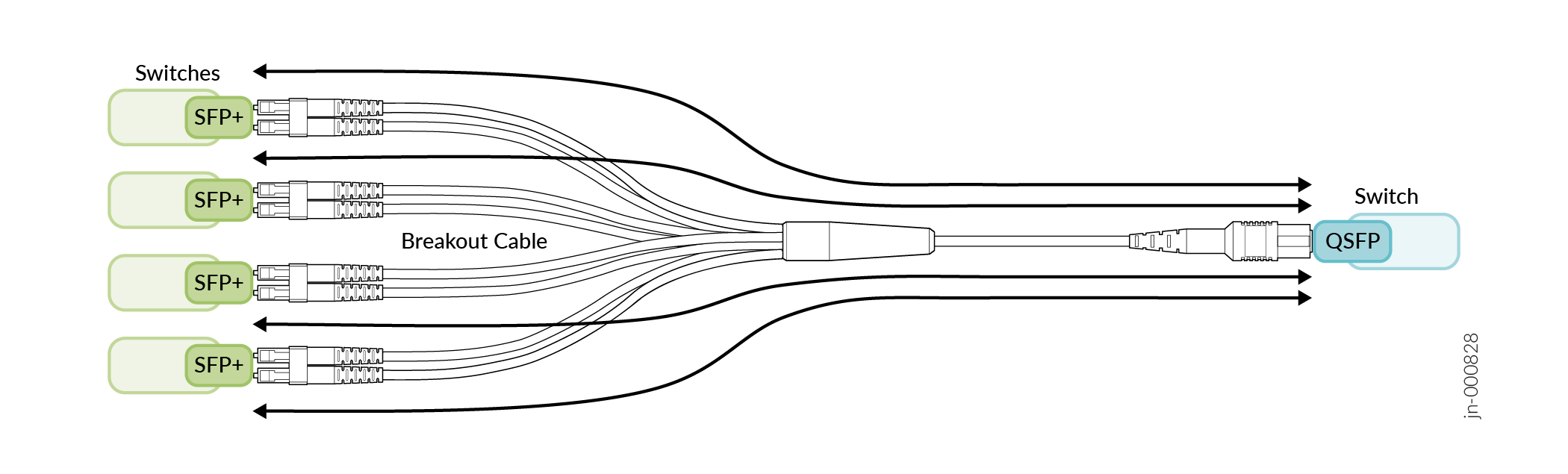
You can split a high-speed port on a firewall or security device into several low-speed ports. For example, you can channelize a 100-Gbps port into four 25-Gbps ports.
Port Speed Autonegotiation
The autonegotiation mechanism helps connected ports determine mutually supported optimal values for speed and duplex mode.
Autonegotiation is a signaling mechanism used by Ethernet over twisted pair. In autonegotiation, two connected devices first share their capabilities for these parameters and then choose the highest performance transmission mode the devices both support. Autonegotiation takes place when a device and a firewall have different Network Interface Cards (NICs).
Interface Naming Conventions
Each interface name includes a unique identifier and follows a naming convention. You use the interface name to configure the interface. You can either configure a port as a single interface (non-channelized interface) or partition the port into smaller data channels or multiple interfaces (channelized interfaces).
When multiple interfaces are supported on a physical port, you use the colon (:) notation in the interface name as a delimiter to differentiate the interfaces on a physical port. In the interface naming convention, xe-x/y/z:channel:
- x refers to the FPC slot number.
- y refers to the PIC slot number.
- z refers to the physical port number.
-
channelrefers to the number of channelized interfaces.
When the 40-Gigabit Ethernet interfaces (et-fpc/pic/port) are channelized
as four 10-Gigabit Ethernet interfaces, the interface appears in the
xe-fpc/pic/port: channel format, and channel is a value
of 0 through 3.
|
Interfaces |
Non-Channelized Interfaces Naming Formats |
Channelized Interfaces Naming Formats |
|---|---|---|
|
10GbE |
Prefix is |
Prefix is |
|
Prefix is |
Prefix is et-. The interface name appears in the
et-fpc/pic/port:channel format. |
Configurable Port Speed Benefits
The primary benefits of optimized and properly configured port speed include:
-
Enhanced Network Performance:
- Reduced Congestion—Higher port speeds lead to quicker data transfer, freeing up network resources faster and reducing the likelihood of data collisions or packet loss.
- Faster Data Transfer—High-speed ports (for example, 1-Gbps ports) significantly reduce the time required to move large files, such as videos, backups, and software updates.
-
Lower Latency—Systems with interfaces supporting higher speeds, such as Gigabit Ethernet, can reduce latency by 30–40 percent compared with interfaces running on Fast Ethernet (100 Mbps), enabling smoother real-time interactions.
-
Improved User Experience
- High-Quality Streaming—Higher speeds minimize buffering and interruptions for high-definition (HD) or 4K video streaming and online gaming.
- Productivity Gains—Faster speeds reduce employee wait time for file transfers, leading to more efficient use of work hours.
-
Concurrent User Support—Increased bandwidth per port ensures multiple users and devices can connect and operate simultaneously without a noticeable drop in performance.
-
Scalability and Future-Proofing
- Support for Modern Standards—New Wi-Fi 6, 6E, and 7 access points can saturate 1-Gbps links; upgrading to 2.5-Gbps or 10-Gbps ports ensures the access points can operate at their full potential.
-
Flexible Configurations—Administrators can manually set port speed on firewalls. This capability ensures compatibility with older security devices while keeping the rest of the network running at maximum velocity.
-
Network Management and Reliability
- Device Compatibility—Using autonegotiation, ports can automatically detect and match the highest possible speed supported by a connected device, ensuring stable connections between varying hardware.
- Traffic Prioritization—Port speed configuration often works alongside quality of service (QoS) to ensure critical traffic, such as VoIP or video conferencing, is prioritized during high-usage periods.