DHCP Fingerprint Forwarding Support (DHCP Local Server and DHCP Relay)
This topic describes how to enable DHCP fingerprinting forwarding to mirror client DHCP messages to fingerprinting servers for device identification and policy enforcement.
Overview
DHCP fingerprinting identifies devices on a network by analysing the DHCP messages sent by client devices when requesting an IP address. Fingerprinting servers use patterns in these messages—based on device type, operating system, and vendor—to examine the combination and ordering of DHCP options.
For DHCPv4, commonly observed options include Option 55 (Parameter Request List), Option 60 (Vendor Class Identifier), and Option 77 (User Class Identifier). These patterns together form a unique “fingerprint” that can be used to identify and classify devices. Similarly for DHCPv6, a different set of options are used. The specific options used for fingerprinting are determined by the fingerprinting server implementation and does not affect the behaviour of the Junos DHCP relay agent or local server.
A Junos OS device processes DHCP messages normally as a relay agent or a DHCP local server. When DHCP fingerprinting forwarding is enabled, it additionally mirrors validated client DHCP packets to configured fingerprinting servers.
For DHCPv4, fingerprinting typically uses messages such as DHCPDISCOVER and DHCPREQUEST. For DHCPv6, the corresponding message types include DHCPv6 SOLICIT and DHCPv6 REQUEST.
The DHCP fingerprint server passively analyses the mirrored DHCP messages to derive fingerprints (such as from option sets and ordering) for device identification or policy decisions, without participating in IP address assignment.
Benefits of DHCP Fingerprinting Packet Forwarding
- Detect and block unauthorized devices.
- Automatically classify devices (for example, phones, laptops, IoT) for inventory and reporting.
- Assign devices to specific VLANs or subnets based on their type.
- Apply device-specific network policies and configurations.
- Maintain detailed logs for visibility and compliance.
How Packet Forwarding Works?
Figure 1 and Figure 2 shows DHCP fingerprint forwarding in Junos OS.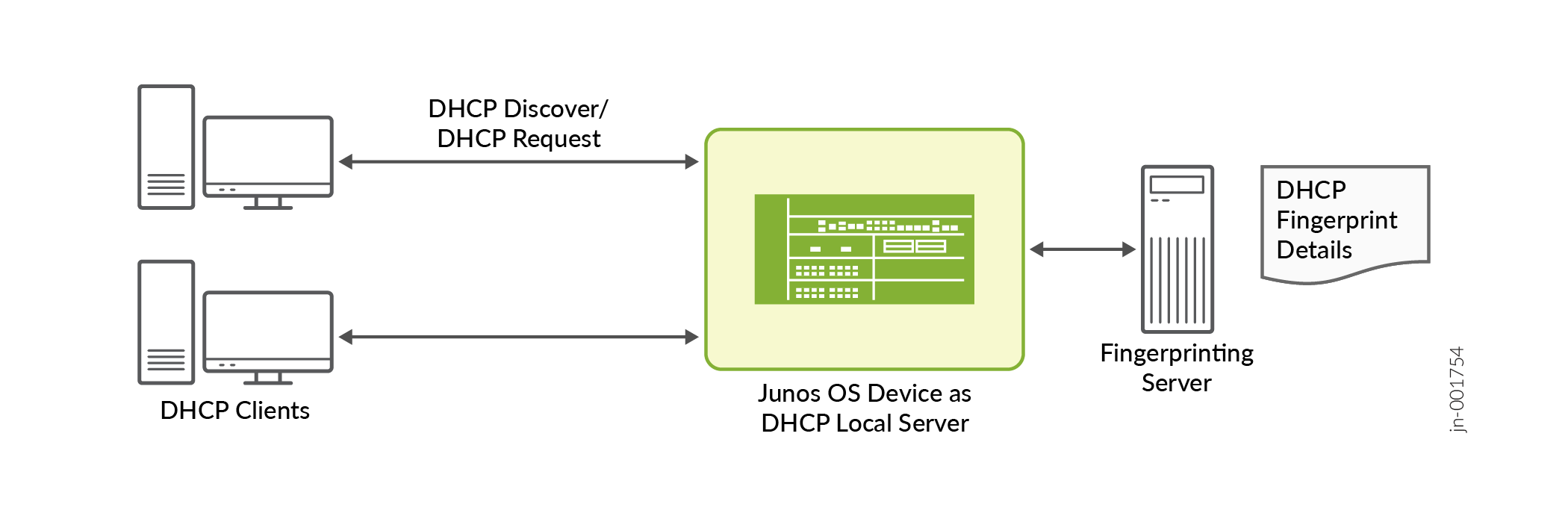
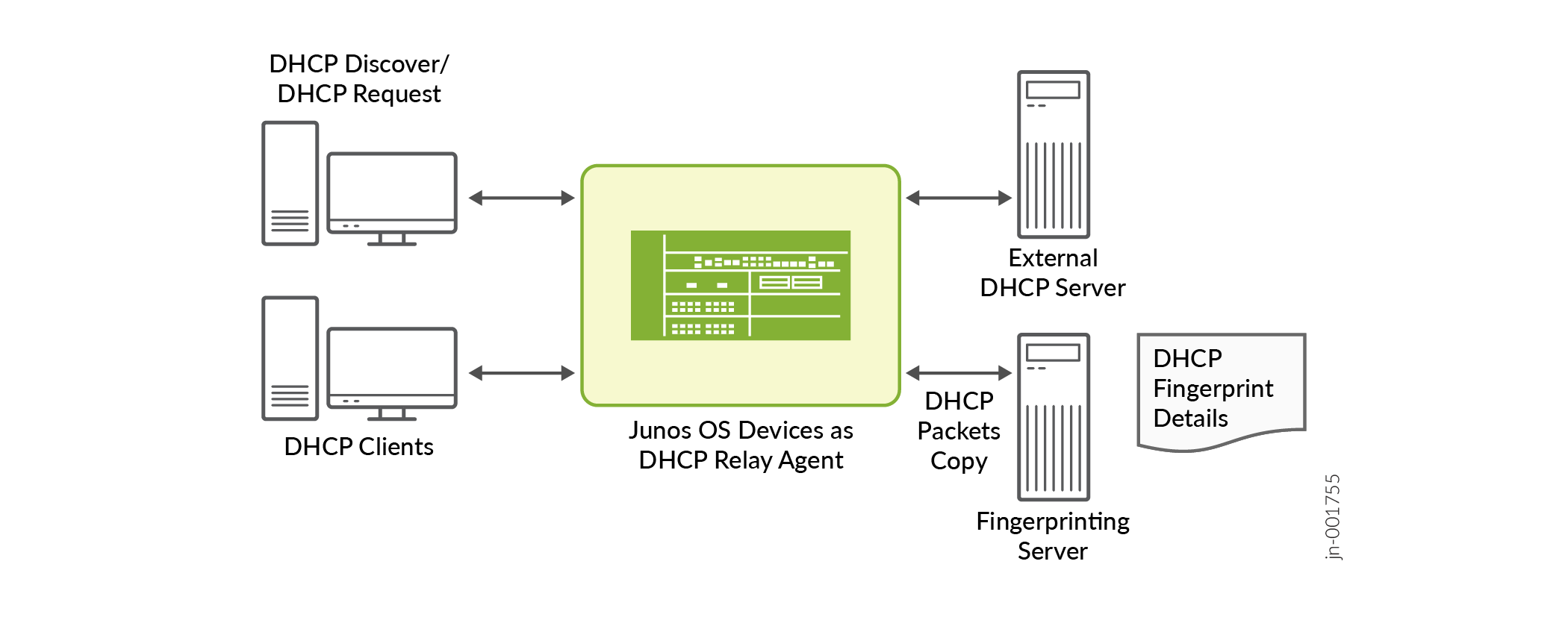
- The DHCP client sends DHCP messages as part of the normal IP address allocation process (DHCPv4 or DHCPv6).
- A Junos OS device, acting as DHCP relay agent or local DHCP server, receives these client messages and continues regular DHCP functions. When DHCP fingerprint packet forwarding is enabled, the device additionally creates stateless copies of the eligible DHCPv4/DHCPv6 packets and forwards the copies to configured fingerprint servers. The device performs this copy operation independently of the DHCP relay and DHCP local server state machines.
- These packet copies are forwarded with minimal changes to preserve the original DHCP fingerprint (example: the device does not alter Option 82, and does not add DHCPv6 relay encapsulation to the copied packets); however, the giaddr field in DHCPv4 packets may be modified before forwarding to the fingerprint server.
- The DHCP local server/DHCP relay agent device can send these packet copies to up to four DHCP fingerprint servers. Because the forwarding is stateless, the device does not create per-client fingerprint sessions and does not expect replies from the fingerprint servers.
- Packet copies can be sent via specific logical systems and routing instances, allowing the fingerprinting servers to reside in a different routing instance than the subscriber access network or upstream DHCP servers, without requiring route leaking.
- The DHCP fingerprint server receives the copied DHCP messages from the relay/local server.
- It analyzes these messages to derive DHCP fingerprints (for example, based on option sets, option ordering, and other DHCP header/option characteristics).
- The fingerprint server uses these fingerprints for purposes such as device identification, profiling, or policy decisions, without participating directly in the IP address assignment.
Configure DHCP Fingerprint Packet Forwarding
Configuring DHCP fingerprint forwarding includes:
- Define multiple fingerprint server groups for DHCPv6 and DHCPv4.
- Select one active fingerprint server group globally, and optionally override it per DHCP group.
- Specify each server address with an optional logical system and routing instance context.
- Resolve reachability and forward the fingerprint copy using the routing-instance (and optional logical-system) context bound to the server address, without leaking routes between routing domains.
Table 1 and Table 2 show configuration statements used for DHCP fingerprint forwarding.
| Scope | Action | Configuration Statements |
|---|---|---|
|
Global-level |
Define a fingerprint server group (up to four IPv4 addresses). |
DHCPv4 [edit] user@host# set system services dhcp-local-server fingerprint-server-group name ipv4-address DHCPv6 [edit] user@host# set system services dhcp-local-server dhcpv6 fingerprint-server-group name ipv6-address |
| Activate the fingerprint server group. |
DHCPv4 user@host# set system services dhcp-local-server active-fingerprint-server-group name DHCPv6 user@host# set system services dhcp-local-server dhcpv6 active-fingerprint-server-group name |
|
| (Optional) Set a logical system context for fingerprint server communication. |
DHCPv4 user@host# set system services dhcp-local-server fingerprint-server-group name ipv4-address logical-system default|name DHCPv6 user@host# set system services dhcp-local-server dhcpv6 fingerprint-server-group name ipv6-address logical-system default|name |
|
| (Optional) Set a routing instance context for fingerprint server communication. |
DHCPv4 user@host# set system services dhcp-local-server fingerprint-server-group name ipv4-address routing-instance default|name DHCPv6 user@host# set system services dhcp-local-server dhcpv6 fingerprint-server-group name ipv6-address routing-instance default|name |
|
| Group-specific | Associate a DHCP group with an active fingerprint server group. |
DHCPv4 user@host# set system services dhcp-local-server group name active-fingerprint-server-group name DHCPv6 user@host# set system services dhcp-local-server dhcpv6 group name active-fingerprint-server-group name |
| Multi-tenant (within a logical system and routing instance) | Define a tenant-scoped fingerprint server group. |
DHCPv4 user@host# set logical-systems name routing-instances name system services dhcp-local-server fingerprint-server-group name ipv4-address DHCPv6 user@host# set logical-systems name routing-instances name system services dhcp-local-server dhcpv6 fingerprint-server-group name ipv6-address |
| Activate the tenant-scoped fingerprint server group. |
DHCPv4 user@host# set logical-systems name routing-instances name system services dhcp-local-server active-fingerprint-server-group name DHCPv6 user@host# set logical-systems name routing-instances name system services dhcp-local-server dhcpv6 active-fingerprint-server-group name |
|
| Create cross-context reference to a logical system for a fingerprint services defined in the default or another logical system. |
DHCPv4 user@host# set logical-systems name routing-instances name system services dhcp-local-server fingerprint-server-group name ipv4-address logical-system default|name DHCPv6 user@host# set logical-systems name routing-instances name system services dhcp-local-server dhcpv6 fingerprint-server-group name ipv6-address logical-system default|name |
|
| Create cross-context reference to a routing instance for fingerprint services defined in the default or another routing instance. |
DHCPv4 user@host# set logical-systems name routing-instances name system services dhcp-local-server fingerprint-server-group name ipv4-address routing-instance default|name DHCPv6 user@host# set logical-systems name routing-instances name system services dhcp-local-server dhcpv6 fingerprint-server-group name ipv6-address routing-instance default|name |
|
| Multi-tenant, group-specific | Associate a tenant DHCP group with an active fingerprint server group. |
DHCPv4 user@host# set logical-systems name routing-instances name system services dhcp-local-server group name active-fingerprint-server-group name DHCPv6 user@host# set logical-systems name routing-instances name system services dhcp-local-server dhcpv6 group name active-fingerprint-server-group name |
| Scope: | Action | Configuration Statements |
|---|---|---|
|
Global |
Create a fingerprint server group and associate it with a server IP address. |
DHCPv4 user@host# set forwarding-options dhcp-relay fingerprint-server-group name ipv4-address DHCPv6 user@host# set forwarding-options dhcp-relay dhcpv6 fingerprint-server-group name IPv6-address |
| Activate the fingerprint server group. |
DHCPv4 user@host# set forwarding-options dhcp-relay active-fingerprint-server-group name DHCPv6 user@host# set forwarding-options dhcp-relay dhcpv6 active-fingerprint-server-group name |
|
| (Optional) Set a logical system context for fingerprint server communication. |
DHCPv4 user@host# set forwarding-options dhcp-relay fingerprint-server-group name ipv4-address logical-system default|name DHCPv6 user@host# set forwarding-options dhcp-relay dhcpv6 fingerprint-server-group name ipv6-address logical-system default|name |
|
| (Optional) Set a routing instance context for fingerprint server communication. |
DHCPv4 user@host# set forwarding-options dhcp-relay fingerprint-server-group name ipv4-address routing-instance default|name DHCPv6 user@host# set forwarding-options dhcp-relay dhcpv6 fingerprint-server-group name ipv6-address routing-instance default|name |
|
| Group-specific | Associate a DHCP group with an active fingerprint server group. |
DHCPv4 user@host# set forwarding-options dhcp-relay group name active-fingerprint-server-group name DHCPv6 user@host# set forwarding-options dhcp-relay group dhcpv6 name fingerprint-server active-fingerprint-server-group name |
| Multi-tenant (within a logical system and routing instance) | Define a tenant-scoped fingerprint server group. |
DHCPv4 user@host# set logical-systems name routing-instances name forwarding-options dhcp-relay fingerprint-server-group name ipv4-address DHCPv6 user@host# set logical-systems name routing-instances name forwarding-options dhcp-relay dhcpv6 fingerprint-server-group name ipv6-address |
| Activate the tenant-scoped fingerprint server group. |
DHCPv4 user@host# set logical-systems name routing-instances name forwarding-options dhcp-relay active-fingerprint-server-group name DHCPv6 user@host# set logical-systems name routing-instances name forwarding-options dhcp-relay dhcpv6 active-fingerprint-server-group name |
|
| Create cross-context reference to a logical system for a fingerprint services defined in the default or another logical system. |
DHCPv4 user@host# set logical-systems name routing-instances name forwarding-options dhcp-relay fingerprint-server-group name ipv4-address logical-system default|name DHCPv6 user@host# set logical-systems name routing-instances name forwarding-options dhcp-relay dhcpv6 fingerprint-server-group name ipv6-address logical-system default|name |
default to reference the default context, or specify
logical-system-name and
routing-instance-name as needed.Configuration Sample
Following samples show configuration of fingerprint servers. This configuration tells the Junos OS device (operating as a DHCP local server), where to send DHCP fingerprint information for DHCP clients.
DHCPv4 Sample Configuration
[edit]
user@host# show system services dhcp-local-server
fingerprint-server-group {
    DFLT-LS-V4-FP-SERVER-GROUP-1 {
        172.16.0.2 {
            logical-system default;
            routing-instance default;
        }
    }
    DFLT-LS-V4-FP-SERVER-GROUP-2 {
        172.16.0.3 {
            logical-system MY-LS;
        }
        172.16.0.4 {
            logical-system MY-LS;
            routing-instance MY-RI-2;
        }
    }
}
active-fingerprint-server-group DFLT-LS-V4-FP-SERVER-GROUP-1;
group DFLT-LS-V4-CLIENT-GROUP-1 {
}
group DFLT-LS-V4-CLIENT-GROUP-2 {
    active-fingerprint-server-group DFLT-LS-V4-FP-SERVER-GROUP-2;

}
In the above sample:
- MY‑V4‑FP‑SGRP‑1 contains one fingerprint server (172.16.0.2). This server uses the current logical system and current routing instance).
- MY-V4-FP-SGRP-2 contains two fingerprint servers, each with its own context. That is, to reach 172.16.0.3, the device uses the routing-instance MY-LS and to reach 172.16.0.4, the device first goes into logical-system MY-LS, then uses routing-instance MY-RI-2 inside that LS.
- DFLT-LS-V4-FP-SERVER-GROUP-1 is globally active fingerprint server
group. if notrhing overrides it, DHCPv6 fingerprint data will go to
172.16.0.2. - You have two DHCP client groups defined:
-
DFLT-LS-V4-CLIENT-GROUP-1—This group does not override the fingerprint server group. This group uses the global active-fingerprint-server-group DFLT-LS-V4-FP-SERVER-GROUP-1.
-
DFLT-LS-V4-CLIENT-GROUP-2—This group overrides the global setting and uses DFLT-LS-V4-FP-SERVER-GROUP-2 as the active fingerprint server group.
-
Similarly the following configuration snippets show DHCPv6 local server, DHCPv4 and DHCPv6 Relay Agent samples.
DHCPv6 Sample Configuration
[edit]
user@host# show system services dhcp-local-server
dhcpv6 {
    fingerprint-server-group {
        DFLT-LS-V6-FP-SERVER-GROUP-1 {
            2001:db8:1000::2 {
                logical-system default;
                routing-instance default;
            }
        }
        DFLT-LS-V6-FP-SERVER-GROUP-2 {
            2001:db8:1000::3;
        }
    }
    active-fingerprint-server-group DFLT-LS-V6-FP-SERVER-GROUP-1;

    group DFLT-LS-V6-CLIENT-GROUP-1 {
    ...
    }
    group DFLT-LS-V6-CLIENT-GROUP-2 {
        active-fingerprint-server-group DFLT-LS-V6-FP-SERVER-GROUP-2;
    }

}
This configuration sets up multiple DHCPv6 fingerprint server groups, with a global active group and an override at the client-group level to direct different clients to specific fingerprint servers.
DHCP Relay Agent Sample Configuration
user@host# show forwarding-options dhcp-relay
dhcpv6 {
    group DFLT-RLY-V6-CLIENT-GROUP-1 {
        active-fingerprint-server-group DFLT-RLY-V6-FP-SERVER-GROUP-1;
    }
    fingerprint-server-group {
        DFLT-RLY-V6-FP-SERVER-GROUP-1 {
            2001:db8:1000::2 {
                logical-system default;
                routing-instance default;
            }
        }
        DFLT-RLY-V6-FP-SERVER-GROUP-2 {
            2001:db8:1000::3;
            2001:db8:1000::4;
        }
    }
    active-fingerprint-server-group DFLT-RLY-V6-FP-SERVER-GROUP-1;
}
fingerprint-server-group {
    DFLT-RLY-V4-FP-SERVER-GROUP-1 {
        172.16.0.2 {
            logical-system default;
            routing-instance default;
        }
        172.16.0.3;
    }
    DFLT-RLY-V4-FP-SERVER-GROUP-2 {
        172.16.0.4 {
            logical-system LS-1;
            routing-instance RI-1;
        }
        172.16.0.5;
}
active-fingerprint-server-group DFLT-RLY-V4-FP-SERVER-GROUP-1;
group DFLT-RLY-V4-FP-SERVER-GROUP-1 {
    active-fingerprint-server-group DFLT-RLY-V4-FP-SERVER-GROUP-1;
}
This configuration sets up multiple DHCPv4 and DHCPv6 relay fingerprint server groups, with a global active group and an override at the client-group level to direct different clients to specific fingerprint servers across multiple logical-system and routing-instance contexts.
Verify Configuration
To verify forwarding, use per-routing-instance counters that track packets sent to fingerprint servers regardless of whether later DHCP processing succeeds.
For DHCPv4, use the following command:
user@host> show dhcp fingerprint statistics summary
Packets dropped:
    Total                      0

Messages sent:
    BOOTREQUEST                0
    DHCPDECLINE                0
    DHCPDISCOVER               0
    DHCPINFORM                 0
    DHCPRELEASE                0
    DHCPREQUEST                0
For DHCPv6, use the following command:
user@host> show dhcpv6 fingerprint statistics summary
Packets dropped:
    Total                      0

Messages sent:
    DHCPV6_DECLINE             0
    DHCPV6_SOLICIT             0
    DHCPV6_INFORMATION_REQUEST 0
    DHCPV6_RELEASE             0
    DHCPV6_REQUEST             0
    DHCPV6_CONFIRM             0
    DHCPV6_RENEW               0
    DHCPV6_REBIND              0
    DHCPV6_RELAY_FORW          0
Use the following commands to clear DHCP fingerprint forwarding statistics:
-
clear dhcp fingerprint statistics -
clear dhcpv6 fingerprint statistics