View Events in Marvis Actions

The Marvis Actions dashboard in the Juniper Routing Assurance application provides network administrators a high-level view of the router events in the network.

To view router events:

  1. Navigate to Marvis > Marvis Actions from the main navigation menu.

    The Marvis Actions dashboard appears displaying the total number of events under each predefined event category.

  2. Click an event category to view all the events recorded for that event category.
  3. Click an event to view details of that event.

    Marvis Actions dashboard displays the event details along with the recommended action to resolve the event as shown in Figure 1.

    Figure 1: Marvis Actions Dashboard Marvis Actions Dashboard
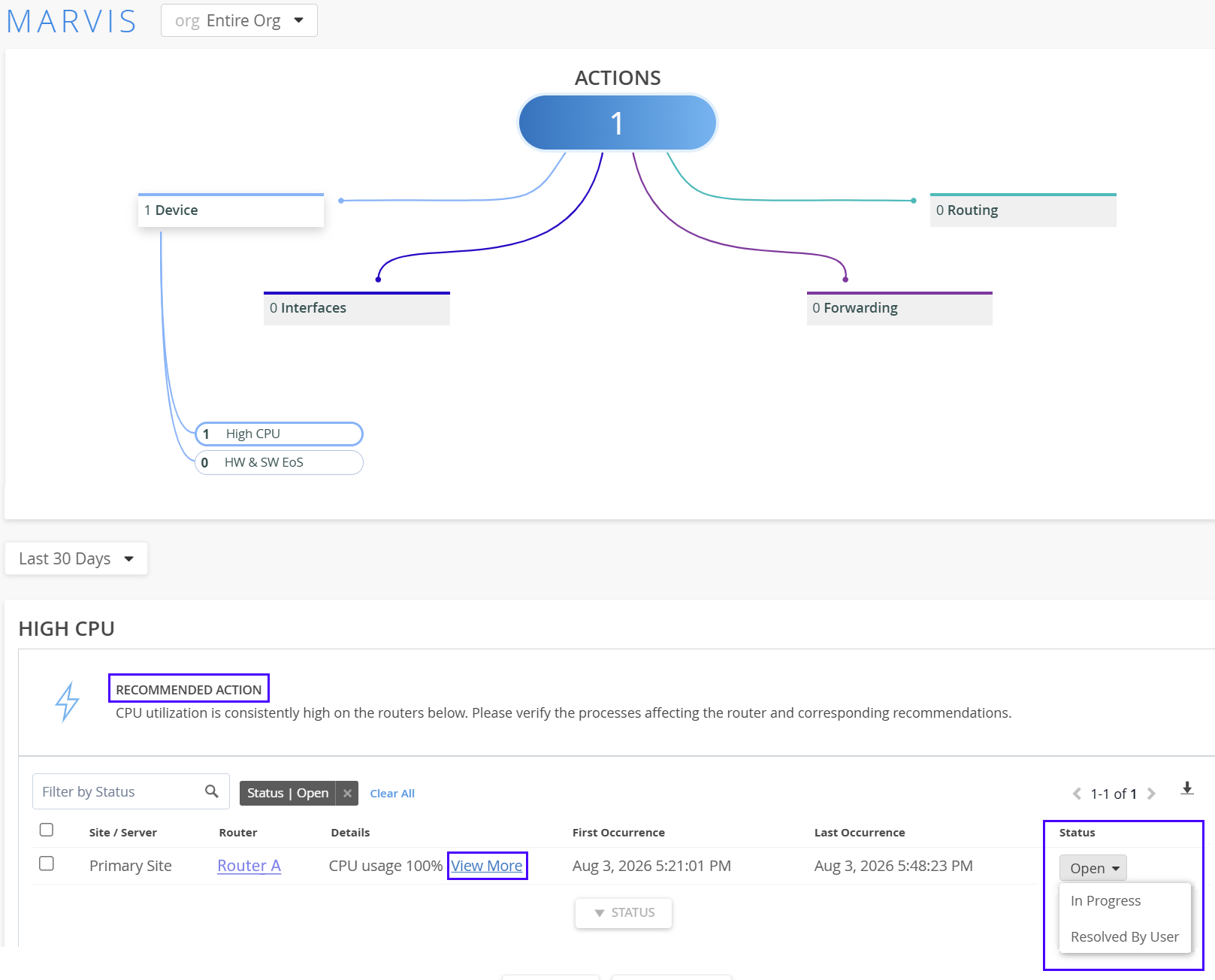
  4. Click View More.
    More details about the event such as the site where the event is reported, the device affected, and the date and the time of the event are displayed.

    You can mark the status of the event as In Progress to indicate that an administrator is working on resolving the event. The event information is removed automatically after the issue is resolved. Click the router name to navigate to the router Insights page.