Create and Import a Global Property Set
If you don’t want to manually set device tags for individual devices, you can import a
Global Property Set. Apstra ConnectorOps for Infected Host Isolation uses a tag-based system
to determine what default actions to take with an infected host. If a connected switch or
device does not have a device tag, Apstra ConnectorOps defaults to the Global Property Set
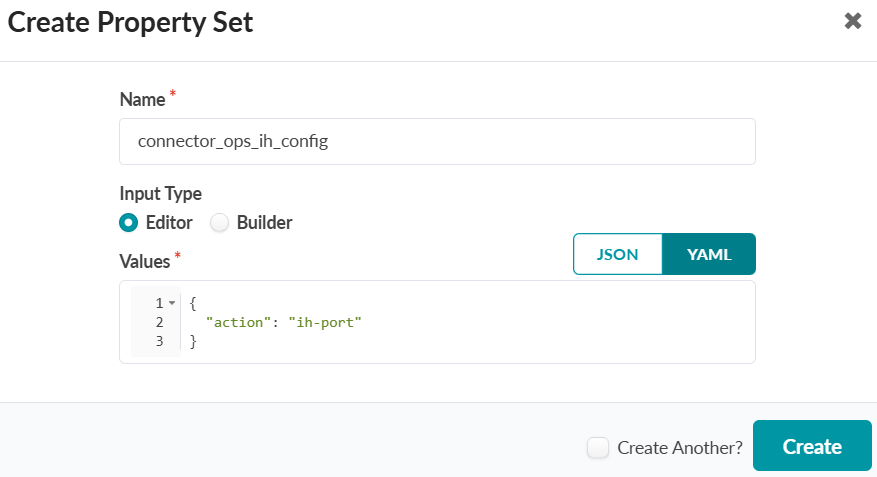
for remediation actions. You must define this Property Set with the
“connector_ops_ih_config” name. The available tags are:
- ih-port: Apstra ConnectorOps shuts down the connected interface if a host on that interface is flagged is infected, and brings it back up when the host is cleared.
- ih-acl: Apstra ConnectorOps adds a link tag with the format
ih-<mac-address>-<host-ip>to the connected interface. The ih-acl-configlet readss this tag and creates a firewall filter that blocks traffic from the infected host’s MAC address. The interface stays up. - ih-no-action: Apstra ConnectorOps detects and logs the infected host and its connected interface, but takes no action.
To create and import a Global Property Set:
- Navigate to Design > Property Sets > Create Property Set.
- Enter a Name and define the Property Set configuration in Values.
-
Click Create.
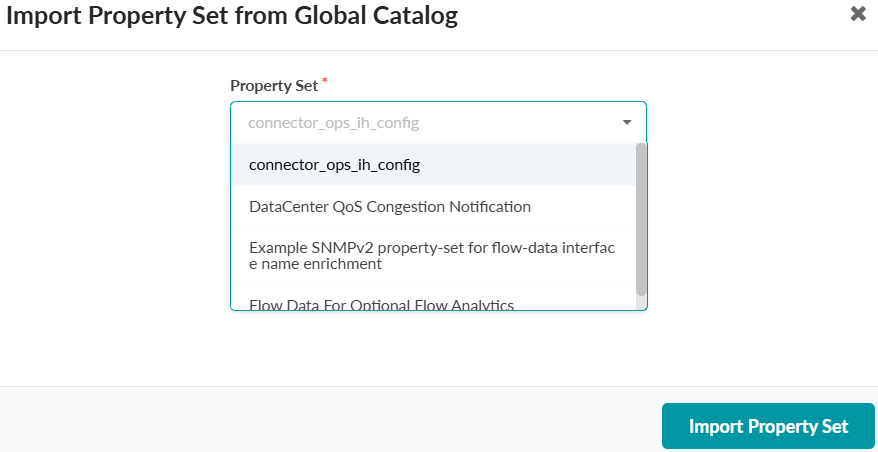
- From within your Blueprint, navigate to Staged > Catalog > Property Sets > Import Property Set.
-
Select the Property Set you created from the dropdown and click Import Property
Set.