Configure DHCPv4 and DHCPv6 Server for HPE Networking Apstra Data Center Director ZTP
When a device connects to a network, Dynamic Host Configuration Protocol (DHCP) automatically assigns an available IP address to it. Apstra, by default, uses a Kea DHCP server for device management (as of Apstra version 5.0.0, previously it was ISC). If you set up a different DHCP server, you’re responsible for configuring the same details as described here.
DHCP Parameters
|
Field Name |
Description |
|---|---|
|
Domain Search ( |
Option to configure multiple search domains (Example entry: |
|
Domain Name ( |
Option to indicate the domain name to use (Example entry: |
|
Domain Name Servers ( |
Option to list all of the DNS IP addresses. To specify more than one value, separate them with a comma (,). For the parsing of the file to succeed, each line must end with a semicolon (;) |
|
TFTP Server IP ( |
IP address of the TFTP server |
|
Subnet / subnet |
CIDR notation of IPv4 subnet (Example entry:
|
|
Subnet / IP Pools / IP Pool |
First address and last address of the IP subnet available for
dynamic assignment. (for example: |
|
Subnet / Router |
The default gateway IP address |
|
Reservation Mode |
Defines the reservation modes to use for this subnet |
|
Host Reservations / Hardware Address |
The host MAC address |
|
Host Reservations / Fixed IP Address |
The fixed IP address allocated for the host |
|
Reservation Mode Default |
All, Global, Out of Pool, or Disabled |
|
Global Host Reservations / Hardware Address |
The host MAC address |
|
Global Host Reservations / Fixed IP Address |
The fixed IP address allocated for the host |
|
Field Name |
Description |
|---|---|
|
valid-lifetime ( |
Defines the default IP lease validity duration |
|
max-valid-lifetime ( |
Defines the maximum IP lease duration |
|
match-client-id ( |
To indicate if server will use client id for lease lookups |
|
interfaces-config / interfaces ( |
The interfaces on which the DHCP server would listen for DHCP messages |
|
lease-database / type ( |
Defines the lease-database type |
|
lease-database / name ( |
The file path inside DHCPD container where lease information would be stored |
|
lease-database / lfc-interval ( |
The intervals at which DHCP will initiate lease file cleanup |
|
subnet / id (id) |
|
|
subnet ( |
CIDR notation of IPv4 subnet |
|
option-date / name |
The standard DHCPv4 option name |
|
option-date / code |
The standard DHCPv4 option code |
|
option-date / space |
space |
|
option-date / data |
The value passed to the specified option |
|
option-def /name ( |
The standard DHCPv4 option name |
|
option-def / code ( |
The standard DHCPv4 option code |
|
option-def / space ( |
space |
|
option-def / type ( |
The value passed to the specified option |
|
client-classes / name ( |
"arista", "cisco", "sonic" |
|
client-classes / test ( |
test |
|
control-socket / socket-name ( |
The location of UNIX socket file used to communicate with control agent |
|
control-socket / socket-type ( |
The DHCP socket type |
|
loggers / name ( |
name |
|
loggers / severity ( |
Defines the logging severity level |
|
loggers / debuglevel ( |
Specifies the level of debug message when severity is set to debug |
|
loggers / output |
output |
|
reservation-mode ( |
Types of reservations allowed (none, all, global, out of pool, disabled) |
|
reservations-global ( |
Indicates if the server should look up global reservations |
|
reservations-in-subnet
( |
Indicate if the server should look up in-subnet reservations |
|
reservations-out-of-pool
( |
Specify if the server can assume that all reserved addresses are out-of-pool. It can be ignored if "reservation-in-subnet" is false |
|
reservations / Hardware Address |
Used to list global reservations |
|
reservations / Fixed IP Address |
The fixed IP address allocated for the host |
DHCPv6
| Field Name | Description |
|
Domain SearchDomain Search ( |
Option to configure multiple search domains (Example entry: dc1.yourdatacenter.com) To specify more than one value, separate them with a comma (,). For the parsing of the file to succeed, each line must end with a semicolon (;) |
|
DNS Servers ( |
Option to list all of the DNS IP addresses. To specify more than one value, separate them with a comma (,). For the parsing of the file to succeed, each line must end with a semicolon (;) |
|
Subnet / subnet ( |
CIDR notation of IPv4 subnet (Example entry: 2001:db8:1::/64) |
|
Subnet / IP Pools / |
The first address and last address of the IP subnet available for dynamic assignment ( for example: entry: 2001:db8:1::1001-2001:db8:1::1fff) |
| Reservation Mode | Defines the reservation modes to use for this subnet |
| Host Reservations / Hardware Address | The host MAC address (Optional with DHCP Unique Identifier) |
| Host Reservations / DHCP Unique Identifier | DHCP Unique Identifier (DUID) of the host (Optional with Hardware Address) |
| Host Reservations / Fixed IP Address | The fixed IP address allocated for the host |
| Reservation Mode Default | All, Global, Out of Pool, or Disabled |
| Global Host Reservations / Hardware Address | The host MAC address (Optional with DHCP Unique Identifier) |
| Global Host Reservations / DHCP Unique Identifier | DHCP Unique Identifier (DUID) of the host (Optional with Hardware Address) |
| Global Host Reservations / Fixed IP Address | The fixed IP address allocated for the host |
|
Field Name |
Description |
|---|---|
|
valid-lifetime ( |
Defines the default IP lease validity duration |
|
max-valid-lifetime ( |
Defines the maximum IP lease duration |
|
preferred-lifetime ( |
Defines the preferred lifetime |
|
interfaces-config / interfaces ( |
The interfaces on which the DHCP server would listen for DHCP messages within IP address for example, |
|
lease-database / type ( |
Defines the lease-database type |
|
lease-database / name ( |
The file path inside DHCPD container where lease information would be stored |
|
lease-database / lfc-interval ( |
The intervals at which DHCP will initiate lease file cleanup |
|
subnet6 / id ( |
ID of subnet 6 |
|
subnet6 / subnet ( |
CIDR notation of IPv6 subnet |
|
subnet6 / interface ( |
Interface with IPv6 global address Default: |
|
option-date / name |
The standard DHCPv6 option name |
|
option-date / code |
The standard DHCPv6 option code |
|
option-date / space |
space |
|
option-date / data |
The value passed to the specified option |
|
option-def /name ( |
The standard DHCPv6 option name |
|
option-def / code ( |
The standard DHCPv6 option code |
|
option-def / space ( |
space |
|
option-def / type ( |
The value passed to the specified option |
|
client-classes / name ( |
|
|
client-classes / test ( |
test |
|
client-classes / option-data ( |
The standard DHCPv6 option name |
|
client-classes /code ( |
The standard DHCPv6 option code |
|
client-classes / space ( |
spaced |
|
client-classes /option-data ( |
The value passed to the specified option |
|
control-socket / socket-name ( |
The location of UNIX socket file used to communicate with the control agent |
|
control-socket / socket-type ( |
The DHCP socket type |
|
loggers / name ( |
name |
|
loggers / severity ( |
Defines the logging severity level |
|
loggers / debuglevel ( |
Specifies the level of debug message when severity is set to debug |
|
loggers / output |
output |
|
reservation-mode ( |
Types of reservations allowed (none, all, global, out of pool, disabled) |
|
reservations-global ( |
Indicates if the server should look up global reservations |
|
reservations-in-subnet
( |
Indicate if the server should look up in-subnet reservations |
|
reservations-out-of-pool
( |
Specify if the server can assume that all reserved addresses are out-of-pool. It can be ignored if "reservation-in-subnet" is false |
|
reservations / Hardware Address |
Used to list global reservations (Optional with DHCP Unique Identifier |
|
reservations / Fixed IP Address |
The fixed IP address allocated for the host |
Use GUI Configurator to Configure DHCPv4 and DHCPv6
You can set up optional parameters that the DHCP services will send to every device that asks for DHCP services. You have the option of configuring these parameters at a later time via configlets. (If you define these parameters in the DHCP service, don't try to set them up again via Apstra; the device OS may return an error.)
If in doubt, don't enter random parameters; it may result in timeouts as a service tries to resolve IP addresses.
-
If you're using the wizard, step 2 is to configure DHCP. (You can skip this
step for now and come back later to complete this configuration.) If you're
not using the wizard, then from the left navigation menu of the Apstra ZTP
GUI, click DHCP, then click Basic
Setup.
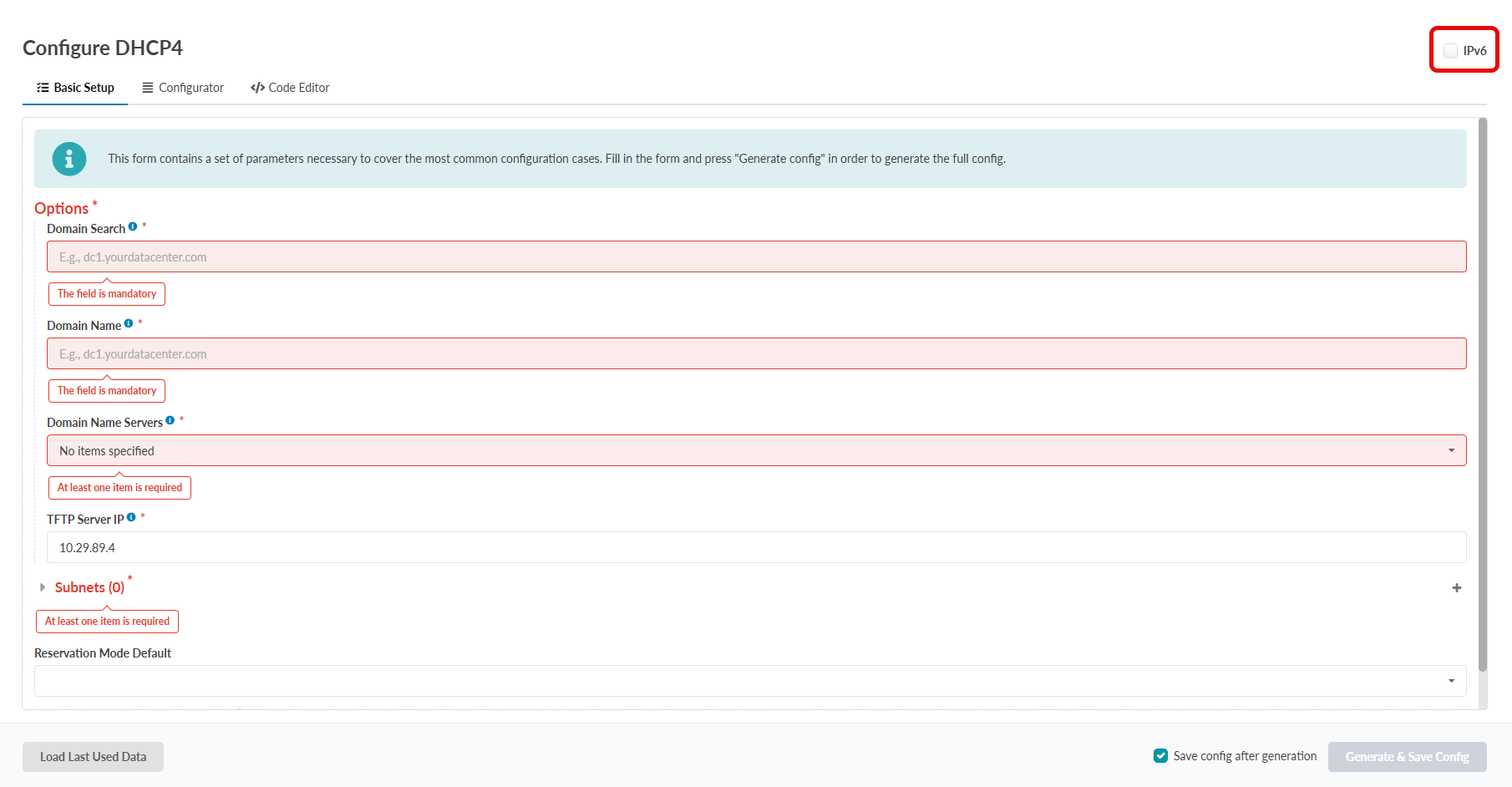 The Basic Setup screen appears.
Use GUI Code Editor to Configure DHCPv4 and DHCPv6
-
From the left navigation menu of the Apstra ZTP GUI, click
DHCP, then click Code
Editor.
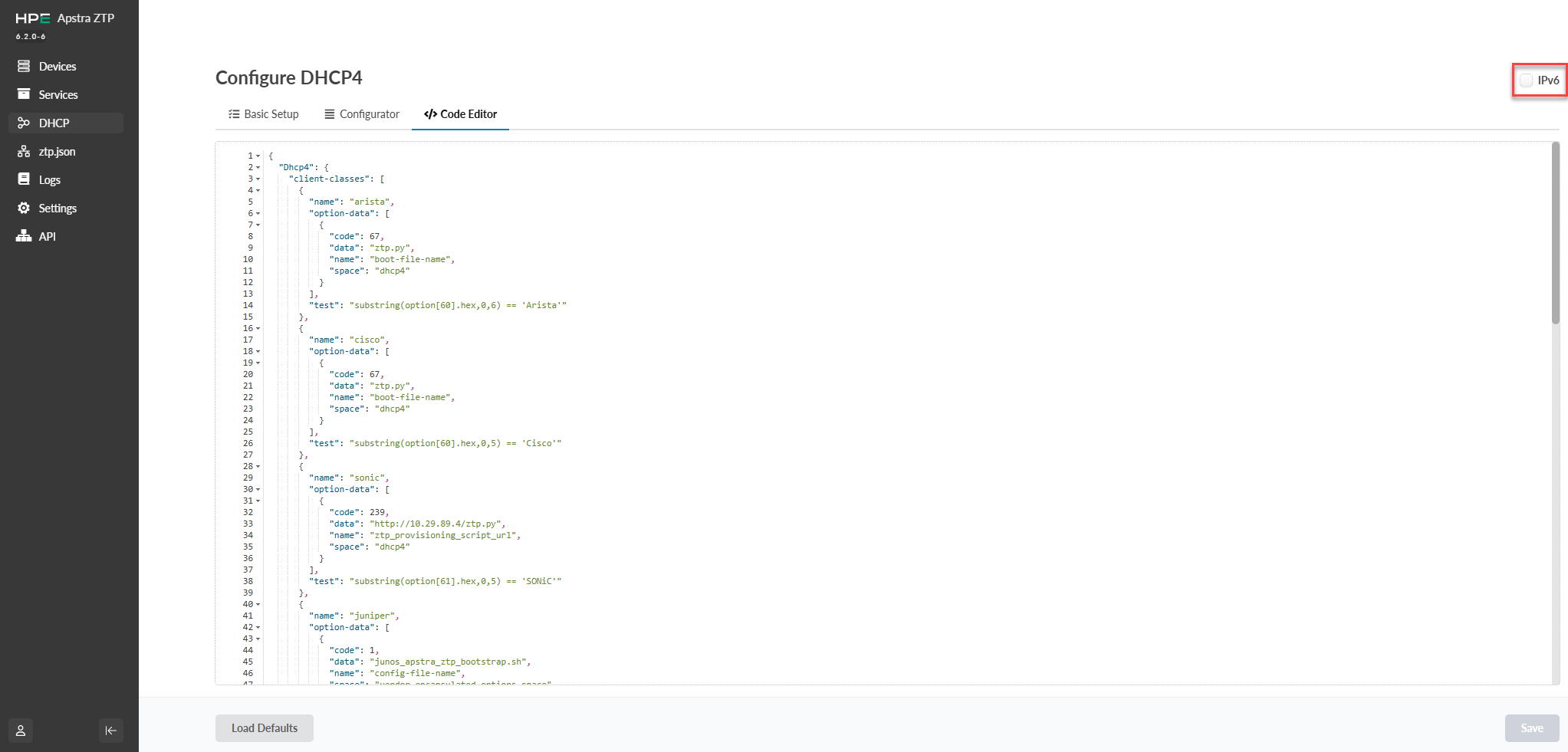 The Code Editor screen opens.
Switch Between DHCPv4 and DHCPv6
In the upper-right-hand corner of the screen, click the IPv6 edit box, and then click Basic Setup.
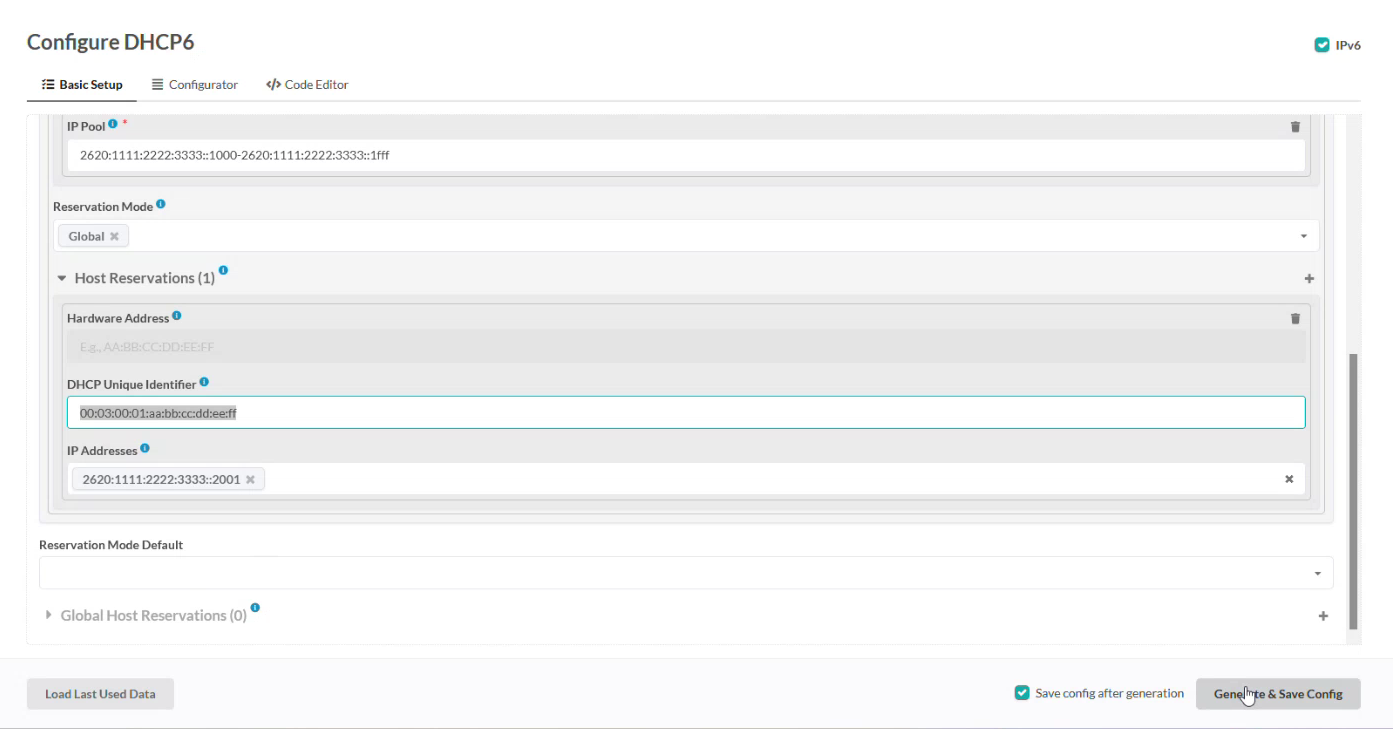
Use Text Editor to Configure DHCPv4 and DHCPv6
All configuration files are owned by root. You must use sudo
to run commands as root using the sudo
command or after becoming root with the sudo
-s command.
The following is an example configuration file for the DHCPv4 server in Kea. It outlines a basic scenario with a single IPv4 subnet, which includes one pool of dynamically allocated addresses.
{ "Dhcp4":

{
    "interfaces-config": {
      "interfaces": [ "eth0" ]
  },

  "lease-database": {
      "type": "memfile",
      "lfc-interval": 3600
  },

  "valid-lifetime": 4000,

"subnet4": [
    {
       "pools": [ { "pool":  "192.0.2.1 - 192.0.2.200" } ],
       "id": 1,
       "subnet": "192.0.2.0/24",
       "interface": "eth0"
    }
  ],

    "loggers": [
        {
            "name": "kea-dhcp4",
            "output-options": [
                {
                    "output": "stdout"
                }
            ],
            "severity": "INFO"
        }
    ]
}

}