VM Sizing
VM Sizing Overview
Overview
This guide provides sizing recommendations for Apstra DCD deployments.
Apstra DCD is delivered as an OVA and is deployed as one or more VMs. The software itself runs as a set of containers, each dedicated to a function: Controller, IBA processing unit, Offbox agent unit. Of these, the Controller is a singleton (only one instance of the controller will be running per Apstra Instance), while, the IBA processing unit and the Offbox agent units can be used to scale horizontally.
Apstra DCD can be run as a single VM or as a cluster of VMs, based on the requirements of the environment being managed.
Determining the sizes for the VM(s) that run Apstra DCD depends on more than device count alone. The complexity of your network model, the number of virtual networks, routing zones, connectivity templates, and virtualised endpoints has a significant influence on resource consumption, particularly on the controller. This guide explains the key variables and how to apply them when planning your deployment.
Cluster Architecture
An Apstra DCD cluster consists of one controller node and zero or more worker nodes. For smaller deployments, all components can run on a single virtual machine. For larger or more complex environments, separating each role onto a dedicated VM improves stability and eliminates the risk of one workload affecting another.
The controller is always a single instance. The Controller holds the logic that runs Apstra DCD, manages the UI, the API termination and the graph database.
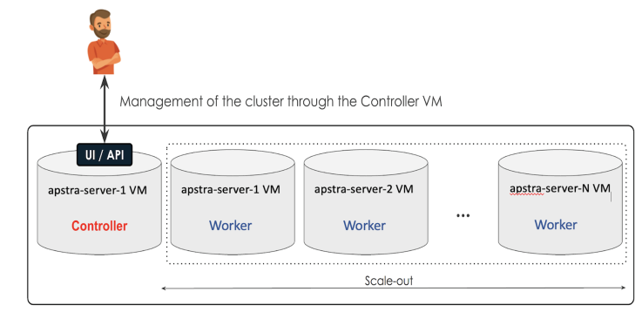
In addition, there is a ZTP server that is available as part of the Apstra DCD install. This is a small, fixed-size VM and is used only during the initial onboarding process for the switches.
How Apstra DCD Uses Resources
Apstra DCD consumes resources in three fundamentally different ways, and each is governed by a different set of factors.
-
Controller resources – This is driven three factors: 1. By the size and complexity of your network model: the number of blueprints, virtual networks, routing zones, connectivity templates, and virtualised endpoints. This affects the size of the graph db, among others. 2. By the number of devices since the device state and config are stored and 3. The Telemetry collected.
-
Off-box agent resources – driven by the number of devices Apstra DCD manages. Off-box agents scale with raw device count, independently of the complexity of the network model. It must be noted that from Apstra 6.2, on-box agents are available for all the supported NOS types. On-box agents are preferred over off-box since they distribute the work, and therefore scale better.
-
IBA unit resources – Driven by probes. Probes can expand their memory footprint, based on number of switches, and the complexity of the probe logic, and the data the probe pulls in.
- Controller Resources - Graph DB
- Controller Resources - Device Data
- Controller Resources - Telemetry Data
- Off-box Agent Resources
- IBA Agent Resources
Controller Resources - Graph DB
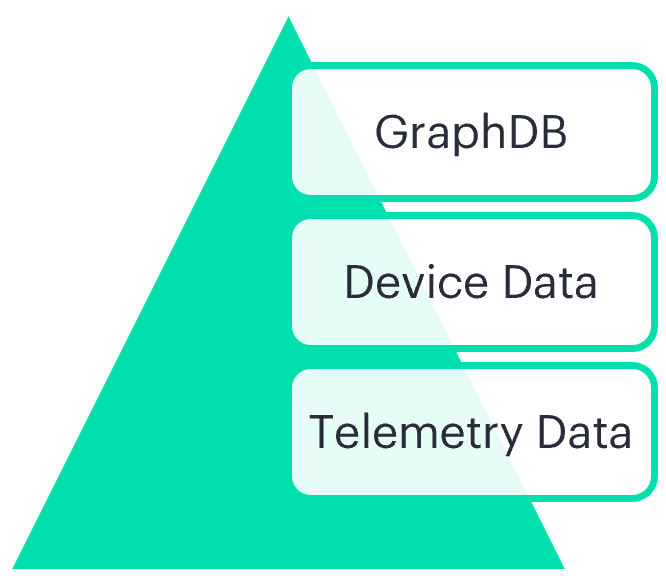
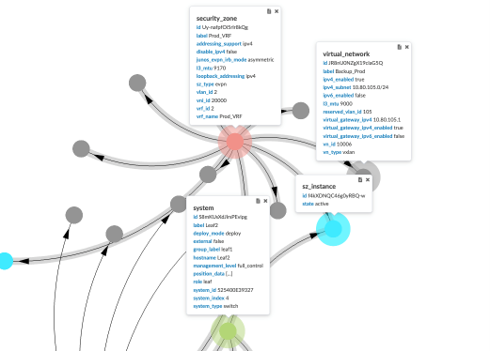
The key factors that determine graph size are:
-
Number of blueprints – each blueprint is an independent graph model. Multiple blueprints increase the controller’s memory requirements
-
Virtual network endpoint count –In virtualised environments where connectivity templates are applied across many interfaces (VMware port groups, for example), endpoint counts can be significantly higher than device count alone would suggest. Virtual network endpoints are per blueprint, so this can result in one blueprint’s memory consumption being radically different from another’s.
-
Routing zones and virtual networks – each VRF and VXLAN adds additional nodes and relationships to the graph.
-
Device Count– more devices can mean more graph nodes and relationships, (since more devices mean more interfaces)
Controller Resources - Device Data
The Apstra DCD Controller stores device state, config and proposed changes. The memory requirements for this depend on the number of devices.
Controller Resources - Telemetry Data
The Apstra DCD Controller stores telemetry data by device. Depending on what telemetry is requested, this also contributes to the memory consumption of the Controller.
Off-box Agent Resources
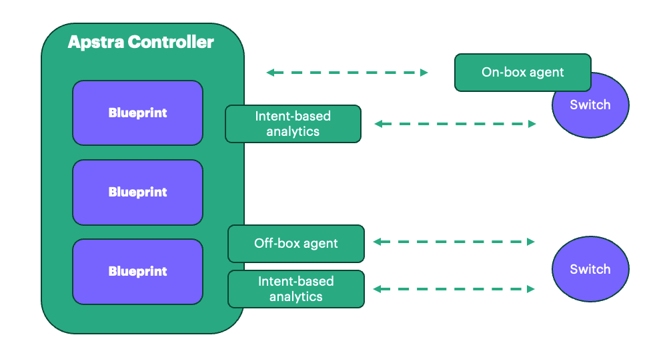
Apstra DCD manages devices through device agents. An agent can be installed either on-box or off-box. An on-box agent is installed on the device itself, whereas an off-box agent is installed on the Apstra DCD server and communicates with the device via API. To find out which platforms support on-box and off-box agents, see the Apstra DCD Device Management documentation.
As mentioned previously, On-Box agents should be used where possible since it spreads some of the load of data collection to the devices. Off-box agents are only required where on-box agents are not available, or for some edge-case operational needs.
Off-box agents can run on worker nodes, separate from the controller. Their resource requirements scale only with the number of devices managed. In the case of JunOS switches, we can use the off-box unit model, which allows each off-box unit to manage 16 devices and consume 1 GM of RAM. For other NOS-es, we will need one off-box agent per switch, and it will consume about 500 MB of RAM. Off-box agents are supported for all NOS-es except for Sonic, which is on-box only.
Because device count – rather than graph size – drives this requirement, two environments with the same number of devices need broadly similar off-box agent capacity even where their controller requirements differ. Off-box agent sizing is covered in detail later in this guide.
IBA Agent Resources
The IBA Processing Unit Agent runs the analytics pipeline used by the probes. The IBA Processing Unit agents’ memory consumption can vary wildly based on what the probes are doing. The data collected and analysed can expand dynamically based on what the probe does and the complexity of the environment.
VM Sizing and Deployment Models
- VM Sizes
- Single-VM Multi-VM Deployment
- Single-VM (all-in-one) Deployment
- Single-VM (all-in-one) Deployment - Considerations
- Multi-VM Deployment
VM Sizes
| Size | vCPUs | RAM | Disk |
|---|---|---|---|
| S | 4 | 16 GB | 80/160 GB |
| M | 8 | 32 GB | 80/160 GB |
| L | 12 | 64 GB | 160 GB |
| XL | 16 | 128 GB | 320 GB |
Single-VM Multi-VM Deployment
Apstra DCD supports two deployment models, and the sizing approach differs between them. In a single-VM (all-in-one) deployment, the controller, off-box agent, and IBA processing unit agents all run on one virtual machine, which is sized as a single combined unit. In a multi-VM deployment, each role runs on its own virtual machine and is sized individually. The two models, and how to size each, are described below.
Single-VM (all-in-one) Deployment
Single-VM (all-in-one) Deployment - Considerations
Single VM deployments are possible, and for most cases it should be sufficient. The VM should be monitored closely and conservatively for memory and CPU usage. If it is found that the VM frequently has excessive memory or CPU overruns, it might be advisable to move to a multi-VM deployment
Multi-VM Deployment
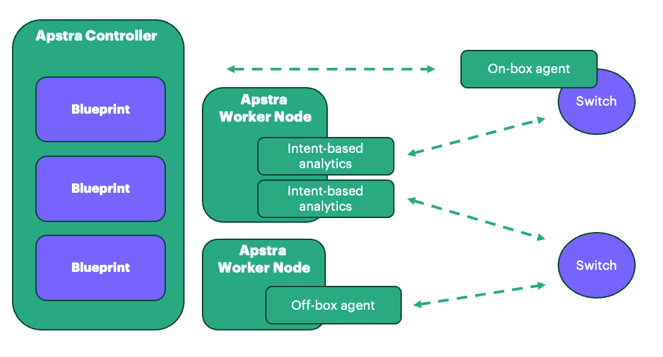
Controller VM – runs the Apstra DCD controller only. Isolating the controller ensures it has dedicated access to memory and CPU, regardless of the workload on agent or IBA nodes.
Off-box agent worker VM(s) – runs off-box agent workloads only, using the off-box unit model. For JunOS devices, and for Apstra DCD versions greater than 6.2, each unit manages approximately 16 devices and requires roughly 1 GB of RAM. For non JunOS devices, each unit manages one device and requires about 500 MB RAM. The VM is sized to cover the number of devices.
If all devices in your environment run on-box agents, a dedicated off-box agent worker VM is not required. Worker nodes would only be needed for IBA workloads in that case.
IBA worker VM – runs IBA Processing Units only. IBA probe memory consumption varies depending on the probes configured and the volume of telemetry collected. Dedicating a separate VM to IBA workloads protects controller and agent stability. It is very difficult to mathematically predict the memory usage of a probe, so this needs to be done with an eye to being defensive.
Sizing Considerations
Controller Sizing
As outlined previously, the primary consumer of memory in a controller is a blueprint and the blueprint’s memory is influenced by devices, routing zones, virtual networks and virtual endpoints. While it is not possible to estimate the exact memory requirements of a blueprint, estimates can be made about the upper limit of the requirements.
| Devices | Virtual Networks | Projected Memory |
|---|---|---|
| <=25 | <= 25 | 10 GB |
| <=50 | <= 25 | 24 GB |
| <=25 | >25 | 24 GB |
| <=50 | >25 | 32 GB |
| <=75 | >25 | 48 GB |
| >100 | >25 | 64 GB |
This section will be modified and improved as we conduct more tests and explore the requirements further.
IBA Units Sizing
Calculating the precise memory requirements for IBA probes cannot be deterministically calculated as it depends on multiple variables.
IBA pipelies are run by IBA processing units, each Unit runs 20 probes each. An IBA unit is tied to a blueprint.
Based on the experiments done so far, we can estimate that per-blueprint, we should allocate about 12 GB for probes.
Some probes (especially evpn probes) and some conditions can cause the IBA units to consume a lot of memory. Therefore, the memory consumption of the Apstra VM hosting IBA units must be watched closely.
Off-Box Units Sizing
Starting with 6.2, On-Box agents can be used for JunOS as well. It is strongly encouraged to use On-Box agents for reasons of scale. This section has relevance only if there’s a decision made to use Off-box agents.
-
If on-box agents are being used, then, we don’t need this VM
-
If the NOS is a JunOS, then, using the Off-Box-Units, we can support 16 devices for every Gigabyte of memory.
-
If the NOS is not a JunOS, and off-box units are used, we can support 2 devices for every Gigabyte of memory.
-
For example:
-
Customer needs to manage 120 Junos Switches Off-Box
-
We need 120/16 = 8 GB Memory
Size an Apstra DCD Deployment
How to Size the all-in-one VM
-
Using the information in the previous section, calculate the memory requirements for a controller, the probes and off-box units.
-
Pick a size that fits the memory requirements of all three
-
For instance, if the Controller needs 10 GB, Probes need 12 GB, and no off-box agents are used, the expected memory requirements are 22 GB. At this point, the small VM size is too small, pick a medium. This gives some space to grow.
-
If memory is a constraint, instead of a standard size, a size that is closer to the actual requirement can be used. In the example above, a medium is 32 GB, but 24 GB will suffice.
-
Note that the Apstra DCD scheduler assumes that the controller will take over half the space in an Apstra DCD VM, so the other components will be allocated in only half the memory space.
-
In practical terms what this means is that if the controller needs 10 GB and the Probes need 8 GB and off-box agents need another 4 GB, we need to allocate atleast 24 GB, not 22 GB, otherwise the Apstra DCD controller will assume that there’s not enough memory to run everything.
How to Size A Multi-VM Deployment
-
Using the information in the first three sections, calculate the memory requirements for the controller, probes and off-box units.
-
For each of these pick the correct sized VM.
-
For instance, if the Controller needs 10 GB, Probes need 12 GB, and no off-box agents are used, two small sized VMs should be sufficient.
For environment-specific sizing guidance, contact your HPE representative.