LDAP Provider

Create LDAP Provider

To create a Lightweight Directory Access Protocol (LDAP) provider from the HPE Networking Apstra Data Center Director GUI
  1. From the left navigation menu, navigate to External Systems > Providers and click Create Provider.
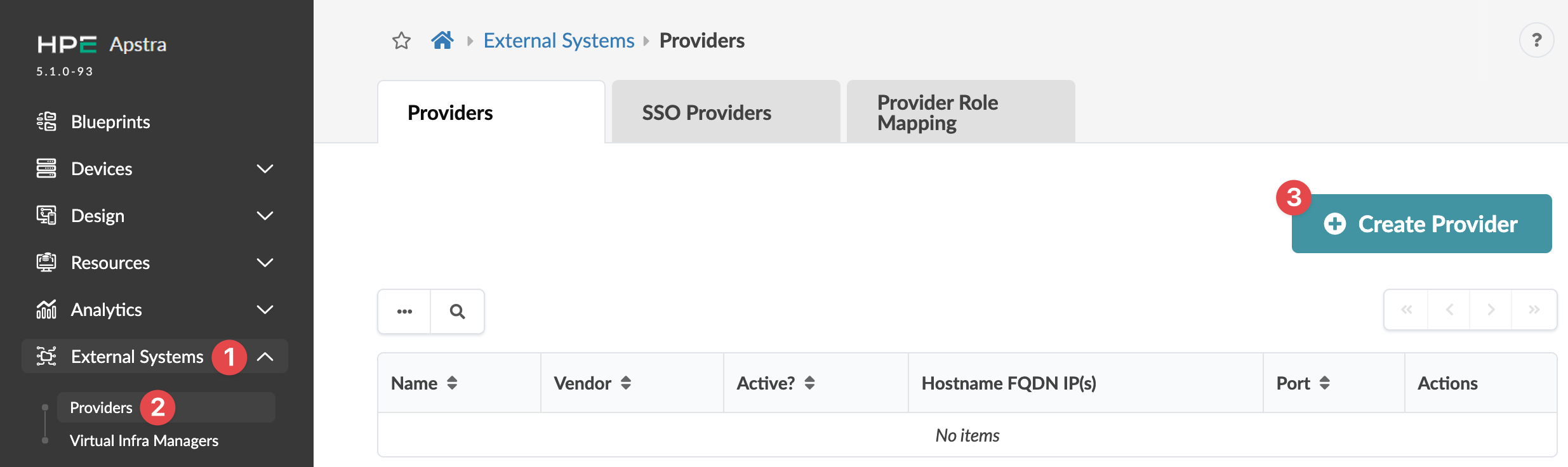
    Juniper Apstra 5.1.0-93 user interface showing External Systems Providers tab with no listed items and Create Provider button.
  2. Enter a Name (64 characters or fewer), select LDAP, and if you want LDAP to be the active provider, toggle on Active?.
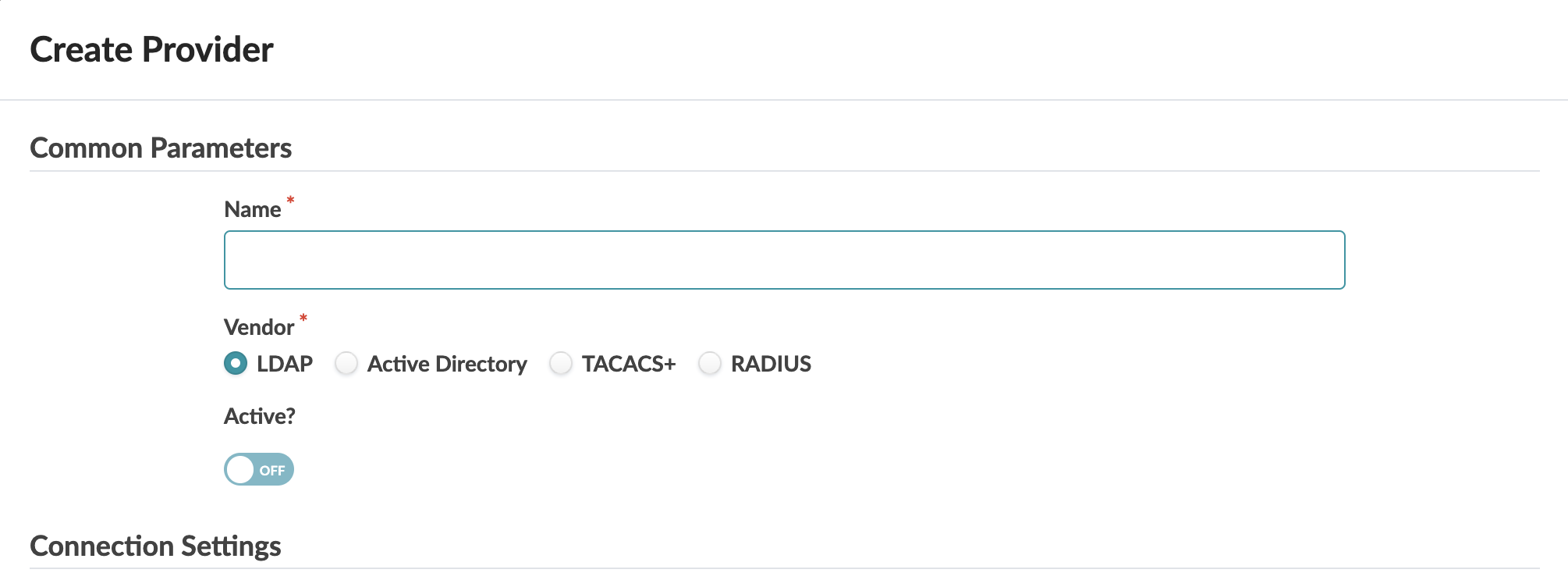
    Create Provider form with fields for Name, Vendor (LDAP selected), and Active toggle set to OFF.
  3. For Connection Settings, enter/select the following:
    • Port - The TCP port - LDAP: 389, LDAPS: 636
    • Hostname FQDN IP(s) - The fully qualified domain name (FQDN) or IP address of the LDAP server. For high availability (HA) environments, specify multiple LDAP servers using the same settings. If the first server cannot be reached, connections to succeeding ones are attempted in order.
  4. For Provider-specific Parameters enter/select the following, as appropriate:
    • Groups Search DN - The LDAP Distinguished Name (DN) path for the RBAC Groups Organizational Unit (OU)
    • Users Search DN - The LDAP Distinguished Name (DN) path for the RBAC Users Organization Unit (OU)
    • Bind DN - The LDAP Distinguished Name (DN) path for the active server user that the Apstra DC Director server will connect as
    • Password - The LDAP server user password for the Apstra DC Director server to connect as
    • Encryption - None, SSL/TLS or STARTTLS
    • Advanced Config
      • Timeout (seconds) - Increasing timeout above the default 30 seconds may impact API responsiveness for all users. If you need a longer timeout for MFA support, you may increase the timeout up to 60 seconds. If you require a timeout above 60 seconds, contact Juniper Technical Support.
      • Username Attribute Name - The LDAP attribute from the user entry that Apstra DC Director Server uses for authentication. (usually cn or uid)
      • User Search Attribute Name
      • User First Name Attribute Name
      • User Last Name Attribute Name
      • User Email Attribute Name
      • User Object Class Attribute Name
      • User Member Attribute Name
      • Group Name Attribute Name
      • Group DN Attribute Name
      • Group Search Attribute Name
      • Group Member Attribute Name
      • Group Member Mapping Attribute Name
      • Group Object Class Attribute Name
  5. You can Check provider parameters and Check login (to verify authentication with the remote user credentials) before creating the provider.
  6. Click Create to create the provider and return to the table view.

Configure LDAP Provider

To authorize Apstra DC Director users via a LDAP provider, the LDAP server must be configured to properly return a provider group attribute. This attribute must be mapped to a defined Apstra DC Director Role. The example configuration below is for the open-source OpenLDAP server.

The user group must be mapped to a defined Apstra DC Director Role.

After configuring and activating a provider, you must map that provider to one or more user roles to give access permissions to users with those roles.