Update Tenant

  1. From the blueprint, navigate to Staged > Policies > Tenants and click the Edit button for the tenant to update.
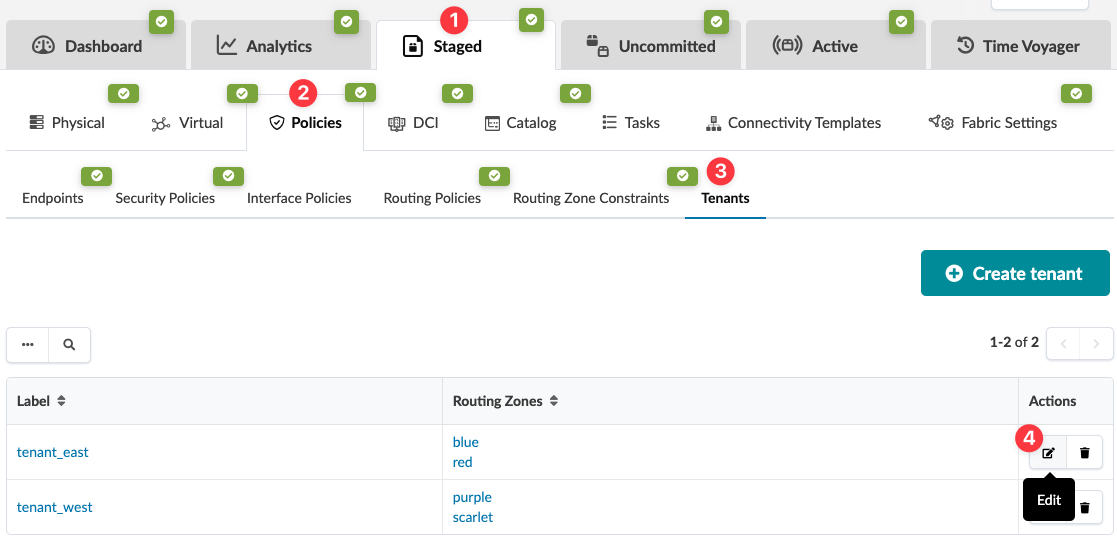
    User interface for managing network policies and tenants. Tabs include Dashboard, Analytics, Staged, Uncommitted, Active, and Time Voyager. Policies tab selected with subcategories like Endpoints and Security Policies. Tenants sub-tab active, showing tenant_east with routing zones blue and red, and tenant_west with zones purple and scarlet. Edit and delete buttons available for each tenant. Create tenant button present.
    The Edit Tenant dialog opens.
  2. Add and/or remove routing zones, as needed, by checking or unchecking the appropriate boxes for the tenant(s).
  3. Click Submit to stage the change and return to the tenant table view.

When you're ready to activate your changes, go to the Uncommitted tab to review and commit (or discard) your changes.