Import Property Set (Datacenter Blueprint)

To import a property set into a blueprint from the GUI:
  1. Make sure the property set that you want to import is in the design catalog.
  2. From the blueprint, navigate to Staged > Catalog > Property Sets and click Import Property Set.
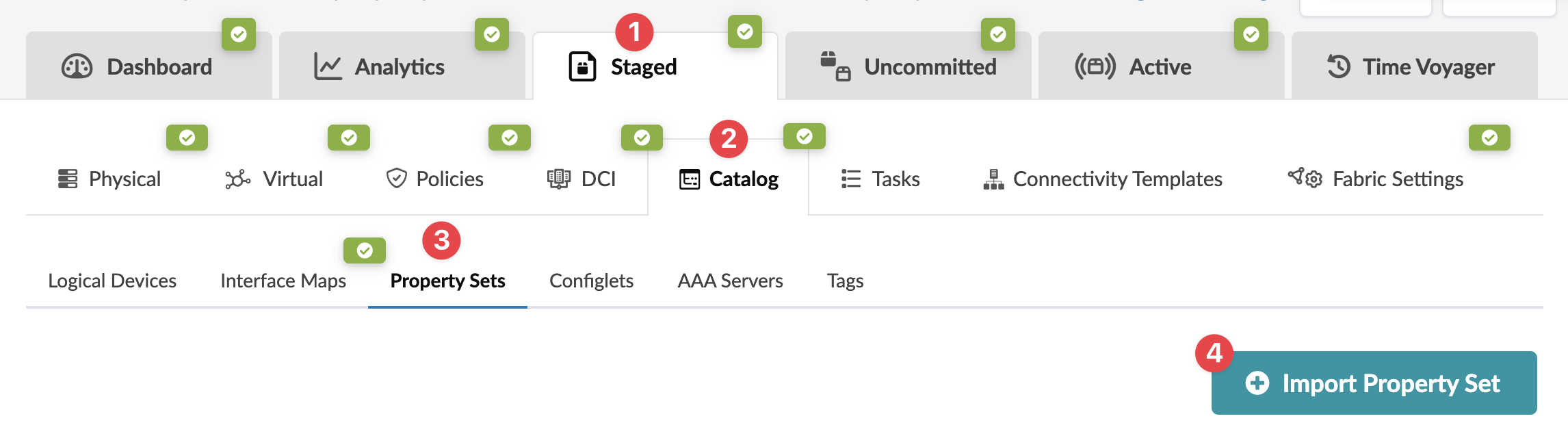
    Screenshot of a network management UI with tabs: Dashboard, Analytics, Staged, Uncommitted, Active, Time Voyager. Sub-navigation includes Physical, Virtual, Policies, DCI, Catalog. Highlighted is Property Sets tab with options for Logical Devices, Interface Maps, Configlets, AAA Servers, and Tags. Import Property Set button is visible. Green checkmarks indicate active sections.
    The Import Property Set from Global Catalog dialog opens.
  3. From the drop-down list, select a property set from the design catalog, then click Import Property Set to stage the import and return to the table view.