Edit Config Template (Freeform Blueprint)

  1. From the blueprint, navigate to Staged > Catalog > Config Templates to go to the table view.
  2. Either from the table view or the details view click the Edit button for the config template to edit.
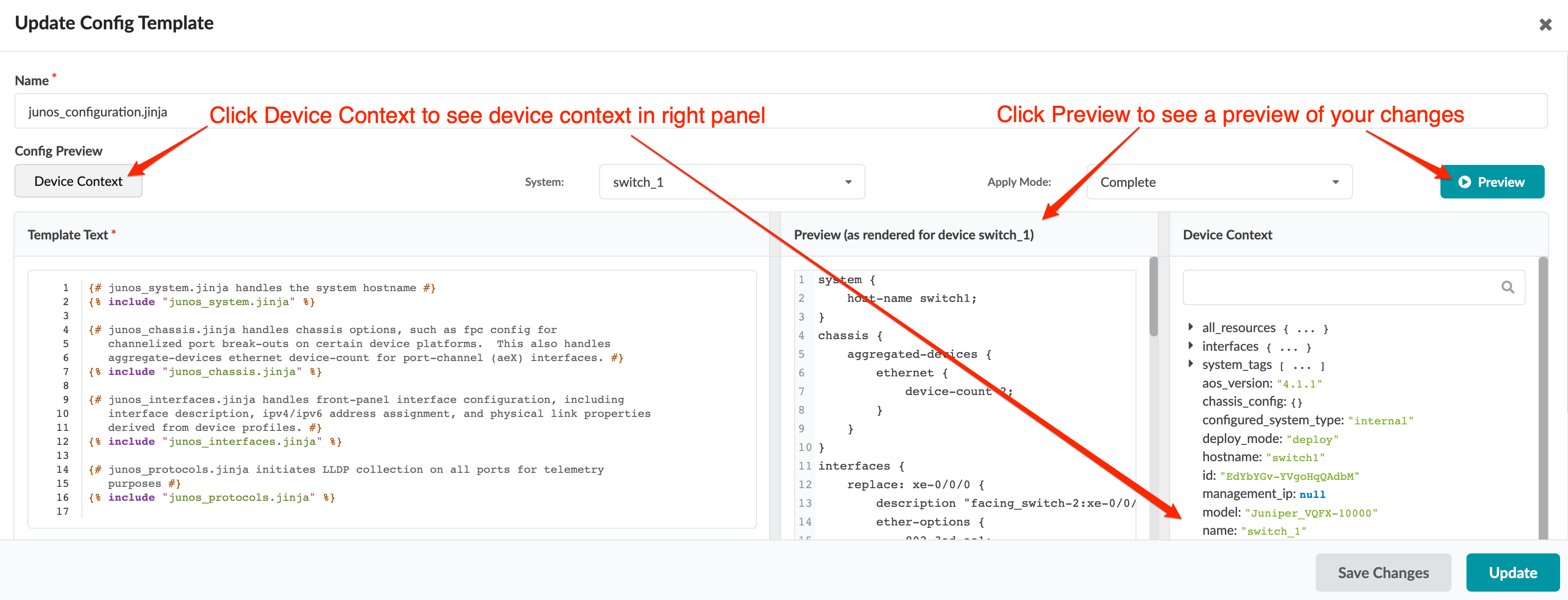
    Configuration interface for updating a template. Left panel shows junos_configuration.jinja template with Junos configuration snippets. Right panel displays device context for switch_1 with hostname, aos_version, and model. Middle-right panel previews rendered configuration. Bottom includes buttons to preview, save, or update changes. Red arrows highlight Device Context and Preview sections.
  3. In the dialog, make your changes.
    • To see device context, click Device Context.

    • To see device context for a specific system, select it from the System drop-down list.

    • To see a preview of your changes, click Preview.

      • To see the full configuration, including the changes you're making, select Complete from the Preview Mode drop-down list.

      • To see only the configuration that you've changed, select Incremental from the Apply Mode drop-down list.
  4. Click Update (bottom-right) to update the config template and return to the table view.