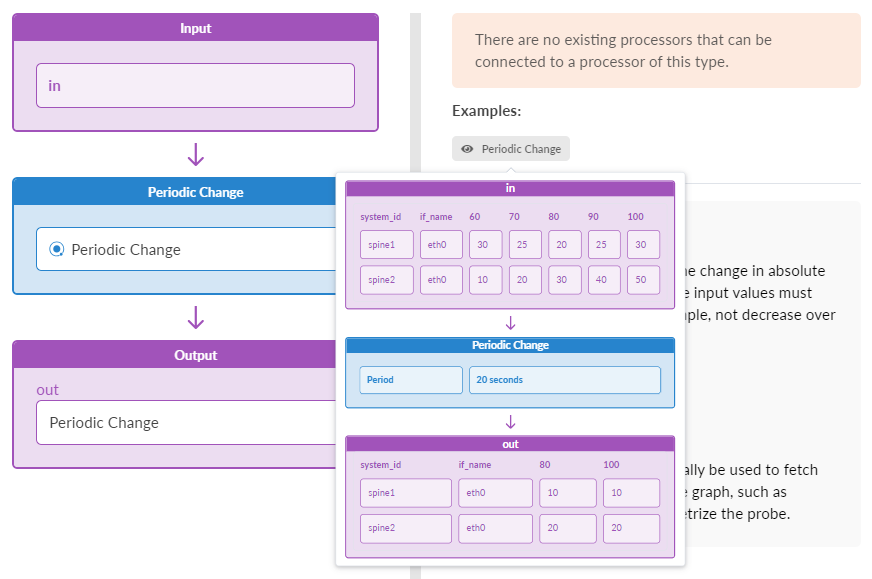
Periodic Change Processor
For each input value, outputs the change in absolute value over a defined period. The input values must change monotonically, for example, not decrease over time.
Graph queries can optionally be used to fetch data from arbitrary nodes in the graph, such as property set nodes, and parametrize the probe.
| Parameter | Description |
|---|---|
| Input Types | Table (number) |
| Output Types | Table (number) |
| Period | The duration of the processing period used to calculate the rate of change (time in seconds, integer, or an expression that evaluates to time in seconds integer value) |
| Graph Query (graph_query) |
One or more queries on graph specified as strings, or a list of such queries. (String will be deprecated in a future release.) Multiple queries should provide all the named nodes referenced by the expression fields (including additional_properties). Graph query is executed on the "operation" graph. Results of the queries can be accessed using the "query_result" variable with the appropriate index. For example, if querying property set nodes under name "ps", the result will be available as "query_result[0]["ps"]". In collector processors ( In other processors it is used for general parameterization and it is only supported as a list of queries.
graph_query: "node("system", role="leaf", name="system").
              out("hosted_interfaces").
              node("interface", name="iface").out("link").
              node("link", role="spine_leaf")"
graph_query: ["node("system", role="leaf", name="system")",
              "node("system", role="spine", name="system")"]
Non-collector processors containing the
graph_query: [node("property_set", label="probe_propset", name="ps")]
duration: int(query_result[0]["ps"].values["accumulate_duration"])
Another example is a that probes can validate a compliance requirement; the compliance value may change over time and/or it can be used by more than one probe. Also, a probe can validate NOS versions on devices. In this case, property sets can be used to define the current NOS version requirement. If it changes tomorrow: change the property set value, instead of going under the probe stage. |