Upgrade Apstra DC Director Flow on the Same VM (in-Place)

This topic provides instructions on how to upgrade your Apstra DC Director Flow configuration on the same VM. This process is referred to as an "in-place" upgrade.

Upgrade Apstra DC Director Flow

You can run an automated upgrade script (recommended) to easily upgrade your Apstra Data Center Director Flow configuration with minimal downtime. Follow the steps in this procedure to upgrade Apstra DC Director Flow from version 4.2.1, 5.0.0, 5.1.0, 6.1.0, 6.1.1, to 6.1.2.
Note:

Make sure to upgrade to the latest Apstra version before running the upgrade file. Navigate to Platform > About in the Apstra DC Director GUI to find the current version. The version also appears in the left navigation menu under the HPE Apstra DC Director logo. For step-by-step upgrade instructions, see the HPE Apstra Installation and Upgrade Guide.

Note: Starting in release 6.1.0, Apstra DC Director Flow reduces storage needs by up to 60 percent compared to earlier requirements. Your VM will require less storage without losing data. Full storage savings take one index rollover cycle (default 7 days) to take affect.

To automatically upgrade Apstra DC Director Flow:

  1. Download the Apstra DC Director Flow Upgrade Installer file from the HPE Support Downloads page located under Applications Tools.
  2. Log in to the Apstra DC Director Flow console. The default credentials are: user=apstra and password=apstra.
  3. Verify the flow collector version that is currently installed (in this example, 7.19.3).
  4. Extract the upgrade (tar.gz) file you just downloaded in Step 1. For example:
    apstra@apstra-flow:~$ tar -xvzf apstra-flow-6.2.0-ubuntu-22.04-7.26.3-upgrade.tar.gz
  5. When the files have finished downloading, cd to the /apstra-flow-6.2.0-ubuntu-22.04-7.26.3-upgrade directory.
    Note:

    This folder contains a README.md file. The file provides steps for manual installation, if needed.

  6. Run the automated upgrade script. Accept the default settings when prompted during the installation. The upgrade will take around 3 to 5 minutes.
    sudo ./upgrade.sh
  7. When the installation is complete, verify that the flow collector was successfully upgraded to version 7.26.3.
  8. Check that your services are active and running.

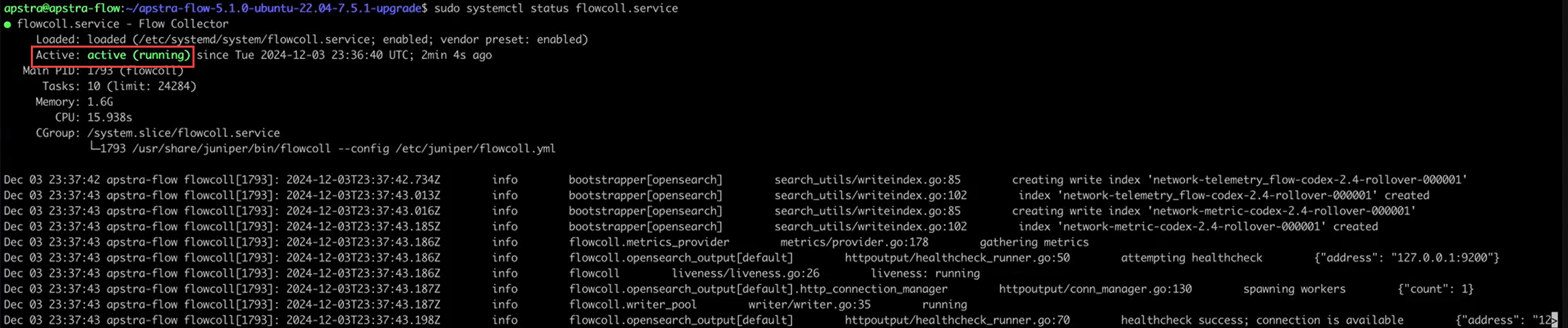
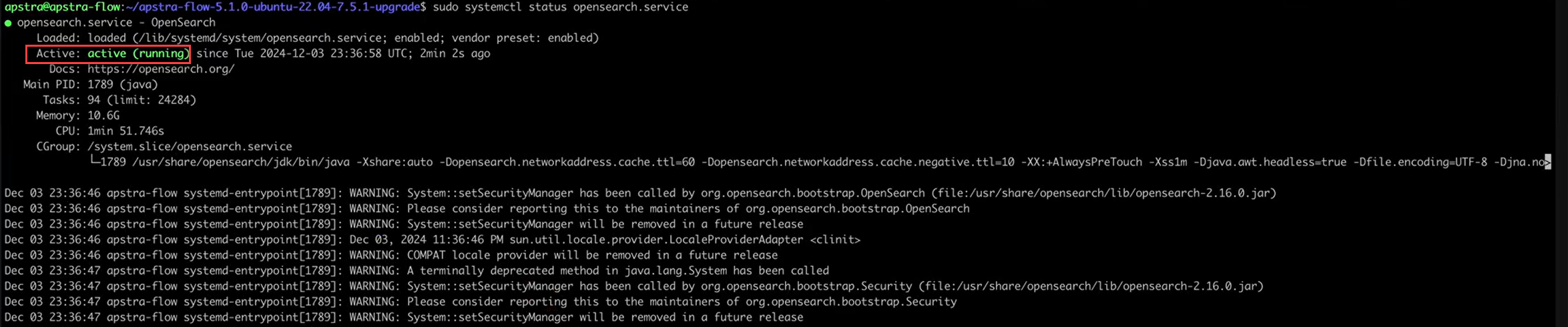
    Run the following commands to see the status of the flowcollector, opensearch, and opensearch-dashboard services:

    Flow collector service status: sudo systemctl status flowcoll.serviceStatus of flowcoll.service: Loaded from etc/systemd/system/flowcoll.service and active. Running for 2m4s with PID 1793, 10 tasks, 1.6GB memory, 15.938s CPU time. Logs show successful operations and health checks.
    OpenSearch service status: sudo systemctl status opensearch.serviceOutput of systemctl status opensearch.service command showing opensearch.service is active and running since Tue Dec 3, 2024. Main PID is 1789, using 10.6G memory. Warnings about deprecated System::setSecurityManager method are present.
    OpenSearch dashboards service: sudo systemctl status opensearch-dashboards.service
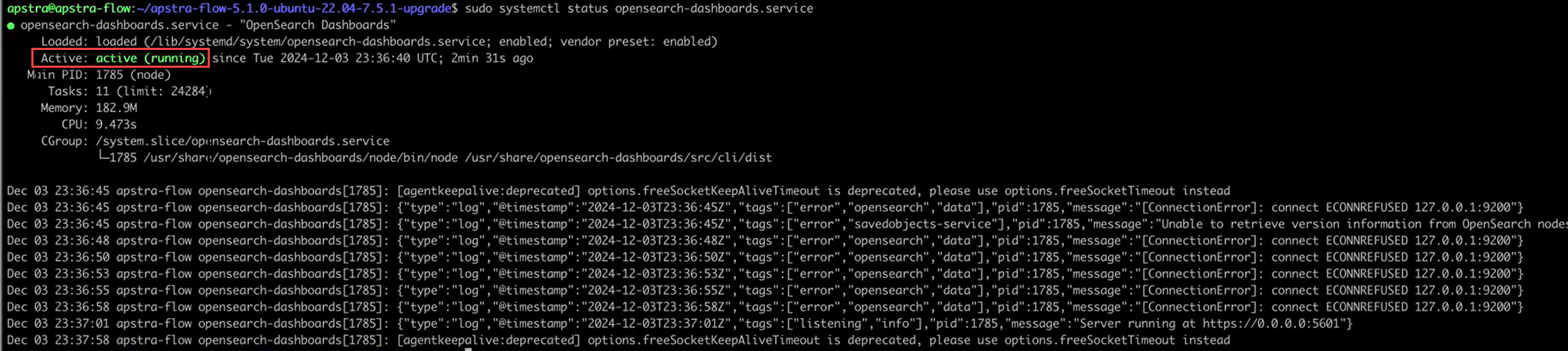
    Systemctl status of opensearch-dashboards.service; active since 2024-12-03. Main PID 1785; 11 tasks; 182.9 MB memory. Connection errors to 127.0.0.1:9200.
  9. Verify the Apstra DC Director Flow version after the upgrade. The new version number should be 7.26.3.
Congratulations! You have successfully upgraded your Apstra DC Director Flow configuration.