Step 2: Up and Running
Now that you've created your HPE Mist account, organization, and first site, you're ready to activate your subscriptions, enter your site information, and add administrators.
Activate Your Subscriptions
Before you begin: Decide which HPE Mist AI and Cloud Services you need, and then contact your HPE account team to purchase them. We'll email your activation code(s) to you. Now you're ready to activate your subscriptions.
-
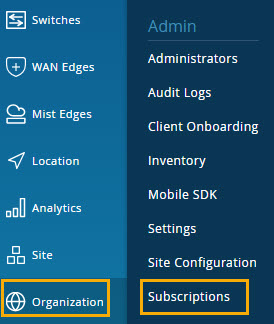
In the left menu, select Organization >
Subscriptions.
-
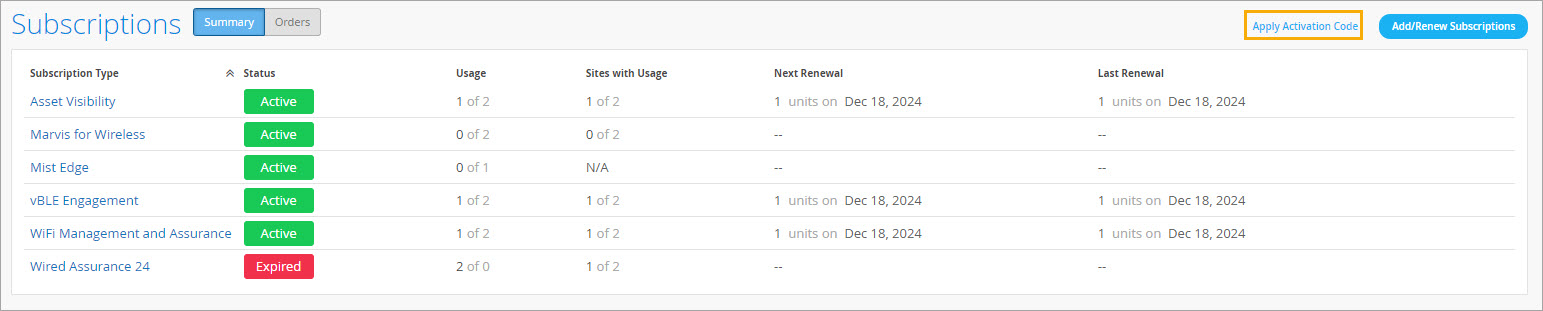
Click Apply Activation Code, near the top right
corner of the subscriptions page.
Enter a Name and Location for Your First Site
Make the default site your own by giving it a
descriptive name and entering your location information.
Add Administrator Accounts
You can add multiple administrator accounts with
different levels of access, depending on the job duties of your team
members.
HPE Mist sends email to the specified addresses. The
recipients use a link to create their logins.