SCBE-MX Description
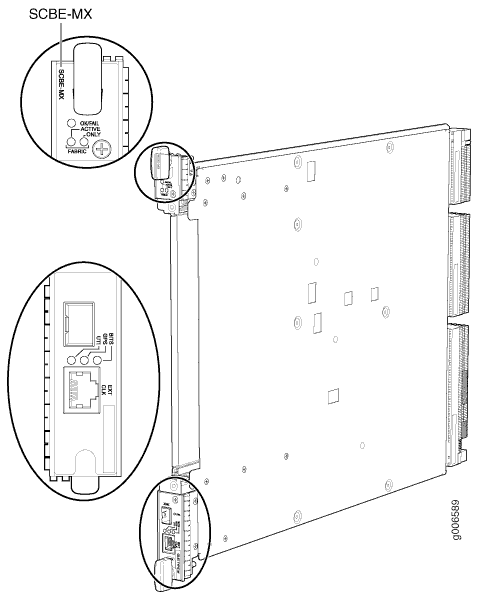
The SCBE-MX is the second generation switch control board and is designed specifically for use with MPC3E line cards to provide full line-rate performance and redundancy without a loss of bandwidth.
The SCBE-MX installs vertically in the MX960 chassis and horizontally in the MX480 and MX240 chassis. The routing engine installs directly into a slot on the SCBE-MX (see Figure 1).
|
Software Release |
11.4R1 |
|
CLI Identification |
|
|
SCBE-MX Maximum Power Requirements |
160 W at 55° C 130 W at 40° C 120 W at 25° C |
|
SCBE-MX Cooling Requirements |
|
|
Fabric Bandwidth Per Slot |
Up to 240 Gbps (non-redundant fabric configuration); 160 Gbps (redundant fabric configuration).
|
|
Switch Fabric Capacity |
5.12 Tbps |
SCBE-MX Features
|
Feature |
Description |
|---|---|
|
Increased Bandwidth |
Provides 160 Gbps/slot bandwidth with redundant fabric support |
|
Improved Fabric Performance |
Provides improved fabric performance for high-capacity line cards using the next-generation fabric (XF) chip |
|
Centralized Stratum 3 Clock Module |
Provides a central clocking module and a centralized clocking architecture that supports clock cleanup and distribution. The Stratum 3 clock module performs clock monitoring, filtering, and holdover at a centralized chassis location. |
|
Redundancy |
Provides full performance with fabric redundancy for high-capacity line cards |
Maximum Number of SCBE-MX’s Per Chassis
Table 1 lists the maximum number of SCBE-MXs you can install in the MX chassis, the corresponding slot labels, and the backup slot used for redundancy. If any slots are empty, you must install a blank panel.
|
Chassis |
Maximum SCBE-MXs |
Slot Labels |
Backup Slot |
|---|---|---|---|
|
MX960 |
3 |
0, 1, and 2 |
2 |
|
MX480 |
2 |
|
|
|
MX240 |
2 |
|
|
SCBE-MX Interoperability with Routing Engines
|
Routing Engines |
Maximum Power Requirement |
|---|---|
|
RE-S-1800 (all variants) RE-S-1300 (EOLed) RE-S-2000 (EOLed) RE-S-2000-4096 (EOL’d) |
90 W |
SCBE-MX LEDs
The FABRIC ACTIVE, FABRIC ONLY, and OK/FAIL LEDs indicate the status of the SCBE-MX. The BITS, GPS, and UTI LEDs (next to the EXT CLK port) indicate the status of the respective clocking interface. Table 2 describes the behavior of the SCBE-MX LEDs.
|
Label |
Color |
State |
Description |
|---|---|---|---|
|
FABRIC ACTIVE |
Green |
On steadily |
Fabric is in active mode. |
|
FABRIC ONLY |
Green |
On steadily |
SCBE-MX operates in fabric-only mode. |
|
– |
Off |
SCBE-MX operates in fabric/control board mode. |
|
|
OK/FAIL |
Green |
On steadily |
SCBE-MX is online. |
|
Red |
On steadily |
SCBE-MX has failed. |
|
|
– |
Off |
SCBE-MX is offline. |
|
|
Red |
On steadily |
GPS clocking interface has failed. |
|
|
– |
Off |
GPS clocking interface is offline. |
|
|
Note:
The LEDs BITS, GPS, and UTI are not currently supported. |
|||
|
BITS |
Green |
On steadily |
Building-integrated timing supply (BITS) clocking interface is active. |
|
Red |
On steadily |
BITS clocking interface has failed. |
|
|
– |
Off |
BITS clocking interface is offline. |
|
|
GPS |
Green |
On steadily |
Global positioning system (GPS) clocking interface is active. |
|
Red |
On steadily |
GPS clocking interface has failed. |
|
|
– |
Off |
GPS clocking interface is offline. |
|
|
UTI |
Green |
On steadily |
Universal Timing Interface (UTI) clocking interface is active. |
|
Red |
On steadily |
UTI clocking interface has failed. |
|
|
– |
Off |
UTI clocking interface is offline. |
|
Upgrading to the SCBE-MX
Here’s the procedures for upgrading your MX960, MX480, or MX240 router to use the SCBE-MX: