MX304-LMIC16
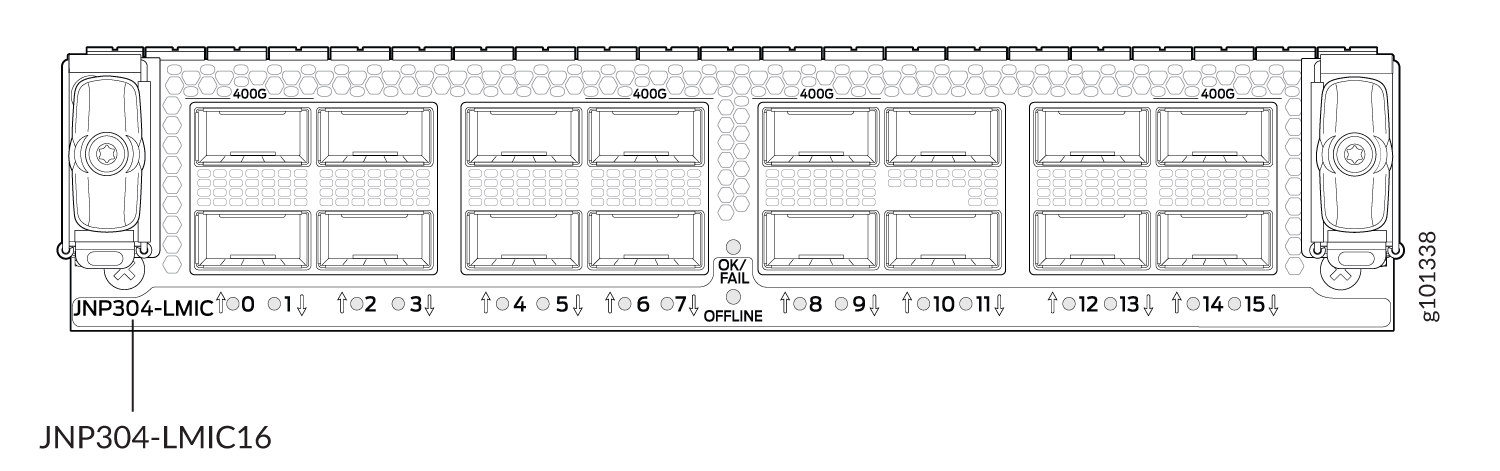
The MX304-LMIC16 (Model number: MX304-LMIC16-BASE) is a field-replaceable line card that provides 1.6 Tbps of forwarding capacity using a single YT ASIC. The MX304-LMIC16 supports up to 16 × 100GbE ports, 4 × 400GbE ports, or a combination of supported interface speeds, and provides MACsec and IEEE 1588 Class-C PTP support. The MX304-LMIC16 plugs directly into the MX304 router as a hot-swappable LMIC and can be installed in any supported LMIC slot, with support for up to three LMICs per chassis.
|
Description |
|
|
Hardware features |
|
|
Software features |
|
|
Cables and connectors |
See the Hardware Compatibility Tool for information about the pluggable transceivers for your Juniper Networks device. |
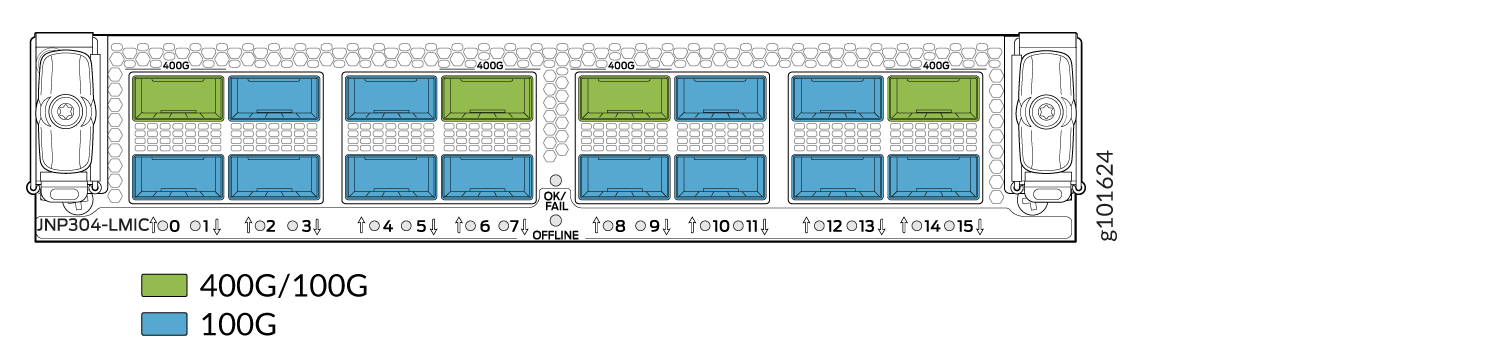
Table 2 summarizes the port speed capability of MX304-LMIC16. Figure 2 shows the ports that support 4x400GbE.
|
MX304-LMIC16 |
Port Number |
Port Speed Supported |
|---|---|---|
|
(Junos OS 24.4R1 and later) MIC 0/ PIC 0 (Junos OS releases earlier than 24.4R1) PIC 0 |
0-15 |
16X100GbE. 4x400GbE on ports 0, 6, 8, and 14. Note:
Ports 0, 2, 4, 6, 8, 10, 12 and 14 support 100G optics up to 11 W, and ports 1, 3, 5, 7, 9, 11, 13 and 15 support 100G optics up to 6 W. Only ports 1, 3, 5, 7, 9, 11, 13 and 15 support 4x1G, 40G, 4x10G, and 4x25G operation. When a port is configured for 40G operation, its paired port (N-1) must remain unconfigured. Note: To understand all the potential restrictions and validate
different port configurations on an MX304 router, use the Port Checker Tool.
|
|
(Junos OS 24.4R1 and later) MIC 1/PIC 1 (Junos OS releases earlier than 24.4R1) PIC 1 |
||
|
(Junos OS 24.4R1 and later) MIC 2/PIC 2 (Junos OS releases earlier than 24.4R1) PIC 2 |
MX304 Port and Interface Numbering
In the physical part of the interface name, a hyphen (-) separates the media type from the MPC number (represented as an FPC in the CLI), and a slash
(/) separates the logical PIC and port numbers:
type-fpc/pic/port
-
type—Media type, which identifies the network device. For example:
-
xe—10GbE interface
-
et—100GbE interfaces (40GbE, 100GbE, 400GbE )
-
fpc—The CLI displays
FPC 0for all the LMICs.-
(Junos OS 24.4R1 and later) mic/pic—Logical PIC on the LMIC.
-
(Junos OS releases earlier than 24.4R1) pic—Logical PIC on the LMIC.
port—Port number.
MX304 LMIC LEDs
Table 2 describes the link LEDs on the MX304 LMIC (multi-rate) front panel.
|
LED Status |
Color |
State |
Description |
|---|---|---|---|
|
OK/FAIL |
Green |
On steadily |
LMIC is functioning normally, and the link is up. |
|
Red |
- |
LMIC has failed. |
|
| Amber/Blinking | LMIC is transitioning. | ||
| Off |
|
show chassis fpc mic-status
command to verify the LMIC online or offline status before the LMIC insertion or removal
process.MX304 LMIC Port LEDs
Table 3 describes the link LEDs for the LMIC ports on the MX304 front panel.
|
Color |
State |
Description |
|---|---|---|
|
Green |
On steadily |
No breakout, port is up. Breakout, all lanes in that port are up. |
|
Red |
On steadily |
Optics transceiver hardware failure. |
|
Amber |
On steadily |
Any other fault except LOS and transceiver hardware failure. |
| Off |
Pluggable not inserted. No breakout; Loss of signal detected. Breakout; Loss of signal on all lanes. |
Software Downgrade Considerations
Junos OS Image Downgrade
When both LMIC16 and LMIC20S modules are installed, downgrading from Junos OS 26.4R1 to a release that does not support the LMIC20S causes the LMIC16 module to go offline. To prevent the LMIC16 from going offline, you can:
- Downgrade to Junos OS 24.4R1 by:
- Powering off the LMIC20S.
Setting the
set chassis fpc <fpc-slot> mic
                                    <mic-slot> power off
configuration for LMIC20S.
- Downgrade to releases earlier than Junos OS 24.4R1 by first removing the LMIC20S and then booting the downgraded release.
- Use a USB installation of a release earlier than Junos OS 26.4R1 by first
removing the LMIC20S before performing the installation.CAUTION:A USB installation can overwrite the existing configuration, including any LMIC20S power-off configuration.
Firmware Upgrade Considerations
Do not perform FPC firmware upgrade operations when an LMIC20S is installed on releases earlier than Junos OS 26.4R1.
Releases earlier than Junos OS 26.4R1 do not differentiate between LMIC16 and LMIC20S hardware during firmware upgrades. If an FPC firmware upgrade is initiated while an LMIC20S is installed, the system can load LMIC16 PIC FPGA firmware onto the LMIC20S. This action corrupts the PIC FPGA firmware, renders the module inoperable, and requires manual recovery.