예: IS-IS IPv4 및 IPv6 유니캐스트 토폴로지 구성
이 예에서는 일반적인 IPv4 유니캐스트 토폴로지 외에 대체 IPv6 유니캐스트 토폴로지를 계산하도록 IS-IS를 구성하는 방법을 보여줍니다.
요구 사항
이 예제를 구성하기 전에 디바이스 초기화 이외의 특별한 구성은 필요하지 않습니다.
개요
이 예에서는 IPv4 및 IPv6 유니캐스트 토폴로지에 중점을 둡니다. IPv4 토폴로지에 대한 IS-IS 인터페이스 메트릭은 IPv6 메트릭과 독립적으로 구성할 수 있습니다. 또한 IPv4 토폴로지에 계속 참여하면서 인터페이스가 IPv6 토폴로지에 참여하지 못하도록 선택적으로 비활성화할 수도 있습니다. 이를 통해 유니캐스트 데이터가 네트워크를 통과하는 경로를 제어할 수 있습니다.
IS-IS에 대한 IPv6 유니캐스트 토폴로지를 활성화하려면 다음 문을 포함합니다.ipv6-unicast
isis {
    topologies {
        ipv6-unicast;
    }
}
IPv6 유니캐스트 토폴로지에 대한 메트릭을 구성하려면 다음 문을 포함합니다.ipv6-unicast-metric
isis {
    interface interface-name {
        level level-number {
            ipv6-unicast-metric number;
        }
    }
}
IS-IS에 대한 IPv6 유니캐스트 토폴로지에서 인터페이스를 제외하려면 다음 문을 포함합니다.no-ipv6-unicast
isis {
    interface interface-name {
        no-ipv6-unicast;
    }
}
그림 1 은 이 예에서 사용되는 토폴로지를 보여줍니다. 검은색 선은 IPv6 토폴로지의 링크 구성원을 나타냅니다. 회색 선은 IPv4 토폴로지의 구성원을 나타냅니다. 일반 TLV를 사용하면 여러 토폴로지를 구축하고 이를 기반으로 SPF 계산을 실행할 수 없습니다. 다중 토폴로지 확장은 hello 패킷에서 지원되는 프로토콜 세트를 전달하는 확장을 설명합니다. 링크에서 다중 토폴로지 라우팅 지원을 활성화한 후, 링크는 기본 서킷이 릴레이할 수 있는 모든 토폴로지를 전달합니다.
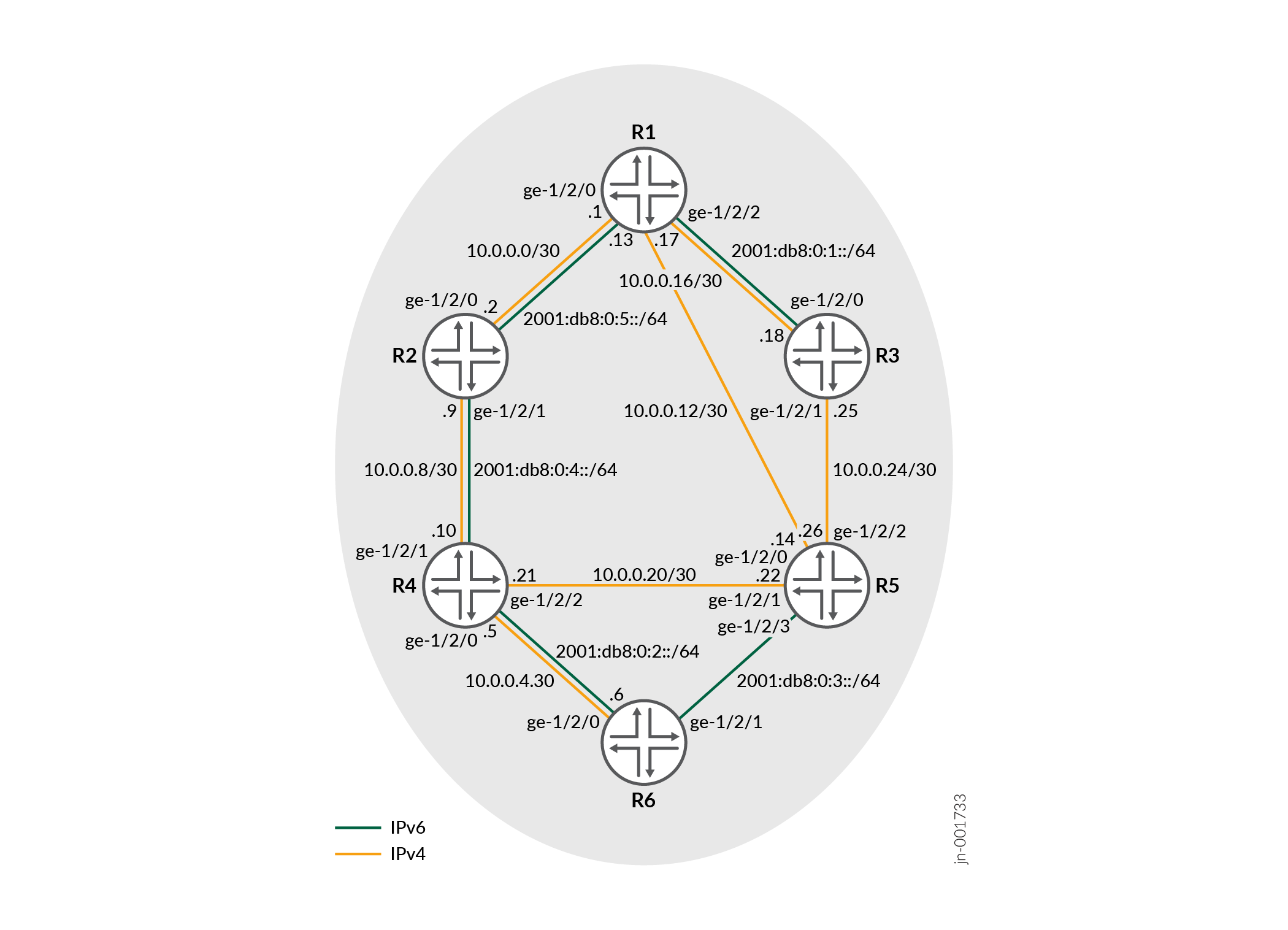
CLI 빠른 구성 은 그림 1의 모든 디바이스에 대한 구성을 보여줍니다. 섹션 #configuration340__isis-ipv6-mtr-step-by-step은 디바이스 R1의 단계를 설명합니다.
구성
절차
CLI 빠른 구성
이 예를 빠르게 구성하려면, 아래 명령을 복사하여 텍스트 파일로 붙여 넣은 다음 모든 라인브레이크를 제거하고, 네트워크 구성을 일치하는 데 필요한 세부 사항을 변경한 다음, 계층 수준에서 [edit] 명령을 복사하여 CLI에 붙여 넣습니다.
디바이스 R1
set interfaces ge-1/2/0 unit 0 family inet address 10.0.0.1/30
set interfaces ge-1/2/0 unit 0 family iso
set interfaces ge-1/2/0 unit 0 family inet6 address 2001:db8:0:5::/64 eui-64
set interfaces ge-1/2/1 unit 0 family inet address 10.0.0.13/30
set interfaces ge-1/2/1 unit 0 family iso
set interfaces ge-1/2/2 unit 0 family inet address 10.0.0.17/30
set interfaces ge-1/2/2 unit 0 family iso
set interfaces ge-1/2/2 unit 0 family inet6 address 2001:db8:0:1::/64 eui-64
set interfaces lo0 unit 0 family inet address 192.168.0.1/32
set interfaces lo0 unit 0 family iso address 49.0002.0192.0168.0001.00
set interfaces lo0 unit 0 family inet6 address 2001:db8::1/128
set protocols isis topologies ipv6-unicast
set protocols isis interface ge-1/2/0.0
set protocols isis interface ge-1/2/1.0 no-ipv6-unicast
set protocols isis interface ge-1/2/2.0
set protocols isis interface lo0.0
디바이스 R2
set interfaces ge-1/2/0 unit 0 family inet address 10.0.0.2/30
set interfaces ge-1/2/0 unit 0 family iso
set interfaces ge-1/2/0 unit 0 family inet6 address 2001:db8:0:5::/64 eui-64
set interfaces ge-1/2/1 unit 0 family inet address 10.0.0.9/30
set interfaces ge-1/2/1 unit 0 family iso
set interfaces ge-1/2/1 unit 0 family inet6 address 2001:db8:0:4::/64 eui-64
set interfaces lo0 unit 0 family inet address 192.168.0.2/32
set interfaces lo0 unit 0 family iso address 49.0002.0192.0168.0002.00
set interfaces lo0 unit 0 family inet6 address 2001:db8::2/128
set protocols isis topologies ipv6-unicast
set protocols isis interface ge-1/2/0.2
set protocols isis interface ge-1/2/1.0
set protocols isis interface lo0.0
디바이스 R3
set interfaces ge-1/2/0 unit 0 family inet address 10.0.0.18/30
set interfaces ge-1/2/0 unit 0 family iso
set interfaces ge-1/2/0 unit 0 family inet6 address 2001:db8:0:1::/64 eui-64
set interfaces ge-1/2/1 unit 0 family inet address 10.0.0.25/30
set interfaces ge-1/2/1 unit 0 family iso
set interfaces lo0 unit 0 family inet address 192.168.0.3/32
set interfaces lo0 unit 0 family iso address 49.0002.0192.0168.0003.00
set interfaces lo0 unit 0 family inet6 address 2001:db8::3/128
set protocols isis topologies ipv6-unicast
set protocols isis interface ge-1/2/0.0
set protocols isis interface ge-1/2/1.0 no-ipv6-unicast
set protocols isis interface lo0.0
디바이스 R4
set interfaces ge-1/2/0 unit 0 family inet address 10.0.0.5/30
set interfaces ge-1/2/0 unit 0 family iso
set interfaces ge-1/2/0 unit 0 family inet6 address 2001:db8:0:2::/64 eui-64
set interfaces ge-1/2/1 unit 0 family inet address 10.0.0.10/30
set interfaces ge-1/2/1 unit 0 family iso
set interfaces ge-1/2/1 unit 0 family inet6 address 2001:db8:0:1::/64 eui-64
set interfaces ge-1/2/2 unit 0 family inet address 10.0.0.21/30
set interfaces ge-1/2/2 unit 0 family iso
set interfaces lo0 unit 0 family inet address 192.168.0.4/32
set interfaces lo0 unit 0 family iso address 49.0002.0192.0168.0004.00
set interfaces lo0 unit 0 family inet6 address 2001:db8::4/128
set protocols isis topologies ipv6-unicast
set protocols isis interface ge-1/2/0.0
set protocols isis interface ge-1/2/1.0
set protocols isis interface ge-1/2/2.0 no-ipv6-unicast
set protocols isis interface lo0.0
디바이스 R5
set interfaces ge-1/2/0 unit 0 family inet address 10.0.0.14/30
set interfaces ge-1/2/0 unit 0 family iso
set interfaces ge-1/2/1 unit 0 family inet address 10.0.0.22/30
set interfaces ge-1/2/1 unit 0 family iso
set interfaces ge-1/2/2 unit 0 family inet address 10.0.0.26/30
set interfaces ge-1/2/2 unit 0 family iso
set interfaces ge-1/2/3 unit 0 family iso
set interfaces ge-1/2/3 unit 0 family inet6 address 2001:db8:0:3::/64 eui-64
set interfaces lo0 unit 0 family inet address 192.168.0.5/32
set interfaces lo0 unit 0 family iso address 49.0002.0192.0168.0005.00
set interfaces lo0 unit 0 family inet6 address 2001:db8::5/128
set protocols isis topologies ipv6-unicast
set protocols isis interface ge-1/2/0.0 no-ipv6-unicast
set protocols isis interface ge-1/2/1.0 no-ipv6-unicast
set protocols isis interface ge-1/2/2.0 no-ipv6-unicast
set protocols isis interface ge-1/2/3.0
set protocols isis interface lo0.0
디바이스 R6
set interfaces ge-1/2/0 unit 0 family inet address 10.0.0.6/30
set interfaces ge-1/2/0 unit 0 family iso
set interfaces ge-1/2/0 unit 0 family inet6 address 2001:db8:0:2::/64 eui-64
set interfaces ge-1/2/1 unit 0 family iso
set interfaces ge-1/2/1 unit 0 family inet6 address 2001:db8:0:3::/64 eui-64
set interfaces lo0 unit 0 family inet address 192.168.0.6/32
set interfaces lo0 unit 0 family iso address 49.0002.0192.0168.0006.00
set interfaces lo0 unit 0 family inet6 address 2001:db8::6/128
set protocols isis topologies ipv6-unicast
set protocols isis interface ge-1/2/0.0
set protocols isis interface ge-1/2/1.0
set protocols isis interface lo0.0
단계별 절차
다음 예에서는 구성 계층에서 다양한 수준을 탐색해야 합니다. CLI 탐색에 대한 정보는 CLI 사용자 가이드의 구성 모드에서 CLI 편집기 사용을 참조하십시오.
대체 IPv6 유니캐스트 토폴로지를 구성하려면 다음을 수행합니다.
-
인터페이스를 구성합니다.
[edit interfaces]
user@R1# set ge-1/2/0 unit 0 family inet address 10.0.0.1/30
user@R1# set ge-1/2/0 unit 0 family iso
user@R1# set ge-1/2/0 unit 0 family inet6 address 2001:db8:0:5::/64 eui-64
user@R1# set ge-1/2/1 unit 0 family inet address 10.0.0.13/30
user@R1# set ge-1/2/1 unit 0 family iso
user@R1# set ge-1/2/2 unit 0 family inet address 10.0.0.17/30
user@R1# set ge-1/2/2 unit 0 family iso
user@R1# set ge-1/2/2 unit 0 family inet6 address 2001:db8:0:1::/64 eui-64
user@R1# set lo0 unit 0 family inet address 192.168.0.1/32
user@R1# set lo0 unit 0 family iso address 49.0002.0192.0168.0001.00
user@R1# set lo0 unit 0 family inet6 address 2001:db8::1/128
-
인터페이스에서 IS-IS를 활성화합니다.
[edit protocols isis]
user@R1# set interface ge-1/2/0.0
user@R1# set interface ge-1/2/1.0
user@R1# set interface ge-1/2/2.0
user@R1# set interface lo0.0
-
IS-IS 인터페이스에서 다중 토폴로지 라우팅을 활성화합니다.
이
ipv6-unicast문은 계층 수준에서 나열되고 구성되어 있는 모든 인터페이스family isofamily inet6에서 다중 토폴로지 IS-IS 라우팅을 활성화합니다.[edit protocols isis interface][edit protocols isis] user@R1# set topologies ipv6-unicast
-
지정된 인터페이스에서 IPv6 유니캐스트 지원을 비활성화합니다.
주어진 인터페이스에서 IPv6에 대한 멀티토폴로지 IS-IS 라우팅을 실행하지 않으려면, IS-IS 인터페이스 구성에 문을 포함하여
no-ipv6-unicast멀티토폴로지 라우팅을 비활성화할 수 있습니다.[edit protocols isis] user@R1# set interface ge-1/2/1.0 no-ipv6-unicast
결과
구성 모드에서 and show protocols 명령을 입력 show interfaces 하여 구성을 확인합니다. 출력에 의도한 구성이 표시되지 않으면 이 예의 지침을 반복하여 구성을 수정합니다.
user@R1# show interfaces
ge-1/2/0 {
    unit 0 {
        family inet {
            address 10.0.0.1/30;
        }
        family iso;
        family inet6 {
            address 2001:db8:0:5::/64 {
                eui-64;
            }
        }
    }
}
ge-1/2/1 {
    unit 0 {
        family inet {
            address 10.0.0.13/30;
        }
        family iso;
    }
}
ge-1/2/2 {
    unit 0 {
        family inet {
            address 10.0.0.17/30;
        }
        family iso;
        family inet6 {
            address 2001:db8:0:1::/64 {
                eui-64;
            }
        }
    }
}
lo0 {
    unit 0 {
        family inet {
            address 192.168.0.1/32;
        }
        family iso {
            address 49.0002.0192.0168.0001.00;
        }
        family inet6 {
            address 2001:db8::1/128;
        }
    }
}
user@R1# show protocols
isis {
    topologies ipv6-unicast;
    interface ge-1/2/0.0;
    interface ge-1/2/1.0 {
        no-ipv6-unicast;
    }
    interface ge-1/2/2.0;
    interface lo0.0;
}
디바이스 구성이 완료되면 구성 모드에서 들어갑니다 commit .
검증
구성이 제대로 작동하고 있는지 확인합니다.
이웃에서 토폴로지 확인
목적
인접 IS-IS 디바이스에서 지원되는 토폴로지를 결정합니다.
작업
운영 모드에서 명령을 입력합니다.show isis adjacency detail
user@R1> show isis adjacency detail

R2
  Interface: ge-1/2/0.0, Level: 3, State: Up, Expires in 24 secs
  Priority: 0, Up/Down transitions: 1, Last transition: 05:28:16 ago
  Circuit type: 3, Speaks: IP, IPv6
  Topologies: Unicast, IPV6-Unicast
  Restart capable: Yes, Adjacency advertisement: Advertise
  IP addresses: 10.0.0.2
  IPv6 addresses: fe80::2a0:a514:0:24c

R5
  Interface: ge-1/2/1.0, Level: 3, State: Up, Expires in 21 secs
  Priority: 0, Up/Down transitions: 1, Last transition: 05:27:47 ago
  Circuit type: 3, Speaks: IP, IPv6
  Topologies: Unicast
  Restart capable: Yes, Adjacency advertisement: Advertise
  IP addresses: 10.0.0.14

R3
  Interface: ge-1/2/2.0, Level: 3, State: Up, Expires in 22 secs
  Priority: 0, Up/Down transitions: 1, Last transition: 05:27:25 ago
  Circuit type: 3, Speaks: IP, IPv6
  Topologies: Unicast, IPV6-Unicast
  Restart capable: Yes, Adjacency advertisement: Advertise
  IP addresses: 10.0.0.18
  IPv6 addresses: fe80::2a0:a514:0:124c
의미
예상대로 디바이스 R5와의 인접성은 IPv4 유니캐스트 토폴로지만 지원하는 반면, 디바이스 R2 및 디바이스 R3와의 인접성은 IPv4 및 IPv6 토폴로지를 모두 지원합니다.
IS-IS SPF 계산 확인
목적
IPv4 및 IPv6에 대해 별도의 SPF 계산이 실행되고 있는지 확인합니다.
작업
운영 모드에서 명령을 입력합니다.show isis spf brief
user@R1> show isis spf brief
IPV4 Unicast IS-IS level 1 SPF results:
Node             Metric     Interface        NH   Via             SNPA
R6.00        20         ge-1/2/1.0      IPV4 R5
R4.00        20         ge-1/2/0.0       IPV4 R2
R5.00        10         ge-1/2/1.0      IPV4 R5
R3.00        10         ge-1/2/2.0      IPV4 R3
R2.00        10         ge-1/2/0.0       IPV4 R2
R1.00        0
  6 nodes

IPV4 Unicast IS-IS level 2 SPF results:
Node             Metric     Interface        NH   Via             SNPA
R6.00        20         ge-1/2/1.0      IPV4 R5
R4.00        20         ge-1/2/0.0       IPV4 R2
R5.00        10         ge-1/2/1.0      IPV4 R5
R3.00        10         ge-1/2/2.0      IPV4 R3
R2.00        10         ge-1/2/0.0       IPV4 R2
R1.00        0
  6 nodes

IPV6 Unicast IS-IS level 1 SPF results:
Node             Metric     Interface        NH   Via             SNPA
R5.00        40         ge-1/2/0.0       IPV6 R2
R6.00        30         ge-1/2/0.0       IPV6 R2
R4.00        20         ge-1/2/0.0       IPV6 R2
R3.00        10         ge-1/2/2.0      IPV6 R3
R2.00        10         ge-1/2/0.0       IPV6 R2
R1.00        0
  6 nodes

IPV6 Unicast IS-IS level 2 SPF results:
Node             Metric     Interface        NH   Via             SNPA
R5.00        40         ge-1/2/0.0       IPV6 R2
R6.00        30         ge-1/2/0.0       IPV6 R2
R4.00        20         ge-1/2/0.0       IPV6 R2
R3.00        10         ge-1/2/2.0      IPV6 R3
R2.00        10         ge-1/2/0.0       IPV6 R2
R1.00        0
  6 nodes
의미
예상대로 IPv4 및 IPv6 토폴로지에 대해 SPF 계산이 수행되고 있습니다.
tcpdump 출력 확인
목적
링크가 IPv4 유니캐스트 토폴로지와 IPv6 유니캐스트 토폴로지 모두의 구성원이 될 수 있는지 확인합니다.
작업
user@R1> monitor traffic detail interface ge-1/2/0.0
[...]

15:52:35.719540  In IS-IS, length 82
        p2p IIH, hlen: 20, v: 1, pdu-v: 1, sys-id-len: 6 (0), max-area: 3 (0)
          source-id: 0192.0168.0002, holding time: 27s, Flags: [Level 1, Level 2]
          circuit-id: 0x01, PDU length: 82
            Point-to-point Adjacency State TLV #240, length: 15
              Adjacency State: Up (0)
              Extended Local circuit-ID: 0x00000054
              Neighbor System-ID: 0192.0168.0001
              Neighbor Extended Local circuit-ID: 0x00000043
            Protocols supported TLV #129, length: 2
              NLPID(s): IPv4 (0xcc), IPv6 (0x8e)
            IPv4 Interface address(es) TLV #132, length: 4
              IPv4 interface address: 10.0.0.2
            IPv6 Interface address(es) TLV #232, length: 16
              IPv6 interface address: fe80::2a0:a514:0:24c
            Area address(es) TLV #1, length: 4
              Area address (length: 3): 49.0002
            Restart Signaling TLV #211, length: 3
              Flags [none], Remaining holding time 0s
            Multi Topology TLV #229, length: 4
              IPv4 unicast Topology (0x000), Flags: [none]
              IPv6 unicast Topology (0x002), Flags: [none]
의미
IS-IS hello(IIH) 패킷은 IPv4 및 IPv6이 지원됨을 보여줍니다. hello 패킷은 유효한 IPv4 및 IPv6 주소를 나열하므로 라우팅 디바이스는 유효한 다음 홉 항목을 생성할 수 있습니다. 지원되는 프로토콜은 멀티토폴로지 TLV #229에 나열되어 있습니다.