自動検知VPN
自動検出VPNと、ファイアウォールでこの機能を設定する方法について説明します。
自動検出VPN(ADVPN)は、トラフィックがハブを経由してルーティングされるのを回避するために、スポーク間にVPNトンネルを動的に確立します。
機能エクスプローラーを使用して、特定の機能のプラットフォームとリリースのサポートを確認します。
プラットフォームに関連する注意事項については、「 ADVPN動作におけるプラットフォーム固有のマルチキャスト 」セクションを参照してください。
自動検出VPNについて
自動検出VPN(ADVPN)は、中央ハブが2つのスポーク間のトラフィックの最適なパスを動的に通知できるようにするテクノロジーです。両方のスポークがハブからの情報を確認すると、ショートカットトンネルを確立し、ハブを介してトラフィックを送信せずにホストが到達できるようにルーティングトポロジーを変更します。
ADVPN プロトコル
ADVPN は、IKEv2 プロトコルの拡張を使用して 2 つのピア間でメッセージを交換し、スポークが互いにショートカット トンネルを確立できるようにします。ADVPN拡張機能をサポートするデバイスは、最初のIKE交換中に、機能情報とADVPNバージョン番号を含む ADVPN_SUPPORTED 通知を IKEv2通知 ペイロードに送信します。ADVPNをサポートするデバイスは、 ショートカットサジェクター またはショートカットパートナーのいずれかとして機能できますが、両方として機能することはできません。
ショートカットの設定
IPsec VPNゲートウェイは、トラフィックがピアの1つとのトンネルを出て、別のピアとのトンネルに入ることを認識した場合、 ショートカットの提案として 機能します。 図1 は、ハブを通過するスポーク1からスポーク3へのトラフィックを示しています。
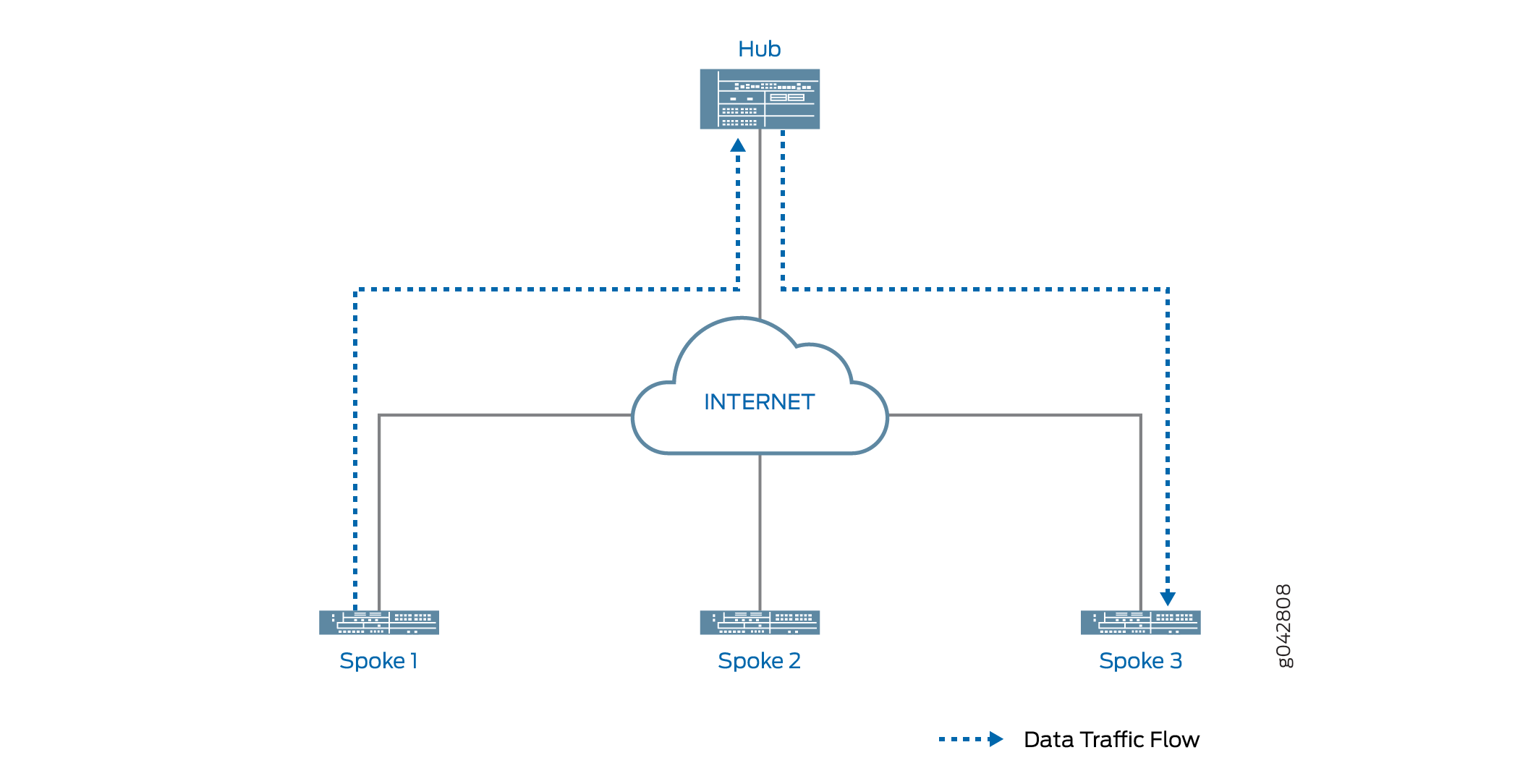 を通過するスポークツースポークトラフィック
ADVPN がデバイスに設定されている場合、ADVPN ショートカット機能情報がハブとスポーク間で交換されます。スポーク1と3が以前にハブにADVPNショートカットパートナー機能をアドバタイズしている限り、ハブはスポーク1と3が互いにショートカットを確立することを提案できます。
ショートカット サジェスターは、すでに確立されているピアとの IKEv2 SA を使用して、2 つのピアのいずれかとのショートカット交換を開始します。ピアがショートカット交換を受け入れた場合、ショートカット提案者は他のピアとのショートカット交換を開始します。ショートカット交換には、ピア( ショートカットパートナーと呼ばれる)が相互にIKEおよびIPsec SAを確立できるようにするための情報が含まれています。ショートカットパートナー間のショートカットの作成は、両方のピアがショートカット交換を受け入れた後にのみ開始されます。
図2 は、スポーク1とスポーク3の間のショートカットを通過するトラフィックを示しています。スポーク1からスポーク3へのトラフィックは、ハブを通過する必要はありません。
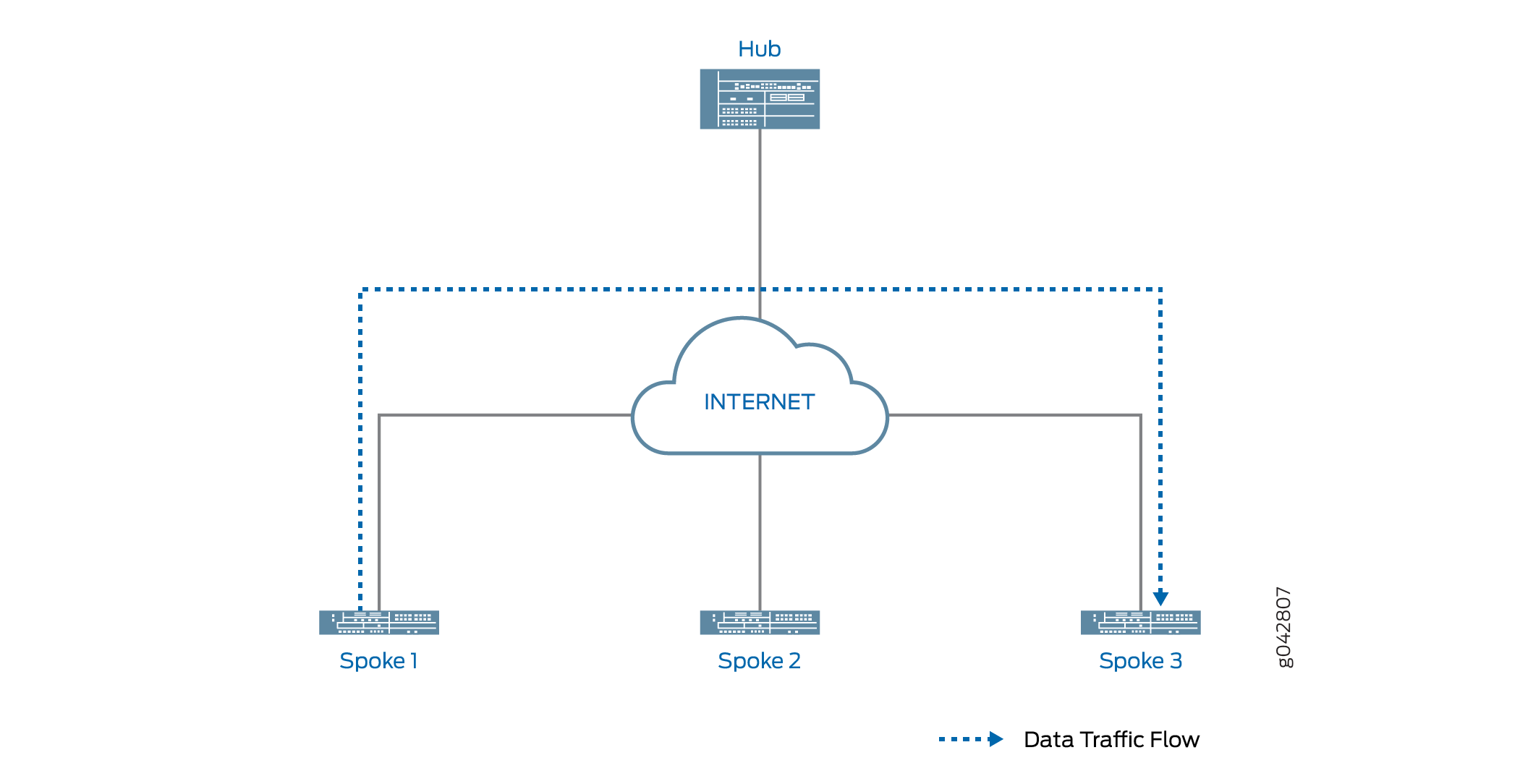 を通過するスポークツースポークトラフィック
ショートカット開始側と応答側のロール
ショートカット サジェスターは、ショートカット パートナーの 1 つを選択して、ショートカットのイニシエーターとして機能します。もう一方のパートナーがレスポンダーとして機能します。パートナーの1人がNATデバイスの背後にある場合、NATデバイスの背後にあるパートナーがイニシエーターとして選択されます。どのパートナーも NAT デバイスの背後にいない場合、提案者はパートナーの 1 人をイニシエーターとしてランダムに選択します。もう一方のパートナーがレスポンダーとして機能します。両方のパートナーが NAT デバイスの背後にある場合、パートナー間にショートカットを作成できません。メジェスターは、どのピアにもショートカット交換を送信しません。
ショートカット サジェスターは、まずレスポンダとのショートカット交換を開始します。レスポンダがショートカットの提案を受け入れると、サジェスターはイニシエーターに通知します。
ショートカット開始側は、ショートカット提案者の通知に含まれる情報を使用して、応答側とのIKEv2交換を確立し、2つのパートナー間で新しいIPsec SAが確立されます。各パートナーにおいて、パートナーの後ろのネットワークへのルートは、パートナーと提案者の間のトンネルではなく、ショートカットを指すようになりました。一方のパートナーの背後から発信され、他のショートカットパートナーの背後にあるネットワークに宛てたトラフィックは、ショートカット上を流れます。
パートナーがショートカットの提案を拒否した場合、パートナーは拒否の理由を提案者に通知します。この場合、パートナー間のトラフィックはショートカット サジェクターを通過し続けます。
ショートカット属性
ショートカットの属性の一部はショートカットのサジェスターから受け取りますが、その他の属性はサジェクターパートナーのVPNトンネル設定から継承されます。 表1に 、ショートカットのパラメーターを示します。
|
属性 |
受信/継承元 |
|---|---|
|
ADVPN |
設定 |
|
アンチリプレイ |
設定 |
|
認証アルゴリズム |
設定 |
|
デッドピアの検出 |
設定 |
|
DFビット |
設定 |
|
暗号化アルゴリズム |
設定 |
|
トンネルを確立する |
提案 |
|
外部インターフェース |
設定 |
|
ゲートウェイポリシー |
設定 |
|
一般的な IKE ID |
設定 |
|
IKEバージョン |
設定 |
|
インストール間隔 |
設定 |
|
ローカルアドレス |
設定 |
|
ローカルアイデンティティ |
提案 |
|
NATトラバーサル |
設定 |
|
完全なフォワード秘匿性 |
設定 |
|
プロトコル |
設定 |
|
プロキシーID |
適用外 |
|
リモートアドレス |
提案 |
|
リモートID |
提案 |
|
不良SPIへの対応 |
設定 |
|
トラフィックセレクター |
適用外 |
ショートカット終端
デフォルトでは、ショートカットは無期限に続きます。ショートカットパートナーは、トラフィックが指定された時間にわたって指定されたレートを下回ると、ショートカットを終了します。デフォルトでは、トラフィックが300秒間、毎秒5パケットを下回ると、ショートカットは終了します。アイドル時間とアイドルしきい値は、パートナー向けに設定可能です。 clear security ike security-association または clear security ipsec security-association コマンドを使用して、いずれかのショートカットパートナーのショートカットを手動で削除し、対応するIKEまたはIPsec SAをクリアできます。ショートカットパートナーのどちらかが、IKEv2削除ペイロードをもう一方のショートカットパートナーに送信することで、いつでもショートカットを終了できます。
ショートカットが終了すると、対応するIKE SAとすべての子IPsecSAが削除されます。ショートカットが終了すると、対応するルートが両方のショートカットパートナーで削除され、2つのピア間のトラフィックは再びサジェスターを通過します。ショートカット終了情報は、パートナーから提案者に送信されます。
ショートカットの有効期間は、ショートカット プロジェクターとショートカット パートナーの間のトンネルとは無関係です。ショートカットは、提案者とパートナー間のトンネルが終了したからといって終了することはありません。
PIM を使用したマルチキャスト サポート
ファイアウォールは、ADVPNインフラストラクチャのポイントツーマルチポイント(P2MP)モードでPIM(プロトコル独立マルチキャスト)をサポートします。P2MPモードで、ファイアウォールのセキュアトンネルインターフェイスst0でPIMを有効にできます。ADVPNでのPIMを使用したマルチキャストトラフィックのサポートは、AutoVPNで提供されるサポートと似ています。ADVPNは、マルチキャストサポートを設定する場合、AutoVPNと同じ考慮事項に従います。P2MP インフラストラクチャでの PIM を使用したマルチキャスト サポートについて詳しくは、 AutoVPN についてを参照してください。st0 P2MPインターフェイスでPIMを有効にするには:
-
マルチノード高可用性環境では、ノードローカルトンネルを使用してP2MPマルチキャストを実現します。st0インターフェイス上のルーティングプロトコルは、同期状態トンネルをサポートしていません。 マルチノード高可用性におけるIPsec VPNサポートを参照してください。
ファイアウォールの 1 つはショートカット サジェクターで、残りのファイアウォールはショートカット パートナーです。通常、マルチキャスト送信者はショートカット サジェスターの背後に配置され、マルチキャスト受信者はショートカット パートナーの背後にあります。マルチキャストサポートでは、提案器とパートナーデバイス上のセキュアトンネル インターフェイスst0は、PIM P2MPモードで設定されます。これらの各デバイスで、st0 P2MPインターフェイスは ネイバーごとのすべてのPIM参加を追跡し、参加状態にあるネイバーに対してのみマルチキャスト転送またはレプリケーションが行われるようにします。
ファイアウォールは、st0 P2MPインターフェイスを介した PIMスパースモードでのIPマルチキャストトラフィックをサポートします。メジェスターは、ファーストホップルーター(FHR)またはランデブーポイント(RP)として機能します。パートナーは、P2MP ネットワークでラストホップルーター(LHR)として機能できます。ネットワーク内のデバイスは、マルチキャスト グループに参加しているネイバーにマルチキャスト データ パケットを複製します。
P2MP インフラストラクチャで PIM を設定する方法の詳細については、「 P2MP インフラストラクチャでマルチキャスト サポートを設定する」を参照してください。
ADVPN 設定の制限事項
ADVPNを設定する場合は、以下の制限に注意してください。
-
ADVPNは、サイト間通信でのみサポートされています。ADVPNサジェスタの設定は、AutoVPNハブでのみ許可されています。
-
提案者とパートナーの両方のロールを設定することはできません。ゲートウェイでADVPNが有効になっている場合、ゲートウェイで提案者ロールとパートナーロールの両方を無効にすることはできません。
-
両方の NAT デバイスの背後にあるパートナー間でショートカットを作成することはできません。提案者は、パートナーの 1 人が NAT デバイスの背後にある場合、または NAT デバイスの背後にパートナーがいない場合のみ、ショートカット交換を開始できます。
- ADVPNにIPv6アドレスを使用するには:
-
すべてのハブアンドスポークデバイスでP2MPをサポートするst0インターフェイスを設定する必要があります。
-
ルーティング設定を静的トンネル上のショートカットトンネルに更新するには、OSPFv3などの動的ルーティングプロトコル(DRP)を実行するトンネルが必要です。
-
IPv6 P2MP st0インターフェイスベースのADVPNでVPN監視機能を設定することはできません。
-
-
IPv6アドレスまたはIPv4アドレスのいずれかをサポートするDRPでADVPNサービスを実行できますが、両方を同時にサポートすることはできません。
-
有効化、無効化、ロールの変更など、パートナーの設定変更の場合、iked:
-
静的IKE SAとIPsec SAを破棄して再ネゴシエートし、新しい機能を交換します。
-
ショートカットのIKE SAとIPsec SA、および存在する提案情報をクリーンアップします。
-
-
以下のような非ADVPN設定変更の場合:
-
静的トンネル設定の変更により、静的 IKE SA と IPsec SA の両方がクリアされ、iked はショートカットの IKE SA と IPsec SA を破棄します。iked は提案情報をクリーンアップします。ショートカットトンネルは、提案者からショートカットの提案を受け取るまで、再度再ネゴシエートすることはありません。
-
静的トンネルIPsec SAのみのクリアにつながる静的トンネル設定の変更により、ショートカットのIKE SAとIPsec SAが破棄されます。iked は提案情報をクリーンアップします。ショートカットトンネルは、提案者からショートカットの提案を受け取るまで、再度再ネゴシエートすることはありません。
-
kmdプロセスとikedプロセスの両方でADVPNを使用した以下の設定はサポートしていません。
-
IKEv1
-
ポリシーベースのVPN
-
IKEv2構成ペイロード
-
トラフィックセレクター
-
ポイントツーポイントのセキュアなトンネルインターフェイス
-
シードされた事前共有キー
-
共有事前共有キー—kmdプロセスではサポートされていません
ショートカットトンネルを使用したトラフィックルーティングについて
トンネルのフラップや致命的な変更により、静的トンネルとショートカットトンネルの両方がダウンする可能性があります。この場合、特定の宛先へのトラフィックが、予想される静的トンネルではなく、予期しないショートカットトンネルを介してルーティングされる可能性があります。
図3では、ハブと各スポークの間に静的トンネルが存在します。ハブとスポークの間にOSPF隣接関係が確立されます。スポークAには、スポークBとのショートカットトンネルもあり、スポーク間にOSPF隣接関係が確立されています。ハブ(ショートカット サジェスター)は、ハブとスポーク A 間の接続がダウンした場合、スポーク B とスポーク A の間のショートカット トンネルを介してスポーク A のネットワークに到達できることを認識します。
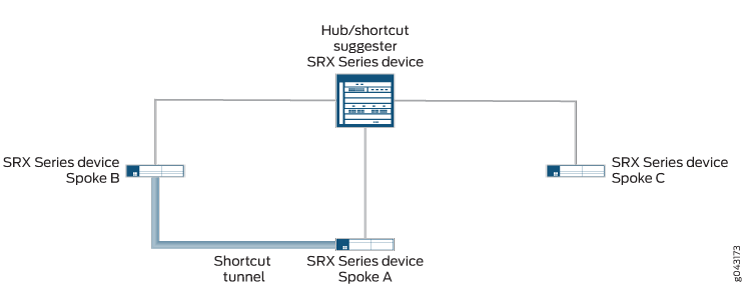 で確立された静的トンネルとショートカットトンネル
図4では、ハブとスポークAの間の静的トンネルがダウンしています。スポークCからスポークAへの新しいトラフィックが発生した場合、スポークCにはスポークAとのショートカットトンネルがないため、トラフィックをハブに転送します。ハブには、スポークAとのアクティブな静的トンネルはありませんが、スポークAとスポークBの間にショートカットトンネルがあることを認識し、スポークCからスポークBにトラフィックを転送します。
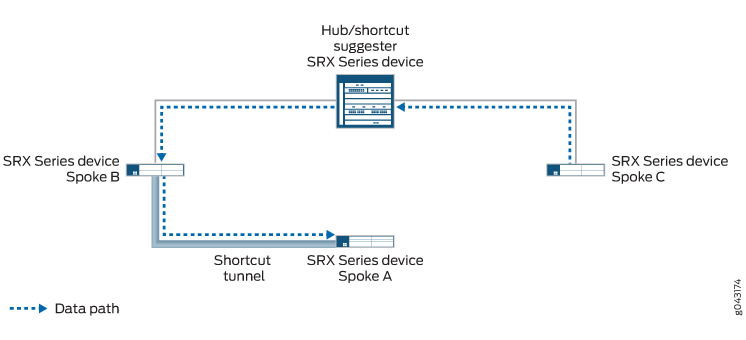
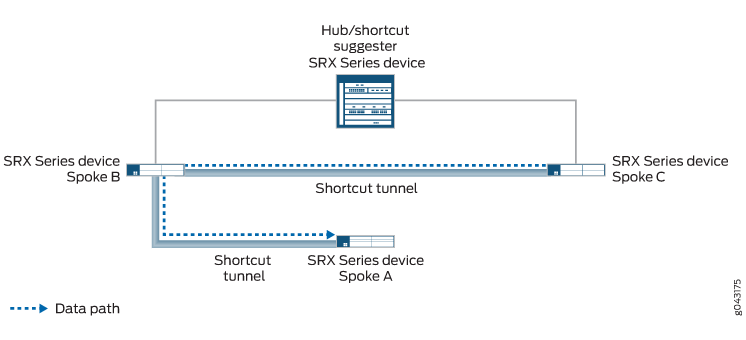
スポークBとスポークCの両方が自動検出VPN(ADVPN)パートナー機能をサポートしている限り、ハブはスポーク同士が互いに直接ショートカットを確立することを提案できます。これは、2つのスポーク間に直接トラフィックがない場合でも発生します。スポークCからスポークAへのトラフィックは、スポークCとスポークBの間のショートカットトンネルを通過し、次にスポークBとスポークAの間のショートカットトンネルを通過します( 図5を参照)。
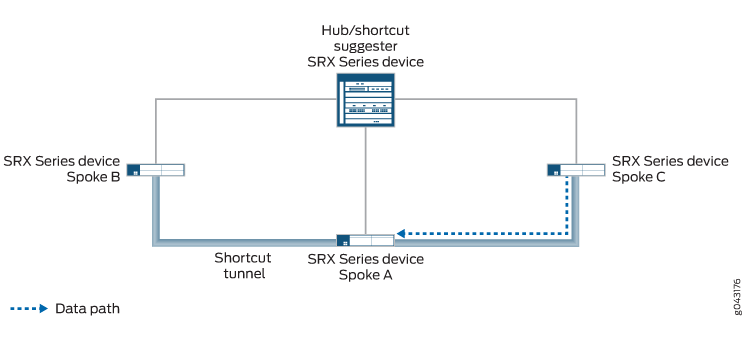
ハブとスポーク A の間の静的トンネルが再確立されると、トンネルがすべてのスポークにアドバタイズされます。スポークCは、スポークAに到達するためのより良いルートがあることを学習します。トラフィックをスポーク B 経由で通過させるのではなく、スポーク A へのトラフィックをハブに転送します。ハブは、スポークCとスポークAの間にショートカットトンネルを確立することを提案しています。ショートカットトンネルがスポークCとスポークAの間に確立されると、トラフィックはショートカットトンネルを通過します( 図6を参照)。スポーク C とスポーク A 間のトラフィックはスポーク B を経由しなくなり、スポーク B とスポーク C の間のショートカット トンネルは最終的に消えます。
[edit security ike gateway gateway-name advpn partner]階層レベルでconnection-limitオプションを使用して、特定のゲートウェイを使用して異なるショートカットパートナーと作成できるショートカットトンネルの最大数を設定できます。最大数はデフォルトでもありますが、プラットフォームによって異なります。
例:自動検出VPNダイナミックトンネルによるネットワークリソース使用率の向上
AutoVPNネットワークを展開している場合、自動検出VPN(ADVPN)を設定することで、ネットワークリソースの使用率を上げることができる場合があります。AutoVPN ネットワークでは、トラフィックがあるスポークから別のスポークに移動している場合でも、VPN トラフィックはハブを通過します。ADVPN を使用すると、スポーク間で VPN トンネルを動的に確立できるため、ネットワーク リソースの使用率が向上します。この例を使用して、AutoVPNネットワークで動的なスポークツースポークVPNトンネルを有効にするようにADVPNを設定します。
要件
この例では、以下のハードウェアおよびソフトウェアコンポーネントを使用しています。
-
AutoVPN ハブアンドスポークとしてサポートされている 3 つのファイアウォール。
-
ADVPNをサポートするJunos OSリリース。
-
デバイスが相互に認証できるようにするハブとスポークに登録されたデジタル証明書。
始める前に:
-
ローカル証明書のリクエストを送信する際には、認証機関(CA)のアドレスと必要な情報(チャレンジパスワードなど)を取得します。
-
各デバイスにデジタル証明書を登録します。
-
証明書の登録を参照してください。
この例では、OSPF動的ルーティングプロトコルと静的ルート設定を使用して、VPNトンネルを介してパケットを転送します。VPN トンネルを介してパケットを転送するために使用される OSPF ダイナミック ルーティング プロトコルについて知識がある必要があります。
概要
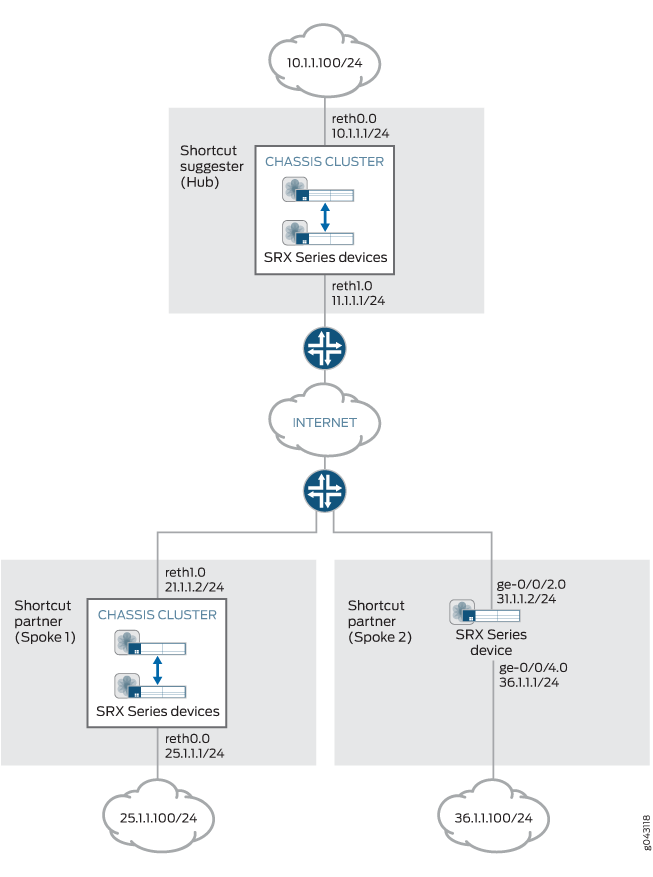
この例では、ADVPN 用の AutoVPN ハブと 2 つのスポークの設定を示しています。スポークはハブへのIPsec VPN接続を確立し、相互に通信したり、ハブ上のリソースにアクセスすることができます。トラフィックは最初はハブを介して一方のスポークからもう一方のスポークに渡されますが、ADVPN を使用すると、スポーク同士で直接セキュリティ アソシエーションを確立できます。ハブは、ショートカット サジェスターとして機能します。ハブでは、ADVPN設定によって partner ロールが無効になっています。スポークでは、ADVPN設定により suggester ロールが無効になります。
AutoVPNハブアンドスポークで設定された特定のフェーズ1とフェーズ2 IKEトンネルオプションは、同じ値である必要があります。 表2は 、この例で使用されている値を示しています。
|
オプション |
値 |
|---|---|
|
IKEの提案: |
|
|
認証方法 |
RSA シグネチャ |
|
Diffie-Hellman(DH)グループ |
グループ5 |
|
認証アルゴリズム |
SHA1 |
|
暗号化アルゴリズム |
AES-256-CBC |
|
IKEポリシー: |
|
|
証明書 |
ローカル証明書 |
|
IKEゲートウェイ: |
|
|
バージョン |
v2のみ |
|
IPsecプロポーザル: |
|
|
プロトコル |
特に |
|
認証アルゴリズム |
HMAC-SHA1-96 |
|
暗号化アルゴリズム |
AES-256-CBC |
|
IPsecポリシー: |
|
|
完全転送機密保持(PFS)グループ |
グループ5 |
ハブとスポークの IKE ゲートウェイ設定には、VPN ピアを識別するリモート値とローカル値が含まれています。 表3 は、この例におけるハブとスポークのIKEゲートウェイ構成を示しています。
|
オプション |
ハブ |
スポーク |
|---|---|---|
|
リモートIPアドレス |
動的 |
スポーク1:11.1.1.1 スポーク2:11.1.1.1 |
|
ローカルIPアドレス |
11.1.1.1 |
スポーク1:21.1.1.2 スポーク2:31.1.1.2 |
|
リモート IKE ID |
スポークの証明書の組織(O)フィールドに文字列「XYZ」、組織ユニット(OU)フィールドに「Sales」が記載された識別名(DN) |
ハブの証明書のOUフィールドに文字列「Sales」が含まれるDN |
|
ローカル IKE ID |
ハブの証明書上のDN |
スポークの証明書上のDN |
スポークの証明書の件名フィールドに、Oフィールドに「XYZ」という文字列が、OUフィールドに「Sales」が含まれている場合、ハブはスポークのIKE IDを認証します。
この例では、すべてのトラフィックを許可するデフォルトのセキュリティポリシーがすべてのデバイスで使用されています。実稼働環境では、より制限の厳しいセキュリティポリシーを設定する必要があります。
設定
Suggesterの設定(ハブ)
CLIクイックコンフィグレーション
この例をすばやく設定するには、以下のコマンドをコピーしてテキスト ファイルに貼り付け、改行を削除し、ネットワーク設定に一致させる必要がある詳細情報を変更し、コマンドを [edit] 階層レベルでCLIにコピー アンド ペーストして、設定モードから commit を入力します。
set interfaces ge-0/0/3 gigether-options redundant-parent reth0
set interfaces ge-0/0/4 gigether-options redundant-parent reth1
set interfaces ge-7/0/3 gigether-options redundant-parent reth0
set interfaces ge-7/0/4 gigether-options redundant-parent reth1
set interfaces reth0 redundant-ether-options redundancy-group 1
set interfaces reth0 unit 0 family inet address 10.1.1.1/24
set interfaces reth1 redundant-ether-options redundancy-group 1
set interfaces reth1 unit 0 family inet address 11.1.1.1/24
set interfaces st0 unit 1 multipoint
set interfaces st0 unit 1 family inet address 172.16.1.1/24
set protocols ospf graceful-restart restart-duration 300
set protocols ospf graceful-restart notify-duration 300
set protocols ospf graceful-restart no-strict-lsa-checking
set protocols ospf area 0.0.0.0 interface st0.1 interface-type p2mp
set protocols ospf area 0.0.0.0 interface st0.1 metric 10
set protocols ospf area 0.0.0.0 interface st0.1 retransmit-interval 1
set protocols ospf area 0.0.0.0 interface st0.1 dead-interval 40
set protocols ospf area 0.0.0.0 interface st0.1 demand-circuit
set protocols ospf area 0.0.0.0 interface st0.1 dynamic-neighbors
set protocols ospf area 0.0.0.0 interface reth0.0
set routing-options graceful-restart
set routing-options static route 21.1.1.0/24 next-hop 11.1.1.2
set routing-options static route 31.1.1.0/24 next-hop 11.1.1.2
set routing-options router-id 172.16.1.1
set security ike proposal IKE_PROP authentication-method rsa-signatures
set security ike proposal IKE_PROP dh-group group5
set security ike proposal IKE_PROP authentication-algorithm sha1
set security ike proposal IKE_PROP encryption-algorithm aes-256-cbc
set security ike policy IKE_POL proposals IKE_PROP
set security ike policy IKE_POL certificate local-certificate Suggester_Certificate_ID
set security ike gateway SUGGESTER_GW ike-policy IKE_POL
set security ike gateway SUGGESTER_GW dynamic distinguished-name wildcard O=XYZ, OU=Sales
set security ike gateway SUGGESTER_GW dynamic ike-user-type group-ike-id
set security ike gateway SUGGESTER_GW dead-peer-detection
set security ike gateway SUGGESTER_GW local-identity distinguished-name
set security ike gateway SUGGESTER_GW external-interface reth1.0
set security ike gateway SUGGESTER_GW local-address 11.1.1.1
set security ike gateway SUGGESTER_GW advpn partner disable
set security ike gateway SUGGESTER_GW advpn suggester
set security ike gateway SUGGESTER_GW version v2-only
set security ipsec proposal IPSEC_PROP protocol esp
set security ipsec proposal IPSEC_PROP authentication-algorithm hmac-sha1-96
set security ipsec proposal IPSEC_PROP encryption-algorithm aes-256-cbc
set security ipsec policy IPSEC_POL perfect-forward-secrecy keys group5
set security ipsec policy IPSEC_POL proposals IPSEC_PROP
set security ipsec vpn SUGGESTER_VPN bind-interface st0.1
set security ipsec vpn SUGGESTER_VPN ike gateway SUGGESTER_GW
set security ipsec vpn SUGGESTER_VPN ike ipsec-policy IPSEC_POL
set security pki ca-profile advpn ca-identity advpn
set security pki ca-profile advpn enrollment url http://10.157.92.176:8080/scep/advpn/
set security zones security-zone trust host-inbound-traffic system-services all
set security zones security-zone trust host-inbound-traffic protocols all
set security zones security-zone trust interfaces st0.1
set security zones security-zone trust interfaces reth0.0
set security zones security-zone untrust host-inbound-traffic system-services all
set security zones security-zone untrust host-inbound-traffic protocols all
set security zones security-zone untrust interfaces reth1.0
set security policies default-policy permit-all
ステップバイステップの手順
次の例では、設定階層のさまざまなレベルに移動する必要があります。手順については、 CLIユーザーガイドを参照してください。
サジェスターを設定するには:
-
インターフェイスを設定します。
[edit interfaces]
user@host# set ge-0/0/3 gigether-options redundant-parent reth0
user@host# set ge-0/0/4 gigether-options redundant-parent reth1
user@host# set ge-7/0/3 gigether-options redundant-parent reth0
user@host# set ge-7/0/4 gigether-options redundant-parent reth1
user@host# set reth0 redundant-ether-options redundancy-group 1
user@host# set reth0 unit 0 family inet address 10.1.1.1/24
user@host# set reth1 redundant-ether-options redundancy-group 1
user@host# set reth1 unit 0 family inet address 11.1.1.1/24
user@host# set st0 unit 1 multipoint
user@host# set st0 unit 1 family inet address 172.16.1.1/24
-
ルーティングプロトコルと静的ルートを設定します。
[edit protocols ospf]
user@host# set graceful-restart restart-duration 300
user@host# set graceful-restart notify-duration 300
user@host# set graceful-restart no-strict-lsa-checking
user@host# set area 0.0.0.0 interface st0.1 interface-type p2mp
user@host# set area 0.0.0.0 interface st0.1 metric 10
user@host# set area 0.0.0.0 interface st0.1 retransmit-interval 1
user@host# set area 0.0.0.0 interface st0.1 dead-interval 40
user@host# set area 0.0.0.0 interface st0.1 demand-circuit
user@host# set area 0.0.0.0 interface st0.1 dynamic-neighbors
user@host# set area 0.0.0.0 interface reth0.0
[edit routing-options]
user@host# set graceful-restart
user@host# set static route 21.1.1.0/24 next-hop 11.1.1.2
user@host# set static route 31.1.1.0/24 next-hop 11.1.1.2
user@host# set router-id 172.16.1.1
-
フェーズ1のオプションを設定します。
[edit security ike proposal IKE_PROP]
user@host# set authentication-method rsa-signatures
user@host# set dh-group group5
user@host# set authentication-algorithm sha1
user@host# set encryption-algorithm aes-256-cbc
[edit security ike policy IKE_POL]
user@host# set proposals IKE_PROP
user@host# set certificate local-certificate Suggester_Certificate_ID
[edit security ike gateway SUGGESTER_GW]
user@host# set ike-policy IKE_POL
user@host# set dynamic distinguished-name wildcard O=XYZ, OU=Sales
user@host# set dynamic ike-user-type group-ike-id
user@host# set dead-peer-detection
user@host# set local-identity distinguished-name
user@host# set external-interface reth1.0
user@host# set local-address 11.1.1.1
user@host# set advpn partner disable
user@host# set advpn suggester
user@host# set version v2-only
-
フェーズ2のオプションを設定します。
[edit security ipsec proposal IPSEC_PROP]
user@host# set protocol esp
user@host# set authentication-algorithm hmac-sha1-96
user@host# set encryption-algorithm aes-256-cbc
[edit security ipsec policy IPSEC_POL]
user@host# set perfect-forward-secrecy keys group5
user@host# set proposals IPSEC_PROP
[edit security isec vpn SUGGESTER_VPN]
user@host# set bind-interface st0.1
user@host# set ike gateway SUGGESTER_GW
user@host# set ike ipsec-policy IPSEC_POL
-
証明書情報を設定します。
[edit security pki]
user@host# set ca-profile advpn ca-identity advpn
user@host# set ca-profile advpn enrollment url http://10.157.92.176:8080/scep/advpn/
-
ゾーンを設定します。
[edit security zones security-zone trust]
user@host# set host-inbound-traffic system-services all
user@host# set host-inbound-traffic protocols all
user@host# set interfaces st0.1
user@host# set interfaces reth0.0
[edit security zones security-zone untrust]
user@host# set host-inbound-traffic system-services all
user@host# set host-inbound-traffic protocols all
user@host# set interfaces reth1.0
-
デフォルトのセキュリティポリシーを設定します。
[edit security policies]
user@host# set default-policy permit-all
結果
設定モードから、 show interfaces、 show protocols、 show routing-options、 show security ike、 show security ipsec、 show security pki、 show security zones、および show security policies コマンドを入力して、設定を確認します。出力に意図した設定が表示されない場合は、この例の手順を繰り返して設定を修正します。
[edit]
    user@host# show interfaces
    ge-0/0/3 {
        gigether-options {
            redundant-parent reth0;
        }
    }
    ge-0/0/4 {
        gigether-options {
            redundant-parent reth1;
        }
    }
    ge-7/0/3 {
        gigether-options {
            redundant-parent reth0;
        }
    }
    ge-7/0/4 {
        gigether-options {
            redundant-parent reth1;
        }
    }
    reth0 {
        redundant-ether-options {
            redundancy-group 1;
        }
        unit 0 {
            family inet {
                address 10.1.1.1/24;
            }
        }
    }
    reth1 {
        redundant-ether-options {
            redundancy-group 1;
        }
        unit 0 {
            family inet {
                address 11.1.1.1/24;
            }
        }
    }
    st0 {
        unit 1 {
            multipoint;
            family inet {
                address 172.16.1.1/24;
            }
        }
    }
    [edit]
    user@host# show protocols
    ospf {
        graceful-restart {
            restart-duration 300;
            notify-duration 300;
            no-strict-lsa-checking;
        }
        area 0.0.0.0 {
            interface st0.1 {
                interface-type p2mp;
                metric 10;
                retransmit-interval 1;
                dead-interval 40;
                demand-circuit;
                dynamic-neighbors;
            }
            interface reth0.0;
        }
    }
    [edit]
    user@host# show routing-options
    graceful-restart;
    static {
        route 21.1.1.0/24 next-hop 11.1.1.2;
        route 31.1.1.0/24 next-hop 11.1.1.2;
    }
    router-id 172.16.1.1;
    [edit]
    user@host# show security ike
    proposal IKE_PROP {
        authentication-method rsa-signatures;
        dh-group group5;
        authentication-algorithm sha1;
        encryption-algorithm aes-256-cbc;
    }
    policy IKE_POL {
        proposals IKE_PROP;
        certificate {
            local-certificate Suggester_Certificate_ID;
        }
    }
    gateway SUGGESTER_GW {
        ike-policy IKE_POL;
        dynamic {
            distinguished-name {
                wildcard O=XYZ, OU=Sales;
            }
            ike-user-type group-ike-id;
        }
        dead-peer-detection {
        }
        local-identity distinguished-name;
        external-interface reth1.0
        local-address 11.1.1.1;
        advpn {
            partner {
                disable;
                }
                suggester {
            ]
        }
        version v2-only;
    }
    [edit]
    user@host# show security ipsec
    proposal IPSEC_PROP {
        protocol esp;
        authentication-algorithm hmac-sha1-96;
        encryption-algorithm aes-256-cbc;
    }
    policy IPSEC_POL {
        perfect-forward-secrecy {
            keys group5;
        }
        proposals IPSEC_PROP;
    }
    vpn SUGGESTER_VPN {
        bind-interface st0.1;
        ike {
            gateway SUGGESTER_GW;
            ipsec-policy IPSEC_POL;
        }
    }
    [edit]
    user@host# show security pki
    ca-profile advpn {
        ca-identity advpn;
        enrollment {
            url http://10.157.92.176:8080/scep/advpn/;
        }
    }
    [edit]
    user@host# show security zones
    security-zone trust {
        host-inbound-traffic {
            system-services {
                all;
            }
            protocols {
                all;
            }
        }
        interfaces {
            st0.1;
            reth0.0;
        }
    }
    security-zone untrust {
        host-inbound-traffic {
            system-services {
                all;
            }
            protocols {
                all;
            }
        }
        interfaces {
            reth1.0;
        }
    }
    [edit]
user@host# show security policies
    default-policy {
        permit-all;
    }
デバイスの設定が完了したら、設定モードから commit を入力します。
パートナーの設定(スポーク1)
CLIクイックコンフィグレーション
この例をすばやく設定するには、以下のコマンドをコピーしてテキスト ファイルに貼り付け、改行を削除し、ネットワーク設定に一致させる必要がある詳細情報を変更し、コマンドを [edit] 階層レベルでCLIにコピー アンド ペーストして、設定モードから commit を入力します。
set interfaces ge-0/0/3 gigether-options redundant-parent reth0
set interfaces ge-0/0/4 gigether-options redundant-parent reth1
set interfaces ge-7/0/3 gigether-options redundant-parent reth0
set interfaces ge-7/0/4 gigether-options redundant-parent reth1
set interfaces reth0 redundant-ether-options redundancy-group 1
set interfaces reth0 unit 0 family inet address 25.1.1.1/24
set interfaces reth1 redundant-ether-options redundancy-group 1
set interfaces reth1 unit 0 family inet address 21.1.1.2/24
set interfaces st0 unit 1 multipoint
set interfaces st0 unit 1 family inet address 172.16.1.2/24
set protocols ospf graceful-restart restart-duration 300
set protocols ospf graceful-restart notify-duration 300
set protocols ospf graceful-restart no-strict-lsa-checking
set protocols ospf area 0.0.0.0 interface st0.1 interface-type p2mp
set protocols ospf area 0.0.0.0 interface st0.1 metric 15
set protocols ospf area 0.0.0.0 interface st0.1 retransmit-interval 1
set protocols ospf area 0.0.0.0 interface st0.1 dead-interval 40
set protocols ospf area 0.0.0.0 interface st0.1 demand-circuit
set protocols ospf area 0.0.0.0 interface st0.1 dynamic-neighbors
set protocols ospf area 0.0.0.0 interface reth0.0
set routing-options graceful-restart
set routing-options static route 11.1.1.0/24 next-hop 21.1.1.1
set routing-options static route 31.1.1.0/24 next-hop 21.1.1.1
set routing-options router-id 172.16.1.2
set security ike proposal IKE_PROP authentication-method rsa-signatures
set security ike proposal IKE_PROP dh-group group5
set security ike proposal IKE_PROP authentication-algorithm sha1
set security ike proposal IKE_PROP encryption-algorithm aes-256-cbc
set security ike policy IKE_POL proposals IKE_PROP
set security ike policy IKE_POL certificate local-certificate Partner1_Certificate_ID
set security ike gateway PARTNER_GW ike-policy IKE_POL
set security ike gateway PARTNER_GW address 11.1.1.1
set security ike gateway PARTNER_GW local-identity distinguished-name
set security ike gateway PARTNER_GW remote-identity distinguished-name container OU=Sales
set security ike gateway PARTNER_GW external-interface reth1
set security ike gateway PARTNER_GW local-address 21.1.1.2
set security ike gateway PARTNER_GW advpn suggester disable
set security ike gateway PARTNER_GW advpn partner
set security ike gateway PARTNER_GW version v2-only
set security ipsec proposal IPSEC_PROP protocol esp
set security ipsec proposal IPSEC_PROP authentication-algorithm hmac-sha1-96
set security ipsec proposal IPSEC_PROP encryption-algorithm aes-256-cbc
set security ipsec policy IPSEC_POL perfect-forward-secrecy keys group5
set security ipsec policy IPSEC_POL proposals IPSEC_PROP
set security ipsec vpn PARTNER_VPN bind-interface st0.1
set security ipsec vpn PARTNER_VPN ike gateway PARTNER_GW
set security ipsec vpn PARTNER_VPN ike ipsec-policy IPSEC_POL
set security ipsec vpn PARTNER_VPN establish-tunnels immediately
set security pki ca-profile advpn ca-identity advpn
set security pki ca-profile advpn enrollment url http://10.157.92.176:8080/scep/advpn/
set security zones security-zone trust host-inbound-traffic system-services all
set security zones security-zone trust host-inbound-traffic protocols all
set security zones security-zone trust interfaces st0.1
set security zones security-zone trust interfaces reth0.0
set security zones security-zone untrust host-inbound-traffic system-services all
set security zones security-zone untrust host-inbound-traffic protocols all
set security zones security-zone untrust interfaces reth1.0
set security policies default-policy permit-all
ステップバイステップの手順
次の例では、設定階層のさまざまなレベルに移動する必要があります。手順については、 CLIユーザーガイドを参照してください。
スポーク1を設定するには:
-
インターフェイスを設定します。
[edit interfaces]
user@host# set ge-0/0/3 gigether-options redundant-parent reth0
user@host# set ge-0/0/4 gigether-options redundant-parent reth1
user@host# set ge-7/0/3 gigether-options redundant-parent reth0
user@host# set ge-7/0/4 gigether-options redundant-parent reth1
user@host# set reth0 redundant-ether-options redundancy-group 1
user@host# set reth0 unit 0 family inet address 25.1.1.1/24
user@host# set reth1 redundant-ether-options redundancy-group 1
user@host# set reth1 unit 0 family inet address 21.1.1.2/24
user@host# set st0 unit 1 multipoint
user@host# set st0 unit 1 family inet address 172.16.1.2/24
-
ルーティングプロトコルと静的ルートを設定します。
[edit protocols ospf]
user@host# set graceful-restart restart-duration 300
user@host# set graceful-restart notify-duration 300
user@host# set graceful-restart no-strict-lsa-checking
user@host# set area 0.0.0.0 interface st0.1 interface-type p2mp
user@host# set area 0.0.0.0 interface st0.1 metric 15
user@host# set area 0.0.0.0 interface st0.1 retransmit-interval 1
user@host# set area 0.0.0.0 interface st0.1 dead-interval 40
user@host# set area 0.0.0.0 interface st0.1 demand-circuit
user@host# set area 0.0.0.0 interface st0.1 dynamic-neighbors
user@host# set protocols ospf area 0.0.0.0 interface reth0.0
[edit routing-options]
user@host# set graceful-restart
user@host# set static route 11.1.1.0/24 next-hop 21.1.1.1
user@host# set static route 31.1.1.0/24 next-hop 21.1.1.1
user@host# set router-id 172.16.1.2
-
フェーズ1のオプションを設定します。
[edit security ike proposal IKE_PROP]
user@host# set authentication-method rsa-signatures
user@host# set dh-group group5
user@host# set authentication-algorithm sha1
user@host# set encryption-algorithm aes-256-cbc
[edit security ike policy IKE_POL]
user@host# set proposals IKE_PROP
user@host# set certificate local-certificate Partner1_Certificate_ID
[edit security ike gateway PARTNER_GW]
user@host# set ike-policy IKE_POL
user@host# set address 11.1.1.1
user@host# set local-identity distinguished-name
user@host# set remote-identity distinguished-name container OU=Sales
user@host# set external-interface reth1
user@host# set local-address 21.1.1.2
user@host# set advpn suggester disable
user@host# set advpn partner
user@host# set version v2-only
-
フェーズ2のオプションを設定します。
[edit security ipsec proposal IPSEC_PROP]
user@host# set protocol esp
user@host# set authentication-algorithm hmac-sha1-96
user@host# set encryption-algorithm aes-256-cbc
[edit security ipsec policy IPSEC_POL]
user@host# set perfect-forward-secrecy keys group5
user@host# set proposals IPSEC_PROP
[edit security isec vpn PARTNER_VPN]
user@host# set bind-interface st0.1
user@host# set ike gateway PARTNER_GW
user@host# set ike ipsec-policy IPSEC_POL
user@host# set establish-tunnels immediately
-
証明書情報を設定します。
[edit security pki]
user@host# set ca-profile advpn ca-identity advpn
user@host# set ca-profile advpn enrollment url http://10.157.92.176:8080/scep/advpn/
-
ゾーンを設定します。
[edit security zones security-zone trust]
user@host# set host-inbound-traffic system-services all
user@host# set host-inbound-traffic protocols all
user@host# set interfaces st0.1
user@host# set interfaces reth0.0
[edit security zones security-zone untrust]
user@host# set host-inbound-traffic system-services all
user@host# set host-inbound-traffic protocols all
user@host# set interfaces reth1.0
-
デフォルトのセキュリティポリシーを設定します。
[edit security policies]
user@host# set default-policy permit-all
結果
設定モードから、 show interfaces、 show protocols、 show routing-options、 show security ike、 show security ipsec、 show security pki、 show security zones、および show security policies コマンドを入力して、設定を確認します。出力に意図した設定が表示されない場合は、この例の手順を繰り返して設定を修正します。
[edit]
    user@host# show interfaces
    ge-0/0/3 {
        gigether-options {
            redundant-parent reth0;
        }
    }
    ge-0/0/4 {
        gigether-options {
            redundant-parent reth1;
        }
    }
    ge-7/0/3 {
        gigether-options {
            redundant-parent reth0;
        }
    }
    ge-7/0/4 {
        gigether-options {
            redundant-parent reth1;
        }
    }
    reth0 {
        redundant-ether-options {
            redundancy-group 1;
        }
        unit 0 {
            family inet {
                address 25.1.1.1/24;
            }
        }
    }
    reth1 {
        redundant-ether-options {
            redundancy-group 1;
        }
        unit 0 {
            family inet {
                address 21.1.1.2/24;
            }
        }
    }
    st0 {
        unit 1 {
            multipoint;
            family inet {
                address 172.16.1.2/24;
            }
        }
    }
    [edit]
    user@host# show protocols
    ospf {
        graceful-restart {
            restart-duration 300;
            notify-duration 300;
            no-strict-lsa-checking;
        }
        area 0.0.0.0 {
            interface st0.1 {
                interface-type p2mp;
                metric 15;
                retransmit-interval 1;
                dead-interval 40;
                demand-circuit;
                dynamic-neighbors;
            }
            interface reth0.0;
        }
    }
    [edit]
    user@host# show routing-options
    graceful-restart;
    static {
        route 11.1.1.0/24 next-hop 21.1.1.1;
        route 31.1.1.0/24 next-hop 21.1.1.1;
    }
    router-id 172.16.1.2;
    [edit]
    user@host# show security ike
    proposal IKE_PROP {
        authentication-method rsa-signatures;
        dh-group group5;
        authentication-algorithm sha1;
        encryption-algorithm aes-256-cbc;
    }
    policy IKE_POL {
        proposals IKE_PROP;
        certificate {
            local-certificate Partner1_Certificate_ID;
        }
    }
    gateway PARTNER_GW {
        ike-policy IKE_POL;
        address 11.1.1.1;
        local-identity distinguished-name;
        remote-identity distinguished-name container OU=Sales;
        external-interface reth1;
        local-address 21.1.1.2;
        advpn {
            suggester {
                disable;
            }
            partner {
            }
        }
        version v2-only;
    }
    [edit]
    user@host# show security ipsec
    proposal IPSEC_PROP {
        protocol esp;
        authentication-algorithm hmac-sha1-96;
        encryption-algorithm aes-256-cbc;
    }
    policy IPSEC_POL {
        perfect-forward-secrecy {
            keys group5;
        }
        proposals IPSEC_PROP;
    }
    vpn PARTNER_VPN {
        bind-interface st0.1;
        ike {
            gateway PARTNER_GW;
            ipsec-policy IPSEC_POL;
        }
        establish-tunnels immediately;
    }
    [edit]
    user@host# show security pki
    ca-profile advpn {
        ca-identity advpn;
        enrollment {
            url http://10.157.92.176:8080/scep/advpn/;
        }
    }
    [edit]
    user@host# show security zones
    security-zone trust {
        host-inbound-traffic {
            system-services {
                all;
            }
            protocols {
                all;
            }
        }
        interfaces {
            st0.1;
            reth0.0;
        }
    }
    security-zone untrust {
        host-inbound-traffic {
            system-services {
                all;
            }
            protocols {
                all;
            }
        }
        interfaces {
            reth1.0;
        }
    }
    [edit]
user@host# show security policies
    default-policy {
        permit-all;
    }
デバイスの設定が完了したら、設定モードから commit を入力します。
パートナーの設定(スポーク2)
CLIクイックコンフィグレーション
この例をすばやく設定するには、以下のコマンドをコピーしてテキスト ファイルに貼り付け、改行を削除し、ネットワーク設定に一致させる必要がある詳細情報を変更し、コマンドを [edit] 階層レベルでCLIにコピー アンド ペーストして、設定モードから commit を入力します。
set interfaces ge-0/0/2 unit 0 family inet address 31.1.1.2/24
set interfaces ge-0/0/4 unit 0 family inet address 36.1.1.1/24
set interfaces st0 unit 1 multipoint
set interfaces st0 unit 1 family inet address 172.16.1.3/24
set protocols ospf graceful-restart restart-duration 300
set protocols ospf graceful-restart notify-duration 300
set protocols ospf graceful-restart no-strict-lsa-checking
set protocols ospf area 0.0.0.0 interface st0.1 interface-type p2mp
set protocols ospf area 0.0.0.0 interface st0.1 metric 15
set protocols ospf area 0.0.0.0 interface st0.1 retransmit-interval 1
set protocols ospf area 0.0.0.0 interface st0.1 dead-interval 40
set protocols ospf area 0.0.0.0 interface st0.1 demand-circuit
set protocols ospf area 0.0.0.0 interface st0.1 dynamic-neighbors
set protocols ospf area 0.0.0.0 interface ge-0/0/4.0
set routing-options graceful-restart
set routing-options static route 11.1.1.0/24 next-hop 31.1.1.1
set routing-options static route 21.1.1.0/24 next-hop 31.1.1.1
set routing-options router-id 172.16.1.3
set security ike proposal IKE_PROP authentication-method rsa-signatures
set security ike proposal IKE_PROP dh-group group5
set security ike proposal IKE_PROP authentication-algorithm sha1
set security ike proposal IKE_PROP encryption-algorithm aes-256-cbc
set security ike policy IKE_POL proposals IKE_PROP
set security ike policy IKE_POL certificate local-certificate Partner2_Certificate_ID
set security ike gateway PARTNER_GW ike-policy IKE_POL
set security ike gateway PARTNER_GW address 11.1.1.1
set security ike gateway PARTNER_GW dead-peer-detection
set security ike gateway PARTNER_GW local-identity distinguished-name
set security ike gateway PARTNER_GW remote-identity distinguished-name container OU=Sales
set security ike gateway PARTNER_GW external-interface ge-0/0/2.0
set security ike gateway PARTNER_GW local-address 31.1.1.2
set security ike gateway PARTNER_GW advpn suggester disable
set security ike gateway PARTNER_GW advpn partner
set security ike gateway PARTNER_GW version v2-only
set security ipsec proposal IPSEC_PROP protocol esp
set security ipsec proposal IPSEC_PROP authentication-algorithm hmac-sha1-96
set security ipsec proposal IPSEC_PROP encryption-algorithm aes-256-cbc
set security ipsec policy IPSEC_POL perfect-forward-secrecy keys group5
set security ipsec policy IPSEC_POL proposals IPSEC_PROP
set security ipsec vpn PARTNER_VPN bind-interface st0.1
set security ipsec vpn PARTNER_VPN ike gateway PARTNER_GW
set security ipsec vpn PARTNER_VPN ike ipsec-policy IPSEC_POL
set security ipsec vpn PARTNER_VPN establish-tunnels immediately
set security pki ca-profile advpn ca-identity advpn
set security pki ca-profile advpn enrollment url http://10.157.92.176:8080/scep/advpn/
set security zones security-zone trust host-inbound-traffic system-services all
set security zones security-zone trust host-inbound-traffic protocols all
set security zones security-zone trust interfaces ge-0/0/4.0
set security zones security-zone trust interfaces st0.1
set security zones security-zone untrust host-inbound-traffic system-services all
set security zones security-zone untrust host-inbound-traffic protocols all
set security zones security-zone untrust interfaces ge-0/0/2.0
set security policies default-policy permit-all
ステップバイステップの手順
次の例では、設定階層のさまざまなレベルに移動する必要があります。手順については、 CLIユーザーガイドを参照してください。
スポーク2を設定するには:
-
インターフェイスを設定します。
[edit interfaces]
user@host# set ge-0/0/2 unit 0 family inet address 31.1.1.2/24
user@host# set ge-0/0/4 unit 0 family inet address 36.1.1.1/24
user@host# set st0 unit 1 multipoint
user@host# set st0 unit 1 family inet address 172.16.1.3/24
-
ルーティングプロトコルと静的ルートを設定します。
[edit protocols ospf
user@host# set graceful-restart restart-duration 300
user@host# set graceful-restart notify-duration 300
user@host# set graceful-restart no-strict-lsa-checking
user@host# set area 0.0.0.0 interface st0.1 interface-type p2mp
user@host# set area 0.0.0.0 interface st0.1 metric 15
user@host# set area 0.0.0.0 interface st0.1 retransmit-interval 1
user@host# set area 0.0.0.0 interface st0.1 dead-interval 40
user@host# set area 0.0.0.0 interface st0.1 demand-circuit
user@host# set area 0.0.0.0 interface st0.1 dynamic-neighbors
user@host# set area 0.0.0.0 interface ge-0/0/4.0
[edit routing-options]
user@host# set graceful-restart
user@host# set static route 11.1.1.0/24 next-hop 31.1.1.1
user@host# set static route 21.1.1.0/24 next-hop 31.1.1.1
user@host# set router-id 172.16.1.3
-
フェーズ1のオプションを設定します。
[edit security ike proposal IKE_PROP]
user@host# set authentication-method rsa-signatures
user@host# set dh-group group5
user@host# set authentication-algorithm sha1
user@host# set encryption-algorithm aes-256-cbc
[edit security ike policy IKE_POL]
user@host# set proposals IKE_PROP
user@host# set certificate local-certificate Partner2_Certificate_ID
[edit security ike gateway PARTNER_GW]
user@host# set ike-policy IKE_POL
user@host# set address 11.1.1.1
user@host# set local-identity distinguished-name
user@host# set remote-identity distinguished-name container OU=Sales
user@host# set external-interface ge-0/0/2.0
user@host# set local-address 31.1.1.2
user@host# set advpn suggester disable
user@host# set advpn partner
user@host# set version v2-only
-
フェーズ2のオプションを設定します。
[edit security ipsec proposal IPSEC_PROP]
user@host# set protocol esp
user@host# set authentication-algorithm hmac-sha1-96
user@host# set encryption-algorithm aes-256-cbc
[edit security ipsec policy IPSEC_POL]
user@host# set perfect-forward-secrecy keys group5
user@host# set proposals IPSEC_PROP
[edit security isec vpn PARTNER_VPN]
user@host# set bind-interface st0.1
user@host# set ike gateway PARTNER_GW
user@host# set ike ipsec-policy IPSEC_POL
user@host# set establish-tunnels immediately
-
証明書情報を設定します。
[edit security pki]
user@host# set ca-profile advpn ca-identity advpn
user@host# set ca-profile advpn enrollment url http://10.157.92.176:8080/scep/advpn/
-
ゾーンを設定します。
[edit security zones security-zone trust]
user@host# set host-inbound-traffic system-services all
user@host# set host-inbound-traffic protocols all
user@host# set interfaces ge-0/0/4.0
user@host# set interfaces st0.1
[edit security zones security-zone untrust]
user@host# set host-inbound-traffic system-services all
user@host# set host-inbound-traffic protocols all
user@host# set interfaces ge-0/0/2.0
-
デフォルトのセキュリティポリシーを設定します。
[edit security policies]
user@host# set default-policy permit-all
結果
設定モードから、 show interfaces、 show protocols、 show routing-options、 show security ike、 show security ipsec、 show security pki、 show security zones、および show security policies コマンドを入力して、設定を確認します。出力に意図した設定が表示されない場合は、この例の手順を繰り返して設定を修正します。
[edit]
    user@host# show interfaces
    ge-0/0/2 {
        unit 0 {
            family inet {
                address 31.1.1.2/24;
            }
        }
    }
    ge-0/0/4{
        unit 0 {
            family inet {
                address 36.1.1.1/24;
            }
        }
    }
    st0 {
        unit 1 {
            multipoint;
            family inet {
                address 172.16.1.3/24;
            }
        }
    }
    [edit]
    user@host# show protocols
    ospf {
        graceful-restart {
            restart-duration 300;
            notify-duration 300;
            no-strict-lsa-checking;
        }
        area 0.0.0.0 {
            interface st0.1 {
                interface-type p2mp;
                metric 15;
                retransmit-interval 1;
                dead-interval 40;
                demand-circuit;
                dynamic-neighbors;
            }
            interface ge-0/0/4.0;
        }
    }
    [edit]
    user@host# show routing-options
    graceful-restart;
    static {
        route 11.1.1.0/24 next-hop 31.1.1.1;
        route 21.1.1.0/24 next-hop 31.1.1.1;
    }
    router-id 172.16.1.3;
    [edit]
    user@host# show security ike
    proposal IKE_PROP {
        authentication-method rsa-signatures;
        dh-group group5;
        authentication-algorithm sha1;
        encryption-algorithm aes-256-cbc;
    }
    policy IKE_POL {
        proposals IKE_PROP;
        certificate {
            local-certificate Partner2_Certificate_ID
        }
    }
    gateway PARTNER_GW {
        ike-policy IKE_POL;
        address 11.1.1.1;
        local-identity distinguished-name;
        remote-identity distinguished-name container OU=Sales;
        external-interface ge-0/0/2.0;
        local-address 31.1.1.2;
        advpn {
            suggester{
                disable;
            }
            partner {
            }
        }
        version v2-only;
    }
    [edit]
    user@host# show security ipsec
    proposal IPSEC_PROP {
        protocol esp;
        authentication-algorithm hmac-sha1-96;
        encryption-algorithm aes-256-cbc;
    }
    policy IPSEC_POL {
        perfect-forward-secrecy {
            keys group5;
        }
        proposals IPSEC_PROP;
    }
    vpn PARTNER_VPN {
        bind-interface st0.1;
        ike {
            gateway PARTNER_GW;
            ipsec-policy IPSEC_POL;
        }
        establish-tunnels immediately;
    }
    [edit]
    user@host# show security pki
    ca-profile advpn {
        ca-identity advpn;
        enrollment {
            url http://10.157.92.176:8080/scep/advpn/;
        }
    }
    [edit]
    user@host# show security zones
    security-zone trust {
        host-inbound-traffic {
            system-services {
                all;
            }
            protocols {
                all;
            }
        }
        interfaces {
            ge-0/0/4.0;
            st0.1;
        }
    }
    security-zone untrust {
        host-inbound-traffic {
            system-services {
                all;
            }
            protocols {
                all;
            }
        }
        interfaces {
            ge-0/0/2.0;
        }
    }
    [edit]
user@host# show security policies
    default-policy {
        permit-all;
    }
デバイスの設定が完了したら、設定モードから commit を入力します。
検証
設定が正常に機能していることを確認します。まず、AutoVPNハブとスポークの間にトンネルが確立されていることを確認します。トラフィックがハブを介してあるスポークから別のスポークに渡されるときに、スポーク間にショートカットを確立できます。ショートカットパートナーがショートカットパートナー間にトンネルを確立していること、およびピアへのルートがパートナーにインストールされていることを確認します。
ハブとスポーク間のトンネルの検証
目的
AutoVPNハブとスポーク間にトンネルが確立されていることを確認します。あるスポークから別のスポークへの初期トラフィックは、ハブを通過する必要があります。
アクション
動作モードから、ハブとスポークに show security ike security-associations コマンドと show security ipsec security-associations コマンドを入力します。
ハブには、以下のコマンドが入力されます。
user@host> show security ike security-associations
node1:
--------------------------------------------------------------------------
Index   State  Initiator cookie  Responder cookie  Mode           Remote Address
10957048 UP    2d58d8fbc396762d  46145be580c68be0  IKEv2          31.1.1.2
10957049 UP    fa05ee6d0f2cfb22  16f5ca836b118c0e  IKEv2          21.1.1.2
user@host> show security ike security-associations detail
node1:
--------------------------------------------------------------------------
IKE peer 31.1.1.2, Index 10957048, Gateway Name: SUGGESTER_GW
  Auto Discovery VPN:
   Type: Static, Local Capability: Suggester, Peer Capability: Partner
   Suggester Shortcut Suggestions Statistics:
     Suggestions sent    :    0
     Suggestions accepted:    0
     Suggestions declined:    0
  Role: Responder, State: UP
  Initiator cookie: 2d58d8fbc396762d, Responder cookie: 46145be580c68be0
  Exchange type: IKEv2, Authentication method: RSA-signatures
  Local: 11.1.1.1:500, Remote: 31.1.1.2:500
  Lifetime: Expires in 28196 seconds
  Peer ike-id: DC=XYZ, CN=partner2, OU=Sales, O=XYZ, L=NewYork, ST=NY, C=US
  Xauth user-name: not available
  Xauth assigned IP: 0.0.0.0
  Algorithms:
   Authentication        : hmac-sha1-96
   Encryption            : aes256-cbc
   Pseudo random function: hmac-sha1
   Diffie-Hellman group  : DH-group-5
  Traffic statistics:
   Input  bytes  :                 2030
   Output bytes  :                 2023
   Input  packets:                    4
   Output packets:                    4
  IPSec security associations: 2 created, 0 deleted
  Phase 2 negotiations in progress: 1

    Negotiation type: Quick mode, Role: Responder, Message ID: 0
    Local: 11.1.1.1:500, Remote: 31.1.1.2:500
    Local identity: DC=XYZ, CN=suggester, OU=Sales, O=XYZ, L=Sunnyvale, ST=CA, C=US
    Remote identity: DC=XYZ, CN=partner2, OU=Sales, O=XYZ, L=NewYork, ST=NY, C=US
    Flags: IKE SA is created

IKE peer 21.1.1.2, Index 10957049, Gateway Name: SUGGESTER_GW
  Auto Discovery VPN:
   Type: Static, Local Capability: Suggester, Peer Capability: Partner
   Suggester Shortcut Suggestions Statistics:
     Suggestions sent    :    0
     Suggestions accepted:    0
     Suggestions declined:    0
  Role: Responder, State: UP
  Initiator cookie: fa05ee6d0f2cfb22, Responder cookie: 16f5ca836b118c0e
  Exchange type: IKEv2, Authentication method: RSA-signatures
  Local: 11.1.1.1:500, Remote: 21.1.1.2:500
  Lifetime: Expires in 28219 seconds
Peer ike-id: DC=XYZ, CN=partner1, OU=Sales, O=XYZ, L=NewYork, ST=NY, C=US
  Xauth user-name: not available
  Xauth assigned IP: 0.0.0.0
  Algorithms:
   Authentication        : hmac-sha1-96
   Encryption            : aes256-cbc
   Pseudo random function: hmac-sha1
   Diffie-Hellman group  : DH-group-5
  Traffic statistics:
   Input  bytes  :                 2030
   Output bytes  :                 2023
   Input  packets:                    4
   Output packets:                    4
  IPSec security associations: 2 created, 0 deleted
  Phase 2 negotiations in progress: 1

    Negotiation type: Quick mode, Role: Responder, Message ID: 0
    Local: 11.1.1.1:500, Remote: 21.1.1.2:500
    Local identity: DC=XYZ, CN=suggester, OU=Sales, O=XYZ, L=Sunnyvale, ST=CA, C=US
    Remote identity: DC=XYZ, CN=partner1, OU=Sales, O=XYZ, L=NewYork, ST=NY, C=US
    Flags: IKE SA is created
user@host> show security ipsec security-associations
node1:
--------------------------------------------------------------------------
  Total active tunnels: 2
  ID    Algorithm       SPI      Life:sec/kb  Mon lsys Port  Gateway
  <201326593 ESP:aes-cbc-256/sha1 44ccf265 2999/ unlim - root 500 31.1.1.2
  >201326593 ESP:aes-cbc-256/sha1 a9d301b0 2999/ unlim - root 500 31.1.1.2
  <201326594 ESP:aes-cbc-256/sha1 98a2b155 3022/ unlim - root 500 21.1.1.2
  >201326594 ESP:aes-cbc-256/sha1 de912bcd 3022/ unlim - root 500 21.1.1.2
user@host> show security ipsec security-associations detail
node1:
--------------------------------------------------------------------------

ID: 201326593 Virtual-system: root, VPN Name: SUGGESTER_VPN
  Local Gateway: 11.1.1.1, Remote Gateway: 31.1.1.2
  Local Identity: ipv4_subnet(any:0,[0..7]=0.0.0.0/0)
  Remote Identity: ipv4_subnet(any:0,[0..7]=0.0.0.0/0)
  Version: IKEv2
  DF-bit: clear, Bind-interface: st0.1
  Port: 500, Nego#: 2, Fail#: 0, Def-Del#: 0 Flag: 0x608a29
  Tunnel events:
    Tue Jan 13 2015 12:57:48 -0800: IPSec SA negotiation successfully completed (1 times)
    Tue Jan 13 2015 12:57:48 -0800: Tunnel is ready. Waiting for trigger event or peer to trigger negotiation (1 times)
    Tue Jan 13 2015 12:57:48 -0800: IKE SA negotiation successfully completed (1 times)
  Direction: inbound, SPI: 44ccf265, AUX-SPI: 0
    Hard lifetime: Expires in 2991 seconds
    Lifesize Remaining:  Unlimited
    Soft lifetime: Expires in 2414 seconds
    Mode: Tunnel(0 0), Type: dynamic, State: installed
    Protocol: ESP, Authentication: hmac-sha1-96, Encryption: aes-cbc (256 bits)
    Anti-replay service: counter-based enabled, Replay window size: 64
  Direction: outbound, SPI: a9d301b0, AUX-SPI: 0
    Hard lifetime: Expires in 2991 seconds
    Lifesize Remaining:  Unlimited
    Soft lifetime: Expires in 2414 seconds
    Mode: Tunnel(0 0), Type: dynamic, State: installed
    Protocol: ESP, Authentication: hmac-sha1-96, Encryption: aes-cbc (256 bits)
    Anti-replay service: counter-based enabled, Replay window size: 64

ID: 201326594 Virtual-system: root, VPN Name: SUGGESTER_VPN
  Local Gateway: 11.1.1.1, Remote Gateway: 21.1.1.2
  Local Identity: ipv4_subnet(any:0,[0..7]=0.0.0.0/0)
  Remote Identity: ipv4_subnet(any:0,[0..7]=0.0.0.0/0)
  Version: IKEv2
  DF-bit: clear, Bind-interface: st0.1
  Port: 500, Nego#: 3, Fail#: 0, Def-Del#: 0 Flag: 0x608a29
  Tunnel events:
    Tue Jan 13 2015 12:58:11 -0800: IPSec SA negotiation successfully completed (1 times)
    Tue Jan 13 2015 12:58:11 -0800: Tunnel is ready. Waiting for trigger event or peer to trigger negotiation (1 times)
    Tue Jan 13 2015 12:58:11 -0800: IKE SA negotiation successfully completed (1 times)
  Direction: inbound, SPI: 98a2b155, AUX-SPI: 0
    Hard lifetime: Expires in 3014 seconds
    Lifesize Remaining:  Unlimited
    Soft lifetime: Expires in 2436 seconds
    Mode: Tunnel(0 0), Type: dynamic, State: installed
    Protocol: ESP, Authentication: hmac-sha1-96, Encryption: aes-cbc (256 bits)
    Anti-replay service: counter-based enabled, Replay window size: 64
  Direction: outbound, SPI: de912bcd, AUX-SPI: 0
    Hard lifetime: Expires in 3014 seconds
    Lifesize Remaining:  Unlimited
    Soft lifetime: Expires in 2436 seconds
    Mode: Tunnel(0 0), Type: dynamic, State: installed
    Protocol: ESP, Authentication: hmac-sha1-96, Encryption: aes-cbc (256 bits)
    Anti-replay service: counter-based enabled, Replay window size: 64
user@host> show route protocol ospf
inet.0: 28 destinations, 28 routes (27 active, 0 holddown, 1 hidden)
Restart Complete
+ = Active Route, - = Last Active, * = Both

25.1.1.0/24        *[OSPF/10] 00:00:27, metric 11
                    > to 172.16.1.2 via st0.1
36.1.1.0/24        *[OSPF/10] 00:00:27, metric 11
                    > to 172.16.1.3 via st0.1
172.16.1.2/32      *[OSPF/10] 00:00:27, metric 10
                    > to 172.16.1.2 via st0.1
172.16.1.3/32      *[OSPF/10] 00:00:27, metric 10
                    > to 172.16.1.3 via st0.1
224.0.0.5/32       *[OSPF/10] 00:00:48, metric 1
                      MultiRecv
user@host> show ospf neighbor
Address          Interface              State     ID               Pri  Dead
172.16.1.3       st0.1                  Full      172.16.1.3       128     -
172.16.1.2       st0.1                  Full      172.16.1.2       128     -
スポーク 1 に以下のコマンドが入力されます。
user@host> show security ike security-associations
node0:
--------------------------------------------------------------------------
Index   State  Initiator cookie  Responder cookie  Mode           Remote Address
578872  UP     fa05ee6d0f2cfb22  16f5ca836b118c0e  IKEv2          11.1.1.1
user@host> show security ike security-associations detail
node0:
--------------------------------------------------------------------------
IKE peer 11.1.1.1, Index 578872, Gateway Name: PARTNER_GW
  Auto Discovery VPN:
   Type: Static, Local Capability: Partner, Peer Capability: Suggester
   Partner Shortcut Suggestions Statistics:
     Suggestions received:    0
     Suggestions accepted:    0
     Suggestions declined:    0
  Role: Initiator, State: UP
  Initiator cookie: fa05ee6d0f2cfb22, Responder cookie: 16f5ca836b118c0e
  Exchange type: IKEv2, Authentication method: RSA-signatures
  Local: 21.1.1.2:500, Remote: 11.1.1.1:500
  Lifetime: Expires in 28183 seconds
  Peer ike-id: DC=XYZ, CN=suggester, OU=Sales, O=XYZ, L=Sunnyvale, ST=CA, C=US
  Xauth user-name: not available
  Xauth assigned IP: 0.0.0.0
  Algorithms:
   Authentication        : hmac-sha1-96
   Encryption            : aes256-cbc
   Pseudo random function: hmac-sha1
   Diffie-Hellman group  : DH-group-5
  Traffic statistics:
   Input  bytes  :                 2023
   Output bytes  :                 2030
   Input  packets:                    4
   Output packets:                    4
  IPSec security associations: 2 created, 0 deleted
  Phase 2 negotiations in progress: 1

    Negotiation type: Quick mode, Role: Initiator, Message ID: 0
    Local: 21.1.1.2:500, Remote: 11.1.1.1:500
    Local identity: DC=XYZ, CN=partner1, OU=Sales, O=XYZ, L=NewYork, ST=NY, C=US
    Remote identity: DC=XYZ, CN=suggester, OU=Sales, O=XYZ, L=Sunnyvale, ST=CA, C=US
    Flags: IKE SA is created
user@host> show security ipsec security-associations
node0:
--------------------------------------------------------------------------
  Total active tunnels: 1
  ID    Algorithm       SPI      Life:sec/kb  Mon lsys Port  Gateway
  <67108866 ESP:aes-cbc-256/sha1 de912bcd 2985/ unlim - root 500 11.1.1.1
  >67108866 ESP:aes-cbc-256/sha1 98a2b155 2985/ unlim - root 500 11.1.1.1
user@host> show security ipsec security-associations detail
node0:
--------------------------------------------------------------------------

ID: 67108866 Virtual-system: root, VPN Name: PARTNER_VPN
  Local Gateway: 21.1.1.2, Remote Gateway: 11.1.1.1
  Local Identity: ipv4_subnet(any:0,[0..7]=0.0.0.0/0)
  Remote Identity: ipv4_subnet(any:0,[0..7]=0.0.0.0/0)
  Version: IKEv2
  DF-bit: clear, Bind-interface: st0.1
  Port: 500, Nego#: 0, Fail#: 0, Def-Del#: 0 Flag: 0x8608a29
  Tunnel events:
    Tue Jan 13 2015 12:58:11 -0800: IPSec SA negotiation successfully completed (1 times)
    Tue Jan 13 2015 12:58:11 -0800: Tunnel is ready. Waiting for trigger event or peer to trigger negotiation (1 times)
    Tue Jan 13 2015 12:58:11 -0800: IKE SA negotiation successfully completed (1 times)
  Direction: inbound, SPI: de912bcd, AUX-SPI: 0
    Hard lifetime: Expires in 2980 seconds
    Lifesize Remaining:  Unlimited
    Soft lifetime: Expires in 2358 seconds
    Mode: Tunnel(0 0), Type: dynamic, State: installed
    Protocol: ESP, Authentication: hmac-sha1-96, Encryption: aes-cbc (256 bits)
    Anti-replay service: counter-based enabled, Replay window size: 64
  Direction: outbound, SPI: 98a2b155, AUX-SPI: 0
    Hard lifetime: Expires in 2980 seconds
    Lifesize Remaining:  Unlimited
    Soft lifetime: Expires in 2358 seconds
    Mode: Tunnel(0 0), Type: dynamic, State: installed
    Protocol: ESP, Authentication: hmac-sha1-96, Encryption: aes-cbc (256 bits)
    Anti-replay service: counter-based enabled, Replay window size: 64
user@host> show route protocol ospf
inet.0: 29 destinations, 29 routes (28 active, 0 holddown, 1 hidden)
Restart Complete
+ = Active Route, - = Last Active, * = Both

10.1.1.0/24        *[OSPF/10] 00:11:46, metric 16
                    > to 172.16.1.1 via st0.1
36.1.1.0/24        *[OSPF/10] 00:11:46, metric 26
                    > to 172.16.1.1 via st0.1
172.16.1.1/32      *[OSPF/10] 00:11:46, metric 15
                    > to 172.16.1.1 via st0.1
172.16.1.3/32      *[OSPF/10] 00:11:46, metric 25
                    > to 172.16.1.1 via st0.1
224.0.0.5/32       *[OSPF/10] 00:16:52, metric 1
                      MultiRecv
user@host> show ospf neighbor
Address          Interface              State     ID               Pri  Dead
172.16.1.1       st0.1                  Full      172.16.1.1       128     -
スポーク 2 には以下のコマンドが入力されます。
user@host> show security ike security-associations
Index   State  Initiator cookie  Responder cookie  Mode           Remote Address
2299162 UP     2d58d8fbc396762d  46145be580c68be0  IKEv2          11.1.1.1
user@host> show security ike security-associations detail
IKE peer 11.1.1.1, Index 2299162, Gateway Name: PARTNER_GW
  Auto Discovery VPN:
   Type: Static, Local Capability: Partner, Peer Capability: Suggester
   Partner Shortcut Suggestions Statistics:
     Suggestions received:    0
     Suggestions accepted:    0
     Suggestions declined:    0
  Role: Initiator, State: UP
  Initiator cookie: 2d58d8fbc396762d, Responder cookie: 46145be580c68be0
  Exchange type: IKEv2, Authentication method: RSA-signatures
  Local: 31.1.1.2:500, Remote: 11.1.1.1:500
  Lifetime: Expires in 28135 seconds
  Peer ike-id: DC=XYZ, CN=suggester, OU=Sales, O=XYZ, L=Sunnyvale, ST=CA, C=US
  Xauth user-name: not available
  Xauth assigned IP: 0.0.0.0
  Algorithms:
   Authentication        : hmac-sha1-96
   Encryption            : aes256-cbc
   Pseudo random function: hmac-sha1
   Diffie-Hellman group  : DH-group-5
  Traffic statistics:
   Input  bytes  :                 2023
   Output bytes  :                 2030
   Input  packets:                    4
   Output packets:                    4
  IPSec security associations: 2 created, 0 deleted
  Phase 2 negotiations in progress: 1

    Negotiation type: Quick mode, Role: Initiator, Message ID: 0
    Local: 31.1.1.2:500, Remote: 11.1.1.1:500
    Local identity: DC=XYZ, CN=partner2, OU=Sales, O=XYZ, L=NewYork, ST=NY, C=US
    Remote identity: DC=XYZ, CN=suggester, OU=Sales, O=XYZ, L=Sunnyvale, ST=CA, C=US
    Flags: IKE SA is created
user@host> show security ipsec security-associations
  Total active tunnels: 1
  ID    Algorithm       SPI      Life:sec/kb  Mon lsys Port  Gateway
  <67108866 ESP:aes-cbc-256/sha1 a9d301b0 2936/ unlim - root 500 11.1.1.1
  >67108866 ESP:aes-cbc-256/sha1 44ccf265 2936/ unlim - root 500 11.1.1.1
user@host> show security ipsec security-associations detail
ID: 67108866 Virtual-system: root, VPN Name: PARTNER_VPN
  Local Gateway: 31.1.1.2, Remote Gateway: 11.1.1.1
  Local Identity: ipv4_subnet(any:0,[0..7]=0.0.0.0/0)
  Remote Identity: ipv4_subnet(any:0,[0..7]=0.0.0.0/0)
  Version: IKEv2
  DF-bit: clear, Bind-interface: st0.1
  Port: 500, Nego#: 0, Fail#: 0, Def-Del#: 0 Flag: 0x8608a29
  Tunnel events:
    Tue Jan 13 2015 12:57:48 -0800: IPSec SA negotiation successfully completed (1 times)
    Tue Jan 13 2015 12:57:48 -0800: Tunnel is ready. Waiting for trigger event or peer to trigger negotiation (1 times)
    Tue Jan 13 2015 12:57:48 -0800: IKE SA negotiation successfully completed (1 times)
  Direction: inbound, SPI: a9d301b0, AUX-SPI: 0
    Hard lifetime: Expires in 2933 seconds
    Lifesize Remaining:  Unlimited
    Soft lifetime: Expires in 2311 seconds
    Mode: Tunnel(0 0), Type: dynamic, State: installed
    Protocol: ESP, Authentication: hmac-sha1-96, Encryption: aes-cbc (256 bits)
    Anti-replay service: counter-based enabled, Replay window size: 64
  Direction: outbound, SPI: 44ccf265, AUX-SPI: 0
    Hard lifetime: Expires in 2933 seconds
    Lifesize Remaining:  Unlimited
    Soft lifetime: Expires in 2311 seconds
    Mode: Tunnel(0 0), Type: dynamic, State: installed
    Protocol: ESP, Authentication: hmac-sha1-96, Encryption: aes-cbc (256 bits)
    Anti-replay service: counter-based enabled, Replay window size: 64
user@host> show route protocol ospf
inet.0: 36 destinations, 36 routes (35 active, 0 holddown, 1 hidden)
Restart Complete
+ = Active Route, - = Last Active, * = Both

10.1.1.0/24        *[OSPF/10] 00:00:09, metric 16
                    > to 172.16.1.1 via st0.1
25.1.1.0/24        *[OSPF/10] 00:00:09, metric 26
                    > to 172.16.1.1 via st0.1
172.16.1.1/32      *[OSPF/10] 00:00:09, metric 15
                    > to 172.16.1.1 via st0.1
172.16.1.2/32      *[OSPF/10] 00:00:09, metric 25
                    > to 172.16.1.1 via st0.1
224.0.0.5/32       *[OSPF/10] 00:17:52, metric 1
                      MultiRecv
user@host> show ospf neighbor
Address          Interface              State     ID               Pri  Dead
172.16.1.1       st0.1                  Full      172.16.1.1       128     -
意味
show security ike security-associationsコマンドは、すべてのアクティブなIKEフェーズ1のSAを一覧表示します。show security ipsec security-associationsコマンドは、すべてのアクティブなIKEフェーズ2のSAを一覧表示します。ハブには、各スポークに 1 つずつ、2 つのアクティブなトンネルが表示されます。各スポークは、ハブへのアクティブなトンネルを示しています。
IKEフェーズ1のSAがリストされていない場合は、フェーズ1の確立に問題が発生しています。設定でIKEポリシーパラメータと外部インターフェイスの設定を確認してください。フェーズ1のプロポーザルパラメータは、ハブとスポークで一致する必要があります。
IKEフェーズ2のSAがリストされていない場合は、フェーズ2の確立に問題があったことを示しています。設定でIKEポリシーパラメータと外部インターフェイスの設定を確認してください。フェーズ2のプロポーザルパラメータは、ハブとスポークで一致する必要があります。
show route protocol ospfコマンドは、OSPFプロトコルから学習したルーティングテーブル内のエントリーを表示します。show ospf neighborコマンドは、OSPFネイバーに関する情報を表示します。
パートナー間のショートカットトンネルの検証
目的
AutoVPN ハブは、トラフィックがそのスポークの 1 つでトンネルを出て、別のスポークでトンネルに入ることを認識した場合、ショートカットの提案として機能します。2 つのショートカット パートナー間で新しい IPsec SA(ショートカット)が確立されます。各パートナーで、パートナーの後ろのネットワークへのルートは、パートナーとトンネル(ハブ)間のトンネルではなく、ショートカットトンネルを指すようになりました。
アクション
動作モードから、スポークに show security ike security-associations、 show security ipsec security-associations、 show route protocol ospf、および show ospf neighbor コマンドを入力します。
ハブには、以下のコマンドが入力されます。
user@host> show security ike security-associations
node0:
--------------------------------------------------------------------------
Index   State  Initiator cookie  Responder cookie  Mode           Remote Address
10957048 UP    2d58d8fbc396762d  46145be580c68be0  IKEv2          31.1.1.2
10957049 UP    fa05ee6d0f2cfb22  16f5ca836b118c0e  IKEv2          21.1.1.2
user@host> show security ike security-associations detail
node0:
--------------------------------------------------------------------------
IKE peer 31.1.1.2, Index 10957048, Gateway Name: SUGGESTER_GW
  Auto Discovery VPN:
   Type: Static, Local Capability: Suggester, Peer Capability: Partner
   Suggester Shortcut Suggestions Statistics:
     Suggestions sent    :    1
     Suggestions accepted:    1
     Suggestions declined:    0
  Role: Responder, State: UP
  Initiator cookie: 2d58d8fbc396762d, Responder cookie: 46145be580c68be0
  Exchange type: IKEv2, Authentication method: RSA-signatures
  Local: 11.1.1.1:500, Remote: 31.1.1.2:500
  Lifetime: Expires in 27781 seconds
  Peer ike-id: DC=XYZ, CN=partner2, OU=Sales, O=XYZ, L=NewYork, ST=NY, C=US
  Xauth user-name: not available
  Xauth assigned IP: 0.0.0.0
  Algorithms:
   Authentication        : hmac-sha1-96
   Encryption            : aes256-cbc
   Pseudo random function: hmac-sha1
   Diffie-Hellman group  : DH-group-5
  Traffic statistics:
   Input  bytes  :                  260
   Output bytes  :                  548
   Input  packets:                    3
   Output packets:                    3
  IPSec security associations: 0 created, 0 deleted
  Phase 2 negotiations in progress: 1

    Negotiation type: Quick mode, Role: Responder, Message ID: 0
    Local: 11.1.1.1:500, Remote: 31.1.1.2:500
    Local identity: DC=XYZ, CN=suggester, OU=Sales, O=XYZ, L=Sunnyvale, ST=CA, C=US
    Remote identity: DC=XYZ, CN=partner2, OU=Sales, O=XYZ, L=NewYork, ST=NY, C=US
    Flags: IKE SA is created

IKE peer 21.1.1.2, Index 10957049, Gateway Name: SUGGESTER_GW
  Auto Discovery VPN:
   Type: Static, Local Capability: Suggester, Peer Capability: Partner
   Suggester Shortcut Suggestions Statistics:
     Suggestions sent    :    1
     Suggestions accepted:    1
     Suggestions declined:    0
  Role: Responder, State: UP
  Initiator cookie: fa05ee6d0f2cfb22, Responder cookie: 16f5ca836b118c0e
  Exchange type: IKEv2, Authentication method: RSA-signatures
  Local: 11.1.1.1:500, Remote: 21.1.1.2:500
  Lifetime: Expires in 27804 seconds
  Peer ike-id: DC=XYZ, CN=partner1, OU=Sales, O=XYZ, L=NewYork, ST=NY, C=US
  Xauth user-name: not available
  Xauth assigned IP: 0.0.0.0
  Algorithms:
   Authentication        : hmac-sha1-96
   Encryption            : aes256-cbc
   Pseudo random function: hmac-sha1
   Diffie-Hellman group  : DH-group-5
  Traffic statistics:
   Input  bytes  :                  244
   Output bytes  :                  548
   Input  packets:                    3
   Output packets:                    3
  IPSec security associations: 0 created, 0 deleted
  Phase 2 negotiations in progress: 1

    Negotiation type: Quick mode, Role: Responder, Message ID: 0
    Local: 11.1.1.1:500, Remote: 21.1.1.2:500
    Local identity: DC=XYZ, CN=suggester, OU=Sales, O=XYZ, L=Sunnyvale, ST=CA, C=US
    Remote identity: DC=XYZ, CN=partner1, OU=Sales, O=XYZ, L=NewYork, ST=NY, C=US
    Flags: IKE SA is created
user@host> show security ipsec security-associations
node0:
--------------------------------------------------------------------------
s  Total active tunnels: 2
  ID    Algorithm       SPI      Life:sec/kb  Mon lsys Port  Gateway
  <201326593 ESP:aes-cbc-256/sha1 44ccf265 2584/ unlim - root 500 31.1.1.2
  >201326593 ESP:aes-cbc-256/sha1 a9d301b0 2584/ unlim - root 500 31.1.1.2
  <201326594 ESP:aes-cbc-256/sha1 98a2b155 2607/ unlim - root 500 21.1.1.2
  >201326594 ESP:aes-cbc-256/sha1 de912bcd 2607/ unlim - root 500 21.1.1.2
user@host> show security ipsec security-associations detail
node0:
--------------------------------------------------------------------------

ID: 201326593 Virtual-system: root, VPN Name: SUGGESTER_VPN
  Local Gateway: 11.1.1.1, Remote Gateway: 31.1.1.2
  Local Identity: ipv4_subnet(any:0,[0..7]=0.0.0.0/0)
  Remote Identity: ipv4_subnet(any:0,[0..7]=0.0.0.0/0)
  Version: IKEv2
  DF-bit: clear, Bind-interface: st0.1
  Port: 500, Nego#: 0, Fail#: 0, Def-Del#: 0 Flag: 0x608a29
  Tunnel events:
    Tue Jan 13 2015 13:09:48 -0800: Bind-interface's address received. Information updated (1 times)
    Tue Jan 13 2015 13:09:48 -0800: Tunnel is ready. Waiting for trigger event or peer to trigger negotiation (1 times)
  Direction: inbound, SPI: 44ccf265, AUX-SPI: 0
    Hard lifetime: Expires in 2578 seconds
    Lifesize Remaining:  Unlimited
    Soft lifetime: Expires in 2001 seconds
    Mode: Tunnel(0 0), Type: dynamic, State: installed
    Protocol: ESP, Authentication: hmac-sha1-96, Encryption: aes-cbc (256 bits)
    Anti-replay service: counter-based enabled, Replay window size: 64
  Direction: outbound, SPI: a9d301b0, AUX-SPI: 0
    Hard lifetime: Expires in 2578 seconds
    Lifesize Remaining:  Unlimited
    Soft lifetime: Expires in 2001 seconds
    Mode: Tunnel(0 0), Type: dynamic, State: installed
    Protocol: ESP, Authentication: hmac-sha1-96, Encryption: aes-cbc (256 bits)
    Anti-replay service: counter-based enabled, Replay window size: 64

ID: 201326594 Virtual-system: root, VPN Name: SUGGESTER_VPN
  Local Gateway: 11.1.1.1, Remote Gateway: 21.1.1.2
  Local Identity: ipv4_subnet(any:0,[0..7]=0.0.0.0/0)
  Remote Identity: ipv4_subnet(any:0,[0..7]=0.0.0.0/0)
  Version: IKEv2
  DF-bit: clear, Bind-interface: st0.1
  Port: 500, Nego#: 0, Fail#: 0, Def-Del#: 0 Flag: 0x608a29
  Tunnel events:
    Tue Jan 13 2015 13:09:48 -0800: Bind-interface's address received. Information updated (1 times)
    Tue Jan 13 2015 13:09:48 -0800: Tunnel is ready. Waiting for trigger event or peer to trigger negotiation (1 times)
  Direction: inbound, SPI: 98a2b155, AUX-SPI: 0
    Hard lifetime: Expires in 2601 seconds
    Lifesize Remaining:  Unlimited
    Soft lifetime: Expires in 2023 seconds
    Mode: Tunnel(0 0), Type: dynamic, State: installed
    Protocol: ESP, Authentication: hmac-sha1-96, Encryption: aes-cbc (256 bits)
    Anti-replay service: counter-based enabled, Replay window size: 64
  Direction: outbound, SPI: de912bcd, AUX-SPI: 0
    Hard lifetime: Expires in 2601 seconds
    Lifesize Remaining:  Unlimited
    Soft lifetime: Expires in 2023 seconds
    Mode: Tunnel(0 0), Type: dynamic, State: installed
    Protocol: ESP, Authentication: hmac-sha1-96, Encryption: aes-cbc (256 bits)
    Anti-replay service: counter-based enabled, Replay window size: 64
user@host> show route protocol ospf
inet.0: 28 destinations, 28 routes (27 active, 0 holddown, 1 hidden)
Restart Complete
+ = Active Route, - = Last Active, * = Both

25.1.1.0/24        *[OSPF/10] 00:04:49, metric 11
                    > to 172.16.1.2 via st0.1
36.1.1.0/24        *[OSPF/10] 00:04:49, metric 11
                    > to 172.16.1.3 via st0.1
172.16.1.2/32      *[OSPF/10] 00:04:49, metric 10
                    > to 172.16.1.2 via st0.1
172.16.1.3/32      *[OSPF/10] 00:04:49, metric 10
                    > to 172.16.1.3 via st0.1
224.0.0.5/32       *[OSPF/10] 00:05:10, metric 1
                      MultiRecv
user@host> show ospf neighbor
Address          Interface              State     ID               Pri  Dead
172.16.1.3       st0.1                  Full      172.16.1.3       128     -
172.16.1.2       st0.1                  Full      172.16.1.2       128     -
スポーク 1 に以下のコマンドが入力されます。
user@host> show security ike security-associations
Index   State  Initiator cookie  Responder cookie  Mode           Remote Address
578872  UP     fa05ee6d0f2cfb22  16f5ca836b118c0e  IKEv2          11.1.1.1
578873  UP     895e4d9c7c5da7a4  17de7f18b45139b4  IKEv2          31.1.1.2
user@host> show security ike security-associations detail
node0:
--------------------------------------------------------------------------
IKE peer 11.1.1.1, Index 578872, Gateway Name: PARTNER_GW
  Auto Discovery VPN:
   Type: Static, Local Capability: Partner, Peer Capability: Suggester
   Partner Shortcut Suggestions Statistics:
     Suggestions received:    1
     Suggestions accepted:    1
     Suggestions declined:    0
  Role: Initiator, State: UP
  Initiator cookie: fa05ee6d0f2cfb22, Responder cookie: 16f5ca836b118c0e
  Exchange type: IKEv2, Authentication method: RSA-signatures
  Local: 21.1.1.2:500, Remote: 11.1.1.1:500
  Lifetime: Expires in 27906 seconds
  Peer ike-id: DC=XYZ, CN=suggester, OU=Sales, O=XYZ, L=Sunnyvale, ST=CA, C=US
  Xauth user-name: not available
  Xauth assigned IP: 0.0.0.0
  Algorithms:
   Authentication        : hmac-sha1-96
   Encryption            : aes256-cbc
   Pseudo random function: hmac-sha1
   Diffie-Hellman group  : DH-group-5
  Traffic statistics:
   Input  bytes  :                 2495
   Output bytes  :                 2274
   Input  packets:                    6
   Output packets:                    7
  IPSec security associations: 2 created, 0 deleted
  Phase 2 negotiations in progress: 1

    Negotiation type: Quick mode, Role: Initiator, Message ID: 0
    Local: 21.1.1.2:500, Remote: 11.1.1.1:500
    Local identity: DC=XYZ, CN=partner1, OU=Sales, O=XYZ, L=NewYork, ST=NY, C=US
    Remote identity: DC=XYZ, CN=suggester, OU=Sales, O=XYZ, L=Sunnyvale, ST=CA, C=US
    Flags: IKE SA is created

IKE peer 31.1.1.2, Index 578873, Gateway Name: PARTNER_GW
  Auto Discovery VPN:
   Type: Shortcut, Local Capability: Partner, Peer Capability: Partner
  Role: Initiator, State: UP
  Initiator cookie: 895e4d9c7c5da7a4, Responder cookie: 17de7f18b45139b4
  Exchange type: IKEv2, Authentication method: RSA-signatures
  Local: 21.1.1.2:500, Remote: 31.1.1.2:500
  Lifetime: Expires in 28787 seconds
  Peer ike-id: DC=XYZ, CN=partner2, OU=Sales, O=XYZ, L=NewYork, ST=NY, C=US
  Xauth user-name: not available
  Xauth assigned IP: 0.0.0.0
  Algorithms:
   Authentication        : hmac-sha1-96
   Encryption            : aes256-cbc
   Pseudo random function: hmac-sha1
   Diffie-Hellman group  : DH-group-5
  Traffic statistics:
   Input  bytes  :                 1855
   Output bytes  :                 1990
   Input  packets:                    2
   Output packets:                    2
  IPSec security associations: 2 created, 0 deleted
  Phase 2 negotiations in progress: 1

    Negotiation type: Quick mode, Role: Initiator, Message ID: 0
    Local: 21.1.1.2:500, Remote: 31.1.1.2:500
    Local identity: DC=XYZ, CN=partner1, OU=Sales, O=XYZ, L=NewYork, ST=NY, C=US
    Remote identity: DC=XYZ, CN=partner2, OU=Sales, O=XYZ, L=NewYork, ST=NY, C=US
    Flags: IKE SA is created
user@host> show security ipsec security-associations
node0:
--------------------------------------------------------------------------
  Total active tunnels: 2
  ID    Algorithm       SPI      Life:sec/kb  Mon lsys Port  Gateway
  <67108866 ESP:aes-cbc-256/sha1 de912bcd 2709/ unlim - root 500 11.1.1.1
  >67108866 ESP:aes-cbc-256/sha1 98a2b155 2709/ unlim - root 500 11.1.1.1
  <67108868 ESP:aes-cbc-256/sha1 75d0177b 3590/ unlim - root 500 31.1.1.2
  >67108868 ESP:aes-cbc-256/sha1 e4919d73 3590/ unlim - root 500 31.1.1.2
user@host> show security ipsec security-associations detail
node0:
--------------------------------------------------------------------------

ID: 67108866 Virtual-system: root, VPN Name: PARTNER_VPN
  Local Gateway: 21.1.1.2, Remote Gateway: 11.1.1.1
  Local Identity: ipv4_subnet(any:0,[0..7]=0.0.0.0/0)
  Remote Identity: ipv4_subnet(any:0,[0..7]=0.0.0.0/0)
  Version: IKEv2
  DF-bit: clear, Bind-interface: st0.1
  Port: 500, Nego#: 0, Fail#: 0, Def-Del#: 0 Flag: 0x8608a29
  Tunnel events:
    Tue Jan 13 2015 12:58:11 -0800: IPSec SA negotiation successfully completed (1 times)
    Tue Jan 13 2015 12:58:11 -0800: Tunnel is ready. Waiting for trigger event or peer to trigger negotiation (1 times)
    Tue Jan 13 2015 12:58:11 -0800: IKE SA negotiation successfully completed (1 times)
  Direction: inbound, SPI: de912bcd, AUX-SPI: 0
    Hard lifetime: Expires in 2701 seconds
    Lifesize Remaining:  Unlimited
    Soft lifetime: Expires in 2079 seconds
    Mode: Tunnel(0 0), Type: dynamic, State: installed
    Protocol: ESP, Authentication: hmac-sha1-96, Encryption: aes-cbc (256 bits)
    Anti-replay service: counter-based enabled, Replay window size: 64
  Direction: outbound, SPI: 98a2b155, AUX-SPI: 0
    Hard lifetime: Expires in 2701 seconds
    Lifesize Remaining:  Unlimited
    Soft lifetime: Expires in 2079 seconds
    Mode: Tunnel(0 0), Type: dynamic, State: installed
    Protocol: ESP, Authentication: hmac-sha1-96, Encryption: aes-cbc (256 bits)
    Anti-replay service: counter-based enabled, Replay window size: 64

ID: 67108868 Virtual-system: root, VPN Name: PARTNER_VPN
  Local Gateway: 21.1.1.2, Remote Gateway: 31.1.1.2
  Local Identity: ipv4_subnet(any:0,[0..7]=0.0.0.0/0)
  Remote Identity: ipv4_subnet(any:0,[0..7]=0.0.0.0/0)
  Auto Discovery VPN:
    Type: Shortcut, Shortcut Role: Initiator
  Version: IKEv2
  DF-bit: clear, Bind-interface: st0.1
  Port: 500, Nego#: 0, Fail#: 0, Def-Del#: 0 Flag: 0x40608a29
  Tunnel events:
    Tue Jan 13 2015 13:12:52 -0800: IPSec SA negotiation successfully completed (1 times)
    Tue Jan 13 2015 13:12:52 -0800: Tunnel is ready. Waiting for trigger event or peer to trigger negotiation (1 times)
    Tue Jan 13 2015 13:12:52 -0800: IKE SA negotiation successfully completed (1 times)
  Direction: inbound, SPI: 75d0177b, AUX-SPI: 0
    Hard lifetime: Expires in 3582 seconds
    Lifesize Remaining:  Unlimited
    Soft lifetime: Expires in 2959 seconds
    Mode: Tunnel(0 0), Type: dynamic, State: installed
    Protocol: ESP, Authentication: hmac-sha1-96, Encryption: aes-cbc (256 bits)
    Anti-replay service: counter-based enabled, Replay window size: 64
  Direction: outbound, SPI: e4919d73, AUX-SPI: 0
    Hard lifetime: Expires in 3582 seconds
    Lifesize Remaining:  Unlimited
    Soft lifetime: Expires in 2959 seconds
    Mode: Tunnel(0 0), Type: dynamic, State: installed
    Protocol: ESP, Authentication: hmac-sha1-96, Encryption: aes-cbc (256 bits)
    Anti-replay service: counter-based enabled, Replay window size: 64
user@host> show route protocol ospf
inet.0: 29 destinations, 29 routes (28 active, 0 holddown, 1 hidden)
Restart Complete
+ = Active Route, - = Last Active, * = Both

10.1.1.0/24        *[OSPF/10] 00:03:29, metric 16
                    > to 172.16.1.1 via st0.1
36.1.1.0/24        *[OSPF/10] 00:00:35, metric 16
                    > to 172.16.1.3 via st0.1
172.16.1.1/32      *[OSPF/10] 00:03:29, metric 15
                    > to 172.16.1.1 via st0.1
172.16.1.3/32      *[OSPF/10] 00:00:35, metric 15
                    > to 172.16.1.3 via st0.1
224.0.0.5/32       *[OSPF/10] 00:20:22, metric 1
                      MultiRecv
user@host> show ospf neighbor
Address          Interface              State     ID               Pri  Dead
172.16.1.3       st0.1                  Full      172.16.1.3       128     -
172.16.1.1       st0.1                  Full      172.16.1.1       128
スポーク 2 には以下のコマンドが入力されます。
user@host> show security ike security-associations
Index   State  Initiator cookie  Responder cookie  Mode           Remote Address
2299162 UP     2d58d8fbc396762d  46145be580c68be0  IKEv2          11.1.1.1
2299163 UP     895e4d9c7c5da7a4  17de7f18b45139b4  IKEv2          21.1.1.2
user@host> show security ike security-associations detail
IKE peer 11.1.1.1, Index 2299162, Gateway Name: PARTNER_GW
  Auto Discovery VPN:
   Type: Static, Local Capability: Partner, Peer Capability: Suggester
   Partner Shortcut Suggestions Statistics:
     Suggestions received:    1
     Suggestions accepted:    1
     Suggestions declined:    0
  Role: Initiator, State: UP
  Initiator cookie: 2d58d8fbc396762d, Responder cookie: 46145be580c68be0
  Exchange type: IKEv2, Authentication method: RSA-signatures
  Local: 31.1.1.2:500, Remote: 11.1.1.1:500
  Lifetime: Expires in 27835 seconds
  Peer ike-id: DC=XYZ, CN=suggester, OU=Sales, O=XYZ, L=Sunnyvale, ST=CA, C=US
  Xauth user-name: not available
  Xauth assigned IP: 0.0.0.0
  Algorithms:
   Authentication        : hmac-sha1-96
   Encryption            : aes256-cbc
   Pseudo random function: hmac-sha1
   Diffie-Hellman group  : DH-group-5
  Traffic statistics:
   Input  bytes  :                 2571
   Output bytes  :                 2290
   Input  packets:                    7
   Output packets:                    7
  IPSec security associations: 2 created, 0 deleted
  Phase 2 negotiations in progress: 1

    Negotiation type: Quick mode, Role: Initiator, Message ID: 0
    Local: 31.1.1.2:500, Remote: 11.1.1.1:500
    Local identity: DC=XYZ, CN=partner2, OU=Sales, O=XYZ, L=NewYork, ST=NY, C=US
    Remote identity: DC=XYZ, CN=suggester, OU=Sales, O=XYZ, L=Sunnyvale, ST=CA, C=US
    Flags: IKE SA is created

IKE peer 21.1.1.2, Index 2299163, Gateway Name: PARTNER_GW
  Auto Discovery VPN:
   Type: Shortcut, Local Capability: Partner, Peer Capability: Partner
  Role: Responder, State: UP
  Initiator cookie: 895e4d9c7c5da7a4, Responder cookie: 17de7f18b45139b4
  Exchange type: IKEv2, Authentication method: RSA-signatures
  Local: 31.1.1.2:500, Remote: 21.1.1.2:500
  Lifetime: Expires in 28739 seconds
  Peer ike-id: DC=XYZ, CN=partner1, OU=Sales, O=XYZ, L=NewYork, ST=NY, C=US
  Xauth user-name: not available
  Xauth assigned IP: 0.0.0.0
  Algorithms:
   Authentication        : hmac-sha1-96
   Encryption            : aes256-cbc
   Pseudo random function: hmac-sha1
   Diffie-Hellman group  : DH-group-5
  Traffic statistics:
   Input  bytes  :                 2066
   Output bytes  :                 1931
   Input  packets:                    3
   Output packets:                    3
  IPSec security associations: 2 created, 0 deleted
  Phase 2 negotiations in progress: 1

    Negotiation type: Quick mode, Role: Responder, Message ID: 0
    Local: 31.1.1.2:500, Remote: 21.1.1.2:500
    Local identity: DC=XYZ, CN=partner2, OU=Sales, O=XYZ, L=NewYork, ST=NY, C=US
    Remote identity: DC=XYZ, CN=partner1, OU=Sales, O=XYZ, L=NewYork, ST=NY, C=US
    Flags: IKE SA is created
user@host> show security ipsec security-associations
  Total active tunnels: 2
  ID    Algorithm       SPI      Life:sec/kb  Mon lsys Port  Gateway
  <67108866 ESP:aes-cbc-256/sha1 a9d301b0 2638/ unlim - root 500 11.1.1.1
  >67108866 ESP:aes-cbc-256/sha1 44ccf265 2638/ unlim - root 500 11.1.1.1
  <67108868 ESP:aes-cbc-256/sha1 e4919d73 3542/ unlim - root 500 21.1.1.2
  >67108868 ESP:aes-cbc-256/sha1 75d0177b 3542/ unlim - root 500 21.1.1.2
user@host> show security ipsec security-associations detail
ID: 67108866 Virtual-system: root, VPN Name: PARTNER_VPN
  Local Gateway: 31.1.1.2, Remote Gateway: 11.1.1.1
  Local Identity: ipv4_subnet(any:0,[0..7]=0.0.0.0/0)
  Remote Identity: ipv4_subnet(any:0,[0..7]=0.0.0.0/0)
  Version: IKEv2
  DF-bit: clear, Bind-interface: st0.1
  Port: 500, Nego#: 0, Fail#: 0, Def-Del#: 0 Flag: 0x8608a29
  Tunnel events:
    Tue Jan 13 2015 12:57:48 -0800: IPSec SA negotiation successfully completed (1 times)
    Tue Jan 13 2015 12:57:48 -0800: Tunnel is ready. Waiting for trigger event or peer to trigger negotiation (1 times)
    Tue Jan 13 2015 12:57:48 -0800: IKE SA negotiation successfully completed (1 times)
  Direction: inbound, SPI: a9d301b0, AUX-SPI: 0
    Hard lifetime: Expires in 2632 seconds
    Lifesize Remaining:  Unlimited
    Soft lifetime: Expires in 2010 seconds
    Mode: Tunnel(0 0), Type: dynamic, State: installed
    Protocol: ESP, Authentication: hmac-sha1-96, Encryption: aes-cbc (256 bits)
    Anti-replay service: counter-based enabled, Replay window size: 64
  Direction: outbound, SPI: 44ccf265, AUX-SPI: 0
    Hard lifetime: Expires in 2632 seconds
    Lifesize Remaining:  Unlimited
    Soft lifetime: Expires in 2010 seconds
    Mode: Tunnel(0 0), Type: dynamic, State: installed
    Protocol: ESP, Authentication: hmac-sha1-96, Encryption: aes-cbc (256 bits)
    Anti-replay service: counter-based enabled, Replay window size: 64

ID: 67108868 Virtual-system: root, VPN Name: PARTNER_VPN
  Local Gateway: 31.1.1.2, Remote Gateway: 21.1.1.2
  Local Identity: ipv4_subnet(any:0,[0..7]=0.0.0.0/0)
  Remote Identity: ipv4_subnet(any:0,[0..7]=0.0.0.0/0)
  Auto Discovery VPN:
    Type: Shortcut, Shortcut Role: Responder
  Version: IKEv2
  DF-bit: clear, Bind-interface: st0.1
  Port: 500, Nego#: 0, Fail#: 0, Def-Del#: 0 Flag: 0x40608aa9
  Tunnel events:
    Tue Jan 13 2015 13:12:52 -0800: IPSec SA negotiation successfully completed (1 times)
    Tue Jan 13 2015 13:12:52 -0800: Tunnel is ready. Waiting for trigger event or peer to trigger negotiation (1 times)
    Tue Jan 13 2015 13:12:52 -0800: IKE SA negotiation successfully completed (1 times)
  Direction: inbound, SPI: e4919d73, AUX-SPI: 0
    Hard lifetime: Expires in 3536 seconds
    Lifesize Remaining:  Unlimited
    Soft lifetime: Expires in 2958 seconds
    Mode: Tunnel(0 0), Type: dynamic, State: installed
    Protocol: ESP, Authentication: hmac-sha1-96, Encryption: aes-cbc (256 bits)
    Anti-replay service: counter-based enabled, Replay window size: 64
  Direction: outbound, SPI: 75d0177b, AUX-SPI: 0
    Hard lifetime: Expires in 3536 seconds
    Lifesize Remaining:  Unlimited
    Soft lifetime: Expires in 2958 seconds
    Mode: Tunnel(0 0), Type: dynamic, State: installed
    Protocol: ESP, Authentication: hmac-sha1-96, Encryption: aes-cbc (256 bits)
    Anti-replay service: counter-based enabled, Replay window size: 64
user@host> show route protocol ospf
inet.0: 36 destinations, 36 routes (35 active, 0 holddown, 1 hidden)
Restart Complete
+ = Active Route, - = Last Active, * = Both

10.1.1.0/24        *[OSPF/10] 00:03:55, metric 16
                    > to 172.16.1.1 via st0.1
25.1.1.0/24        *[OSPF/10] 00:01:02, metric 16
                    > to 172.16.1.2 via st0.1
172.16.1.1/32      *[OSPF/10] 00:03:55, metric 15
                    > to 172.16.1.1 via st0.1
172.16.1.2/32      *[OSPF/10] 00:01:02, metric 15
                    > to 172.16.1.2 via st0.1
224.0.0.5/32       *[OSPF/10] 00:21:38, metric 1
                      MultiRecv
user@host> show ospf neighbor
Address          Interface              State     ID               Pri  Dead
172.16.1.2       st0.1                  Full      172.16.1.2       128     -
172.16.1.1       st0.1                  Full      172.16.1.1       128     -
意味
show security ike security-associationsコマンドは、すべてのアクティブなIKEフェーズ1のSAを一覧表示します。show security ipsec security-associationsコマンドは、すべてのアクティブなIKEフェーズ2のSAを一覧表示します。ハブには、各スポークに 1 つずつ、2 つのアクティブなトンネルが表示されています。各スポークには、ハブへのトンネルとショートカットパートナーへのトンネルの2つのアクティブなトンネルが表示されます。
show route protocol ospfコマンドは、パートナーとハブへのルートの追加を示しています。
例:IPv6トラフィック用のOSPFv3を使用したADVPNの設定
この例では、ADVPN ハブと 2 本のスポークを設定してショートカット トンネルを作成し、ハブを介してトラフィックを送信せずにホストが到達できるようにルーティング トポロジーを変更する方法を示します。この例では、OSPFv3を使用して、VPNトンネルを介してパケットを転送するように、IPv6環境向けADVPNを設定します。
要件
この例では、以下のハードウェアおよびソフトウェアコンポーネントを使用しています。
-
ADVPNハブアンドスポークとしてサポートされている3つのファイアウォール
-
kmdプロセスを実行するファイアウォールでサポートされているJunos OSリリース。
-
ikedプロセスを実行するファイアウォールでサポートされているJunos OSリリース。
始める前に:
-
ローカル証明書のリクエストを送信する際には、認証機関(CA)のアドレスと必要な情報(チャレンジパスワードなど)を取得します。
VPNトンネルを介してパケットを転送するために使用される動的ルーティングプロトコルに精通している必要があります。
概要
この例では、ADVPN ハブの構成と、その後の 2 本のスポークの構成を示します。
この例では、最初のステップは、SCEP(簡易証明書登録プロトコル)を使用して各デバイスにデジタル証明書を登録することです。スポークの証明書には、件名フィールドに組織単位(OU)値「SLT」が含まれています。ハブは、OUフィールドの値「SLT」と一致するグループIKE IDで設定されています。
スポークはハブへのIPsec VPN接続を確立し、相互に通信したり、ハブ上のリソースにアクセスすることができます。ADVPNハブとすべてのスポークで設定されたフェーズ1とフェーズ2のIKEトンネルオプションは、同じ値である必要があります。 表4に 、この例で使用されているオプションを示します。
|
オプション |
値 |
|---|---|
|
IKEの提案: |
|
|
認証方法 |
RSA デジタル証明書 |
|
Diffie-Hellman(DH)グループ |
19 |
|
認証アルゴリズム |
SHA-384 |
|
暗号化アルゴリズム |
AES 256 CBC |
|
IKEポリシー: |
|
|
モード |
メイン |
|
IPsecプロポーザル: |
|
|
プロトコル |
ESP |
|
存続期間の秒数 |
3000 |
|
暗号化アルゴリズム |
AES 256 GCM |
|
IPsecポリシー: |
|
|
完全転送機密保持(PFS)グループ |
19 |
すべてのデバイスで同じ認証機関(CA)が設定されます。
表5は 、ハブとすべてのスポークで設定されたオプションを示しています。
|
オプション |
ハブ |
すべてのスポーク |
|---|---|---|
|
IKEゲートウェイ: |
||
|
リモートIPアドレス |
動的 |
2001:db8:2000::1 |
|
リモート IKE ID |
組織単位(OU)フィールドに文字列 |
ハブの証明書上のDN |
|
ローカル IKE ID |
ハブの証明書上のDN |
スポークの証明書上のDN |
|
外部インターフェース |
reth1 |
スポーク1:ge-0/0/0.0 スポーク2:ge-0/0/0.0 |
|
VPN: |
||
|
バインドインターフェイス |
st0.1 |
st0.1 |
|
トンネルを確立する |
(未設定) |
すぐにトンネルを確立 |
表6は 、各スポークで異なる設定オプションを示しています。
|
オプション |
スポーク1 |
スポーク2 |
|---|---|---|
|
st0.1インターフェイス |
2001:db8:9000::2/64 |
2001:db8:9000::3/64 |
|
内部ネットワークへのインターフェイス |
(ge-0/0/1.0)2001:db8:4000::1/64 |
(ge-0/0/1.0)2001:db8:6000::1/64 |
|
インターネットへのインターフェイス |
(ge-0/0/0.0)2001:db8:3000::2/64 |
(ge-0/0/0.0) 2001:db8:5000::2/64 |
すべてのデバイスのルーティング情報は、VPNトンネルを介して交換されます。
この例では、すべてのトラフィックを許可するデフォルトのセキュリティポリシーがすべてのデバイスで使用されています。実稼働環境では、より制限の厳しいセキュリティポリシーを設定する必要があります。.
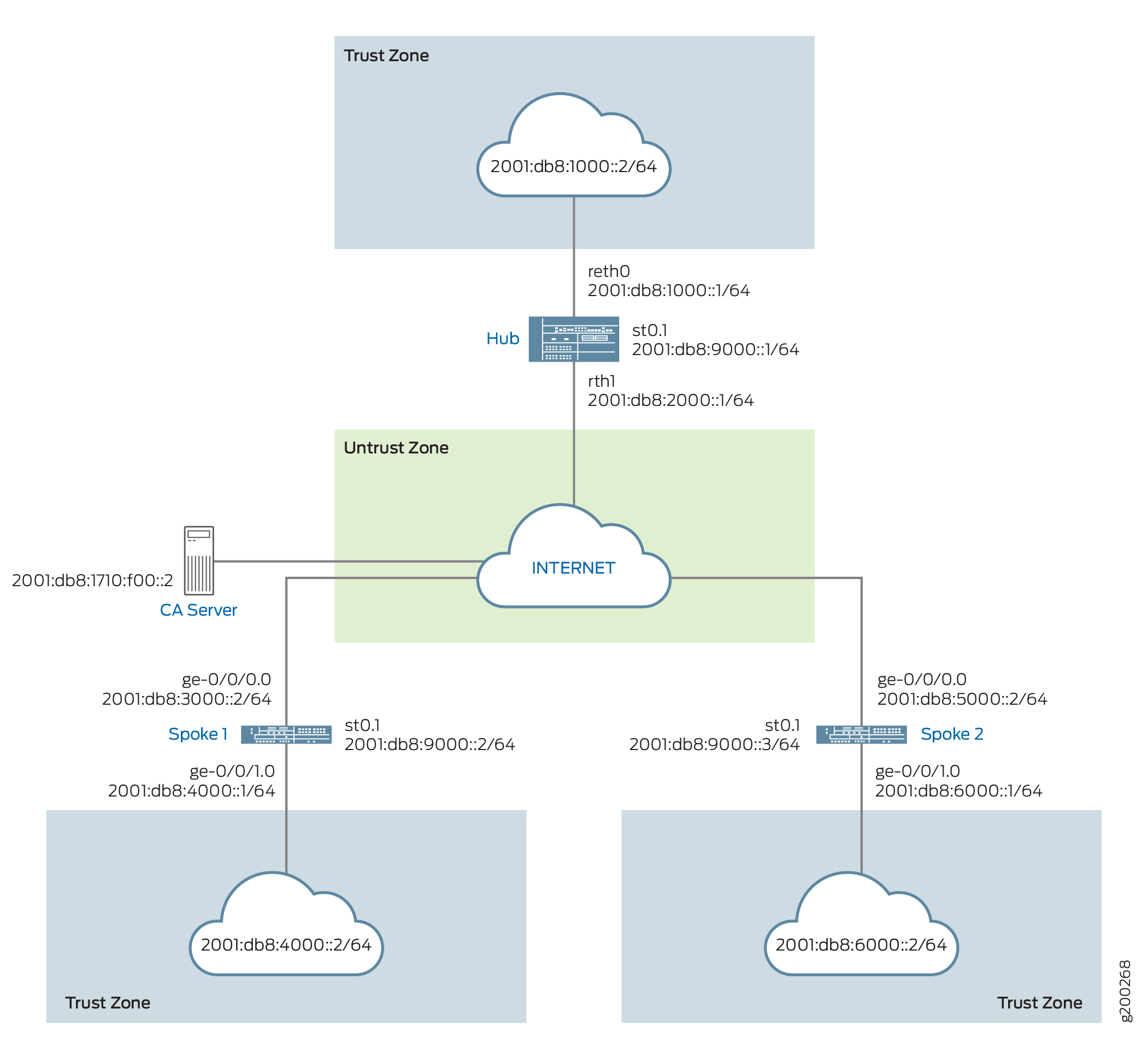
設定
ADVPNを設定するには、以下のタスクを実行します。
最初のセクションでは、ハブアンドスポークデバイスでSCEP(簡易証明書登録プロトコル)を使用して、CAおよびローカル証明書をオンラインで取得する方法について説明します。
SCEPでデバイス証明書を登録する
ステップバイステップの手順
ハブ上のSCEPでデジタル証明書を登録するには:
-
CAを設定します。
[edit]
user@host# set security pki ca-profile ca-profile1 ca-identity ca-profile1
user@host# set security pki ca-profile ca-profile1 enrollment url http://2001:db8:1710:f00::2/certsrv/mscep/mscep.dll
user@host# set security pki ca-profile ca-profile1 revocation-check disable
user@host# commit
-
CA証明書を登録します。
user@host> request security pki ca-certificate enroll ca-profile ca-profile1
プロンプトで yes と入力して、CA証明書を読み込みます。
-
キーペアを生成します。
user@host> request security pki generate-key-pair certificate-id Local1
-
ローカル証明書を登録します。
user@host> request security pki local-certificate enroll ca-profile ca-profile1 certificate-id Local1 domain-name example.net email hub@example.net ip-address 10.1.1.1 subject DC=example.net,CN=hub,OU=SLT,O=example,L=Bengaluru,ST=KA,C=IN challenge-password <password>
-
ローカル証明書を確認します。
user@host> show security pki local-certificate detail

Certificate identifier: Local1
  Certificate version: 3
  Serial number: 40a6d5f300000000258d
  Issuer:
    Common name: CASERVER1, Domain component: net, Domain component: internal
  Subject:
    Organization: example, Organizational unit: SLT, Country: IN, State: KA,
    Locality: Bengaluru, Common name: hub, Domain component: example.net
  Subject string:
    C=IN, DC=example.net, ST=KA, L=Bengaluru, O=example, OU=SLT, CN=hub
  Alternate subject: "hub@example.net", example.net, 10.1.1.1
  Validity:
    Not before: 11- 6-2012 09:39
    Not after: 11- 6-2013 09:49
  Public key algorithm: rsaEncryption(1024 bits)
    30:81:89:02:81:81:00:c9:c9:cc:30:b6:7a:86:12:89:b5:18:b3:76
    01:2d:cc:65:a8:a8:42:78:cd:d0:9a:a2:c0:aa:c4:bd:da:af:88:f3
    2a:78:1f:0a:58:e6:11:2c:81:8f:0e:7c:de:86:fc:48:4c:28:5b:8b
    34:91:ff:2e:91:e7:b5:bd:79:12:de:39:46:d9:fb:5c:91:41:d1:da
    90:f5:09:00:9b:90:07:9d:50:92:7d:ff:fb:3f:3c:bc:34:e7:e3:c8
    ea:cb:99:18:b4:b6:1d:a8:99:d3:36:b9:1b:36:ef:3e:a1:fd:48:82
    6a:da:22:07:da:e0:d2:55:ef:57:be:09:7a:0e:17:02:03:01:00:01
  Signature algorithm: sha1WithRSAEncryption
  Distribution CRL:
    http://ca-server1/CertEnroll/CASERVER1.crl
    file://\\ca-server1\CertEnroll\CASERVER1.crl
  Fingerprint:
    e1:f7:a1:a6:1e:c3:97:69:a5:07:9b:09:14:1a:c7:ae:09:f1:f6:35 (sha1)
    a0:02:fa:8d:5c:63:e5:6d:f7:f4:78:56:ac:4e:b2:c4 (md5)
  Auto-re-enrollment:
    Status: Disabled
    Next trigger time: Timer not started
ステップバイステップの手順
スポーク1のSCEPでデジタル証明書を登録するには:
-
CAを設定します。
[edit]
user@host# set security pki ca-profile ca-profile1 ca-identity ca-profile1
user@host# set security pki ca-profile ca-profile1 enrollment url http://2001:db8:1710:f00::2/certsrv/mscep/mscep.dll
user@host# set security pki ca-profile ca-profile1 revocation-check disable
user@host# commit
-
CA証明書を登録します。
user@host> request security pki ca-certificate enroll ca-profile ca-profile1
プロンプトで yes と入力して、CA証明書を読み込みます。
-
キーペアを生成します。
user@host> request security pki generate-key-pair certificate-id Local1
-
ローカル証明書を登録します。
user@host> request security pki local-certificate enroll ca-profile ca-profile1 certificate-id Local1 domain-name example.net email spoke1@example.net ip-address 10.2.2.1 subject DC=example.net,CN=spoke1,OU=SLT,O=example,L=Mysore,ST=KA,C=IN challenge-password <password>
-
ローカル証明書を確認します。
user@host> show security pki local-certificate detail

Certificate identifier: Local1
  Certificate version: 3
  Serial number: 40a7975f00000000258e
  Issuer:
    Common name: CASERVER1, Domain component: net, Domain component: internal
  Subject:
    Organization: example, Organizational unit: SLT, Country: IN, State: KA,
    Locality: Mysore, Common name: spoke1, Domain component: example.net
  Subject string:
    C=IN, DC=example.net, ST=KA, L=Mysore, O=example, OU=SLT, CN=spoke1
  Alternate subject: "spoke1@example.net", example.net, 10.2.2.1
  Validity:
    Not before: 11- 6-2012 09:40
    Not after: 11- 6-2013 09:50
  Public key algorithm: rsaEncryption(1024 bits)
    30:81:89:02:81:81:00:d8:45:09:77:cd:36:9a:6f:58:44:18:91:db
    b0:c7:8a:ee:c8:d7:a6:d2:e2:e7:20:46:2b:26:1a:92:e2:4e:8a:ce
    c9:25:d9:74:a2:81:ad:ea:e0:38:a0:2f:2d:ab:a6:58:ac:88:35:f4
    90:01:08:33:33:75:2c:44:26:f8:25:18:97:96:e4:28:de:3b:35:f2
    4a:f5:92:b7:57:ae:73:4f:8e:56:71:ab:81:54:1d:75:88:77:13:64
    1b:6b:01:96:15:0a:1c:54:e3:db:f8:ec:ec:27:5b:86:39:c1:09:a1
    e4:24:1a:19:0d:14:2c:4b:94:a4:04:91:3f:cb:ef:02:03:01:00:01
  Signature algorithm: sha1WithRSAEncryption
  Distribution CRL:
    http://ca-server1/CertEnroll/CASERVER1.crl
    file://\\ca-server1\CertEnroll\CASERVER1.crl
  Fingerprint:
    b6:24:2a:0e:96:5d:8c:4a:11:f3:5a:24:89:7c:df:ea:d5:c0:80:56 (sha1)
    31:58:7f:15:bb:d4:66:b8:76:1a:42:4a:8a:16:b3:a9 (md5)
  Auto-re-enrollment:
    Status: Disabled
    Next trigger time: Timer not started
件名フィールドに表示される組織単位(OU)は
SLTです。ハブのIKE設定には、スポークを識別するためのou=SLTが含まれています。
ステップバイステップの手順
スポーク2のSCEPでデジタル証明書を登録するには:
-
CAを設定します。
[edit]
user@host# set security pki ca-profile ca-profile1 ca-identity ca-profile1
user@host# set security pki ca-profile ca-profile1 enrollment url http://2001:db8:1710:f00::2/certsrv/mscep/mscep.dll
user@host# set security pki ca-profile ca-profile1 revocation-check disable
user@host# commit
-
CA証明書を登録します。
user@host> request security pki ca-certificate enroll ca-profile ca-profile1
プロンプトで yes と入力して、CA証明書を読み込みます。
-
キーペアを生成します。
user@host> request security pki generate-key-pair certificate-id Local1
-
ローカル証明書を登録します。
user@host> request security pki local-certificate enroll ca-profile ca-profile1 certificate-id Local1 domain-name example.net email spoke2@example.net ip-address 10.3.3.1 subject DC=example.net,CN=spoke2,OU=SLT,O=example,L=Tumkur,ST=KA,C=IN challenge-password <password>
-
ローカル証明書を確認します。
user@host> show security pki local-certificate detail

Certificate identifier: Local1
  Certificate version: 3
  Serial number: 40bb71d400000000258f
  Issuer:
    Common name: CASERVER1, Domain component: net, Domain component: internal
  Subject:
    Organization: example, Organizational unit: SLT, Country: IN, State: KA,
    Locality: Tumkur, Common name: spoke2, Domain component: example.net
  Subject string:
    C=IN, DC=example.net, ST=KA, L=Tumkur, O=example, OU=SLT, CN=spoke2
  Alternate subject: "spoke2@example.net", example.net, 10.3.3.1
  Validity:
    Not before: 11- 6-2012 10:02
    Not after: 11- 6-2013 10:12
  Public key algorithm: rsaEncryption(1024 bits)
    30:81:89:02:81:81:00:b6:2e:e2:da:e6:ac:57:e4:5d:ff:de:f6:89
    27:d6:3e:1b:4a:3f:b2:2d:b3:d3:61:ed:ed:6a:07:d9:8a:d2:24:03
    77:1a:fe:84:e1:12:8a:2d:63:6e:bf:02:6b:15:96:5a:4f:37:a0:46
    44:09:96:c0:fd:bb:ab:79:2c:5d:92:bd:31:f0:3b:29:51:ce:89:8e
    7c:2b:02:d0:14:5b:0a:a9:02:93:21:ea:f9:fc:4a:e7:08:bc:b1:6d
    7c:f8:3e:53:58:8e:f1:86:13:fe:78:b5:df:0b:8e:53:00:4a:46:11
    58:4a:38:e9:82:43:d8:25:47:7d:ef:18:f0:ef:a7:02:03:01:00:01
  Signature algorithm: sha1WithRSAEncryption
  Distribution CRL:
    http://ca-server1/CertEnroll/CASERVER1.crl
    file://\\ca-server1\CertEnroll\CASERVER1.crl
  Fingerprint:
    1a:6d:77:ac:fd:94:68:ce:cf:8a:85:f0:39:fc:e0:6b:fd:fe:b8:66 (sha1)
    00:b1:32:5f:7b:24:9c:e5:02:e6:72:75:9e:a5:f4:77 (md5)
  Auto-re-enrollment:
    Status: Disabled
    Next trigger time: Timer not started
件名フィールドに表示される組織単位(OU)は
SLTです。ハブのIKE設定には、スポークを識別するためのou=SLTが含まれています。
ハブの設定
CLIクイックコンフィグレーション
この例をすばやく設定するには、以下のコマンドをコピーしてテキスト ファイルに貼り付け、改行を削除し、ネットワーク設定に一致させる必要がある詳細情報を変更し、コマンドを [edit] 階層レベルでCLIにコピー アンド ペーストして、設定モードから commit を入力します。
set chassis cluster reth-count 2
set chassis cluster node 0
set chassis cluster node 1
set chassis cluster redundancy-group 0 node 0 priority 254
set chassis cluster redundancy-group 0 node 1 priority 1
set chassis cluster redundancy-group 1 node 0 priority 254
set chassis cluster redundancy-group 1 node 1 priority 1
set security pki ca-profile ROOT-CA ca-identity ROOT-CA
set security pki ca-profile ROOT-CA enrollment url http://2001:db8:1710:f00::2/certsrv/mscep/mscep.dll
set security pki ca-profile ROOT-CA enrollment retry 5
set security pki ca-profile ROOT-CA enrollment retry-interval 0
set security pki ca-profile ROOT-CA revocation-check disable
set security ike proposal IKE_PROP authentication-method rsa-signatures
set security ike proposal IKE_PROP dh-group group19
set security ike proposal IKE_PROP authentication-algorithm sha-384
set security ike proposal IKE_PROP encryption-algorithm aes-256-cbc
set security ike proposal IKE_PROP lifetime-seconds 6000
set security ike policy IKE_POL mode main
set security ike policy IKE_POL proposals IKE_PROP
set security ike policy IKE_POL certificate local-certificate HUB
set security ike gateway IKE_GWA_1 ike-policy IKE_POL
set security ike gateway IKE_GWA_1 dynamic distinguished-name wildcard OU=SLT
set security ike gateway IKE_GWA_1 dynamic ike-user-type group-ike-id
set security ike gateway IKE_GWA_1 dead-peer-detection always-send
set security ike gateway IKE_GWA_1 dead-peer-detection interval 10
set security ike gateway IKE_GWA_1 dead-peer-detection threshold 3
set security ike gateway IKE_GWA_1 local-identity distinguished-name
set security ike gateway IKE_GWA_1 external-interface reth1
set security ike gateway IKE_GWA_1 advpn partner disable
set security ike gateway IKE_GWA_1 version v2-only
set security ipsec proposal IPSEC_PROP protocol esp
set security ipsec proposal IPSEC_PROP encryption-algorithm aes-256-gcm
set security ipsec proposal IPSEC_PROP lifetime-seconds 3000
set security ipsec policy IPSEC_POL perfect-forward-secrecy keys group19
set security ipsec policy IPSEC_POL proposals IPSEC_PROP
set security ipsec vpn IPSEC_VPNA_1 bind-interface st0.1
set security ipsec vpn IPSEC_VPNA_1 ike gateway IKE_GWA_1
set security ipsec vpn IPSEC_VPNA_1 ike ipsec-policy IPSEC_POL
set security policies default-policy permit-all
set security zones security-zone untrust host-inbound-traffic system-services all
set security zones security-zone untrust host-inbound-traffic protocols ospf3
set security zones security-zone untrust interfaces reth1.0
set security zones security-zone untrust interfaces st0.1
set security zones security-zone trust host-inbound-traffic system-services all
set security zones security-zone trust host-inbound-traffic protocols ospf3
set security zones security-zone trust interfaces reth0.0
set interfaces ge-0/0/0 gigether-options redundant-parent reth1
set interfaces ge-0/0/1 gigether-options redundant-parent reth0
set interfaces ge-7/0/0 gigether-options redundant-parent reth1
set interfaces ge-7/0/1 gigether-options redundant-parent reth0
set interfaces reth0 redundant-ether-options redundancy-group 1
set interfaces reth0 unit 0 family inet
set interfaces reth0 unit 0 family inet6 address 2001:db8:1000::1/64
set interfaces reth1 redundant-ether-options redundancy-group 1
set interfaces reth1 unit 0 family inet
set interfaces reth1 unit 0 family inet6 address 2001:db8:2000::1/64
set interfaces st0 unit 1 multipoint
set interfaces st0 unit 1 family inet6 address 2001:db8:9000::1/64
set routing-options rib inet6.0 static route 2001:db8:3000::0/64 next-hop 2001:db8:2000::2
set routing-options rib inet6.0 static route 2001:db8:5000::0/64 next-hop 2001:db8:2000::2
set protocols ospf3 area 0.0.0.0 interface reth0.0
set protocols ospf3 area 0.0.0.0 interface st0.1 interface-type p2mp
set protocols ospf3 area 0.0.0.0 interface st0.1 dynamic-neighbors
ステップバイステップの手順
次の例では、設定階層のさまざまなレベルに移動する必要があります。
ハブを設定するには:
-
インターフェイスを設定します。
[edit interfaces]
user@host# set ge-0/0/0 gigether-options redundant-parent reth1
user@host# set ge-0/0/1 gigether-options redundant-parent reth0
user@host# set ge-7/0/0 gigether-options redundant-parent reth1
user@host# set ge-7/0/1 gigether-options redundant-parent reth0
user@host# set reth0 redundant-ether-options redundancy-group 1
user@host# set reth0 unit 0 family inet
user@host# set reth0 unit 0 family inet6 address 2001:db8:1000::1/64
user@host# set reth1 redundant-ether-options redundancy-group 1
user@host# set reth1 unit 0 family inet
user@host# set reth1 unit 0 family inet6 address 2001:db8:2000::1/64
user@host# set st0 unit 1 multipoint
user@host# set st0 unit 1 family inet6 address 2001:db8:9000::1/64
-
ルーティングプロトコルを設定します。
[edit protocols ospf3]
user@host# set ospf3 area 0.0.0.0 interface reth0.0
user@host# set ospf3 area 0.0.0.0 interface st0.1 interface-type p2mp
user@host# set ospf3 area 0.0.0.0 interface st0.1 dynamic-neighbors
[edit routing-options]
user@host# set rib inet6.0 static route 2001:db8:3000::0/64 next-hop 2001:db8:2000::2
user@host# set rib inet6.0 static route 2001:db8:5000::0/64 next-hop 2001:db8:2000::2
-
フェーズ1のオプションを設定します。
[edit security ike proposal IKE_PROP]
user@host# set authentication-method rsa-signatures
user@host# set dh-group group19
user@host# set authentication-algorithm sha-384
user@host# set encryption-algorithm aes-256-cbc
user@host# set lifetime-seconds 6000
[edit security ike policy IKE_POL]
user@host# set mode main
user@host# set proposals IKE_PROP
user@host# set certificate local-certificate HUB
[edit security ike gateway IKE_GWA_1]
user@host# set ike-policy IKE_POL
user@host# set dynamic distinguished-name wildcard OU=SLT
user@host# set ike-user-type group-ike-id
user@host# set dead-peer-detection always-send
user@host# set dead-peer-detection interval 10
user@host# set dead-peer-detection threshold 3
user@host# set local-identity distinguished-name
user@host# set external-interface reth1
user@host# set version v2-only
-
フェーズ2のオプションを設定します。
[edit security ipsec proposal IPSEC_PROP]
user@host# set protocol esp
user@host# set encryption-algorithm aes-256-gcm
user@host# set lifetime-seconds 3000
[edit security ipsec policy IPSEC_POL]
user@host# set perfect-forward-secrecy keys group19
user@host# set proposals IPSEC_PROP
[edit security ipsec vpn IPSEC_VPNA_1]
user@host# set bind-interface st0.1
user@host# set ike gateway IKE_GWA_1
user@host# set ike ipsec-policy IPSEC_POL
-
ゾーンを設定します。
[edit security zones security-zone untrust]
user@host# set host-inbound-traffic system-services all
user@host# set host-inbound-traffic protocols ospf3
user@host# set interfaces reth1.0
user@host# set interfaces st0.1
[edit security zones security-zone trust]
user@host# set host-inbound-traffic system-services all
user@host# set host-inbound-traffic protocols ospf3
user@host# set interfaces reth0.0
-
デフォルトのセキュリティポリシーを設定します。
[edit security policies]
user@host# set default-policy permit-all
-
CAプロファイルを設定します。
[edit security pki]
user@host# set ca-profile ROOT-CA ca-identity ROOT-CA
user@host# set ca-profile ROOT-CA enrollment url http://2001:db8:1710:f00::2/certsrv/mscep/mscep.dll
user@host# set ca-profile ROOT-CA enrollment retry 5
user@host# set ca-profile ROOT-CA enrollment retry-interval 0
user@host# set pki ca-profile ROOT-CA revocation-check disable
-
シャーシクラスターの設定
[edit chassis cluster]
set reth-count 2
set node 0
set node 1
set redundancy-group 0 node 0 priority 254
set redundancy-group 0 node 1 priority 1
set redundancy-group 1 node 0 priority 254
set redundancy-group 1 node 1 priority 1
結果
設定モードから、 show interfaces、 show protocols、 show routing-options、 show security ike、 show security ipsec、 show security zones、 show security policies、および show security pki show chassis cluster コマンドを入力して、設定を確認します。出力に意図した設定が表示されない場合は、この例の設定手順を繰り返して修正します。
[edit]
user@host# show interfaces
ge-0/0/0 {
    gigether-options {
        redundant-parent reth1;
    }
}
ge-0/0/1 {
    gigether-options {
        redundant-parent reth0;
        }
    }
    reth0 {
        redundant-ether-options {
            redundancy-group 1;
        }
        unit 0 {
            family inet;
            family inet6 {
                address 2001:db8:1000::1/64;
            }
        }
    }
    reth1 {
        redundant-ether-options {
            redundancy-group 1;
        }
        unit 0 {
            family inet;
            family inet6 {
                address 2001:db8:2000::1/64;
            }
        }
    }
    st0 {
        unit 1 {
            multipoint;
            family inet6 {
                address 2001:db8:9000::1/64 {
                    primary;
                }
            }
        }
    }
[edit]
user@host# show protocols
ospf3 {
    area 0.0.0.0 {
        interface st0.1 {
            interface-type p2mp;
            demand-circuit;
            dynamic-neighbors;
        }
        interface ge-0/0/1.0;
        interface reth0.0;
    }
}
[edit]
user@host# show routing-options
rib inet6.0 {
    static {
        route 2001:db8:3000::/64 next-hop 2001:db8:2000::2;
        route 2001:db8:5000::/64 next-hop 2001:db8:2000::2;
    }
}
[edit]
user@host# show security ike
proposal IKE_PROP {
    authentication-method rsa-signatures;
    dh-group group19;
    authentication-algorithm sha-384;
    encryption-algorithm aes-256-cbc;
    lifetime-seconds 6000;
}
policy IKE_POL {
    mode main;
    proposals IKE_PROP;
    certificate {
        local-certificate HUB;
    }
}
gateway IKE_GWA_1 {
    ike-policy IKE_POL;
    dynamic {
        distinguished-name {
            wildcard OU=SLT;
        }
        ike-user-type group-ike-id;
    }
    dead-peer-detection {
        always-send;
        interval 10;
        threshold 3;
    }
    local-identity distinguished-name;
    external-interface reth1;
    advpn {
        partner {
            disable;
        }
    }
    version v2-only;
}
[edit]
user@host# show security ipsec
proposal IPSEC_PROP {
    protocol esp;
    encryption-algorithm aes-256-gcm;
    lifetime-seconds 3000;
}
policy IPSEC_POL {
    perfect-forward-secrecy {
        keys group19;
    }
    proposals IPSEC_PROP;
}
vpn IPSEC_VPNA_1 {
    bind-interface st0.1;
    ike {
        gateway IKE_GWA_1;
        ipsec-policy IPSEC_POL;
    }
}
[edit]
user@host# show security zones
security-zone untrust {
    host-inbound-traffic {
        system-services {
            all;
        }
        protocols {
            ospf3;
        }
    }
    interfaces {
        st0.1;
        reth1.0;
    }
}
security-zone trust {
    host-inbound-traffic {
        system-services {
            all;
        }
        protocols {
            ospf3;
        }
    }
    interfaces {
        reth0.0;
    }
}
[edit]
user@host# show security policies
default-policy {
    permit-all;
}
[edit]
user@host# show security pki
ca-profile ROOT-CA {
    ca-identity ROOT-CA;
    enrollment {
        url http://2001:db8:1710:f00::2/certsrv/mscep/mscep.dll;
        retry 5;
        retry-interval 0;
    }
    revocation-check {
        disable;
    }
}
デバイスの設定が完了したら、設定モードから commit を入力します。
スポーク1の設定
CLIクイックコンフィグレーション
この例をすばやく設定するには、以下のコマンドをコピーしてテキスト ファイルに貼り付け、改行を削除し、ネットワーク設定に一致させる必要がある詳細情報を変更し、コマンドを [edit] 階層レベルでCLIにコピー アンド ペーストして、設定モードから commit を入力します。
set security pki ca-profile ROOT-CA ca-identity ROOT-CA
set security pki ca-profile ROOT-CA enrollment url http://2001:db8:1710:f00::2/certsrv/mscep/mscep.dll
set security pki ca-profile ROOT-CA enrollment retry 5
set security pki ca-profile ROOT-CA enrollment retry-interval 0
set security pki ca-profile ROOT-CA revocation-check disable
set security ike proposal IKE_PROP authentication-method rsa-signatures
set security ike proposal IKE_PROP dh-group group19
set security ike proposal IKE_PROP authentication-algorithm sha-384
set security ike proposal IKE_PROP encryption-algorithm aes-256-cbc
set security ike proposal IKE_PROP lifetime-seconds 6000
set security ike policy IKE_POL mode main
set security ike policy IKE_POL proposals IKE_PROP
set security ike policy IKE_POL certificate local-certificate SPOKE1
set security ike gateway IKE_GW_SPOKE_1 ike-policy IKE_POL
set security ike gateway IKE_GW_SPOKE_1 address 2001:db8:2000::1
set security ike gateway IKE_GW_SPOKE_1 dead-peer-detection always-send
set security ike gateway IKE_GW_SPOKE_1 dead-peer-detection interval 10
set security ike gateway IKE_GW_SPOKE_1 dead-peer-detection threshold 3
set security ike gateway IKE_GW_SPOKE_1 local-identity distinguished-name
set security ike gateway IKE_GW_SPOKE_1 remote-identity distinguished-name container OU=SLT
set security ike gateway IKE_GW_SPOKE_1 external-interface ge-0/0/0.0
set security ike gateway IKE_GW_SPOKE_1 advpn suggester disable
set security ike gateway IKE_GW_SPOKE_1 version v2-only
set security ipsec proposal IPSEC_PROP protocol esp
set security ipsec proposal IPSEC_PROP encryption-algorithm aes-256-gcm
set security ipsec proposal IPSEC_PROP lifetime-seconds 3000
set security ipsec policy IPSEC_POL perfect-forward-secrecy keys group19
set security ipsec policy IPSEC_POL proposals IPSEC_PROP
set security ipsec vpn IPSEC_VPN_SPOKE_1 bind-interface st0.1
set security ipsec vpn IPSEC_VPN_SPOKE_1 ike gateway IKE_GW_SPOKE_1
set security ipsec vpn IPSEC_VPN_SPOKE_1 ike ipsec-policy IPSEC_POL
set security ipsec vpn IPSEC_VPN_SPOKE_1 establish-tunnels immediately
set security policies default-policy permit-all
set security zones security-zone trust host-inbound-traffic system-services all
set security zones security-zone trust host-inbound-traffic protocols ospf3
set security zones security-zone trust interfaces ge-0/0/1.0
set security zones security-zone untrust host-inbound-traffic system-services all
set security zones security-zone untrust host-inbound-traffic protocols ospf3
set security zones security-zone untrust interfaces st0.1
set security zones security-zone untrust interfaces ge-0/0/0.0
set interfaces ge-0/0/0 unit 0 family inet6 address 2001:db8:3000::2/64
set interfaces ge-0/0/1 unit 0 family inet6 address 2001:db8:4000::1/64
set interfaces st0 unit 1 multipoint
set interfaces st0 unit 1 family inet6 address 2001:db8:9000::2/64
set routing-options rib inet6.0 static route 2001:db8:2000::0/64 next-hop 2001:db8:3000::1
set protocols ospf3 area 0.0.0.0 interface ge-0/0/1.0
set protocols ospf3 area 0.0.0.0 interface st0.1 interface-type p2mp
set protocols ospf3 area 0.0.0.0 interface st0.1 dynamic-neighbors
ステップバイステップの手順
次の例では、設定階層のさまざまなレベルに移動する必要があります。
スポーク1を設定するには:
-
インターフェイスを設定します。
[edit interfaces]
user@host# set ge-0/0/0 unit 0 family inet6 address 2001:db8:3000::2/64
user@host# set ge-0/0/1 unit 0 family inet6 address 2001:db8:4000::1/64
user@host# set st0 unit 1 multipoint
user@host# set st0 unit 1 family inet6 address 2001:db8:9000::2/64
-
ルーティングプロトコルを設定します。
[edit protocols ospf3]
set area 0.0.0.0 interface ge-0/0/1.0
set area 0.0.0.0 interface st0.1 interface-type p2mp
set area 0.0.0.0 interface st0.1 dynamic-neighbors
[edit routing-options]
user@host# set rib inet6.0 static route 2001:db8:2000::/64 next-hop 2001:db8:3000::1
-
フェーズ1のオプションを設定します。
[edit security ike proposal IKE_PROP]
user@host# set authentication-method rsa-signatures
user@host# set dh-group group19
user@host# set authentication-algorithm sha-384
user@host# set encryption-algorithm aes-256-cbc
user@host# set lifetime-seconds 6000
[edit security ike policy IKE_POL]
user@host# set mode main
user@host# set proposals IKE_PROP
user@host# set certificate local-certificate SPOKE1
[edit security ike gateway IKE_GW_SPOKE_1]
user@host# set ike-policy IKE_POL
user@host# set address 2001:db8:2000::1
user@host# set dead-peer-detection always-send
user@host# set dead-peer-detection interval 10
user@host# set dead-peer-detection threshold 3
user@host# set local-identity distinguished-name
user@host# set remote-identity distinguished-name container OU=SLT
user@host# set external-interface ge-0/0/0.0
user@host# set advpn suggester disable
user@host# set version v2-only
-
フェーズ2のオプションを設定します。
[edit security ipsec proposal IPSEC_PROPl]
user@host# set protocol esp
user@host# set encryption-algorithm aes-256-gcm
user@host# set lifetime-seconds 3000
[edit security ipsec policy IPSEC_POL]
user@host# set perfect-forward-secrecy keys group19
user@host# set proposals IPSEC_PROP
[edit security ipsec vpn IPSEC_VPN_SPOKE_1]
user@host# set bind-interface st0.1
user@host# set ike gateway IKE_GW_SPOKE_1
user@host# set ike ipsec-policy IPSEC_POL
user@host# set establish-tunnels immediately
-
ゾーンを設定します。
[edit security zones security-zone untrust]
user@host# set host-inbound-traffic system-services all
user@host# set host-inbound-traffic protocols ospf3
user@host# set interfaces st0.1
user@host# set interfaces ge-0/0/0.0
[edit security zones security-zone trust]
user@host# set host-inbound-traffic system-services all
user@host# set host-inbound-traffic protocols ospf3
user@host# set interfaces ge-0/0/1.0
-
デフォルトのセキュリティポリシーを設定します。
[edit security policies]
user@host# set default-policy permit-all
-
CAプロファイルを設定します。
[edit security pki]
user@host# set ca-profile ROOT-CA ca-identity ROOT-CA
user@host# set ca-profile ROOT-CA enrollment url http://2001:db8:1710:f00::2/certsrv/mscep/mscep.dll
user@host# set ca-profile ROOT-CA enrollment retry 5
user@host# set ca-profile ROOT-CA enrollment retry-interval 0
user@host# set ca-profile ROOT-CA revocation-check disable
結果
設定モードから、 show interfaces、 show protocols、 show routing-options、 show security ike、 show security ipsec、 show security zones、 show security policies、および show security pki コマンドを入力して、設定を確認します。出力に意図した設定が表示されない場合は、この例の設定手順を繰り返して修正します。
[edit]
user@host# show interfaces
ge-0/0/0 {
    unit 0 {
        family inet6 {
            address 2001:db8:3000::2/64;
        }
    }
}
ge-0/0/1 {
    unit 0 {
        family inet6 {
            address 2001:db8:4000::1/64;
        }
    }
}
st0 {
    unit 1 {
        multipoint;
        family inet6 {
            address 2001:db8:9000::2/64;
        }
    }
}
[edit]
user@host# show protocols
ospf3 {
    area 0.0.0.0 {
        interface st0.1 {
            interface-type p2mp;
            dynamic-neighbors;
        }
        interface ge-0/0/1.0;
    }
}
[edit]
user@host# show routing-options
rib inet6.0 {
    static {
        route 2001:db8:2000::/64 next-hop [ 2001:db8:3000::1 2001:db8:5000::1 ];
    }
}
[edit]
user@host# show security ike
proposal IKE_PROP {
    authentication-method rsa-signatures;
    dh-group group19;
    authentication-algorithm sha-384;
    encryption-algorithm aes-256-cbc;
    lifetime-seconds 6000;
}
policy IKE_POL {
    mode main;
    proposals IKE_PROP;
    certificate {
        local-certificate SPOKE1;
    }
}
gateway IKE_GW_SPOKE_1 {
    ike-policy IKE_POL;
    address 2001:db8:2000::1;
    dead-peer-detection {
        always-send;
        interval 10;
        threshold 3;
    }
    local-identity distinguished-name;
    remote-identity distinguished-name container OU=SLT;
    external-interface ge-0/0/0.0;
    advpn {
        suggester {
            disable;
        }
    }
    version v2-only;
}
[edit]
user@host# show security ipsec
proposal IPSEC_PROP {
    protocol esp;
    encryption-algorithm aes-256-gcm;
    lifetime-seconds 3000;
}
policy IPSEC_POL {
    perfect-forward-secrecy {
        keys group19;
    }
    proposals IPSEC_PROP;
}
vpn IPSEC_VPN_SPOKE_1 {
    bind-interface st0.1;
    ike {
        gateway IKE_GW_SPOKE_1;
        ipsec-policy IPSEC_POL;
    }
    establish-tunnels immediately;
}
[edit]
user@host# show security zones
security-zone untrust {
    host-inbound-traffic {
        system-services {
            all;
        }
        protocols {
            ospf3;
        }
    }
    interfaces {
        st0.1;
        ge-0/0/0.0;
    }
}
security-zone trust {
    host-inbound-traffic {
        system-services {
            all;
        }
        protocols {
            ospf3;
        }
    }
    interfaces {
         ge-0/0/1.0;
    }
}
[edit]
user@host# show security policies
default-policy {
    permit-all;
}
[edit]
user@host# show security pki
ca-profile ROOT-CA {
    ca-identity ROOT-CA;
    enrollment {
        url http://2001:db8:1710:f00::2/certsrv/mscep/mscep.dll;
        retry 5;
        retry-interval 0;
    }
    revocation-check {
        disable;
    }
}
デバイスの設定が完了したら、設定モードから commit を入力します。
スポーク 2 の設定
CLIクイックコンフィグレーション
この例をすばやく設定するには、以下のコマンドをコピーしてテキスト ファイルに貼り付け、改行を削除し、ネットワーク設定に一致させる必要がある詳細情報を変更し、コマンドを [edit] 階層レベルでCLIにコピー アンド ペーストして、設定モードから commit を入力します。
set security pki ca-profile ROOT-CA ca-identity ROOT-CA
set security pki ca-profile ROOT-CA enrollment url http://2001:db8:1710:f00::2/certsrv/mscep/mscep.dll
set security pki ca-profile ROOT-CA enrollment retry 5
set security pki ca-profile ROOT-CA enrollment retry-interval 0
set security pki ca-profile ROOT-CA revocation-check disable
set security ike proposal IKE_PROP authentication-method rsa-signatures
set security ike proposal IKE_PROP dh-group group19
set security ike proposal IKE_PROP authentication-algorithm sha-384
set security ike proposal IKE_PROP encryption-algorithm aes-256-cbc
set security ike proposal IKE_PROP lifetime-seconds 6000
set security ike policy IKE_POL mode main
set security ike policy IKE_POL proposals IKE_PROP
set security ike policy IKE_POL certificate local-certificate SPOKE2
set security ike gateway IKE_GW_SPOKE_2 ike-policy IKE_POL
set security ike gateway IKE_GW_SPOKE_2 address 2001:db8:2000::1
set security ike gateway IKE_GW_SPOKE_2 dead-peer-detection always-send
set security ike gateway IKE_GW_SPOKE_2 dead-peer-detection interval 10
set security ike gateway IKE_GW_SPOKE_2 dead-peer-detection threshold 3
set security ike gateway IKE_GW_SPOKE_2 local-identity distinguished-name
set security ike gateway IKE_GW_SPOKE_2 remote-identity distinguished-name container OU=SLT
set security ike gateway IKE_GW_SPOKE_2 external-interface ge-0/0/0.0
set security ike gateway IKE_GW_SPOKE_2 advpn suggester disable
set security ike gateway IKE_GW_SPOKE_2 version v2-only
set security ipsec proposal IPSEC_PROP protocol esp
set security ipsec proposal IPSEC_PROP encryption-algorithm aes-256-gcm
set security ipsec proposal IPSEC_PROP lifetime-seconds 3000
set security ipsec policy IPSEC_POL perfect-forward-secrecy keys group19
set security ipsec policy IPSEC_POL proposals IPSEC_PROP
set security ipsec vpn IPSEC_VPN_SPOKE_2 bind-interface st0.1
set security ipsec vpn IPSEC_VPN_SPOKE_2 ike gateway IKE_GW_SPOKE_2
set security ipsec vpn IPSEC_VPN_SPOKE_2 ike ipsec-policy IPSEC_POL
set security ipsec vpn IPSEC_VPN_SPOKE_2 establish-tunnels immediately
set security policies default-policy permit-all
set security zones security-zone trust host-inbound-traffic system-services all
set security zones security-zone trust host-inbound-traffic protocols ospf3
set security zones security-zone trust interfaces ge-0/0/1.0
set security zones security-zone untrust host-inbound-traffic system-services all
set security zones security-zone untrust host-inbound-traffic protocols ospf3
set security zones security-zone untrust interfaces st0.1
set security zones security-zone untrust interfaces ge-0/0/0.0
set interfaces ge-0/0/0 unit 0 family inet6 address 2001:db8:5000::2/64
set interfaces ge-0/0/1 unit 0 family inet6 address 2001:db8:6000::1/64
set interfaces st0 unit 1 family inet6 address 2001:db8:9000::3/64
set routing-options rib inet6.0 static route 2001:db8:2000::/64 next-hop 2001:db8:5000::1
set protocols ospf3 area 0.0.0.0 interface ge-0/0/1.0
set protocols ospf3 area 0.0.0.0 interface st0.1 interface-type p2mp
set protocols ospf3 area 0.0.0.0 interface st0.1 dynamic-neighbors
ステップバイステップの手順
次の例では、設定階層のさまざまなレベルに移動する必要があります。
スポーク2を設定するには:
-
インターフェイスを設定します。
[edit interfaces]
user@host# set ge-0/0/0 unit 0 family inet6 address 2001:db8:5000::2/64
user@host# set ge-0/0/1 unit 0 family inet6 address 2001:db8:6000::1/64
user@host# set st0 unit 1 family inet6 address 2001:db8:9000::3/64
-
ルーティングプロトコルを設定します。
[edit protocols ospf3]
user@host# set area 0.0.0.0 interface st0.1 interface-type p2mp
user@host# set area 0.0.0.0 interface st0.1 dynamic-neighbors
user@host# set area 0.0.0.0 interface ge-0/0/1.0
[edit routing-options]
user@host# set rib inet6.0 static route 2001:db8:2000::/64 next-hop 2001:db8:5000::1
-
フェーズ1のオプションを設定します。
[edit security ike proposal IKE_PROP]
user@host# set authentication-method rsa-signatures
user@host# set dh-group group19
user@host# set authentication-algorithm sha-384
user@host# set encryption-algorithm aes-256-cbc
user@host# set lifetime-seconds 6000
[edit security ike policy IKE_POL]
user@host# set mode main
user@host# set proposals IKE_PROP
user@host# set certificate local-certificate SPOKE2
[edit security ike gateway IKE_GW_SPOKE_2]
user@host# set ike-policy IKE_POL
user@host# set address 2001:db8:2000::1
user@host# set dead-peer-detection always-send
user@host# set dead-peer-detection interval 10
user@host# set dead-peer-detection threshold 3
user@host# set local-identity distinguished-name
user@host# set remote-identity distinguished-name container OU=SLT
user@host# set external-interface ge-0/0/0.0
user@host# set advpn suggester disable
user@host# set version v2-only
-
フェーズ2のオプションを設定します。
[edit security ipsec proposal IPSEC_PROPl]
user@host# set protocol esp
user@host# set encryption-algorithm aes-256-gcm
user@host# set lifetime-seconds 3000
[edit security ipsec policy IPSEC_POL]
user@host# set perfect-forward-secrecy keys group19
user@host# set proposals IPSEC_PROP
[edit security ipsec vpn IPSEC_VPN_SPOKE_2]
user@host# set bind-interface st0.1
user@host# set ike gateway IKE_GW_SPOKE_2
user@host# set ike ipsec-policy IPSEC_POL
user@host# set establish-tunnels immediately
-
ゾーンを設定します。
[edit security zones security-zone untrust]
user@host# set host-inbound-traffic system-services all
user@host# set host-inbound-traffic protocols ospf3
user@host# set interfaces st0.1
user@host# set interfaces ge-0/0/0.0
[edit security zones security-zone trust]
user@host# set host-inbound-traffic system-services all
user@host# set host-inbound-traffic protocols ospf3
user@host# set interfaces ge-0/0/1.0
-
デフォルトのセキュリティポリシーを設定します。
[edit security policies]
user@host# set default-policy permit-all
-
CAプロファイルを設定します。
[edit security pki]
user@host# set ca-profile ROOT-CA ca-identity ROOT-CA
user@host# set ca-profile ROOT-CA enrollment url http://2001:db8:1710:f00::2/certsrv/mscep/mscep.dll
user@host# set ca-profile ROOT-CA enrollment retry 5
user@host# set ca-profile ROOT-CA enrollment retry-interval 0
user@host# set ca-profile ROOT-CA revocation-check disable
結果
設定モードから、 show interfaces、 show protocols、 show routing-options、 show security ike、 show security ipsec、 show security zones、 show security policies、および show security pki コマンドを入力して、設定を確認します。出力に意図した設定が表示されない場合は、この例の設定手順を繰り返して修正します。
[edit]
user@host# show interfaces
ge-0/0/0 {
    unit 0 {
        family inet6 {
            address 2001:db8:5000::2/64;
        }
    }
}
ge-0/0/1 {
    unit 0 {
        family inet6 {
            address 2001:db8:6000::1/64;
        }
    }
}
    st0 {
        unit 1 {
            family inet6 {
                address 2001:db8:9000::3/64;
            }
        }
    }
[edit]
user@host# show protocols
ospf3 {
    area 0.0.0.0 {
        interface st0.1 {
            interface-type p2mp;
            dynamic-neighbors;
        }
        interface ge-0/0/1.0;
    }
}
[edit]
user@host# show routing-options
rib inet6.0 {
    static {
    route 2001:db8:2000::/64 next-hop [ 2001:db8:3000::1 2001:db8:5000::1 ];
    }
}
[edit]
user@host# show security ike
proposal IKE_PROP {
    authentication-method rsa-signatures;
    dh-group group19;
    authentication-algorithm sha-384;
    encryption-algorithm aes-256-cbc;
    lifetime-seconds 6000;
}
policy IKE_POL {
    mode main;
    proposals IKE_PROP;
    certificate {
        local-certificate SPOKE2;
    }
}
gateway IKE_GW_SPOKE_2 {
    ike-policy IKE_POL;
    address 2001:db8:2000::1;
    dead-peer-detection {
        always-send;
        interval 10;
        threshold 3;
    }
    local-identity distinguished-name;
    remote-identity distinguished-name container OU=SLT;
    external-interface ge-0/0/0.0;
    advpn {
        suggester {
        disable
        }
    }
    version v2-only;
}
[edit]
user@host# show security ipsec
proposal IPSEC_PROP {
    protocol esp;
    encryption-algorithm aes-256-gcm;
    lifetime-seconds 3000;
}
policy IPSEC_POL {
    perfect-forward-secrecy {
        keys group19;
    }
    proposals IPSEC_PROP;
}
vpn IPSEC_VPN_SPOKE_2 {
    bind-interface st0.1;
    ike {
        gateway IKE_GW_SPOKE_2;
        ipsec-policy IPSEC_POL;
    }
    establish-tunnels immediately;
}
[edit]
user@host# show security zones
security-zone untrust {
    host-inbound-traffic {
        system-services {
            all;
        }
        protocols {
            ospf3;
        }
    }
    interfaces {
        ge-0/0/0.0;
        st0.1;
    }
}
    security-zone trust {
        host-inbound-traffic {
            system-services {
                all;
            }
            protocols {
                ospf3;
            }
        }
        interfaces {
            ge-0/0/1.0;
        }
    }
[edit]
user@host# show security policies
default-policy {
    permit-all;
}
[edit]
user@host# show security pki
ca-profile ROOT-CA {
    ca-identity ROOT-CA;
    enrollment {
        url http://2001:db8:1710:f00::2/certsrv/mscep/mscep.dll;
        retry 5;
        retry-interval 0;
    }
    revocation-check {
        disable;
    }
}
デバイスの設定が完了したら、設定モードから commit を入力します。
検証
設定が正常に機能していることを確認します。
IKEステータスの検証
目的
IKEステータスを確認します。
アクション
動作モードから、 show security ike sa コマンドを入力します。
user@host> show security ike sa
Index   State Initiator cookie          Responder cookie          Mode Remote Address

4295070 UP    2001:db8:1ad4ba7a115fa229 2001:db8:32e6382a058bb296 Main 2001:db8:3000::2

295069  UP    2001:db8:88a1520c20cbbe04 2001:db8:7fa4c8e365393c48 Main 2001:db8:5000::2
意味
show security ike saコマンドは、すべてのアクティブなIKEフェーズ1のSAを一覧表示します。SAが表示されない場合は、フェーズ1の確立に問題があったことを示しています。設定でIKEポリシーパラメータと外部インターフェイスの設定を確認してください。フェーズ1のプロポーザルパラメータは、ハブとスポークで一致する必要があります。
IPsecステータスの検証
目的
IPsecステータスを確認します。
アクション
動作モードから、 show security ipsec sa コマンドを入力します。
user@host> show security ipsec sa
Total active tunnels: 2     Total Ipsec sas: 2
  ID    Algorithm       SPI      Life:sec/kb  Mon lsys Port  Gateway
  <67108881 ESP:aes-gcm-256/None 3dba3f80 2979/ unlim - root 500 2001:db8:5000::2
  >67108881 ESP:aes-gcm-256/None 46746d5d 2979/ unlim - root 500 2001:db8:5000::2
  <67108882 ESP:aes-gcm-256/None 16dceb60 2992/ unlim - root 500 2001:db8:3000::2
  >67108882 ESP:aes-gcm-256/None 681209c2 2992/ unlim - root 500 2001:db8:3000::2
意味
show security ipsec saコマンドは、すべてのアクティブなIKEフェーズ2のSAを一覧表示します。SAが表示されない場合は、フェーズ2の確立に問題があったことになります。設定でIKEポリシーパラメータと外部インターフェイスの設定を確認してください。フェーズ2のプロポーザルパラメータは、ハブとスポークで一致する必要があります。
IPsecネクストホップトンネルの検証
目的
IPsecネクストホップトンネルを検証します。
アクション
動作モードから、 show security ipsec next-hop-tunnels コマンドを入力します。
user@host> show security ipsec next-hop-tunnels
Next-hop gateway              interface  IPSec VPN name Flag IKE-ID                            XAUTH username
2001:db8:9000::2              st0.1      IPSEC_VPNA_1   Auto C=US, DC=example.net, ST=CA, L=Sunnyvale, O=example, OU=SLT, CN=SPOKE1 Not-Available
2001:db8:9000::3              st0.1      IPSEC_VPNA_1   Auto C=US, DC=example.net, ST=CA, L=Sunnyvale, O=example, OU=SLT, CN=SPOKE2 Not-Available
2001:db8::5668:ad10:fcd8:10c8 st0.1      IPSEC_VPNA_1   Auto C=US, DC=example.net, ST=CA, L=Sunnyvale, O=example, OU=SLT, CN=SPOKE2 Not-Available
2001:db8::5668:ad10:fcd8:112f st0.1      IPSEC_VPNA_1   Auto C=US, DC=example.net, ST=CA, L=Sunnyvale, O=example, OU=SLT, CN=SPOKE1 Not-Available
意味
ネクストホップゲートウェイは、スポークの st0 インターフェイスのIPアドレスです。ネクストホップは、正しいIPsec VPN名に関連付けられている必要があります。
OSPFv3の検証
目的
OSPFv3がスポークの st0 インターフェイスのIPアドレスを参照していることを確認します。
アクション
動作モードから、 show ospf3 neighbor interface コマンドを入力します。
user@host> show ospf3 neighbor interface
ID                        Interface              State   Pri   Dead
2001:db8:9000:2   st0.1                  Full    128      -
  Neighbor-address 2001:db8::5668:ad10:fcd8:110e


2001:db8:20:54:49.693       	INFO 	${ret} = ID      Interface  State Pri Dead
2001:db8:9000:3   st0.1                  Full    128      -
  Neighbor-address 2001:db8::5668:ad10:fcd8:110e
ADVPN ショートカット トンネルの確立後に OSPF がルートを迅速に更新できるようにする
問題点
説明
OSPFがルーティングテーブル内のショートカットルートを更新するのに最大9秒かかることがあります。トラフィックがショートカットトンネルに転送されるまでに最大で10秒かかることがあります。
症状
2 つのショートカット パートナー間にショートカット トンネルが確立されると、OSPF は OSPF hello パケットを開始します。ショートカットトンネルの確立とOSPFネイバーインストールのタイミングにより、トンネル内の最初のパケットがドロップされる場合があります。これにより、OSPFがOSPF隣接関係の確立を再試行する可能性があります。
デフォルトでは、OSPF が隣接関係の確立を再試行する間隔は 10 秒です。ショートカットトンネルが確立された後、OSPFがパートナー間の隣接関係を確立するのに10秒以上かかることがあります。
ソリューション
1秒または2秒など、より短い再試行間隔を設定すると、OSPFがショートカットトンネルを介して隣接関係をより速く確立できます。例えば、以下の設定を使用します。
[edit]
set protocols ospf area 0.0.0.0 interface st0.1 retransmit-interval 1
set protocols ospf area 0.0.0.0 interface st0.1 dead-interval 40
ADVPN動作におけるプラットフォーム固有のマルチキャスト
機能エクスプローラーを使用して、特定の機能のプラットフォームとリリースのサポートを確認します。
お使いのプラットフォームに固有の動作を確認するには、以下の表を使用してください。
|
プラットフォーム |
違い |
|---|---|
|
SRXシリーズ |
|
変更履歴テーブル
サポートされる機能は、使用しているプラットフォームとリリースによって決まります。 機能エクスプローラー を使用して、機能がお使いのプラットフォームでサポートされているかどうかを確認します。
p2mp インターフェイスタイプが導入されたADVPNをサポートします。