例:条件付きデフォルトルートポリシーの設定
この例では、1 つのルーティング デバイスで条件付きデフォルト ルートを設定し、そのデフォルト ルートを OSPF に再配布する方法を示します。
要件
この例を設定する前に、デバイスの初期化以外の特別な設定を行う必要はありません。
概要
この例では、OSPFエリア0には3つのルーティングデバイスが含まれています。デバイスR3は、インターネットサービスプロバイダ(ISP)などの外部ピアとのBGPセッションを持っています。
静的ルートをBGPに伝送するために、この例ではルートを定義する際に discard ステートメントを含めます。ISPはデフォルトの静的ルートをBGPに注入し、顧客ネットワークに外部ネットワークに到達するためのデフォルトの静的ルートを提供します。静的ルートには破棄ネクストホップがあります。つまり、パケットがより具体的なルートに一致しない場合、パケットは拒否され、この宛先の拒否ルートがルーティングテーブルにインストールされますが、Internet Control Message Protocol(ICMP)到達不能メッセージは送信されません。破棄ネクストホップにより、動的ルーティングプロトコルを介してアドバタイズできるサマリールートを開始できます。
デバイスR3は、デフォルトルートをOSPFにエクスポートします。デバイスR3のルートポリシーは、ISPへの接続がダウンした場合、デフォルトルートがルーティングテーブルでアクティブでなくなるため、OSPFにエクスポートされないようにする条件付きです。このポリシーは、パケットが通知なしにサイレントにドロップされることを防ぎます(nullルートフィルタリングとも呼ばれます)。
この例では、すべてのデバイスの設定と、デバイスR3の設定の手順を示しています。
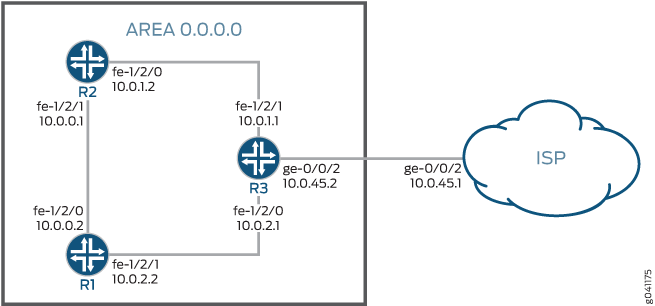
設定
CLIクイックコンフィグレーション
この例を簡単に設定するには、以下のコマンドをコピーしてテキストファイルに貼り付け、改行を削除して、ネットワーク構成に合わせて必要な詳細を変更し、コマンドを [edit] 階層レベルのCLIにコピー&ペーストしてください。
デバイスR1
set interfaces fe-1/2/0 unit 0 description R1->R3
set interfaces fe-1/2/0 unit 0 family inet address 10.0.1.2/30
set interfaces fe-1/2/1 unit 2 description R1->R2
set interfaces fe-1/2/1 unit 2 family inet address 10.0.0.1/30
set protocols ospf area 0.0.0.0 interface fe-1/2/0.0
set protocols ospf area 0.0.0.0 interface fe-1/2/1.2
デバイスR2
set interfaces fe-1/2/0 unit 1 description R2->R1
set interfaces fe-1/2/0 unit 1 family inet address 10.0.0.2/30
set interfaces fe-1/2/1 unit 4 description R2->R3
set interfaces fe-1/2/1 unit 4 family inet address 10.0.2.2/30
set protocols ospf area 0.0.0.0 interface fe-1/2/0.1
set protocols ospf area 0.0.0.0 interface fe-1/2/1.4
デバイスR3
set interfaces fe-1/2/0 unit 3 description R3->R2
set interfaces fe-1/2/0 unit 3 family inet address 10.0.2.1/30
set interfaces fe-1/2/1 unit 5 description R3->R1
set interfaces fe-1/2/1 unit 5 family inet address 10.0.1.1/30
set interfaces ge-0/0/2 unit 0 description R3->ISP
set interfaces ge-0/0/2 unit 0 family inet address 10.0.45.2/30
set protocols bgp group ext type external
set protocols bgp group ext peer-as 64500
set protocols bgp group ext neighbor 10.0.45.1
set protocols ospf export gendefault
set protocols ospf area 0.0.0.0 interface fe-1/2/1.4
set protocols ospf area 0.0.0.0 interface fe-1/2/0.3
set policy-options policy-statement gendefault term upstreamroutes from protocol bgp
set policy-options policy-statement gendefault term upstreamroutes from as-path upstream
set policy-options policy-statement gendefault term upstreamroutes from route-filter 0.0.0.0/0 upto /16
set policy-options policy-statement gendefault term upstreamroutes then next-hop 10.0.45.1
set policy-options policy-statement gendefault term upstreamroutes then accept
set policy-options policy-statement gendefault term end then reject
set policy-options as-path upstream "^64500 "
set routing-options autonomous-system 64501
デバイスISP
set interfaces ge-0/0/2 unit 0 family inet address 10.0.45.1/30
set protocols bgp group ext type external
set protocols bgp group ext export advertise-default
set protocols bgp group ext peer-as 64501
set protocols bgp group ext neighbor 10.0.45.2
set policy-options policy-statement advertise-default term 1 from route-filter 0.0.0.0/0 exact
set policy-options policy-statement advertise-default term 1 then accept
set routing-options static route 0.0.0.0/0 discard
set routing-options autonomous-system 64500
手順
ステップバイステップの手順
次の例では、設定階層のさまざまなレベルに移動する必要があります。CLIのナビゲーションについては、『Junos OS CLIユーザーガイド』の「設定モードでのCLIエディターの使用」を参照してください。
デバイスR3を設定するには:
-
インターフェイスを設定します。
[edit interfaces]
user@R3# set fe-1/2/0 unit 3 description R3->R2
user@R3# set fe-1/2/0 unit 3 family inet address 10.0.2.1/30
user@R3# set fe-1/2/1 unit 5 description R3->R1
user@R3# set fe-1/2/1 unit 5 family inet address 10.0.1.1/30
user@R3# set ge-0/0/2 unit 0 description R3->ISP
user@R3# set ge-0/0/2 unit 0 family inet address 10.0.45.2/30
-
自律システム(AS)番号を設定します。
[edit routing-options]
user@R3# set autonomous-system 64501
-
ISPデバイスとのBGPセッションを設定します。
[edit protocols bgp group ext]
user@R3# set type external
user@R3# set peer-as 64500
user@R3# set neighbor 10.0.45.1
-
OSPFを設定します。
[edit protocols ospf area 0.0.0.0]
user@R3# set interface fe-1/2/1.4
user@R3# set interface fe-1/2/0.3
-
ルーティングポリシーを設定します。
[edit policy-options policy-statement gendefault]
user@R3# set term upstreamroutes from protocol bgp
user@R3# set term upstreamroutes from as-path upstream
user@R3# set term upstreamroutes from route-filter 0.0.0.0/0 upto /16
user@R3# set term upstreamroutes then next-hop 10.0.45.1
user@R3# set term upstreamroutes then accept
user@R3# set term end then reject
[edit policy-options]
user@R3# set as-path upstream "^64500 "
-
エクスポートポリシーをOSPFに適用します。
[edit protocols ospf]
user@R3# set export gendefault
-
デバイスの設定が完了したら、設定をコミットします。
[edit]
user@R3# commit
結果
showコマンドを発行して、設定を確認します。出力に意図した設定が表示されない場合は、この例の手順を繰り返して設定を修正します。
user@R3# show
interfaces {
    fe-1/2/0 {
        unit 3 {
            description R3->R2;
            family inet {
                address 10.0.2.1/30;
            }
        }
    }
    fe-1/2/1 {
        unit 5 {
            description R3->R1;
            family inet {
                address 10.0.1.1/30;
            }
        }
    }
    ge-1/2/0 {
        unit 0 {
            description R3->ISP;
            family inet {
                address 10.0.45.2/30;
            }
        }
    }
}
protocols {
    bgp {
        group ext {
            type external;
            peer-as 64500;
            neighbor 10.0.45.1;
        }
    }
    ospf {
        export gendefault;
        area 0.0.0.0 {
            interface fe-1/2/1.4;
            interface fe-1/2/0.3;
        }
    }
}
policy-options {
    policy-statement gendefault {
        term upstreamroutes {
            from {
                protocol bgp;
                as-path upstream;
                route-filter 0.0.0.0/0 upto /16;
            }
            then {
                next-hop 10.0.45.1;
                accept;
            }
        }
        term end {
            then reject;
        }
    }
    as-path upstream "^64500 ";
}
routing-options {
    autonomous-system 64501;
}
検証
設定が正常に機能していることを確認します。
ISPへのルートが機能していることを確認する
目的
デバイスR3とISPのルーターの間に接続が確立されていることを確認します。
アクション
user@R3> ping 10.0.45.1
PING 10.0.45.1 (10.0.45.1): 56 data bytes
64 bytes from 10.0.45.1: icmp_seq=0 ttl=64 time=1.185 ms
64 bytes from 10.0.45.1: icmp_seq=1 ttl=64 time=1.199 ms
64 bytes from 10.0.45.1: icmp_seq=2 ttl=64 time=1.186 ms
意味
pingコマンドは到達可能性を確認します。
静的ルートが再配布されていることの検証
目的
BGPポリシーが静的ルートをデバイスR3のルーティングテーブルに再配布していることを確認します。また、OSPFポリシーが静的ルートをデバイスR1とデバイスR2のルーティングテーブルに再配布していることを確認します。
アクション
user@R3> show route protocol bgp

inet.0: 9 destinations, 10 routes (9 active, 0 holddown, 1 hidden)
+ = Active Route, - = Last Active, * = Both

0.0.0.0/0          *[BGP/170] 00:00:25, localpref 100
                      AS path: 64500 I
                    > to 10.0.45.1 via ge-0/0/2.6
user@R1> show route protocol ospf

inet.0: 7 destinations, 7 routes (7 active, 0 holddown, 0 hidden)
+ = Active Route, - = Last Active, * = Both

0.0.0.0/0          *[OSPF/150] 00:03:58, metric 0, tag 0
                    > to 10.0.1.1 via fe-1/2/0.0
10.0.2.0/30        *[OSPF/10] 03:37:45, metric 2
                      to 10.0.1.1 via fe-1/2/0.0
                    > to 10.0.0.2 via fe-1/2/1.2
172.16.233.5/32       *[OSPF/10] 03:38:41, metric 1
                      MultiRecv
user@R2> show route protocol ospf
inet.0: 7 destinations, 7 routes (7 active, 0 holddown, 0 hidden)
+ = Active Route, - = Last Active, * = Both

0.0.0.0/0          *[OSPF/150] 00:04:04, metric 0, tag 0
                    > to 10.0.2.1 via fe-1/2/1.4
10.0.1.0/30        *[OSPF/10] 03:37:46, metric 2
                      to 10.0.0.1 via fe-1/2/0.1
                    > to 10.0.2.1 via fe-1/2/1.4
172.16.233.5/32       *[OSPF/10] 03:38:47, metric 1
                      MultiRecv
意味
ルーティングテーブルには、デフォルトの0.0.0.0/0ルートが含まれています。デバイスR1とデバイスR2がルーティングテーブルで指定されていないネットワーク宛てのパケットを受信した場合、それらのパケットはさらに処理するためにデバイスR3に送信されます。デバイスR3がルーティングテーブルで指定されていないネットワーク宛てのパケットを受信した場合、それらのパケットはさらなる処理のためにISPに送信されます。
ポリシー条件のテスト
目的
外部ネットワークが到達不能になった場合に、インターフェイスを無効にして、ルーティングテーブルからルートが削除されるようにします。
アクション
user@R3> deactivate interfaces ge-0/0/2 unit 0 family inet address 10.0.45.2/30
user@R3> commit
user@R1> show route protocol ospf

inet.0: 6 destinations, 6 routes (6 active, 0 holddown, 0 hidden)
+ = Active Route, - = Last Active, * = Both

10.0.2.0/30        *[OSPF/10] 03:41:48, metric 2
                      to 10.0.1.1 via fe-1/2/0.0
                    > to 10.0.0.2 via fe-1/2/1.2
172.16.233.5/32       *[OSPF/10] 03:42:44, metric 1
                      MultiRecv

user@R2> show route protocol ospf
inet.0: 6 destinations, 6 routes (6 active, 0 holddown, 0 hidden)
+ = Active Route, - = Last Active, * = Both

10.0.1.0/30        *[OSPF/10] 03:42:10, metric 2
                      to 10.0.0.1 via fe-1/2/0.1
                    > to 10.0.2.1 via fe-1/2/1.4
172.16.233.5/32       *[OSPF/10] 03:43:11, metric 1
                      MultiRecv
意味
デバイスR1とデバイスR2のルーティングテーブルには、デフォルトの0.0.0.0/0ルートは含まれていません。これにより、デフォルト ルートが OSPF ドメインに存在しなくなったことが検証されます。ge-0/0/2.6インターフェイスを再活性化するには、 activate interfaces ge-0/0/2 unit 0 family inet address 10.0.45.2/30 設定モードコマンドを発行します。